IPv4 to IPv6 Converter
Convert any dotted IPv4 address into IPv4-mapped, IPv4-compatible, 6to4, NAT64, ISATAP, ULA, documentation, and reverse lookup helper formats for home lab planning.
| Format | Generated Address | Prefix Logic | Best Use |
|---|
| IPv4 Octet | Decimal | Hex Byte | Binary Byte |
|---|
| Pattern | IPv6 Prefix | IPv4 Placement | Practical Note |
|---|---|---|---|
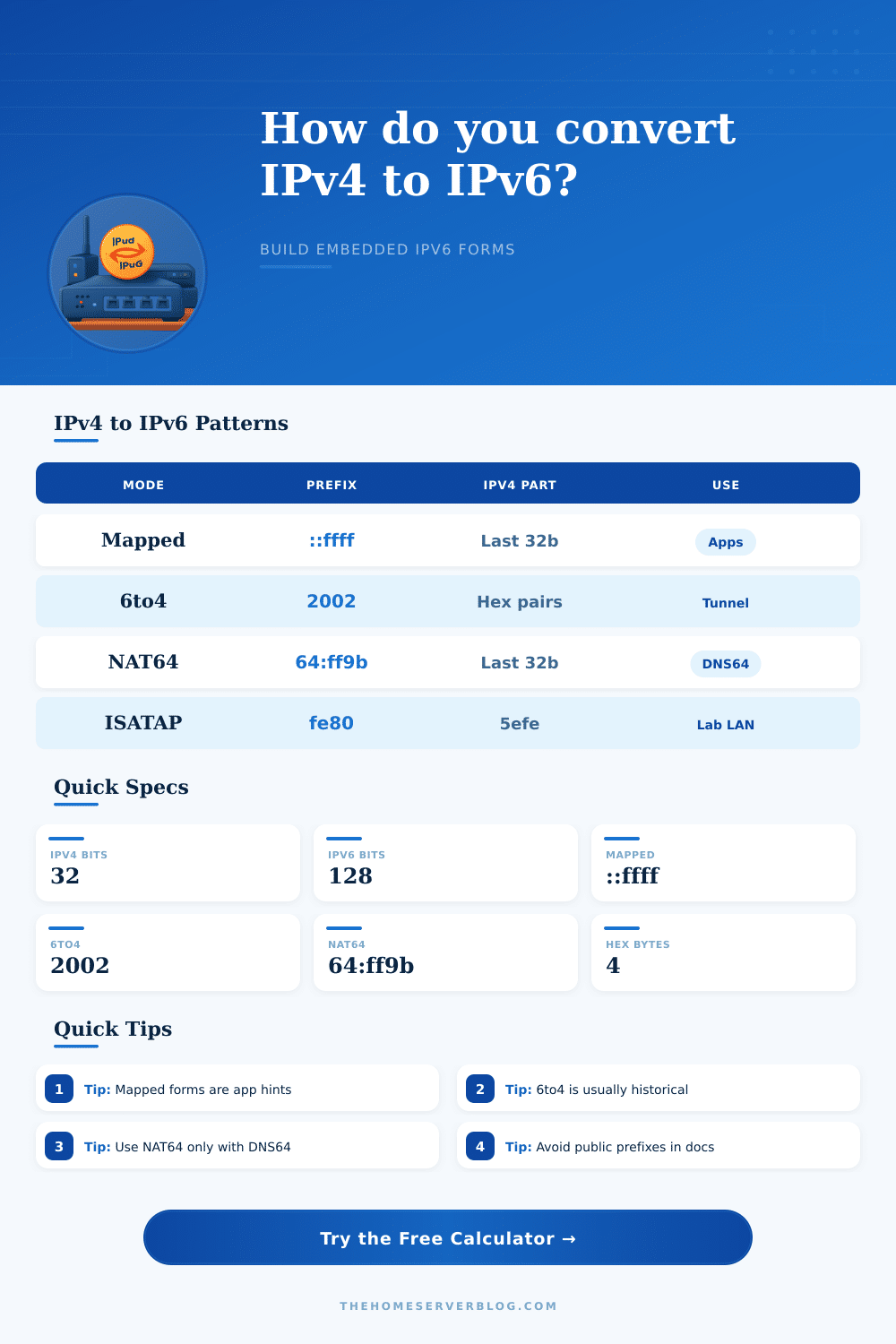
| IPv4-mapped IPv6 | ::ffff:0:0/96 | Last 32 bits | Common in software APIs that accept both address families. |
| IPv4-compatible IPv6 | ::/96 | Last 32 bits | Obsolete for real routing, but sometimes appears in old notes. |
| 6to4 automatic tunnel | 2002::/16 | Hextets 2 and 3 | Decoding is useful; new deployments usually avoid it. |
| NAT64 well-known prefix | 64:ff9b::/96 | Last 32 bits | Use with a NAT64 translator and DNS64-aware testing. |
| Documentation IPv6 | 2001:db8::/32 | Chosen by lab author | Safe for examples because it is reserved for documentation. |
| Unique local address | fc00::/7 | Host identifier | Good for isolated labs when you are not using provider IPv6. |
| Project | Typical IPv4 | Preferred IPv6 Form | Secondary Check |
|---|---|---|---|
| Router gateway migration | 192.168.1.1 | ULA or provider /64 host address | Do not use mapped form as a router address. |
| NAS app allowlist | 192.168.1.10 | IPv4-mapped when the app expects it | Confirm the daemon is dual-stack aware. |
| NAT64 compatibility test | 203.0.113.10 | NAT64 /96 plus IPv4 bytes | Requires an actual NAT64 gateway. |
| Old tunnel config audit | 198.51.100.24 | 6to4 or ISATAP decoding | Mark legacy tunnel use in notes. |
| Documentation screenshot | 192.0.2.44 | 2001:db8 documentation prefix | Avoid publishing real public addresses. |
An IPv4 address and an IPv6 address are two different numbering systems for IP address. An IPv4 address wont work on the IPv6 side of a device because there are two entirely different numbering systems. When someone use a firewall rule, it is likely that they will discover that an IPv4 address wont work in an IPv6 environment.
A useful tool can convert an IPv4 address into various embedded form of an IPv6 address. An IPv4 address contain four number, while an IPv6 address contains a long string of hexadecimal numbers. This tool will not choose the correct form for the IPv4 address for the user.
Convert IPv4 Addresses to IPv6 Forms
Instead, the tool will show the user what each of the embedded form of an IPv6 address will look like. Mapped address are one of the embedded forms of an IPv6 address. Mapped addresses use IPv4 anycast addresses to allow software to use a single socket for both IPv4 and IPv6 communications.
IPv4 addresses embedded into an IPv6 address will end with the original four octets of the IPv4 address. These addresses can be used to tell the operating system to treat data packet as IPv4 packets, even if the API call that is used contains an IPv6 data structure. Mapped addresses can be used in situations such as when someone is debugging an Access Control List or when they are reading connection logs.
Other embedded forms of IPv6 addresses include 6to4 and ISATAP addresses, which tunnels create automatically. These forms of embedded addresses exist in the old configuration files for the devices vendors because these addresses were used to connect to the internet using IPv6 before many Internet Service Providers upgraded the hardware that carried the internet connections to there customers. This tool can be used to determine whether an embedded IPv6 address match the legacy rules within the configuration file of the device.
Another form of embedded addresses is the use of NAT64 prefixes. These only work if there is a NAT64 gateway and DNS64 service in place between the client and the destination server. If the two services are not present, the NAT64 prefix will only display a pattern on the screen for the user to view.
When using this tool, a user must select the device role that is being used on the network. The role determine the level of caution that the tool uses in converting the address. For example, if the address is a gateway address, it should not be expressed as a mapped address.
However, the address of an endpoint within an application container could use a mapped address. The scope of the IPv4 address must also be selected. This will tell the tool whether the IPv4 address is a public address, a private address, or one that is used for documentation purposes only.
Public addresses should be used with caution when adding them to network diagrams because these addresses can create noise for others who are attempting to reproduce the network configuration and setup. Another two variables for the users to enter into the tool are the prefix length and the planning buffer. A /64 prefix length will assign an IPv6 address to each device on a VLAN.
Using a /128 prefix length is only useful if the network administrator only require a single IPv6 address for a service on that network. The planning buffer is a percentage that informs the tool of how many extra rows of information should be provided to the user for review. This buffer is created for situations in which the migration of a network is performed over time.
The planning buffer provides a cushion of extra information for network managers to prevent the chance of making a mistake during the migration of the network. The table at the bottom of the tool displays information regarding the conversion of an IPv4 address to an IPv6 address. The tool break down the IPv4 address into its eight bits for each of the four octets.
These thirty-two bits are placed into the low-order position of the IPv6 address. Comparing the different versions of the address will allow the user to see the relationship between the two addresses. Additionally, the tool features a row that displays the reverse point for the IPv4 and IPv6 address.
A reverse lookup is often used when troubleshooting DNS issues for devices on the network. Therefore, having both the IPv4 and IPv6 address for a device will allow the user to avoid the need to use an external calculator to determine the reverse point of that address. These embedded addresses are not permanent to the network.
These are only shorthand notations of the original IPv4 address. If the IPv4 address is changed to another address, or if the NAT64 gateway is turned off, the embedded IPv6 address will no longer have any meaning for the network. It is up to the users to leave the original IPv4 address within their notes to ensure that the relationship between the two addresses is clear to them.
Finally, the best way to use this tool is to develop a habit of using it regularly. When using this tool, one can generate a set of possible embedded IPv6 addresses. Additionally, one can label the addresses with their intended use on the network.
These addresses can then be stored in a location next to the device inventory for that network. If one sees an unfamiliar string of numbers in a log file or within the firewall hit count for a network, that list of embedded IPv6 addresses will allow them to quickly determine whether the log string is a mapped socket, a tunnel to an embedded address, or an example of an embedded address that is used for documentation purposes only. Through the development of this habit, individuals will find fewer instances of friction between the records of IPv4 devices and IPv6 devices.