Jitter Buffer Calculator
Estimate VoIP jitter buffer size, added delay, burst tolerance, and call quality headroom from real network measurements.
Calculation Breakdown
| Buffer Band | Delay Added | Best Fit | Watch Point |
|---|---|---|---|
| Fixed 20 ms | Very low | Clean LAN and fiber PBX links | Not enough for bursty Wi-Fi |
| Adaptive 40 ms | Low | Home office softphones and Wi-Fi 6 | Needs QoS under load |
| Adaptive 60 ms | Moderate | Cable WAN, VPN, and mixed paths | Delay starts to feel noticeable |
| Adaptive 100 ms | High | LTE failover or congested WAN | Conversation overlap increases |
| 120 ms+ | Very high | Satellite or emergency links | Usually a network problem, not a buffer problem |
| Codec Profile | Packet Time | Typical Bitrate | Buffer Note |
|---|---|---|---|
| G.711 20 ms | 20 ms | About 80-90 kbps with overhead | Simple and predictable; delay matters more than compression |
| G.729 20 ms | 20 ms | About 24-32 kbps with overhead | Compression artifacts appear sooner under loss |
| Opus 20 ms | 20 ms | Variable bitrate | Handles loss better, but late packets still need buffering |
| Opus 40 ms | 40 ms | Lower packet rate | Fewer packets, larger delay step, less fine-grained tuning |
| WebRTC voice | 20 ms | Adaptive | Usually uses dynamic jitter buffering internally |
| Network Path | Expected Jitter | Suggested Buffer | Practical Limit |
|---|---|---|---|
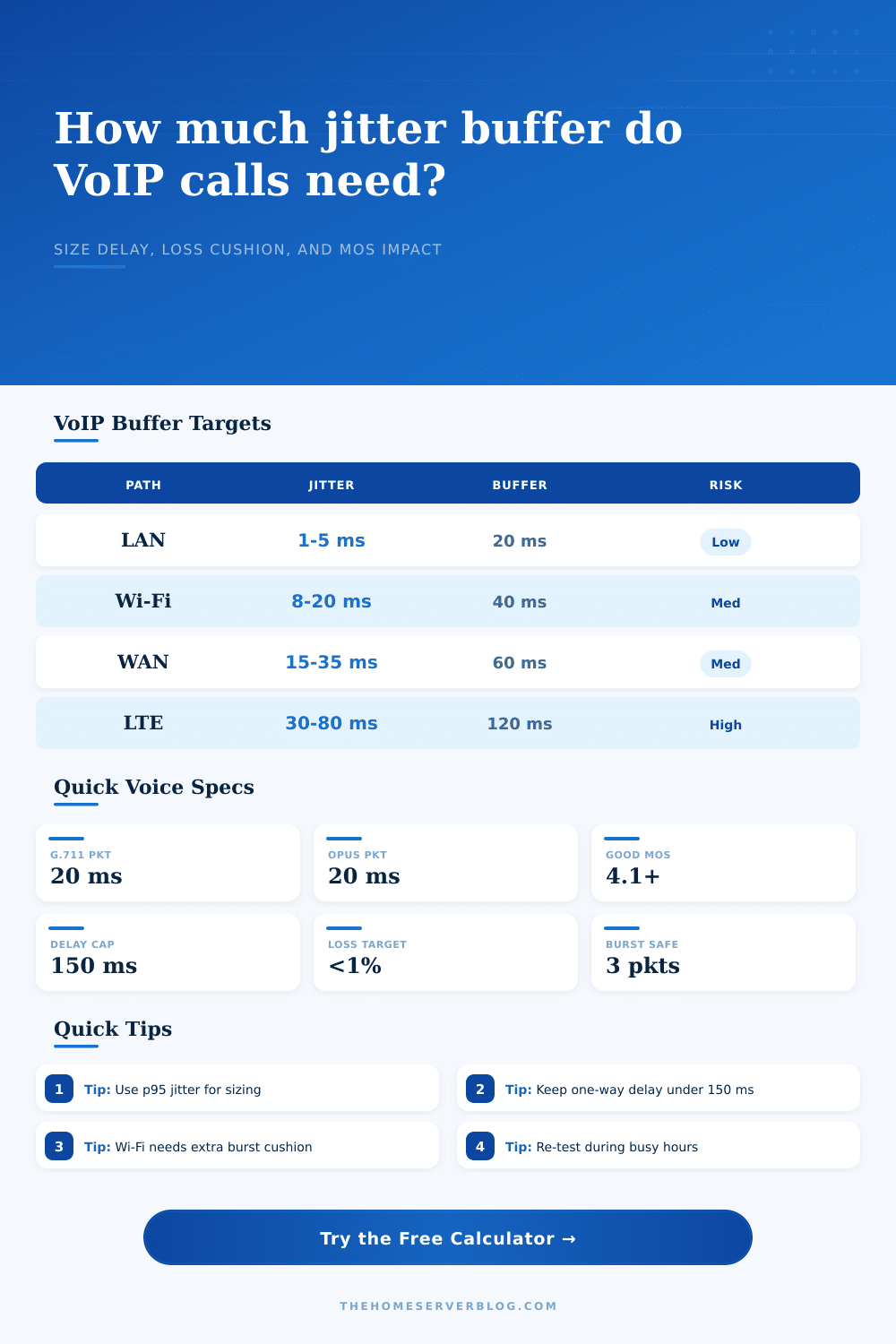
| Managed wired LAN | 1-5 ms | 20-30 ms | Keep switch queues shallow |
| Home Wi-Fi mesh | 8-25 ms | 40-70 ms | Roaming and retries create spikes |
| Fiber internet | 5-20 ms | 30-50 ms | Usually access-light, routing-heavy |
| Cable internet | 15-45 ms | 50-90 ms | Bufferbloat during upload can dominate |
| LTE or 5G | 30-90 ms | 90-140 ms | Radio scheduling changes rapidly |
| Satellite backup | 50-160 ms | 120-220 ms | Delay may exceed conversational limits |
| Home Server Scenario | Calls | Starting Point | Secondary Check |
|---|---|---|---|
| Desk phone beside PBX | 1-2 | 20 ms fixed or adaptive | Confirm switch QoS markings survive |
| Family softphones on Wi-Fi | 2-4 | 40 ms adaptive | Test while streaming and backing up NAS data |
| Home call queue | 3-8 | 50-70 ms adaptive | Measure uplink queue delay under peak load |
| Remote worker over VPN | 1-3 | 60 ms adaptive | Check tunnel MTU and split-tunnel routing |
| LTE backup for PBX | 1-4 | 100 ms adaptive | Use only as failover when possible |
VoIP combines real-time nature of talking with digital transmission of packets. Your words travel as a stream of data burst from your phone to another, through routers and switches, over wireless signals. When those data packet reach their destination intact and in the right order, you hear someone talking back. When they’re not, your listener has to choose between accepting silence, or pausing until missing packets arrives.
That pause is jitter buffer. Getting its size just right means finding the right balance between speed and patience.
How to Choose the Right Jitter Buffer Size
Most users greatly under-appreciate network-induced variance. You may have near zero jitter over a quiet LAN with a wired desk phone; yet experience micro-stutters caused by neighbor interference or background streaming on your busy home office’s Wi-Fi for a softphone. The calculator takes that measurement and the type of your path as inputs. If you’re wondering whether your delay is acceptable, it saves you from guessing. It translates network variability into a concrete buffer size. This tell you exactly how many milliseconds of irregularity you can absorbs without dropping any packets.
Most importantly, you need the input for 95th percentile jitter. You will type this in once, and it is very important. When you see average jitter, everything looks great…until your video call spikes bandwidth or somebody downloads a file. The 95th percentile is a higher value, meaning you are sizing the buffer for things that happen often but do not occur during calm morning hours. That’s what trips up most home setups: they can’t handle any sort of load because the buffer was sized for quiet times and first burst of anything causes robotic voice artifacts and packet loss.
The actual codec you use does matter. While moddern codecs such as Opus can pack sound into tight spaces and even hide some artifacts that might occur during compression, it will not address latency issues. Depending on what kind of codec you’re using, there may be bigger or smaller gap between packets. Your buffer needs to be aligned with the interval between those packets. So if you have a codec which packs sound into relatively small chunks, you don’t need to increase your buffer unnecesarily. The calculator takes this into account and matches the suggested buffer with the packet time you set.
However, humans only has so much patience when it comes to delayed conversation. Above 150 milliseconds of one-way latency, research shows that conversation feels unnatural. Because there’s no way to know whether someone is done talking yet, people start interrupting and talking over each other. The recommended buffer size adds your current network latency together with this figure, which gives you an idea of your total one-way delay. If it exceeds 150 milliseconds, then you must choose between sacrificing conversational flow for clarity, or clarity for conversational flow. In other words, it’s a classic engineering tradeoff. Buffer less for snappy conversation, or buffer more for clearer call. You should of chose.
The largest variable in a typical small business or home lab environment is Wi-Fi. Unlike wired Ethernet, wireless networks adds scheduling delays and retransmissions to the mix. As the reference tables on the page illustrate, Wi-Fi paths frequently require much larger buffers different than cable or fiber connections. There is nothing wrong with your network; it’s just how radio spectrum works. Wi-Fi 6 is more efficient, but the traffic is still bursty. The calculator takes a practical allowance into account for this kind of access so that your buffer can hold retries while not discarding valid packets.
A separate topic altogether is packet loss. A jitter buffer conceals those pesky late packets. But it doesn’t generate packets that were never sent in the first place. Raising the buffer size won’t solve a problem where your network loses over 1% of its packets. You’ll just have an even more delayed call that sounds equally broken. To tell whether you’re having a jitter issue or a loss issue, use the loss input on the tool. If loss causes your estimated MOS score to drop, then don’t bother adjusting your buffer size; adjust your networks stability.
Calibrating the Jitter Buffer: You calibrate the size of the jitter buffer. You need some amount of buffer for smoothing out any bumps in the network. But too large and the delay will be distracting. We use real world profiles as a start with our calculator, but ultimately the test is your own ear. Listen to your calls when they are busy. Too small and you’ll hear overlap or echoes. Too big and you’ll hear choppy, robotic sounding call. A perfect call is a seamless conversation where the tech just melts away.
A good buffer is the one you never notice. So is a good network.