HomeServerBlog switching timer tool
MAC Aging Time Calculator
Estimate a practical switch MAC address table aging timer for wired access, roaming Wi-Fi, hypervisor bridges, EVPN overlays, and noisy home lab VLANs where stale entries and unknown-unicast flooding both matter.
Common dynamic MAC aging default; often configurable globally or per VLAN on enterprise switching platforms.
Common bridge table timeout for learned Ethernet switching entries, with platform-specific configuration scope.
Typical ageing_time behavior used by Proxmox vmbr and Linux host bridges; kernel values may be shown in centiseconds.
Common lab bridge default; shorter timers are useful for VM mobility tests but can increase flooding.
Common switch MAC aging default on managed access platforms; confirm syntax and valid range per OS family.
Bridge host entries commonly age in minutes; RouterOS menus expose bridge host and forwarding behavior together.
Small managed switch networks usually follow the five-minute pattern for learned dynamic addresses.
Managed switch guidance commonly treats 300 seconds as the default dynamic MAC aging interval.
| Scenario | Starting Timer | Why It Works | Watch Counter |
|---|---|---|---|
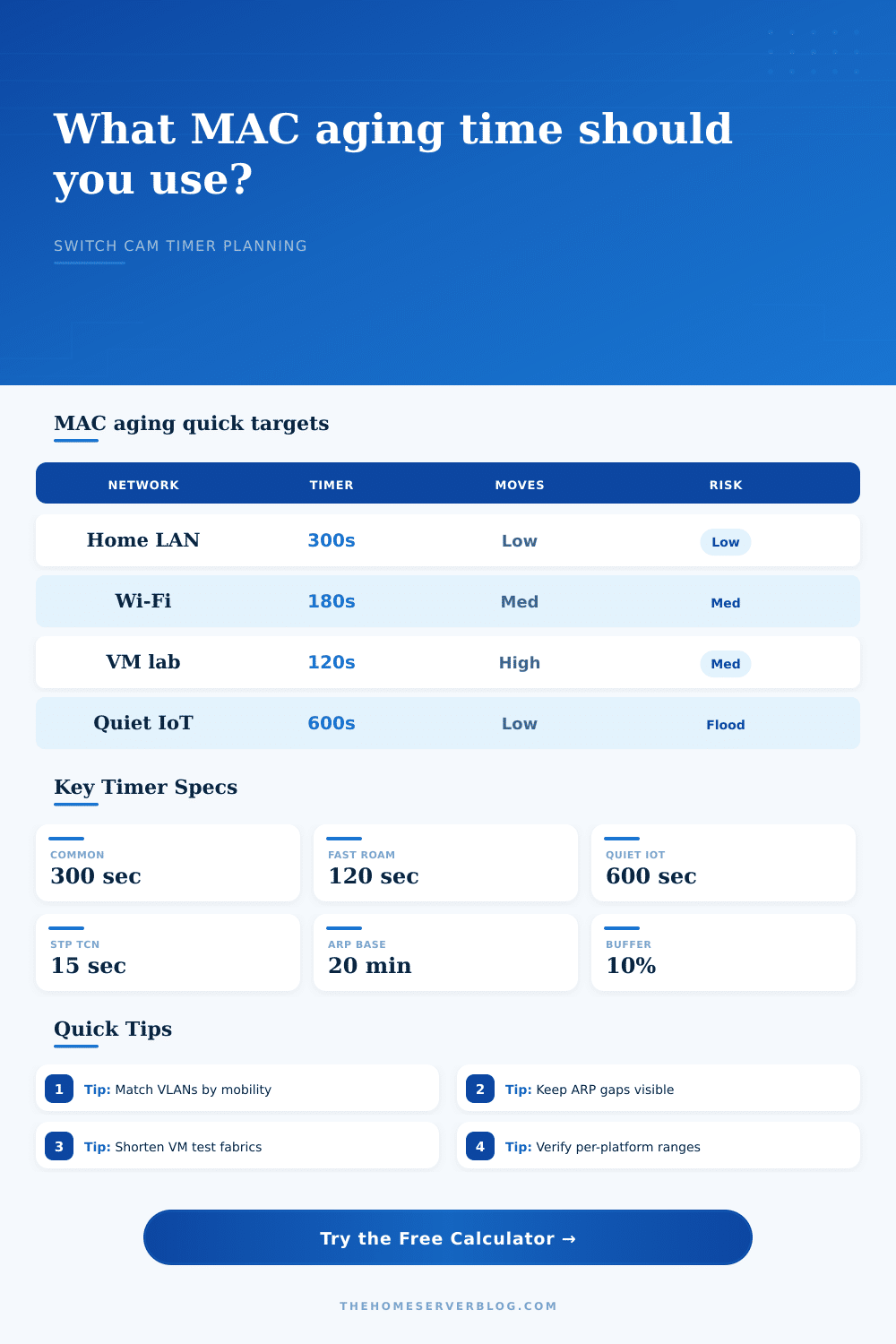
| Mostly wired home LAN | 300 seconds | Five minutes keeps quiet desktops and printers learned without holding stale moves too long. | Unknown unicast rate |
| Controller Wi-Fi roaming VLAN | 180 to 300 seconds | Clients normally relearn on the new AP quickly, but shorter timers can clean silent stale entries. | Client MAC move logs |
| Hypervisor bridge or VM migration | 120 to 240 seconds | VMs and containers can appear on new ports more often than physical hosts during lab work. | Bridge FDB churn |
| Quiet IoT sensor VLAN | 600 to 900 seconds | Sleepy devices may not send traffic often, so longer timers reduce avoidable unicast flooding. | Flooded frames per port |
| STP failover testing | 60 to 180 seconds | Short timers make stale forwarding entries clear faster after planned topology experiments. | TCN and MAC flush events |
| EVPN or VXLAN edge lab | 120 to 300 seconds | Overlay control plane and local bridge learning need enough time to converge cleanly. | Duplicate MAC dampening |
| Timer Relationship | Typical Value | Calculator Use | Planning Note |
|---|---|---|---|
| Dynamic MAC aging | 300 seconds | Primary output to configure or compare. | Lower clears stale entries, higher reduces quiet-host flooding. |
| Classic STP forward delay | 15 seconds | Minimum guardrail for topology change cleanup. | RSTP may converge faster, but lab switches vary. |
| Gateway ARP cache | 20 minutes | Used to estimate unknown-unicast gap for quiet endpoints. | If ARP outlives MAC entries, silent destinations can be flooded. |
| Wi-Fi roam event | 10 to 120 seconds | Helps choose a mobility-friendly target. | Roam speed is not the same as MAC aging, but it drives relearn expectations. |
| DHCP lease | 4 hours to 7 days | Not a direct aging input. | Lease time does not clear switch FDB entries by itself. |
| CAM table pressure | Vendor limit | Estimated with entries divided by timer minutes. | Small switches suffer sooner when many clients churn. |
| Common Project Size | MAC Entries | Good Start | Secondary Check |
|---|---|---|---|
| 5-port home office switch | 8 to 20 | 300 seconds | Default is usually fine. |
| Two AP home WLAN | 30 to 80 | 240 seconds | Watch roaming client moves. |
| 24-port PoE camera switch | 24 to 64 | 600 seconds | Longer timers help quiet cameras stay learned. |
| Proxmox mini cluster | 80 to 250 | 180 seconds | Check Linux bridge FDB churn. |
| 10G NAS and VM rack | 150 to 600 | 240 seconds | Separate storage and VM mobility VLANs. |
| EVPN overlay practice lab | 300 to 2000 | 180 seconds | Confirm duplicate MAC dampening behavior. |
| Symptom | Timer Direction | Likely Cause | Check First |
|---|---|---|---|
| Unknown unicast bursts to many ports | Increase | MAC entries expire before quiet hosts refresh ARP or send traffic. | Flood counter and ARP age |
| Traffic follows old port after move | Decrease | Stale FDB entry persists after silent roam, failover, or VM migration. | MAC table move log |
| Frequent MAC flapping alerts | Do not mask | Loop, wrong bridge, duplicate connection, or miswired uplink. | Spanning tree and cabling |
| Small switch CPU spikes | Increase or segment | Too many entries relearn at once on a short timer. | FDB size and per-port flood |
| IoT devices unreachable after sleep | Increase | Silent endpoints age out while the gateway still sends unicast. | Client sleep interval |
| VM failover takes too long | Decrease carefully | Moved MAC remains associated with the previous bridge port. | Gratuitous ARP and FDB update |
Default Access
Use this for normal wired clients, printers, NAS boxes, and home routers when there is no sign of stale forwarding or excess flooding.
300 s Balanced baselineMobility VLAN
Roaming clients and VMs benefit from a timer short enough to clear silent moves without creating constant relearn pressure.
120 to 240 s Faster cleanupQuiet Devices
Longer timers help sleepy IoT clients, cameras, and printers stay in the forwarding database between infrequent packets.
600 to 900 s Less floodingLoop Symptoms
MAC aging cannot fix a loop. If entries flap constantly, solve spanning tree, bonding, cabling, or duplicate bridge issues first.
Fix topology Timer is secondaryA MAC aging timer is a forwarding database policy, not a security control. Static MAC entries, port security entries, controller forwarding modes, and overlay control planes can follow different aging behavior.
Until you have a network problem, you probably don’t think about MAC addresses. You’re taking that video call and your Wi-Fi signal momentarily goes down. Or maybe you’re moving a virtual machine and it just locks up. The LEDs on your switches look fine; but there’s some stale entry in the forwarding database that blocks traffic. That’s the kind of friction Layer 2 switching has.
It relies on MAC aging time. That’s the timer that says: How long does the switch remember which port a given device was connected to? If it is set wrong, you’ll see either traffic being blackholed or unneccesary broadcast flooding.
How to Set the Right MAC Aging Timer
Basically you don’t want to blindly believe what the calculator tells you; unless you understand what it’s calculating.” It does calculation. You just need to understand what each value means. That all hinges on a fundamental trade-off: how accurate do you want your forwarding? How much should you compromise on memory efficiency?
Switches only have so much space in their CAM tables. If there are too many entries, they’ll fill up with old information about devices that aren’t there anymore. This cause them to drop new ones. Make the timer too small and quiet device will time out before you’re ready. When a new one comes along, switch will flood the traffic to everyone because it doesn’t know where it goes anymore. That generates noise and can cause a broadcast storm.
By default most home labs use a three hundred second timer, or five minutes. That’s fine if you have only static wired devices like printers and desktops. Throw in mobility and it doesn’t work anymore. When I connect to a Wi-Fi network, I move from one AP to another and am on a new port. The switch continues to send packets along the old port where the client used to be until that entry ages out. For several seconds, the switch think my client is still there, sending packets down an incorrect cable and dropping voice packets.
A one-hundred twenty second timer reduce instability for quiet devices. While raw timer time is important, it’s not everything. What are the devices on that VLAN? Are they security cameras? Or are they virtual machines? Cameras will constantly be sending video streams, so their MAC entry gets refreshed every couple of seconds. No need for a long timer. If you have a virtual machine, it can instantly migrate across ports. It needs the switch to pick up on this change promptly. The calculator takes into account cases like this (hypervisor bridges and wired access VLANs). Depending off your setup, different timers is best.
The other thing you should look at is the ARP gap. That’s another one that bites admins in the butt. Most home labs default to keeping track of where a device is located for about 5 minutes. After this time, it just forgets where the device was connected. The router also keeps track of IP-to-MAC mappings in a cache (typically for 20 minutes). Let’s say your laptop goes to sleep. Now the switch doesn’t know where the laptop is. When it wakes up, the router sends a packet out on the previous port. Since there is no mapping in the switch for that port, the switch broadcast it to all ports. This creates a flood of unknown unicast packets, causing a spike in unknown unicast traffic. These floods saturates the switch CPU if hundreds of sleeping computers does it. Increasing the MAC aging timer help here because it keeps those entries alive longer and prevents the floods from occurring.
There is no one right answer. Any right answer is fine. It is just the right answer for you given your level of risk. Fast roam will accept some flooding as a price. Slow failover will accept some quiet as a trade-off. The tool takes the balance between those three: how sensitive it is to flooding, how often it needs to move, and how many entries exist. Takes away guessing.
Know your network condition. Is there a lot of movement? Are things asleep? Is this a lab where stuff gets broken all the time? Those answers will tell you what the timer should of been.
Remember: there’s no single number that defines how you tune a switch; it’s more of an exercise in watching what switches do than remembering what the vendors’ defaults are. Keep an eye on MAC move logs. Watch the unknown unicast counters. Understand that when things flap, it usually doesn’t indicate a timer problem but instead some type of topology problem (e.g., bad cable, loop). No amount of timer tweaking can fix a loop or a bad cable. The timer is then a way to smooth out the network experience after the cabling is solid. Then it helps the network to work quietely and invisibly.