Mobile Data Usage Calculator
Estimate monthly cellular data for phones, hotspots, 5G routers, travel SIMs, failover WAN, remote work, streaming, cameras, and cloud sync.
Estimated mobile data requirement
| Activity | Typical rate | Data per hour | Calculator use |
|---|---|---|---|
| SD mobile video | 1.2 Mbps | 0.54 GB | Low-res commute or small phone screen |
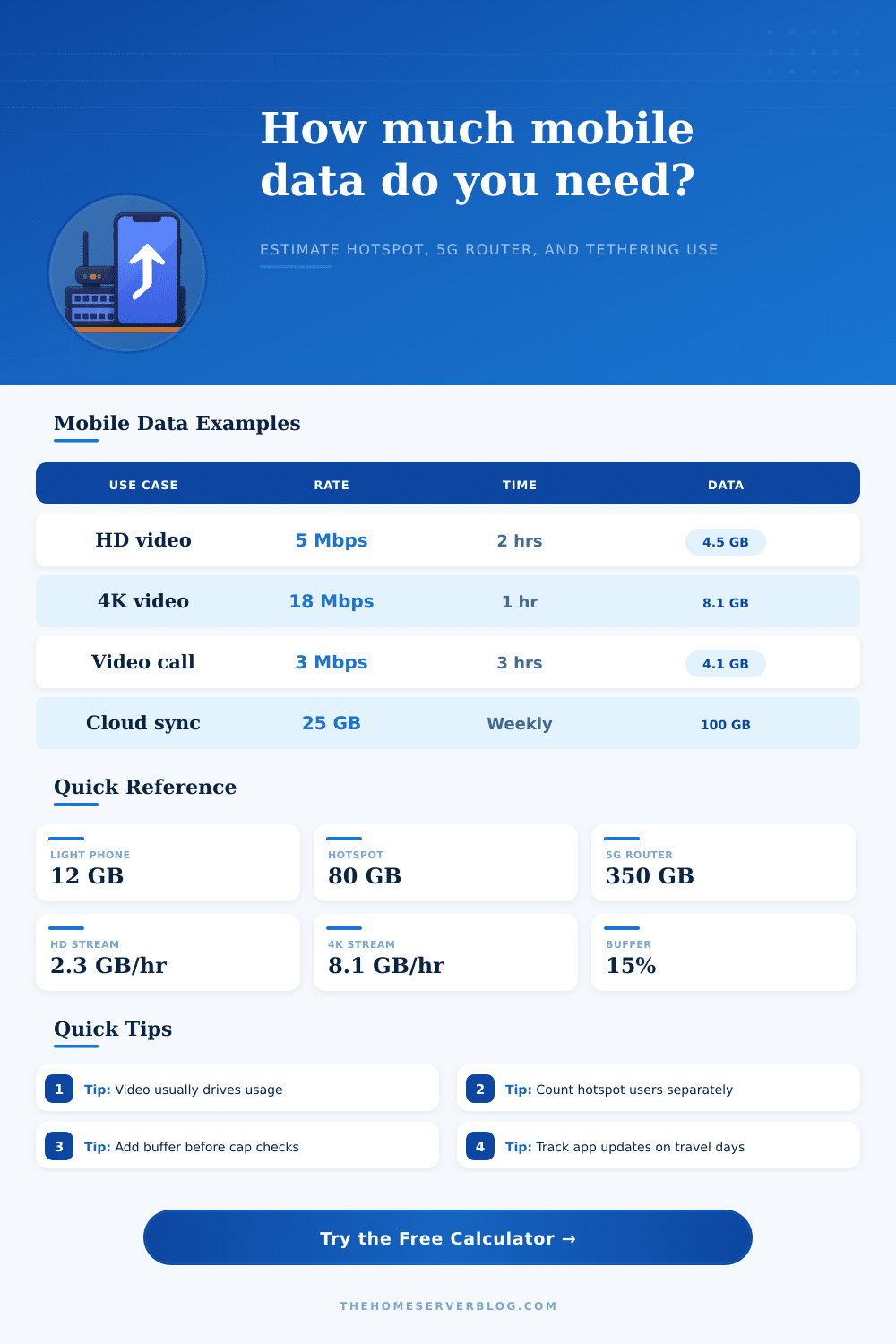
| HD streaming video | 5 Mbps | 2.25 GB | Default hotspot video estimate |
| Full HD high bitrate | 8 Mbps | 3.60 GB | Large tablet or laptop tethering |
| 4K mobile video | 18 Mbps | 8.10 GB | Travel router or home 5G replacement |
| Video meeting | 3 Mbps | 1.35 GB | Two-way work call with screen share |
| Music streaming | 0.32 Mbps | 0.14 GB | High-quality music or podcast stream |
| Online gaming | 0.30 Mbps | 0.14 GB | Gameplay traffic before patches |
| Browsing and maps | 0.20 GB/hr | 0.20 GB | Mixed email, maps, chat, and web |
| Device profile | Typical use | Overhead range | Practical note |
|---|---|---|---|
| Phone LTE or 5G handset | Personal apps | 5-12% | Background refresh is usually modest |
| Dedicated mobile hotspot | Shared laptop access | 10-18% | Multiple clients add idle chatter |
| Home 5G router or CPE | Primary or backup WAN | 12-22% | LAN devices may auto-update quietly |
| Tethered laptop | Work sessions | 10-20% | Cloud drives and OS patches matter |
| Tablet or shared plan | Family media | 8-16% | Video quality settings dominate totals |
| IoT modem or camera | Telemetry or upload | 5-14% | Continuous uplink can exceed browsing |
| Router cellular failover | WAN outage backup | 12-25% | Only count expected outage days |
| Travel eSIM or roaming SIM | Short cycle use | 12-25% | Add room for maps and photo upload |
| Plan size | Good fit | Approx HD hours | Risk point |
|---|---|---|---|
| 10-20 GB | Light phone plus maps | 4-8 hours | One long video day can matter |
| 50 GB | Commuting and light hotspot | 22 hours | Laptop updates can surprise you |
| 100 GB | Remote work hotspot | 44 hours | Daily HD streaming consumes headroom |
| 300 GB | RV router or failover WAN | 133 hours | 4K video can burn it quickly |
| 600 GB | Heavy 5G home router | 267 hours | Cloud backup seeding is the hazard |
| Scenario | Active days | Expected data | Secondary driver |
|---|---|---|---|
| Light Phone | 30 | 10-15 GB | Maps and social video |
| Remote Work Hotspot | 22 | 80-140 GB | Meetings and file sync |
| RV 5G Router | 28 | 250-500 GB | Evening streaming |
| WAN Failover | 3-7 | 20-120 GB | Outage duration |
| Creator Upload Kit | 12 | 150-400 GB | Video upload batches |
Due to the difficulty in understanding and matching mobile data plans to your data use, there is some factors that will influence the data that you use on your mobile device. Your data use may be low for some months for tasks like streaming media, but high the following month for tasks like video calls or laptop works. Such small choices that adds up to a considerable amount of data can lead to data plan insufficiency.
The calculator on this page will calculate your data need by asking you for specific information. Factors like the type of connection, the number of days that you will use the data plan, the number of individual that will share the data plan, and the activities that you will perform on an average day will all be asked of you. For instance, if you use your mobile data for streaming videos for one hour, you will use more data then if you spent several hours browsing the internet or performing messaging task.
How to Use the Data Calculator
Additionally, if you use your mobile device as a hotspot for other devices, you will use more data than if you use only your mobile device itself. Thus, these different category will allow the calculator to provide you with an estimate of whether or not your data plan has enough data to handle your needs, or if you will experience throttle of your data plan. As with any calculation of data use, video streaming is one of the major contributor to data use.
Streaming videos for even a few minutes add up to significant data over time, especially if you have multiple device in your home that stream videos. Furthermore, video calling and screen sharing use a moderate amount of data, but occurs at a higher consistency than video streaming. Additionally, tasks like cloud synchronization and app updates use some of that data, but often while you are not actively use your mobile devices.
Thus, by categorizing these different data using task into the calculator, you can understand which task is contributing the most to your mobile data plan. Another overlooked category of data is the data that your mobile device uses while you are not actively performing a task. Such data is referred to as background overhead, and includes task like network chatter, establishing VPN connection, and background app updates.
Because your mobile devices cannot be 100% efficient in using data, there will always be background overhead. Thus, by increasing this data input in the calculator, you can more accurately calculate your monthly data cost and requirements. Another way in which the calculator is useful is in providing you with a safety buffer to account for unexpected data uses.
For example, you may have an update to your mobile operating system or apps that will use some of your data without your knowledge. Similarly, you may have a week in which you perform video call with others. By providing for a safety buffer in the calculator, you can ensure that you do not exceed your data limit.
In addition to these data uses, many individuals are often aware of their data plans data limit, but often forget about the concept of data throttling. Data throttling is the process of reducing the speed at which your mobile device accesses data. Thus, if your mobile data is approaching or nearing the cap for that mobile data plan, your connection speed will slow.
Such slow speeds can cause difficulty performing video calls or performing data-intensive downloads. Thus, the calculator will allow you to understand if your needs will reach your data cap, and to ensure that you have some headroom in your mobile data plan to ensure that you can experience the benefit of your mobile data plan during your busiest weeks. Additionally, the type of device that you use may influence the amount of data that you use.
For instance, using a mobile device by one person will produce less data than if you use a router for the entire home network. Additionally, using a SIM card for travel for a few days will have different data needs than if you use the mobile data plan as a failover connection to your home network in the case of an outage. Thus, while there are different connection device profile in the calculator, they will allow the data calculator to remain accurate regarding your mobile data plan’s needs.
Another reason that the data calculator may not provide you with the exact amount of data that you will use each month is because your data use is often unpredictable. For instance, you may be performing heavy cloud synchronization task within the same week in which you are also using your mobile device as a hotspot for others in the home. Thus, the calculator will provide you with a baseline for your mobile data plan’s data need, but you may also adjust those factor in the calculator if you know in advance that you will be performing additional video calls or performing additional data uploads.
These reference table will allow you to select for each activity the amount of data that it will use. For example, one hour of high-definition video streaming will use the same amount of data as several hours of streaming music or browsing the web. Thus, these tables will allow you to determine which data-using activities you will perform to determine the appropriate data plan.
The goal of this data calculator is not to provide you with the most precise estimation possible of the amount of data that you will use each month. However, the goal is to provide you with enough information to avoid two specific problem. The first problem is selecting a mobile data plan that is too small for your data need.
The second problem is paying for a mobile data plan that is too large for your data need. Thus, by understanding the different data-using activities and how much data they require, and how much extra data you may need for unexpected data use, you can avoid these two problem.