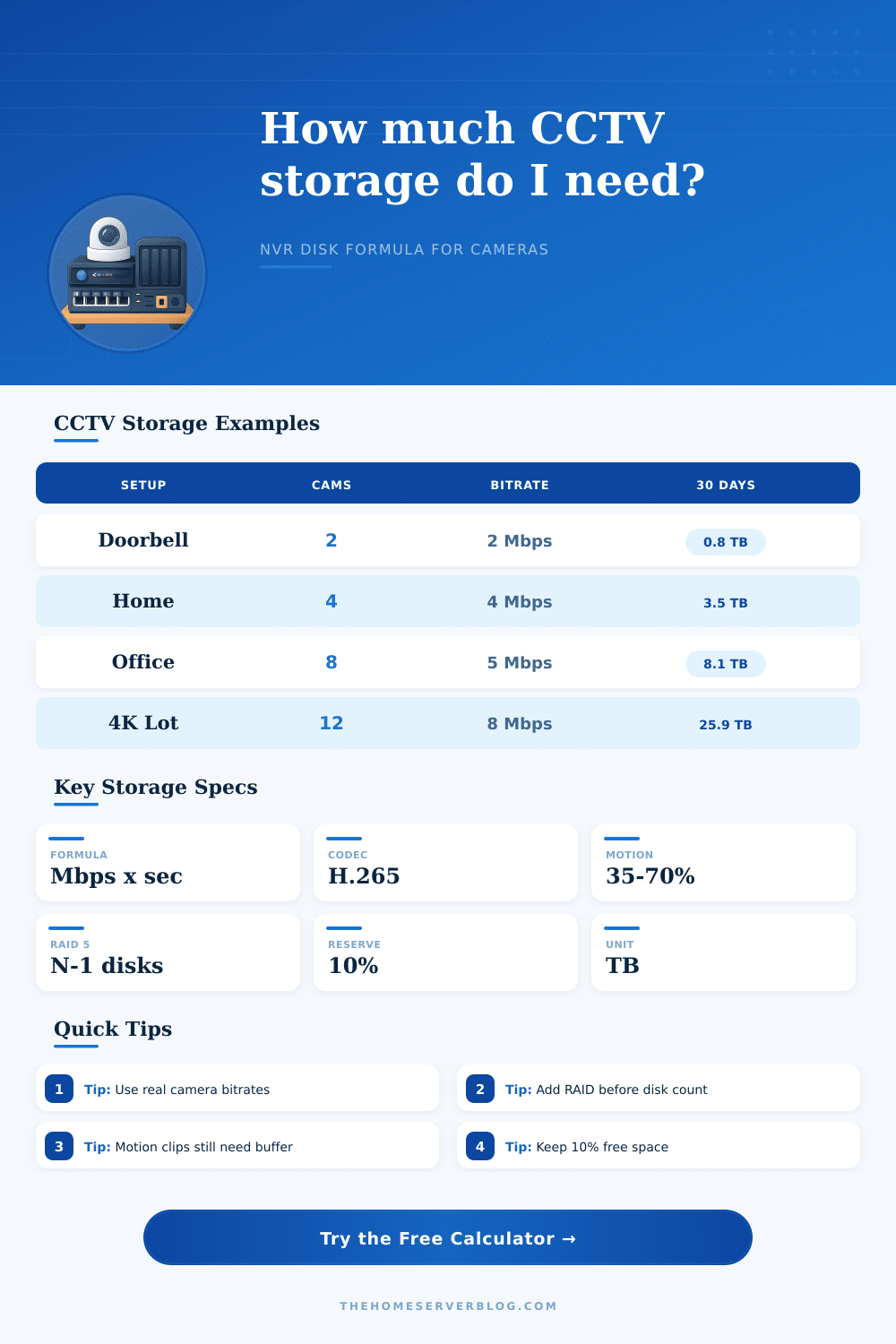
CCTV Storage Calculator Formula
Estimate NVR capacity from camera count, bitrate, codec, frame rate, recording schedule, retention days, RAID overhead, and disk reserve.
📹Surveillance presets
🔧Camera and recording inputs
Codec multipliers estimate relative storage when the entered bitrate is based on H.264 planning.
CCTV storage result
📊Selected camera and NVR spec grid
📐CCTV storage formula breakdown
| Formula Step | Expression | What It Means | Calculator Input |
|---|---|---|---|
| Adjusted bitrate | Mbps x codec x FPS ratio | Normalizes the planning bitrate for compression and frame rate. | Bitrate, codec, FPS, reference FPS |
| Daily camera data | Mbps x 86,400 / 8 / 1,000,000 | Converts megabits per second into terabytes per day. | Adjusted bitrate |
| Motion duty cycle | Raw TB x motion percent | Applies the portion of the day actually recorded. | Motion recording percentage |
| Protected capacity | Raw TB / (1 - RAID - reserve) | Adds parity, filesystem, and free-space planning overhead. | RAID overhead and reserve |
💾Camera bitrate planning table
| Camera Class | Typical Stream | Common FPS | Planning Notes |
|---|---|---|---|
| 2MP entry camera | 1.5 to 3 Mbps | 10 to 15 FPS | Good for doors, halls, and low-motion rooms. |
| 4MP PoE dome | 3 to 6 Mbps | 12 to 20 FPS | Balanced choice for homes and small offices. |
| 8MP / 4K camera | 6 to 12 Mbps | 15 to 25 FPS | Use more reserve for busy scenes and night noise. |
| LPR or PTZ stream | 8 to 16 Mbps | 25 to 30 FPS | High detail and high FPS can dominate NVR storage. |
🗄NVR and RAID capacity table
| NVR Layout | Planning Overhead | Best Use | Capacity Reminder |
|---|---|---|---|
| Single surveillance disk | 0% plus reserve | Small home systems with backup clips elsewhere. | One disk failure can remove the archive. |
| Mirror style storage | 15% to 50% | Critical entrances or systems with few large disks. | Mirror math depends on the exact NVR layout. |
| RAID 5 planning | 25% | Common four-bay NVRs and SMB camera sets. | Usable pool is roughly N minus one drive. |
| RAID 6 planning | 35% | Larger archives that need two-disk fault tolerance. | Usable pool is roughly N minus two drives. |
🏠Common CCTV project sizes
| Project | Camera Count | Typical Retention | Storage Pattern |
|---|---|---|---|
| Door and driveway | 2 to 4 cameras | 14 to 30 days | Motion-based recording keeps storage modest. |
| Whole-home PoE NVR | 6 to 10 cameras | 30 to 45 days | One 8 TB to 16 TB pool is a common planning range. |
| Retail or workshop | 10 to 18 cameras | 30 to 60 days | RAID and write-load limits matter as much as size. |
| Parking lot or yard | 8 to 24 cameras | 45 to 90 days | Night noise and high-motion scenes increase bitrate. |
💡Storage planning tips
When planning surveillance storage, you must understand how the cameras writes to the storage disk so that you can ensure that the footage that you require from the surveillance system is available. If the system has too little storage, the system will automatically delete the oldest recordings to allow space for new recordings. In this situation, the oldest surveillance footage will be lost.
If the system has too much storage, you will be spending money on purchasing storage drive that will not be utilized to their full capacity. To plan surveillance storage correctly, you must understand the relationship between the bitrate of the surveillance cameras and the storage capacity of the system. Bitrate is the most important factor in determining storage capacity for surveillance cameras.
How to plan storage for surveillance cameras
High resolution does not necessarily mean that a surveillance camera will create more data than a camera with a low resolution. High-resolution cameras can lose data due to the efficient codec used for the surveillance footage. Low resolution cameras may require more storage for recording of scenes with constant motion.
Data rate will be used as the primary measurement to determine storage need for surveillance cameras. Frame rate is another factor in surveillance storage. Frame rate determines the number of images that the surveillance camera will take every second.
If the frame rate is increased, surveillance cameras will create more data that is written to the storage. The same applies to decreasing the frame rate for surveillance cameras. Data created at each frame rate can be calculated so that the storage needs of the surveillance system are understood.
Another factor that affects the storage needs of surveillance cameras is recording schedule. Continuous recording of surveillance footage will result in surveillance cameras continuously writing data to the storage media. Motion-based recording will result in the cameras only writing data to the storage media when motion is detected in the recorded area.
Using motion-based recording can reduce the amount of data used by the surveillance cameras by more than half. Knowing the percentage of the day that the surveillance cameras will be recording motion will allow for the daily storage needs of the surveillance system to be calculated. Once you calculate the daily storage needs of the surveillance cameras, you must account for storage overhead.
RAID storage configurations require the use of some of the storage for parity, which is used to protect the data stored on the drives in case of drive failure. Storage administrators may also want to allocate some of the storage for performance of the system or in case of future increase to the storage needs of the surveillance system. These percentage of the total storage should be accounted for in planning the surveillance storage system, or the system will run out of storage space much sooner than expected.
The number of drives required for the surveillance system will depend on the calculated data protected by the RAID system. Using larger drives will reduce the total number of drives needed for storage. Using fewer drives will reduce the power and heat consumption of the surveillance system.
Using fewer drives, however, increases the risk of data loss should one of the drives fail. Different RAID configurations can be compared to determine the total number of drives required to meet the storage needs of the surveillance system. Another factor to consider in surveillance systems is the write limits of the Network Video Recorder (NVR).
The NVR may not be able to record all of the surveillance cameras if the total bitrate of the surveillance cameras exceeds the write limit of the NVR. Ensuring that the estimated write load of the surveillance system is within the rated capacity of the NVR will prevent the NVR from failing to record all surveillance cameras. Surveillance storage needs can change over time.
New surveillance cameras may be added to the system. The firmware of existing surveillance cameras may change the bitrate at which the surveillance cameras write to the storage. Changes in the lighting in surveillance areas or changes in the amount of motion in those areas will also change the amount of data written to the surveillance storage system.
Planning for these changes means that the bitrates and the percentage of the surveillance time that the cameras are recording motion should be planned to be slightly higher than those that will be used on the first day of operation of the surveillance system. Retention of surveillance footage is another factor in the management of surveillance storage. Data will be retained in surveillance systems for some period of time, after which the system will automatically delete the footage.
The length of time that the footage is retained can be calculated to determine the storage needs of the surveillance system. The longer that the footage is to be retained, the more storage space will be required. The required length of time for which the surveillance footage is to be retained should be decided in advance.
Extending the period of time that the footage is to be retained will also extend the storage needs of the surveillance system. Ensuring that you calculate the storage needs for the surveillance system based off the behavior of the surveillance cameras and the individuals that require access to the surveillance footage will ensure that the surveillance system functions as required. When planning surveillance storage, you must understand how the cameras writes to the storage disk so that you can ensure that the footage that you require from the surveillance system is available.
If the system has too little storage, the system will automatically delete the oldest recordings to allow space for new recordings. In this situation, the oldest surveillance footage will be lost. If the system has too much storage, you will be spending money on purchasing storage drive that will not be utilized to their full capacity.
To plan surveillance storage correctly, you must understand the relationship between the bitrate of the surveillance cameras and the storage capacity of the system. Bitrate is the most important factor in determining storage capacity for surveillance cameras. High resolution does not necessarily mean that a surveillance camera will create more data than a camera with a low resolution.
High-resolution cameras can lose data due to the efficient codec used for the surveillance footage. Low resolution cameras may require more storage for recording of scenes with constant motion. Data rate will be used as the primary measurement to determine storage need for surveillance cameras.
Frame rate is another factor in surveillance storage. Frame rate determines the number of images that the surveillance camera will take every second. If the frame rate is increased, surveillance cameras will create more data that is written to the storage.
The same applies to decreasing the frame rate for surveillance cameras. Data created at each frame rate can be calculated so that the storage needs of the surveillance system are understood. Another factor that affects the storage needs of surveillance cameras is recording schedule.
Continuous recording of surveillance footage will result in surveillance cameras continuously writing data to the storage media. Motion-based recording will result in the cameras only writing data to the storage media when motion is detected in the recorded area. Using motion-based recording can reduce the amount of data used by the surveillance cameras by more than half.
Knowing the percentage of the day that the surveillance cameras will be recording motion will allow for the daily storage needs of the surveillance system to be calculated. Once you calculate the daily storage needs of the surveillance cameras, you must account for storage overhead. RAID storage configurations require the use of some of the storage for parity, which is used to protect the data stored on the drives in case of drive failure.
Storage administrators may also want to allocate some of the storage for performance of the system or in case of future increase to the storage needs of the surveillance system. These percentage of the total storage should be accounted for in planning the surveillance storage system, or the system will run out of storage space much sooner than expected. The number of drives required for the surveillance system will depend on the calculated data protected by the RAID system.
Using larger drives will reduce the total number of drives needed for storage. Using fewer drives will reduce the power and heat consumption of the surveillance system. Using fewer drives, however, increases the risk of data loss should one of the drives fail.
Different RAID configurations can be compared to determine the total number of drives required to meet the storage needs of the surveillance system. Another factor to consider in surveillance systems is the write limits of the Network Video Recorder (NVR). The NVR may not be able to record all of the surveillance cameras if the total bitrate of the surveillance cameras exceeds the write limit of the NVR.
Ensuring that the estimated write load of the surveillance system is within the rated capacity of the NVR will prevent the NVR from failing to record all surveillance cameras. Surveillance storage needs can change over time. New surveillance cameras may be added to the system.
The firmware of existing surveillance cameras may change the bitrate at which the surveillance cameras write to the storage. Changes in the lighting in surveillance areas or changes in the amount of motion in those areas will also change the amount of data written to the surveillance storage system. Planning for these changes means that the bitrates and the percentage of the surveillance time that the cameras are recording motion should be planned to be slightly higher than those that will be used on the first day of operation of the surveillance system.
Retention of surveillance footage is another factor in the management of surveillance storage. Data will be retained in surveillance systems for some period of time, after which the system will automatically delete the footage. The length of time that the footage is retained can be calculated to determine the storage needs of the surveillance system.
The longer that the footage is to be retained, the more storage space will be required. The required length of time for which the surveillance footage is to be retained should be decided in advance. Extending the period of time that the footage is to be retained will also extend the storage needs of the surveillance system.
Ensuring that you calculate the storage needs for the surveillance system based off the behavior of the surveillance cameras and the individuals that require access to the surveillance footage will ensure that the surveillance system functions as required. When planning surveillance storage, you must understand how the cameras writes to the storage disk so that you can ensure that the footage that you require from the surveillance system is available. If the system has too little storage, the system will automatically delete the oldest recordings to allow space for new recordings.
In this situation, the oldest surveillance footage will be lost. If the system has too much storage, you will be spending money on purchasing storage drive that will not be utilized to their full capacity. To plan surveillance storage correctly, you must understand the relationship between the bitrate of the surveillance cameras and the storage capacity of the system.
Bitrate is the most important factor in determining storage capacity for surveillance cameras. High resolution does not necessarily mean that a surveillance camera will create more data than a camera with a low resolution. High-resolution cameras can lose data due to the efficient codec used for the surveillance footage.
Low resolution cameras may require more storage for recording of scenes with constant motion. Data rate will be used as the primary measurement to determine storage need for surveillance cameras. Frame rate is another factor in surveillance storage.
Frame rate determines the number of images that the surveillance camera will take every second. If the frame rate is increased, surveillance cameras will create more data that is written to the storage. The same applies to decreasing the frame rate for surveillance cameras.
Data created at each frame rate can be calculated so that the storage needs of the surveillance system are understood. Another factor that affects the storage needs of surveillance cameras is recording schedule. Continuous recording of surveillance footage will result in surveillance cameras continuously writing data to the storage media.
Motion-based recording will result in the cameras only writing data to the storage media when motion is detected in the recorded area. Using motion-based recording can reduce the amount of data used by the surveillance cameras by more than half. Knowing the percentage of the day that the surveillance cameras will be recording motion will allow for the daily storage needs of the surveillance system to be calculated.
Once you calculate the daily storage needs of the surveillance cameras, you must account for storage overhead. RAID storage configurations require the use of some of the storage for parity, which is used to protect the data stored on the drives in case of drive failure. Storage administrators may also want to allocate some of the storage for performance of the system or in case of future increase to the storage needs of the surveillance system.
These percentage of the total storage should be accounted for in planning the surveillance storage system, or the system will run out of storage space much sooner than expected. The number of drives required for the surveillance system will depend on the calculated data protected by the RAID system. Using larger drives will reduce the total number of drives needed for storage.
Using fewer drives will reduce the power and heat consumption of the surveillance system. Using fewer drives, however, increases the risk of data loss should one of the drives fail. Different RAID configurations can be compared to determine the total number of drives required to meet the storage needs of the surveillance system.
Another factor to consider in surveillance systems is the write limits of the Network Video Recorder (NVR). The NVR may not be able to record all of the surveillance cameras if the total bitrate of the surveillance cameras exceeds the write limit of the NVR. Ensuring that the estimated write load of the surveillance system is within the rated capacity of the NVR will prevent the NVR from failing to record all surveillance cameras.
Surveillance storage needs can change over time. New surveillance cameras may be added to the system. The firmware of existing surveillance cameras may change the bitrate at which the surveillance cameras write to the storage.
Changes in the lighting in surveillance areas or changes in the amount of motion in those areas will also change the amount of data written to the surveillance storage system. Planning for these changes means that the bitrates and the percentage of the surveillance time that the cameras are recording motion should be planned to be slightly higher than those that will be used on the first day of operation of the surveillance system. Retention of surveillance footage is another factor in the management of surveillance storage.
Data will be retained in surveillance systems for some period of time, after which the system will automatically delete the footage. The length of time that the footage is retained can be calculated to determine the storage needs of the surveillance system. The longer that the footage is to be retained, the more storage space will be required.
The required length of time for which the surveillance footage is to be retained should be decided in advance. Extending the period of time that the footage is to be retained will also extend the storage needs of the surveillance system. Ensuring that you calculate the storage needs for the surveillance system based off the behavior of the surveillance cameras and the individuals that require access to the surveillance footage will ensure that the surveillance system functions as required.
When planning surveillance storage, you must understand how the cameras writes to the storage disk so that you can ensure that the footage that you require from the surveillance system is available. If the system has too little storage, the system will automatically delete the oldest recordings to allow space for new recordings. In this situation, the oldest surveillance footage will be lost.
If the system has too much storage, you will be spending money on purchasing storage drive that will not be utilized to their full capacity. To plan surveillance storage correctly, you must understand the relationship between the bitrate of the surveillance cameras and the storage capacity of the system. Bitrate is the most important factor in determining storage capacity for surveillance cameras.
High resolution does not necessarily mean that a surveillance camera will create more data than a camera with a low resolution. High-resolution cameras can lose data due to the efficient codec used for the surveillance footage. Low resolution cameras may require more storage for recording of scenes with constant motion.
Data rate will be used as the primary measurement to determine storage need for surveillance cameras. Frame rate is another factor in surveillance storage. Frame rate determines the number of images that the surveillance camera will take every second.
If the frame rate is increased, surveillance cameras will create more data that is written to the storage. The same applies to decreasing the frame rate for surveillance cameras. Data created at each frame rate can be calculated so that the storage needs of the surveillance system are understood.
Another factor that affects the storage needs of surveillance cameras is recording schedule. Continuous recording of surveillance footage will result in surveillance cameras continuously writing data to the storage media. Motion-based recording will result in the cameras only writing data to the storage media when motion is detected in the recorded area.
Using motion-based recording can reduce the amount of data used by the surveillance cameras by more than half. Knowing the percentage of the day that the surveillance cameras will be recording motion will allow for the daily storage needs of the surveillance system to be calculated. Once you calculate the daily storage needs of the surveillance cameras, you must account for storage overhead.
RAID storage configurations require the use of some of the storage for parity, which is used to protect the data stored on the drives in case of drive failure. Storage administrators may also want to allocate some of the storage for performance of the system or in case of future increase to the storage needs of the surveillance system. These percentage of the total storage should be accounted for in planning the surveillance storage system, or the system will run out of storage space much sooner than expected.
The number of drives required for the surveillance system will depend on the calculated data protected by the RAID system. Using larger drives will reduce the total number of drives needed for storage. Using fewer drives will reduce the power and heat consumption of the surveillance system.
Using fewer drives, however, increases the risk of data loss should one of the drives fail. Different RAID configurations can be compared to determine the total number of drives required to meet the storage needs of the surveillance system. Another factor to consider in surveillance systems is the write limits of the Network Video Recorder (NVR).
The NVR may not be able to record all of the surveillance cameras if the total bitrate of the surveillance cameras exceeds the write limit of the NVR. Ensuring that the estimated write load of the surveillance system is within the rated capacity of the NVR will prevent the NVR from failing to record all surveillance cameras. Surveillance storage needs can change over time.
New surveillance cameras may be added to the system. The firmware of existing surveillance cameras may change the bitrate at which the surveillance cameras write to the storage. Changes in the lighting in surveillance areas or changes in the amount of motion in those areas will also change the amount of data written to the surveillance storage system.
Planning for these changes means that the bitrates and the percentage of the surveillance time that the cameras are recording motion should be planned to be slightly higher than those that will be used on the first day of operation of the surveillance system. Retention of surveillance footage is another factor in the management of surveillance storage. Data will be retained in surveillance systems for some period of time, after which the system will automatically delete the footage.
The length of time that the footage is retained can be calculated to determine the storage needs of the surveillance system. The longer that the footage is to be retained, the more storage space will be required. The required length of time for which the surveillance footage is to be retained should be decided in advance.
Extending the period of time that the footage is to be retained will also extend the storage needs of the surveillance system. Ensuring that you calculate the storage needs for the surveillance system based off the behavior of the surveillance cameras and the individuals that require access to the surveillance footage will ensure that the surveillance system functions as required. When planning surveillance storage, you must understand how the cameras writes to the storage disk so that you can ensure that the footage that you require from the surveillance system is available.
If the system has too little storage, the system will automatically delete the oldest recordings to allow space for new recordings. In this situation, the oldest surveillance footage will be lost. If the system has too much storage, you will be spending money on purchasing storage drive that will not be utilized to their full capacity.
To plan surveillance storage correctly, you must understand the relationship between the bitrate of the surveillance cameras and the storage capacity of the system. Bitrate is the most important factor in determining storage capacity for surveillance cameras. High resolution does not necessarily mean that a surveillance camera will create more data than a camera with a low resolution.
High-resolution cameras can lose data due to the efficient codec used for the surveillance footage. Low resolution cameras may require more storage for recording of scenes with constant motion. Data rate will be used as the primary measurement to determine storage need for surveillance cameras.
Frame rate is another factor in surveillance storage. Frame rate determines the number of images that the surveillance camera will take every second. If the frame rate is increased, surveillance cameras will create more data that is written to the storage.
The same applies to decreasing the frame rate for surveillance cameras. Data created at each frame rate can be calculated so that the storage needs of the surveillance system are understood. Another factor that affects the storage needs of surveillance cameras is recording schedule.
Continuous recording of surveillance footage will result in surveillance cameras continuously writing data to the storage media. Motion-based recording will result in the cameras only writing data to the storage media when motion is detected in the recorded area. Using motion-based recording can reduce the amount of data used by the surveillance cameras by more than half.
Knowing the percentage of the day that the surveillance cameras will be recording motion will allow for the daily storage needs of the surveillance system to be calculated. Once you calculate the daily storage needs of the surveillance cameras, you must account for storage overhead. RAID storage configurations require the use of some of the storage for parity, which is used to protect the data stored on the drives in case of drive failure.
Storage administrators may also want to allocate some of the storage for performance of the system or in case of future increase to the storage needs of the surveillance system. These percentage of the total storage should be accounted for in planning the surveillance storage system, or the system will run out of storage space much sooner than expected. The number of drives required for the surveillance system will depend on the calculated data protected by the RAID system.
Using larger drives will reduce the total number of drives needed for storage. Using fewer drives will reduce the power and heat consumption of the surveillance system. Using fewer drives, however, increases the risk of data loss should one of the drives fail.
Different RAID configurations can be compared to determine the total number of drives required to meet the storage needs of the surveillance system. Another factor to consider in surveillance systems is the write limits of the Network Video Recorder (NVR). The NVR may not be able to record all of the surveillance cameras if the total bitrate of the surveillance cameras exceeds the write limit of the NVR.
Ensuring that the estimated write load of the surveillance system is within the rated capacity of the NVR will prevent the NVR from failing to record all surveillance cameras. Surveillance storage needs can change over time. New surveillance cameras may be added to the system.
The firmware of existing surveillance cameras may change the bitrate at which the surveillance cameras write to the storage. Changes in the lighting in surveillance areas or changes in the amount of motion in those areas will also change the amount of data written to the surveillance storage system. Planning for these changes means that the bitrates and the percentage of the surveillance time that the cameras are recording motion should be planned to be slightly higher than those that will be used on the first day of operation of the surveillance system.
Retention of surveillance footage is another factor in the management of surveillance storage. Data will be retained in surveillance systems for some period of time, after which the system will automatically delete the footage. The length of time that the footage is retained can be calculated to determine the storage needs of the surveillance system.
The longer that the footage is to be retained, the more storage space will be required. The required length of time for which the surveillance footage is to be retained should be decided in advance. Extending the period of time that the footage is to be retained will also extend the storage needs of the surveillance system.
Ensuring that you calculate the storage needs for the surveillance system based off the behavior of the surveillance cameras and the individuals that require access to the surveillance footage will ensure that the surveillance system functions as required. When planning surveillance storage, you must understand how the cameras writes to the storage disk so that you can ensure that the footage that you require from the surveillance system is available. If the system has too little storage, the system will automatically delete the oldest recordings to allow space for new recordings.
In this situation, the oldest surveillance footage will be lost. If the system has too much storage, you will be spending money on purchasing storage drive that will not be utilized to their full capacity. To plan surveillance storage correctly, you must understand the relationship between the bitrate of the surveillance cameras and the storage capacity of the system.
Bitrate is the most important factor in determining storage capacity for surveillance cameras. High resolution does not necessarily mean that a surveillance camera will create more data than a camera with a low resolution. High-resolution cameras can lose data due to the efficient codec used for the surveillance footage.
Low resolution cameras may require more storage for recording of scenes with constant motion. Data rate will be used as the primary measurement to determine storage need for surveillance cameras. Frame rate is another factor in surveillance storage.
Frame rate determines the number of images that the surveillance camera will take every second. If the frame rate is increased, surveillance cameras will create more data that is written to the storage. The same applies to decreasing the frame rate for surveillance cameras.
Data created at each frame rate can be calculated so that the storage needs of the surveillance system are understood. Another factor that affects the storage needs of surveillance cameras is recording schedule. Continuous recording of surveillance footage will result in surveillance cameras continuously writing data to the storage media.
Motion-based recording will result in the cameras only writing data to the storage media when motion is detected in the recorded area. Using motion-based recording can reduce the amount of data used by the surveillance cameras by more than half. Knowing the percentage of the day that the surveillance cameras will be recording motion will allow for the daily storage needs of the surveillance system to be calculated.
Once you calculate the daily storage needs of the surveillance cameras, you must account for storage overhead. RAID storage configurations require the use of some of the storage for parity, which is used to protect the data stored on the drives in case of drive failure. Storage administrators may also want to allocate some of the storage for performance of the system or in case of future increase to the storage needs of the surveillance system.
These percentage of the total storage should be accounted for in planning the surveillance storage system, or the system will run out of storage space much sooner than expected. The number of drives required for the surveillance system will depend on the calculated data protected by the RAID system. Using larger drives will reduce the total number of drives needed for storage.
Using fewer drives will reduce the power and heat consumption of the surveillance system. Using fewer drives, however, increases the risk of data loss should one of the drives fail. Different RAID configurations can be compared to determine the total number of drives required to meet the storage needs of the surveillance system.
Another factor to consider in surveillance systems is the write limits of the Network Video Recorder (NVR). The NVR may not be able to record all of the surveillance cameras if the total bitrate of the surveillance cameras exceeds the write limit of the NVR. Ensuring that the estimated write load of the surveillance system is within the rated capacity of the NVR will prevent the NVR from failing to record all surveillance cameras.
Surveillance storage needs can change over time. New surveillance cameras may be added to the system. The firmware of existing surveillance cameras may change the bitrate at which the surveillance cameras write to the storage.
Changes in the lighting in surveillance areas or changes in the amount of motion in those areas will also change the amount of data written to the surveillance storage system. Planning for these changes means that the bitrates and the percentage of the surveillance time that the cameras are recording motion should be planned to be slightly higher than those that will be used on the first day of operation of the surveillance system. Retention of surveillance footage is another factor in the management of surveillance storage.
Data will be retained in surveillance systems for some period of time, after which the system will automatically delete the footage. The length of time that the footage is retained can be calculated to determine the storage needs of the surveillance system. The longer that the footage is to be retained, the more storage space will be required.
The required length of time for which the surveillance footage is to be retained should be decided in advance. Extending the period of time that the footage is to be retained will also extend the storage needs of the surveillance system. Ensuring that you calculate the storage needs for the surveillance system based off the behavior of the surveillance cameras and the individuals that require access to the surveillance footage will ensure that the surveillance system functions as required.
When planning surveillance storage, you must understand how the cameras writes to the storage disk so that you can ensure that the footage that you require from the surveillance system is available. If the system has too little storage, the system will automatically delete the oldest recordings to allow space for new recordings. In this situation, the oldest surveillance footage will be lost.
If the system has too much storage, you will be spending money on purchasing storage drive that will not be utilized to their full capacity. To plan surveillance storage correctly, you must understand the relationship between the bitrate of the surveillance cameras and the storage capacity of the system. Bitrate is the most important factor in determining storage capacity for surveillance cameras.
High resolution does not necessarily mean that a surveillance camera will create more data than a camera with a low resolution. High-resolution cameras can lose data due to the efficient codec used for the surveillance footage. Low resolution cameras may require more storage for recording of scenes with constant motion.
Data rate will be used as the primary measurement to determine storage need for surveillance cameras. Frame rate is another factor in surveillance storage. Frame rate determines the number of images that the surveillance camera will take every second.
If the frame rate is increased, surveillance cameras will create more data that is written to the storage. The same applies to decreasing the frame rate for surveillance cameras. Data created at each frame rate can be calculated so that the storage needs of the surveillance system are understood.
Another factor that affects the storage needs of surveillance cameras is recording schedule. Continuous recording of surveillance footage will result in surveillance cameras continuously writing data to the storage media. Motion-based recording will result in the cameras only writing data to the storage media when motion is detected in the recorded area.
Using motion-based recording can reduce the amount of data used by the surveillance cameras by more than half. Knowing the percentage of the day that the surveillance cameras will be recording motion will allow for the daily storage needs of the surveillance system to be calculated. Once you calculate the daily storage needs of the surveillance cameras, you must account for storage overhead.
RAID storage configurations require the use of some of the storage for parity, which is used to protect the data stored on the drives in case of drive failure. Storage administrators may also want to allocate some of the storage for performance of the system or in case of future increase to the storage needs of the surveillance system. These percentage of the total storage should be accounted for in planning the surveillance storage system, or the system will run out of storage space much sooner than expected.
The number of drives required for the surveillance system will depend on the calculated data protected by the RAID system. Using larger drives will reduce the total number of drives needed for storage. Using fewer drives will reduce the power and heat consumption of the surveillance system.
Using fewer drives, however, increases the risk of data loss should one of the drives fail. Different RAID configurations can be compared to determine the total number of drives required to meet the storage needs of the surveillance system. Another factor to consider in surveillance systems is the write limits of the Network Video Recorder (NVR).
The NVR may not be able to record all of the surveillance cameras if the total bitrate of the surveillance cameras exceeds the write limit of the NVR. Ensuring that the estimated write load of the surveillance system is within the rated capacity of the NVR will prevent the NVR from failing to record all surveillance cameras. Surveillance storage needs can change over time.
New surveillance cameras may be added to the system. The firmware of existing surveillance cameras may change the bitrate at which the surveillance cameras write to the storage. Changes in the lighting in surveillance areas or changes in the amount of motion in those areas will also change the amount of data written to the surveillance storage system.
Planning for these changes means that the bitrates and the percentage of the surveillance time that the cameras are recording motion should be planned to be slightly higher than those that will be used on the first day of operation of the surveillance system. Retention of surveillance footage is another factor in the management of surveillance storage. Data will be retained in surveillance systems for some period of time, after which the system will automatically delete the footage.
The length of time that the footage is retained can be calculated to determine the storage needs of the surveillance system. The longer that the footage is to be retained, the more storage space will be required. The required length of time for which the surveillance footage is to be retained should be decided in advance.
Extending the period of time that the footage is to be retained will also extend the storage needs of the surveillance system. Ensuring that you calculate the storage needs for the surveillance system based off the behavior of the surveillance cameras and the individuals that require access to the surveillance footage will ensure that the surveillance system functions as required. When planning surveillance storage, you must understand how the cameras writes to the storage disk so that you can ensure that the footage that you require from the surveillance system is available.
If the system has too little storage, the system will automatically delete the oldest recordings to allow space for new recordings. In this situation, the oldest surveillance footage will be lost. If the system has too much storage, you will be spending money on purchasing storage drive that will not be utilized to their full capacity.
To plan surveillance storage correctly, you must understand the relationship between the bitrate of the surveillance cameras and the storage capacity of the system. Bitrate is the most important factor in determining storage capacity for surveillance cameras. High resolution does not necessarily mean that a surveillance camera will create more data than a camera with a low resolution.
High-resolution cameras can lose data due to the efficient codec used for the surveillance footage. Low resolution cameras may require more storage for recording of scenes with constant motion. Data rate will be used as the primary measurement to determine storage need for surveillance cameras.
Frame rate is another factor in surveillance storage. Frame rate determines the number of images that the surveillance camera will take every second. If the frame rate is increased, surveillance cameras will create more data that is written to the storage.
The same applies to decreasing the frame rate for surveillance cameras. Data created at each frame rate can be calculated so that the storage needs of the surveillance system are understood. Another factor that affects the storage needs of surveillance cameras is recording schedule.
Continuous recording of surveillance footage will result in surveillance cameras continuously writing data to the storage media. Motion-based recording will result in the cameras only writing data to the storage media when motion is detected in the recorded area. Using motion-based recording can reduce the amount of data used by the surveillance cameras by more than half.
Knowing the percentage of the day that the surveillance cameras will be recording motion will allow for the daily storage needs of the surveillance system to be calculated. Once you calculate the daily storage needs of the surveillance cameras, you must account for storage overhead. RAID storage configurations require the use of some of the storage for parity, which is used to protect the data stored on the drives in case of drive failure.
Storage administrators may also want to allocate some of the storage for performance of the system or in case of future increase to the storage needs of the surveillance system. These percentage of the total storage should be accounted for in planning the surveillance storage system, or the system will run out of storage space much sooner than expected. The number of drives required for the surveillance system will depend on the calculated data protected by the RAID system.
Using larger drives will reduce the total number of drives needed for storage. Using fewer drives will reduce the power and heat consumption of the surveillance system. Using fewer drives, however, increases the risk of data loss should one of the drives fail.
Different RAID configurations can be compared to determine the total number of drives required to meet the storage needs of the surveillance system. Another factor to consider in surveillance systems is the write limits of the Network Video Recorder (NVR). The NVR may not be able to record all of the surveillance cameras if the total bitrate of the surveillance cameras exceeds the write limit of the NVR.
Ensuring that the estimated write load of the surveillance system is within the rated capacity of the NVR will prevent the NVR from failing to record all surveillance cameras. Surveillance storage needs can change over time. New surveillance cameras may be added to the system.
The firmware of existing surveillance cameras may change the bitrate at which the surveillance cameras write to the storage. Changes in the lighting in surveillance areas or changes in the amount of motion in those areas will also change the amount of data written to the surveillance storage system. Planning for these changes means that the bitrates and the percentage of the surveillance time that the cameras are recording motion should be planned to be slightly higher than those that will be used on the first day of operation of the surveillance system.
Retention of surveillance footage is another factor in the management of surveillance storage. Data will be retained in surveillance systems for some period of time, after which the system will automatically delete the footage. The length of time that the footage is retained can be calculated to determine the storage needs of the surveillance system.
The longer that the footage is to be retained, the more storage space will be required. The required length of time for which the surveillance footage is to be retained should be decided in advance. Extending the period of time that the footage is to be retained will also extend the storage needs of the surveillance system.
Ensuring that you calculate the storage needs for the surveillance system based off the behavior of the surveillance cameras and the individuals that require access to the surveillance footage will ensure that the surveillance system functions as required. When planning surveillance storage, you must understand how the cameras writes to the storage disk so that you can ensure that the footage that you require from the surveillance system is available. If the system has too little storage, the system will automatically delete the oldest recordings to allow space for new recordings.
In this situation, the oldest surveillance footage will be lost. If the system has too much storage, you will be spending money on purchasing storage drive that will not be utilized to their full capacity. To plan surveillance storage correctly, you must understand the relationship between the bitrate of the surveillance cameras and the storage capacity of the system.
Bitrate is the most important factor in determining storage capacity for surveillance cameras. High resolution does not necessarily mean that a surveillance camera will create more data than a camera with a low resolution. High-resolution cameras can lose data due to the efficient codec used for the surveillance footage.
Low resolution cameras may require more storage for recording of scenes with constant motion. Data rate will be used as the primary measurement to determine storage need for surveillance cameras. Frame rate is another factor in surveillance storage.
Frame rate determines the number of images that the surveillance camera will take every second. If the frame rate is increased, surveillance cameras will create more data that is written to the storage. The same applies to decreasing the frame rate for surveillance cameras.
Data created at each frame rate can be calculated so that the storage needs of the surveillance system are understood. Another factor that affects the storage needs of surveillance cameras is recording schedule. Continuous recording of surveillance footage will result in surveillance cameras continuously writing data to the storage media.
Motion-based recording will result in the cameras only writing data to the storage media when motion is detected in the recorded area. Using motion-based recording can reduce the amount of data used by the surveillance cameras by more than half. Knowing the percentage of the day that the surveillance cameras will be recording motion will allow for the daily storage needs of the surveillance system to be calculated.
Once you calculate the daily storage needs of the surveillance cameras, you must account for storage overhead. RAID storage configurations require the use of some of the storage for parity, which is used to protect the data stored on the drives in case of drive failure. Storage administrators may also want to allocate some of the storage for performance of the system or in case of future increase to the storage needs of the surveillance system.
These percentage of the total storage should be accounted for in planning the surveillance storage system, or the system will run out of storage space much sooner than expected. The number of drives required for the surveillance system will depend on the calculated data protected by the RAID system. Using larger drives will reduce the total number of drives needed for storage.
Using fewer drives will reduce the power and heat consumption of the surveillance system. Using fewer drives, however, increases the risk of data loss should one of the drives fail. Different RAID configurations can be compared to determine the total number of drives required to meet the storage needs of the surveillance system.
Another factor to consider in surveillance systems is the write limits of the Network Video Recorder (NVR). The NVR may not be able to record all of the surveillance cameras if the total bitrate of the surveillance cameras exceeds the write limit of the NVR. Ensuring that the estimated write load of the surveillance system is within the rated capacity of the NVR will prevent the NVR from failing to record all surveillance cameras.
Surveillance storage needs can change over time. New surveillance cameras may be added to the system. The firmware of existing surveillance cameras may change the bitrate at which the surveillance cameras write to the storage.
Changes in the lighting in surveillance areas or changes in the amount of motion in those areas will also change the amount of data written to the surveillance storage system. Planning for these changes means that the bitrates and the percentage of the surveillance time that the cameras are recording motion should be planned to be slightly higher than those that will be used on the first day of operation of the surveillance system. Retention of surveillance footage is another factor in the management of surveillance storage.
Data will be retained in surveillance systems for some period of time, after which the system will automatically delete the footage. The length of time that the footage is retained can be calculated to determine the storage needs of the surveillance system. The longer that the footage is to be retained, the more storage space will be required.
The required length of time for which the surveillance footage is to be retained should be decided in advance. Extending the period of time that the footage is to be retained will also extend the storage needs of the surveillance system. Ensuring that you calculate the storage needs for the surveillance system based off the behavior of the surveillance cameras and the individuals that require access to the surveillance footage will ensure that the surveillance system functions as required.
When planning surveillance storage, you must understand how the cameras writes to the storage disk so that you can ensure that the footage that you require from the surveillance system is available. If the system has too little storage, the system will automatically delete the oldest recordings to allow space for new recordings. In this situation, the oldest surveillance footage will be lost.
If the system has too much storage, you will be spending money on purchasing storage drive that will not be utilized to their full capacity. To plan surveillance storage correctly, you must understand the relationship between the bitrate of the surveillance cameras and the storage capacity of the system. Bitrate is the most important factor in determining storage capacity for surveillance cameras.
High resolution does not necessarily mean that a surveillance camera will create more data than a camera with a low resolution. High-resolution cameras can lose data due to the efficient codec used for the surveillance footage. Low resolution cameras may require more storage for recording of scenes with constant motion.
Data rate will be used as the primary measurement to determine storage need for surveillance cameras. Frame rate is another factor in surveillance storage. Frame rate determines the number of images that the surveillance camera will take every second.
If the frame rate is increased, surveillance cameras will create more data that is written to the storage. The same applies to decreasing the frame rate for surveillance cameras. Data created at each frame rate can be calculated so that the storage needs of the surveillance system are understood.
Another factor that affects the storage needs of surveillance cameras is recording schedule. Continuous recording of surveillance footage will result in surveillance cameras continuously writing data to the storage media. Motion-based recording will result in the cameras only writing data to the storage media when motion is detected in the recorded area.
Using motion-based recording can reduce the amount of data used by the surveillance cameras by more than half. Knowing the percentage of the day that the surveillance cameras will be recording motion will allow for the daily storage needs of the surveillance system to be calculated. Once you calculate the daily storage needs of the surveillance cameras, you must account for storage overhead.
RAID storage configurations require the use of some of the storage for parity, which is used to protect the data stored on the drives in case of drive failure. Storage administrators may also want to allocate some of the storage for performance of the system or in case of future increase to the storage needs of the surveillance system. These percentage of the total storage should be accounted for in planning the surveillance storage system, or the system will run out of storage space much sooner than expected.
The number of drives required for the surveillance system will depend on the calculated data protected by the RAID system. Using larger drives will reduce the total number of drives needed for storage. Using fewer drives will reduce the power and heat consumption of the surveillance system.
Using fewer drives, however, increases the risk of data loss should one of the drives fail. Different RAID configurations can be compared to determine the total number of drives required to meet the storage needs of the surveillance system. Another factor to consider in surveillance systems is the write limits of the Network Video Recorder (NVR).
The NVR may not be able to record all of the surveillance cameras if the total bitrate of the surveillance cameras exceeds the write limit of the NVR. Ensuring that the estimated write load of the surveillance system is within the rated capacity of the NVR will prevent the NVR from failing to record all surveillance cameras. Surveillance storage needs can change over time.
New surveillance cameras may be added to the system. The firmware of existing surveillance cameras may change the bitrate at which the surveillance cameras write to the storage. Changes in the lighting in surveillance areas or changes in the amount of motion in those areas will also change the amount of data written to the surveillance storage system.
Planning for these changes means that the bitrates and the percentage of the surveillance time that the cameras are recording motion should be planned to be slightly higher than those that will be used on the first day of operation of the surveillance system. Retention of surveillance footage is another factor in the management of surveillance storage. Data will be retained in surveillance systems for some period of time, after which the system will automatically delete the footage.
The length of time that the footage is retained can be calculated to determine the storage needs of the surveillance system. The longer that the footage is to be retained, the more storage space will be required. The required length of time for which the surveillance footage is to be retained should be decided in advance.
Extending the period of time that the footage is to be retained will also extend the storage needs of the surveillance system. Ensuring that you calculate the storage needs for the surveillance system based off the behavior of the surveillance cameras and the individuals that require access to the surveillance footage will ensure that the surveillance system functions as required. When planning surveillance storage, you must understand how the cameras writes to the storage disk so that you can ensure that the footage that you require from the surveillance system is available.
If the system has too little storage, the system will automatically delete the oldest recordings to allow space for new recordings. In this situation, the oldest surveillance footage will be lost. If the system has too much storage, you will be spending money on purchasing storage drive that will not be utilized to their full capacity.
To plan surveillance storage correctly, you must understand the relationship between the bitrate of the surveillance cameras and the storage capacity of the system. Bitrate is the most important factor in determining storage capacity for surveillance cameras. High resolution does not necessarily mean that a surveillance camera will create more data than a camera with a low resolution.
High-resolution cameras can lose data due to the efficient codec used for the surveillance footage. Low resolution cameras may require more storage for recording of scenes with constant motion. Data rate will be used as the primary measurement to determine storage need for surveillance cameras.
Frame rate is another factor in surveillance storage. Frame rate determines the number of images that the surveillance camera will take every second. If the frame rate is increased, surveillance cameras will create more data that is written to the storage.
The same applies to decreasing the frame rate for surveillance cameras. Data created at each frame rate can be calculated so that the storage needs of the surveillance system are understood. Another factor that affects the storage needs of surveillance cameras is recording schedule.
Continuous recording of surveillance footage will result in surveillance cameras continuously writing data to the storage media. Motion-based recording will result in the cameras only writing data to the storage media when motion is detected in the recorded area. Using motion-based recording can reduce the amount of data used by the surveillance cameras by more than half.
Knowing the percentage of the day that the surveillance cameras will be recording motion will allow for the daily storage needs of the surveillance system to be calculated. Once you calculate the daily storage needs of the surveillance cameras, you must account for storage overhead. RAID storage configurations require the use of some of the storage for parity, which is used to protect the data stored on the drives in case of drive failure.
Storage administrators may also want to allocate some of the storage for performance of the system or in case of future increase to the storage needs of the surveillance system. These percentage of the total storage should be accounted for in planning the surveillance storage system, or the system will run out of storage space much sooner than expected. The number of drives required for the surveillance system will depend on the calculated data protected by the RAID system.
Using larger drives will reduce the total number of drives needed for storage. Using fewer drives will reduce the power and heat consumption of the surveillance system. Using fewer drives, however, increases the risk of data loss should one of the drives fail.
Different RAID configurations can be compared to determine the total number of drives required to meet the storage needs of the surveillance system. Another factor to consider in surveillance systems is the write limits of the Network Video Recorder (NVR). The NVR may not be able to record all of the surveillance cameras if the total bitrate of the surveillance cameras exceeds the write limit of the NVR.
Ensuring that the estimated write load of the surveillance system is within the rated capacity of the NVR will prevent the NVR from failing to record all surveillance cameras. Surveillance storage needs can change over time. New surveillance cameras may be added to the system.
The firmware of existing surveillance cameras may change the bitrate at which the surveillance cameras write to the storage. Changes in the lighting in surveillance areas or changes in the amount of motion in those areas will also change the amount of data written to the surveillance storage system. Planning for these changes means that the bitrates and the percentage of the surveillance time that the cameras are recording motion should be planned to be slightly higher than those that will be used on the first day of operation of the surveillance system.
Retention of surveillance footage is another factor in the management of surveillance storage. Data will be retained in surveillance systems for some period of time, after which the system will automatically delete the footage. The length of time that the footage is retained can be calculated to determine the storage needs of the surveillance system.
The longer that the footage is to be retained, the more storage space will be required. The required length of time for which the surveillance footage is to be retained should be decided in advance. Extending the period of time that the footage is to be retained will also extend the storage needs of the surveillance system.
Ensuring that you calculate the storage needs for the surveillance system based off the behavior of the surveillance cameras and the individuals that require access to the surveillance footage will ensure that the surveillance system functions as required. When planning surveillance storage, you must understand how the cameras writes to the storage disk so that you can ensure that the footage that you require from the surveillance system is available. If the system has too little storage, the system will automatically delete the oldest recordings to allow space for new recordings.
In this situation, the oldest surveillance footage will be lost. If the system has too much storage, you will be spending money on purchasing storage drive that will not be utilized to their full capacity. To plan surveillance storage correctly, you must understand the relationship between the bitrate of the surveillance cameras and the storage capacity of the system.
Bitrate is the most important factor in determining storage capacity for surveillance cameras. High resolution does not necessarily mean that a surveillance camera will create more data than a camera with a low resolution. High-resolution cameras can lose data due to the efficient codec used for the surveillance footage.
Low resolution cameras may require more storage for recording of scenes with constant motion. Data rate will be used as the primary measurement to determine storage need for surveillance cameras. Frame rate is another factor in surveillance storage.
Frame rate determines the number of images that the surveillance camera will take every second. If the frame rate is increased, surveillance cameras will create more data that is written to the storage. The same applies to decreasing the frame rate for surveillance cameras.
Data created at each frame rate can be calculated so that the storage needs of the surveillance system are understood. Another factor that affects the storage needs of surveillance cameras is recording schedule. Continuous recording of surveillance footage will result in surveillance cameras continuously writing data to the storage media.
Motion-based recording will result in the cameras only writing data to the storage media when motion is detected in the recorded area. Using motion-based recording can reduce the amount of data used by the surveillance cameras by more than half. Knowing the percentage of the day that the surveillance cameras will be recording motion will allow for the daily storage needs of the surveillance system to be calculated.
Once you calculate the daily storage needs of the surveillance cameras, you must account for storage overhead. RAID storage configurations require the use of some of the storage for parity, which is used to protect the data stored on the drives in case of drive failure. Storage administrators may also want to allocate some of the storage for performance of the system or in case of future increase to the storage needs of the surveillance system.
These percentage of the total storage should be accounted for in planning the surveillance storage system, or the system will run out of storage space much sooner than expected. The number of drives required for the surveillance system will depend on the calculated data protected by the RAID system. Using larger drives will reduce the total number of drives needed for storage.
Using fewer drives will reduce the power and heat consumption of the surveillance system. Using fewer drives, however, increases the risk of data loss should one of the drives fail. Different RAID configurations can be compared to determine the total number of drives required to meet the storage needs of the surveillance system.
Another factor to consider in surveillance systems is the write limits of the Network Video Recorder (NVR). The NVR may not be able to record all of the surveillance cameras if the total bitrate of the surveillance cameras exceeds the write limit of the NVR. Ensuring that the estimated write load of the surveillance system is within the rated capacity of the NVR will prevent the NVR from failing to record all surveillance cameras.
Surveillance storage needs can change over time. New surveillance cameras may be added to the system. The firmware of existing surveillance cameras may change the bitrate at which the surveillance cameras write to the storage.
Changes in the lighting in surveillance areas or changes in the amount of motion in those areas will also change the amount of data written to the surveillance storage system. Planning for these changes means that the bitrates and the percentage of the surveillance time that the cameras are recording motion should be planned to be slightly higher than those that will be used on the first day of operation of the surveillance system. Retention of surveillance footage is another factor in the management of surveillance storage.
Data will be retained in surveillance systems for some period of time, after which the system will automatically delete the footage. The length of time that the footage is retained can be calculated to determine the storage needs of the surveillance system. The longer that the footage is to be retained, the more storage space will be required.
The required length of time for which the surveillance footage is to be retained should be decided in advance. Extending the period of time that the footage is to be retained will also extend the storage needs of the surveillance system. Ensuring that you calculate the storage needs for the surveillance system based off the behavior of the surveillance cameras and the individuals that require access to the surveillance footage will ensure that the surveillance system functions as required.
When planning surveillance storage, you must understand how the cameras writes to the storage disk so that you can ensure that the footage that you require from the surveillance system is available. If the system has too little storage, the system will automatically delete the oldest recordings to allow space for new recordings. In this situation, the oldest surveillance footage will be lost.
If the system has too much storage, you will be spending money on purchasing storage drive that will not be utilized to their full capacity. To plan surveillance storage correctly, you must understand the relationship between the bitrate of the surveillance cameras and the storage capacity of the system. Bitrate is the most important factor in determining storage capacity for surveillance cameras.
High resolution does not necessarily mean that a surveillance camera will create more data than a camera with a low resolution. High-resolution cameras can lose data due to the efficient codec used for the surveillance footage. Low resolution cameras may require more storage for recording of scenes with constant motion.
Data rate will be used as the primary measurement to determine storage need for surveillance cameras. Frame rate is another factor in surveillance storage. Frame rate determines the number of images that the surveillance camera will take every second.
If the frame rate is increased, surveillance cameras will create more data that is written to the storage. The same applies to decreasing the frame rate for surveillance cameras. Data created at each frame rate can be calculated so that the storage needs of the surveillance system are understood.
Another factor that affects the storage needs of surveillance cameras is recording schedule. Continuous recording of surveillance footage will result in surveillance cameras continuously writing data to the storage media. Motion-based recording will result in the cameras only writing data to the storage media when motion is detected in the recorded area.
Using motion-based recording can reduce the amount of data used by the surveillance cameras by more than half. Knowing the percentage of the day that the surveillance cameras will be recording motion will allow for the daily storage needs of the surveillance system to be calculated. Once you calculate the daily storage needs of the surveillance cameras, you must account for storage overhead.
RAID storage configurations require the use of some of the storage for parity, which is used to protect the data stored on the drives in case of drive failure. Storage administrators may also want to allocate some of the storage for performance of the system or in case of future increase to the storage needs of the surveillance system. These percentage of the total storage should be accounted for in planning the surveillance storage system, or the system will run out of storage space much sooner than expected.
The number of drives required for the surveillance system will depend on the calculated data protected by the RAID system. Using larger drives will reduce the total number of drives needed for storage. Using fewer drives will reduce the power and heat consumption of the surveillance system.
Using fewer drives, however, increases the risk of data loss should one of the drives fail. Different RAID configurations can be compared to determine the total number of drives required to meet the storage needs of the surveillance system. Another factor to consider in surveillance systems is the write limits of the Network Video Recorder (NVR).
The NVR may not be able to record all of the surveillance cameras if the total bitrate of the surveillance cameras exceeds the write limit of the NVR. Ensuring that the estimated write load of the surveillance system is within the rated capacity of the NVR will prevent the NVR from failing to record all surveillance cameras. Surveillance storage needs can change over time.
New surveillance cameras may be added to the system. The firmware of existing surveillance cameras may change the bitrate at which the surveillance cameras write to the storage. Changes in the lighting in surveillance areas or changes in the amount of motion in those areas will also change the amount of data written to the surveillance storage system.
Planning for these changes means that the bitrates and the percentage of the surveillance time that the cameras are recording motion should be planned to be slightly higher than those that will be used on the first day of operation of the surveillance system. Retention of surveillance footage is another factor in the management of surveillance storage. Data will be retained in surveillance systems for some period of time, after which the system will automatically delete the footage.
The length of time that the footage is retained can be calculated to determine the storage needs of the surveillance system. The longer that the footage is to be retained, the more storage space will be required. The required length of time for which the surveillance footage is to be retained should be decided in advance.
Extending the period of time that the footage is to be retained will also extend the storage needs of the surveillance system. Ensuring that you calculate the storage needs for the surveillance system based off the behavior of the surveillance cameras and the individuals that require access to the surveillance footage will ensure that the surveillance system functions as required. When planning surveillance storage, you must understand how the cameras writes to the storage disk so that you can ensure that the footage that you require from the surveillance system is available.
If the system has too little storage, the system will automatically delete the oldest recordings to allow space for new recordings. In this situation, the oldest surveillance footage will be lost. If the system has too much storage, you will be spending money on purchasing storage drive that will not be utilized to their full capacity.
To plan surveillance storage correctly, you must understand the relationship between the bitrate of the surveillance cameras and the storage capacity of the system. Bitrate is the most important factor in determining storage capacity for surveillance cameras. High resolution does not necessarily mean that a surveillance camera will create more data than a camera with a low resolution.
High-resolution cameras can lose data due to the efficient codec used for the surveillance footage. Low resolution cameras may require more storage for recording of scenes with constant motion. Data rate will be used as the primary measurement to determine storage need for surveillance cameras.
Frame rate is another factor in surveillance storage. Frame rate determines the number of images that the surveillance camera will take every second. If the frame rate is increased, surveillance cameras will create more data that is written to the storage.
The same applies to decreasing the frame rate for surveillance cameras. Data created at each frame rate can be calculated so that the storage needs of the surveillance system are understood. Another factor that affects the storage needs of surveillance cameras is recording schedule.
Continuous recording of surveillance footage will result in surveillance cameras continuously writing data to the storage media. Motion-based recording will result in the cameras only writing data to the storage media when motion is detected in the recorded area. Using motion-based recording can reduce the amount of data used by the surveillance cameras by more than half.
Knowing the percentage of the day that the surveillance cameras will be recording motion will allow for the daily storage needs of the surveillance system to be calculated. Once you calculate the daily storage needs of the surveillance cameras, you must account for storage overhead. RAID storage configurations require the use of some of the storage for parity, which is used to protect the data stored on the drives in case of drive failure.
Storage administrators may also want to allocate some of the storage for performance of the system or in case of future increase to the storage needs of the surveillance system. These percentage of the total storage should be accounted for in planning the surveillance storage system, or the system will run out of storage space much sooner than expected. The number of drives required for the surveillance system will depend on the calculated data protected by the RAID system.
Using larger drives will reduce the total number of drives needed for storage. Using fewer drives will reduce the power and heat consumption of the surveillance system. Using fewer drives, however, increases the risk of data loss should one of the drives fail.
Different RAID configurations can be compared to determine the total number of drives required to meet the storage needs of the surveillance system. Another factor to consider in surveillance systems is the write limits of the Network Video Recorder (NVR). The NVR may not be able to record all of the surveillance cameras if the total bitrate of the surveillance cameras exceeds the write limit of the NVR.
Ensuring that the estimated write load of the surveillance system is within the rated capacity of the NVR will prevent the NVR from failing to record all surveillance cameras. Surveillance storage needs can change over time. New surveillance cameras may be added to the system.
The firmware of existing surveillance cameras may change the bitrate at which the surveillance cameras write to the storage. Changes in the lighting in surveillance areas or changes in the amount of motion in those areas will also change the amount of data written to the surveillance storage system. Planning for these changes means that the bitrates and the percentage of the surveillance time that the cameras are recording motion should be planned to be slightly higher than those that will be used on the first day of operation of the surveillance system.
Retention of surveillance footage is another factor in the management of surveillance storage. Data will be retained in surveillance systems for some period of time, after which the system will automatically delete the footage. The length of time that the footage is retained can be calculated to determine the storage needs of the surveillance system.
The longer that the footage is to be retained, the more storage space will be required. The required length of time for which the surveillance footage is to be retained should be decided in advance. Extending the period of time that the footage is to be retained will also extend the storage needs of the surveillance system.
Ensuring that you calculate the storage needs for the surveillance system based off the behavior of the surveillance cameras and the individuals that require access to the surveillance footage will ensure that the surveillance system functions as required. When planning surveillance storage, you must understand how the cameras writes to the storage disk so that you can ensure that the footage that you require from the surveillance system is available. If the system has too little storage, the system will automatically delete the oldest recordings to allow space for new recordings.
In this situation, the oldest surveillance footage will be lost. If the system has too much storage, you will be spending money on purchasing storage drive that will not be utilized to their full capacity. To plan surveillance storage correctly, you must understand the relationship between the bitrate of the surveillance cameras and the storage capacity of the system.
Bitrate is the most important factor in determining storage capacity for surveillance cameras. High resolution does not necessarily mean that a surveillance camera will create more data than a camera with a low resolution. High-resolution cameras can lose data due to the efficient codec used for the surveillance footage.
Low resolution cameras may require more storage for recording of scenes with constant motion. Data rate will be used as the primary measurement to determine storage need for surveillance cameras. Frame rate is another factor in surveillance storage.
Frame rate determines the number of images that the surveillance camera will take every second. If the frame rate is increased, surveillance cameras will create more data that is written to the storage. The same applies to decreasing the frame rate for surveillance cameras.
Data created at each frame rate can be calculated so that the storage needs of the surveillance system are understood. Another factor that affects the storage needs of surveillance cameras is recording schedule. Continuous recording of surveillance footage will result in surveillance cameras continuously writing data to the storage media.
Motion-based recording will result in the cameras only writing data to the storage media when motion is detected in the recorded area. Using motion-based recording can reduce the amount of data used by the surveillance cameras by more than half. Knowing the percentage of the day that the surveillance cameras will be recording motion will allow for the daily storage needs of the surveillance system to be calculated.
Once you calculate the daily storage needs of the surveillance cameras, you must account for storage overhead. RAID storage configurations require the use of some of the storage for parity, which is used to protect the data stored on the drives in case of drive failure. Storage administrators may also want to allocate some of the storage for performance of the system or in case of future increase to the storage needs of the surveillance system.
These percentage of the total storage should be accounted for in planning the surveillance storage system, or the system will run out of storage space much sooner than expected. The number of drives required for the surveillance system will depend on the calculated data protected by the RAID system. Using larger drives will reduce the total number of drives needed for storage.
Using fewer drives will reduce the power and heat consumption of the surveillance system. Using fewer drives, however, increases the risk of data loss should one of the drives fail. Different RAID configurations can be compared to determine the total number of drives required to meet the storage needs of the surveillance system.
Another factor to consider in surveillance systems is the write limits of the Network Video Recorder (NVR). The NVR may not be able to record all of the surveillance cameras if the total bitrate of the surveillance cameras exceeds the write limit of the NVR. Ensuring that the estimated write load of the surveillance system is within the rated capacity of the NVR will prevent the NVR from failing to record all surveillance cameras.
Surveillance storage needs can change over time. New surveillance cameras may be added to the system. The firmware of existing surveillance cameras may change the bitrate at which the surveillance cameras write to the storage.
Changes in the lighting in surveillance areas or changes in the amount of motion in those areas will also change the amount of data written to the surveillance storage system. Planning for these changes means that the bitrates and the percentage of the surveillance time that the cameras are recording motion should be planned to be slightly higher than those that will be used on the first day of operation of the surveillance system. Retention of surveillance footage is another factor in the management of surveillance storage.
Data will be retained in surveillance systems for some period of time, after which the system will automatically delete the footage. The length of time that the footage is retained can be calculated to determine the storage needs of the surveillance system. The longer that the footage is to be retained, the more storage space will be required.
The required length of time for which the surveillance footage is to be retained should be decided in advance. Extending the period of time that the footage is to be retained will also extend the storage needs of the surveillance system. Ensuring that you calculate the storage needs for the surveillance system based off the behavior of the surveillance cameras and the individuals that require access to the surveillance footage will ensure that the surveillance system functions as required.
When planning surveillance storage, you must understand how the cameras writes to the storage disk so that you can ensure that the footage that you require from the surveillance system is available. If the system has too little storage, the system will automatically delete the oldest recordings to allow space for new recordings. In this situation, the oldest surveillance footage will be lost.
If the system has too much storage, you will be spending money on purchasing storage drive that will not be utilized to their full capacity. To plan surveillance storage correctly, you must understand the relationship between the bitrate of the surveillance cameras and the storage capacity of the system. Bitrate is the most important factor in determining storage capacity for surveillance cameras.
High resolution does not necessarily mean that a surveillance camera will create more data than a camera with a low resolution. High-resolution cameras can lose data due to the efficient codec used for the surveillance footage. Low resolution cameras may require more storage for recording of scenes with constant motion.
Data rate will be used as the primary measurement to determine storage need for surveillance cameras. Frame rate is another factor in surveillance storage. Frame rate determines the number of images that the surveillance camera will take every second.
If the frame rate is increased, surveillance cameras will create more data that is written to the storage. The same applies to decreasing the frame rate for surveillance cameras. Data created at each frame rate can be calculated so that the storage needs of the surveillance system are understood.
Another factor that affects the storage needs of surveillance cameras is recording schedule. Continuous recording of surveillance footage will result in surveillance cameras continuously writing data to the storage media. Motion-based recording will result in the cameras only writing data to the storage media when motion is detected in the recorded area.
Using motion-based recording can reduce the amount of data used by the surveillance cameras by more than half. Knowing the percentage of the day that the surveillance cameras will be recording motion will allow for the daily storage needs of the surveillance system to be calculated. Once you calculate the daily storage needs of the surveillance cameras, you must account for storage overhead.
RAID storage configurations require the use of some of the storage for parity, which is used to protect the data stored on the drives in case of drive failure. Storage administrators may also want to allocate some of the storage for performance of the system or in case of future increase to the storage needs of the surveillance system. These percentage of the total storage should be accounted for in planning the surveillance storage system, or the system will run out of storage space much sooner than expected.
The number of drives required for the surveillance system will depend on the calculated data protected by the RAID system. Using larger drives will reduce the total number of drives needed for storage. Using fewer drives will reduce the power and heat consumption of the surveillance system.
Using fewer drives, however, increases the risk of data loss should one of the drives fail. Different RAID configurations can be compared to determine the total number of drives required to meet the storage needs of the surveillance system. Another factor to consider in surveillance systems is the write limits of the Network Video Recorder (NVR).
The NVR may not be able to record all of the surveillance cameras if the total bitrate of the surveillance cameras exceeds the write limit of the NVR. Ensuring that the estimated write load of the surveillance system is within the rated capacity of the NVR will prevent the NVR from failing to record all surveillance cameras. Surveillance storage needs can change over time.
New surveillance cameras may be added to the system. The firmware of existing surveillance cameras may change the bitrate at which the surveillance cameras write to the storage. Changes in the lighting in surveillance areas or changes in the amount of motion in those areas will also change the amount of data written to the surveillance storage system.
Planning for these changes means that the bitrates and the percentage of the surveillance time that the cameras are recording motion should be planned to be slightly higher than those that will be used on the first day of operation of the surveillance system. Retention of surveillance footage is another factor in the management of surveillance storage. Data will be retained in surveillance systems for some period of time, after which the system will automatically delete the footage.
The length of time that the footage is retained can be calculated to determine the storage needs of the surveillance system. The longer that the footage is to be retained, the more storage space will be required. The required length of time for which the surveillance footage is to be retained should be decided in advance.
Extending the period of time that the footage is to be retained will also extend the storage needs of the surveillance system. Ensuring that you calculate the storage needs for the surveillance system based off the behavior of the surveillance cameras and the individuals that require access to the surveillance footage will ensure that the surveillance system functions as required. When planning surveillance storage, you must understand how the cameras writes to the storage disk so that you can ensure that the footage that you require from the surveillance system is available.
If the system has too little storage, the system will automatically delete the oldest recordings to allow space for new recordings. In this situation, the oldest surveillance footage will be lost. If the system has too much storage, you will be spending money on purchasing storage drive that will not be utilized to their full capacity.
To plan surveillance storage correctly, you must understand the relationship between the bitrate of the surveillance cameras and the storage capacity of the system. Bitrate is the most important factor in determining storage capacity for surveillance cameras. High resolution does not necessarily mean that a surveillance camera will create more data than a camera with a low resolution.
High-resolution cameras can lose data due to the efficient codec used for the surveillance footage. Low resolution cameras may require more storage for recording of scenes with constant motion. Data rate will be used as the primary measurement to determine storage need for surveillance cameras.
Frame rate is another factor in surveillance storage. Frame rate determines the number of images that the surveillance camera will take every second. If the frame rate is increased, surveillance cameras will create more data that is written to the storage.
The same applies to decreasing the frame rate for surveillance cameras. Data created at each frame rate can be calculated so that the storage needs of the surveillance system are understood. Another factor that affects the storage needs of surveillance cameras is recording schedule.
Continuous recording of surveillance footage will result in surveillance cameras continuously writing data to the storage media. Motion-based recording will result in the cameras only writing data to the storage media when motion is detected in the recorded area. Using motion-based recording can reduce the amount of data used by the surveillance cameras by more than half.
Knowing the percentage of the day that the surveillance cameras will be recording motion will allow for the daily storage needs of the surveillance system to be calculated. Once you calculate the daily storage needs of the surveillance cameras, you must account for storage overhead. RAID storage configurations require the use of some of the storage for parity, which is used to protect the data stored on the drives in case of drive failure.
Storage administrators may also want to allocate some of the storage for performance of the system or in case of future increase to the storage needs of the surveillance system. These percentage of the total storage should be accounted for in planning the surveillance storage system, or the system will run out of storage space much sooner than expected. The number of drives required for the surveillance system will depend on the calculated data protected by the RAID system.
Using larger drives will reduce the total number of drives needed for storage. Using fewer drives will reduce the power and heat consumption of the surveillance system. Using fewer drives, however, increases the risk of data loss should one of the drives fail.
Different RAID configurations can be compared to determine the total number of drives required to meet the storage needs of the surveillance system. Another factor to consider in surveillance systems is the write limits of the Network Video Recorder (NVR). The NVR may not be able to record all of the surveillance cameras if the total bitrate of the surveillance cameras exceeds the write limit of the NVR.
Ensuring that the estimated write load of the surveillance system is within the rated capacity of the NVR will prevent the NVR from failing to record all surveillance cameras. Surveillance storage needs can change over time. New surveillance cameras may be added to the system.
The firmware of existing surveillance cameras may change the bitrate at which the surveillance cameras write to the storage. Changes in the lighting in surveillance areas or changes in the amount of motion in those areas will also change the amount of data written to the surveillance storage system. Planning for these changes means that the bitrates and the percentage of the surveillance time that the cameras are recording motion should be planned to be slightly higher than those that will be used on the first day of operation of the surveillance system.
Retention of surveillance footage is another factor in the management of surveillance storage. Data will be retained in surveillance systems for some period of time, after which the system will automatically delete the footage. The length of time that the footage is retained can be calculated to determine the storage needs of the surveillance system.
The longer that the footage is to be retained, the more storage space will be required. The required length of time for which the surveillance footage is to be retained should be decided in advance. Extending the period of time that the footage is to be retained will also extend the storage needs of the surveillance system.
Ensuring that you calculate the storage needs for the surveillance system based off the behavior of the surveillance cameras and the individuals that require access to the surveillance footage will ensure that the surveillance system functions as required. When planning surveillance storage, you must understand how the cameras writes to the storage disk so that you can ensure that the footage that you require from the surveillance system is available. If the system has too little storage, the system will automatically delete the oldest recordings to allow space for new recordings.
In this situation, the oldest surveillance footage will be lost. If the system has too much storage, you will be spending money on purchasing storage drive that will not be utilized to their full capacity. To plan surveillance storage correctly, you must understand the relationship between the bitrate of the surveillance cameras and the storage capacity of the system.
Bitrate is the most important factor in determining storage capacity for surveillance cameras. High resolution does not necessarily mean that a surveillance camera will create more data than a camera with a low resolution. High-resolution cameras can lose data due to the efficient codec used for the surveillance footage.
Low resolution cameras may require more storage for recording of scenes with constant motion. Data rate will be used as the primary measurement to determine storage need for surveillance cameras. Frame rate is another factor in surveillance storage.
Frame rate determines the number of images that the surveillance camera will take every second. If the frame rate is increased, surveillance cameras will create more data that is written to the storage. The same applies to decreasing the frame rate for surveillance cameras.
Data created at each frame rate can be calculated so that the storage needs of the surveillance system are understood. Another factor that affects the storage needs of surveillance cameras is recording schedule. Continuous recording of surveillance footage will result in surveillance cameras continuously writing data to the storage media.
Motion-based recording will result in the cameras only writing data to the storage media when motion is detected in the recorded area. Using motion-based recording can reduce the amount of data used by the surveillance cameras by more than half. Knowing the percentage of the day that the surveillance cameras will be recording motion will allow for the daily storage needs of the surveillance system to be calculated.
Once you calculate the daily storage needs of the surveillance cameras, you must account for storage overhead. RAID storage configurations require the use of some of the storage for parity, which is used to protect the data stored on the drives in case of drive failure. Storage administrators may also want to allocate some of the storage for performance of the system or in case of future increase to the storage needs of the surveillance system.
These percentage of the total storage should be accounted for in planning the surveillance storage system, or the system will run out of storage space much sooner than expected. The number of drives required for the surveillance system will depend on the calculated data protected by the RAID system. Using larger drives will reduce the total number of drives needed for storage.
Using fewer drives will reduce the power and heat consumption of the surveillance system. Using fewer drives, however, increases the risk of data loss should one of the drives fail. Different RAID configurations can be compared to determine the total number of drives required to meet the storage needs of the surveillance system.
Another factor to consider in surveillance systems is the write limits of the Network Video Recorder (NVR). The NVR may not be able to record all of the surveillance cameras if the total bitrate of the surveillance cameras exceeds the write limit of the NVR. Ensuring that the estimated write load of the surveillance system is within the rated capacity of the NVR will prevent the NVR from failing to record all surveillance cameras.
Surveillance storage needs can change over time. New surveillance cameras may be added to the system. The firmware of existing surveillance cameras may change the bitrate at which the surveillance cameras write to the storage.
Changes in the lighting in surveillance areas or changes in the amount of motion in those areas will also change the amount of data written to the surveillance storage system. Planning for these changes means that the bitrates and the percentage of the surveillance time that the cameras are recording motion should be planned to be slightly higher than those that will be used on the first day of operation of the surveillance system. Retention of surveillance footage is another factor in the management of surveillance storage.
Data will be retained in surveillance systems for some period of time, after which the system will automatically delete the footage. The length of time that the footage is retained can be calculated to determine the storage needs of the surveillance system. The longer that the footage is to be retained, the more storage space will be required.
The required length of time for which the surveillance footage is to be retained should be decided in advance. Extending the period of time that the footage is to be retained will also extend the storage needs of the surveillance system. Ensuring that you calculate the storage needs for the surveillance system based off the behavior of the surveillance cameras and the individuals that require access to the surveillance footage will ensure that the surveillance system functions as required.
When planning surveillance storage, you must understand how the cameras writes to the storage disk so that you can ensure that the footage that you require from the surveillance system is available. If the system has too little storage, the system will automatically delete the oldest recordings to allow space for new recordings. In this situation, the oldest surveillance footage will be lost.
If the system has too much storage, you will be spending money on purchasing storage drive that will not be utilized to their full capacity. To plan surveillance storage correctly, you must understand the relationship between the bitrate of the surveillance cameras and the storage capacity of the system. Bitrate is the most important factor in determining storage capacity for surveillance cameras.
High resolution does not necessarily mean that a surveillance camera will create more data than a camera with a low resolution. High-resolution cameras can lose data due to the efficient codec used for the surveillance footage. Low resolution cameras may require more storage for recording of scenes with constant motion.
Data rate will be used as the primary measurement to determine storage need for surveillance cameras. Frame rate is another factor in surveillance storage. Frame rate determines the number of images that the surveillance camera will take every second.
If the frame rate is increased, surveillance cameras will create more data that is written to the storage. The same applies to decreasing the frame rate for surveillance cameras. Data created at each frame rate can be calculated so that the storage needs of the surveillance system are understood.
Another factor that affects the storage needs of surveillance cameras is recording schedule. Continuous recording of surveillance footage will result in surveillance cameras continuously writing data to the storage media. Motion-based recording will result in the cameras only writing data to the storage media when motion is detected in the recorded area.
Using motion-based recording can reduce the amount of data used by the surveillance cameras by more than half. Knowing the percentage of the day that the surveillance cameras will be recording motion will allow for the daily storage needs of the surveillance system to be calculated. Once you calculate the daily storage needs of the surveillance cameras, you must account for storage overhead.
RAID storage configurations require the use of some of the storage for parity, which is used to protect the data stored on the drives in case of drive failure. Storage administrators may also want to allocate some of the storage for performance of the system or in case of future increase to the storage needs of the surveillance system. These percentage of the total storage should be accounted for in planning the surveillance storage system, or the system will run out of storage space much sooner than expected.
The number of drives required for the surveillance system will depend on the calculated data protected by the RAID system. Using larger drives will reduce the total number of drives needed for storage. Using fewer drives will reduce the power and heat consumption of the surveillance system.
Using fewer drives, however, increases the risk of data loss should one of the drives fail. Different RAID configurations can be compared to determine the total number of drives required to meet the storage needs of the surveillance system. Another factor to consider in surveillance systems is the write limits of the Network Video Recorder (NVR).
The NVR may not be able to record all of the surveillance cameras if the total bitrate of the surveillance cameras exceeds the write limit of the NVR. Ensuring that the estimated write load of the surveillance system is within the rated capacity of the NVR will prevent the NVR from failing to record all surveillance cameras. Surveillance storage needs can change over time.
New surveillance cameras may be added to the system. The firmware of existing surveillance cameras may change the bitrate at which the surveillance cameras write to the storage. Changes in the lighting in surveillance areas or changes in the amount of motion in those areas will also change the amount of data written to the surveillance storage system.
Planning for these changes means that the bitrates and the percentage of the surveillance time that the cameras are recording motion should be planned to be slightly higher than those that will be used on the first day of operation of the surveillance system. Retention of surveillance footage is another factor in the management of surveillance storage. Data will be retained in surveillance systems for some period of time, after which the system will automatically delete the footage.
The length of time that the footage is retained can be calculated to determine the storage needs of the surveillance system. The longer that the footage is to be retained, the more storage space will be required. The required length of time for which the surveillance footage is to be retained should be decided in advance.
Extending the period of time that the footage is to be retained will also extend the storage needs of the surveillance system. Ensuring that you calculate the storage needs for the surveillance system based off the behavior of the surveillance cameras and the individuals that require access to the surveillance footage will ensure that the surveillance system functions as required. When planning surveillance storage, you must understand how the cameras writes to the storage disk so that you can ensure that the footage that you require from the surveillance system is available.
If the system has too little storage, the system will automatically delete the oldest recordings to allow space for new recordings. In this situation, the oldest surveillance footage will be lost. If the system has too much storage, you will be spending money on purchasing storage drive that will not be utilized to their full capacity.
To plan surveillance storage correctly, you must understand the relationship between the bitrate of the surveillance cameras and the storage capacity of the system. Bitrate is the most important factor in determining storage capacity for surveillance cameras. High resolution does not necessarily mean that a surveillance camera will create more data than a camera with a low resolution.
High-resolution cameras can lose data due to the efficient codec used for the surveillance footage. Low resolution cameras may require more storage for recording of scenes with constant motion. Data rate will be used as the primary measurement to determine storage need for surveillance cameras.
Frame rate is another factor in surveillance storage. Frame rate determines the number of images that the surveillance camera will take every second. If the frame rate is increased, surveillance cameras will create more data that is written to the storage.
The same applies to decreasing the frame rate for surveillance cameras. Data created at each frame rate can be calculated so that the storage needs of the surveillance system are understood. Another factor that affects the storage needs of surveillance cameras is recording schedule.
Continuous recording of surveillance footage will result in surveillance cameras continuously writing data to the storage media. Motion-based recording will result in the cameras only writing data to the storage media when motion is detected in the recorded area. Using motion-based recording can reduce the amount of data used by the surveillance cameras by more than half.
Knowing the percentage of the day that the surveillance cameras will be recording motion will allow for the daily storage needs of the surveillance system to be calculated. Once you calculate the daily storage needs of the surveillance cameras, you must account for storage overhead. RAID storage configurations require the use of some of the storage for parity, which is used to protect the data stored on the drives in case of drive failure.
Storage administrators may also want to allocate some of the storage for performance of the system or in case of future increase to the storage needs of the surveillance system. These percentage of the total storage should be accounted for in planning the surveillance storage system, or the system will run out of storage space much sooner than expected. The number of drives required for the surveillance system will depend on the calculated data protected by the RAID system.
Using larger drives will reduce the total number of drives needed for storage. Using fewer drives will reduce the power and heat consumption of the surveillance system. Using fewer drives, however, increases the risk of data loss should one of the drives fail.
Different RAID configurations can be compared to determine the total number of drives required to meet the storage needs of the surveillance system. Another factor to consider in surveillance systems is the write limits of the Network Video Recorder (NVR). The NVR may not be able to record all of the surveillance cameras if the total bitrate of the surveillance cameras exceeds the write limit of the NVR.
Ensuring that the estimated write load of the surveillance system is within the rated capacity of the NVR will prevent the NVR from failing to record all surveillance cameras. Surveillance storage needs can change over time. New surveillance cameras may be added to the system.
The firmware of existing surveillance cameras may change the bitrate at which the surveillance cameras write to the storage. Changes in the lighting in surveillance areas or changes in the amount of motion in those areas will also change the amount of data written to the surveillance storage system. Planning for these changes means that the bitrates and the percentage of the surveillance time that the cameras are recording motion should be planned to be slightly higher than those that will be used on the first day of operation of the surveillance system.
Retention of surveillance footage is another factor in the management of surveillance storage. Data will be retained in surveillance systems for some period of time, after which the system will automatically delete the footage. The length of time that the footage is retained can be calculated to determine the storage needs of the surveillance system.
The longer that the footage is to be retained, the more storage space will be required. The required length of time for which the surveillance footage is to be retained should be decided in advance. Extending the period of time that the footage is to be retained will also extend the storage needs of the surveillance system.
Ensuring that you calculate the storage needs for the surveillance system based off the behavior of the surveillance cameras and the individuals that require access to the surveillance footage will ensure that the surveillance system functions as required. When planning surveillance storage, you must understand how the cameras writes to the storage disk so that you can ensure that the footage that you require from the surveillance system is available. If the system has too little storage, the system will automatically delete the oldest recordings to allow space for new recordings.
In this situation, the oldest surveillance footage will be lost. If the system has too much storage, you will be spending money on purchasing storage drive that will not be utilized to their full capacity. To plan surveillance storage correctly, you must understand the relationship between the bitrate of the surveillance cameras and the storage capacity of the system.
Bitrate is the most important factor in determining storage capacity for surveillance cameras. High resolution does not necessarily mean that a surveillance camera will create more data than a camera with a low resolution. High-resolution cameras can lose data due to the efficient codec used for the surveillance footage.
Low resolution cameras may require more storage for recording of scenes with constant motion. Data rate will be used as the primary measurement to determine storage need for surveillance cameras. Frame rate is another factor in surveillance storage.
Frame rate determines the number of images that the surveillance camera will take every second. If the frame rate is increased, surveillance cameras will create more data that is written to the storage. The same applies to decreasing the frame rate for surveillance cameras.
Data created at each frame rate can be calculated so that the storage needs of the surveillance system are understood. Another factor that affects the storage needs of surveillance cameras is recording schedule. Continuous recording of surveillance footage will result in surveillance cameras continuously writing data to the storage media.
Motion-based recording will result in the cameras only writing data to the storage media when motion is detected in the recorded area. Using motion-based recording can reduce the amount of data used by the surveillance cameras by more than half. Knowing the percentage of the day that the surveillance cameras will be recording motion will allow for the daily storage needs of the surveillance system to be calculated.
Once you calculate the daily storage needs of the surveillance cameras, you must account for storage overhead. RAID storage configurations require the use of some of the storage for parity, which is used to protect the data stored on the drives in case of drive failure. Storage administrators may also want to allocate some of the storage for performance of the system or in case of future increase to the storage needs of the surveillance system.
These percentage of the total storage should be accounted for in planning the surveillance storage system, or the system will run out of storage space much sooner than expected. The number of drives required for the surveillance system will depend on the calculated data protected by the RAID system. Using larger drives will reduce the total number of drives needed for storage.
Using fewer drives will reduce the power and heat consumption of the surveillance system. Using fewer drives, however, increases the risk of data loss should one of the drives fail. Different RAID configurations can be compared to determine the total number of drives required to meet the storage needs of the surveillance system.
Another factor to consider in surveillance systems is the write limits of the Network Video Recorder (NVR). The NVR may not be able to record all of the surveillance cameras if the total bitrate of the surveillance cameras exceeds the write limit of the NVR. Ensuring that the estimated write load of the surveillance system is within the rated capacity of the NVR will prevent the NVR from failing to record all surveillance cameras.
Surveillance storage needs can change over time. New surveillance cameras may be added to the system. The firmware of existing surveillance cameras may change the bitrate at which the surveillance cameras write to the storage.
Changes in the lighting in surveillance areas or changes in the amount of motion in those areas will also change the amount of data written to the surveillance storage system. Planning for these changes means that the bitrates and the percentage of the surveillance time that the cameras are recording motion should be planned to be slightly higher than those that will be used on the first day of operation of the surveillance system. Retention of surveillance footage is another factor in the management of surveillance storage.
Data will be retained in surveillance systems for some period of time, after which the system will automatically delete the footage. The length of time that the footage is retained can be calculated to determine the storage needs of the surveillance system. The longer that the footage is to be retained, the more storage space will be required.
The required length of time for which the surveillance footage is to be retained should be decided in advance. Extending the period of time that the footage is to be retained will also extend the storage needs of the surveillance system. Ensuring that you calculate the storage needs for the surveillance system based off the behavior of the surveillance cameras and the individuals that require access to the surveillance footage will ensure that the surveillance system functions as required.
When planning surveillance storage, you must understand how the cameras writes to the storage disk so that you can ensure that the footage that you require from the surveillance system is available. If the system has too little storage, the system will automatically delete the oldest recordings to allow space for new recordings. In this situation, the oldest surveillance footage will be lost.
If the system has too much storage, you will be spending money on purchasing storage drive that will not be utilized to their full capacity. To plan surveillance storage correctly, you must understand the relationship between the bitrate of the surveillance cameras and the storage capacity of the system. Bitrate is the most important factor in determining storage capacity for surveillance cameras.
High resolution does not necessarily mean that a surveillance camera will create more data than a camera with a low resolution. High-resolution cameras can lose data due to the efficient codec used for the surveillance footage. Low resolution cameras may require more storage for recording of scenes with constant motion.
Data rate will be used as the primary measurement to determine storage need for surveillance cameras. Frame rate is another factor in surveillance storage. Frame rate determines the number of images that the surveillance camera will take every second.
If the frame rate is increased, surveillance cameras will create more data that is written to the storage. The same applies to decreasing the frame rate for surveillance cameras. Data created at each frame rate can be calculated so that the storage needs of the surveillance system are understood.
Another factor that affects the storage needs of surveillance cameras is recording schedule. Continuous recording of surveillance footage will result in surveillance cameras continuously writing data to the storage media. Motion-based recording will result in the cameras only writing data to the storage media when motion is detected in the recorded area.
Using motion-based recording can reduce the amount of data used by the surveillance cameras by more than half. Knowing the percentage of the day that the surveillance cameras will be recording motion will allow for the daily storage needs of the surveillance system to be calculated. Once you calculate the daily storage needs of the surveillance cameras, you must account for storage overhead.
RAID storage configurations require the use of some of the storage for parity, which is used to protect the data stored on the drives in case of drive failure. Storage administrators may also want to allocate some of the storage for performance of the system or in case of future increase to the storage needs of the surveillance system. These percentage of the total storage should be accounted for in planning the surveillance storage system, or the system will run out of storage space much sooner than expected.
The number of drives required for the surveillance system will depend on the calculated data protected by the RAID system. Using larger drives will reduce the total number of drives needed for storage. Using fewer drives will reduce the power and heat consumption of the surveillance system.
Using fewer drives, however, increases the risk of data loss should one of the drives fail. Different RAID configurations can be compared to determine the total number of drives required to meet the storage needs of the surveillance system. Another factor to consider in surveillance systems is the write limits of the Network Video Recorder (NVR).
The NVR may not be able to record all of the surveillance cameras if the total bitrate of the surveillance cameras exceeds the write limit of the NVR. Ensuring that the estimated write load of the surveillance system is within the rated capacity of the NVR will prevent the NVR from failing to record all surveillance cameras. Surveillance storage needs can change over time.
New surveillance cameras may be added to the system. The firmware of existing surveillance cameras may change the bitrate at which the surveillance cameras write to the storage. Changes in the lighting in surveillance areas or changes in the amount of motion in those areas will also change the amount of data written to the surveillance storage system.
Planning for these changes means that the bitrates and the percentage of the surveillance time that the cameras are recording motion should be planned to be slightly higher than those that will be used on the first day of operation of the surveillance system. Retention of surveillance footage is another factor in the management of surveillance storage. Data will be retained in surveillance systems for some period of time, after which the system will automatically delete the footage.
The length of time that the footage is retained can be calculated to determine the storage needs of the surveillance system. The longer that the footage is to be retained, the more storage space will be required. The required length of time for which the surveillance footage is to be retained should be decided in advance.
Extending the period of time that the footage is to be retained will also extend the storage needs of the surveillance system. Ensuring that you calculate the storage needs for the surveillance system based off the behavior of the surveillance cameras and the individuals that require access to the surveillance footage will ensure that the surveillance system functions as required. When planning surveillance storage, you must understand how the cameras writes to the storage disk so that you can ensure that the footage that you require from the surveillance system is available.
If the system has too little storage, the system will automatically delete the oldest recordings to allow space for new recordings. In this situation, the oldest surveillance footage will be lost. If the system has too much storage, you will be spending money on purchasing storage drive that will not be utilized to their full capacity.
To plan surveillance storage correctly, you must understand the relationship between the bitrate of the surveillance cameras and the storage capacity of the system. Bitrate is the most important factor in determining storage capacity for surveillance cameras. High resolution does not necessarily mean that a surveillance camera will create more data than a camera with a low resolution.
High-resolution cameras can lose data due to the efficient codec used for the surveillance footage. Low resolution cameras may require more storage for recording of scenes with constant motion. Data rate will be used as the primary measurement to determine storage need for surveillance cameras.
Frame rate is another factor in surveillance storage. Frame rate determines the number of images that the surveillance camera will take every second. If the frame rate is increased, surveillance cameras will create more data that is written to the storage.
The same applies to decreasing the frame rate for surveillance cameras. Data created at each frame rate can be calculated so that the storage needs of the surveillance system are understood. Another factor that affects the storage needs of surveillance cameras is recording schedule.
Continuous recording of surveillance footage will result in surveillance cameras continuously writing data to the storage media. Motion-based recording will result in the cameras only writing data to the storage media when motion is detected in the recorded area. Using motion-based recording can reduce the amount of data used by the surveillance cameras by more than half.
Knowing the percentage of the day that the surveillance cameras will be recording motion will allow for the daily storage needs of the surveillance system to be calculated. Once you calculate the daily storage needs of the surveillance cameras, you must account for storage overhead. RAID storage configurations require the use of some of the storage for parity, which is used to protect the data stored on the drives in case of drive failure.
Storage administrators may also want to allocate some of the storage for performance of the system or in case of future increase to the storage needs of the surveillance system. These percentage of the total storage should be accounted for in planning the surveillance storage system, or the system will run out of storage space much sooner than expected. The number of drives required for the surveillance system will depend on the calculated data protected by the RAID system.
Using larger drives will reduce the total number of drives needed for storage. Using fewer drives will reduce the power and heat consumption of the surveillance system. Using fewer drives, however, increases the risk of data loss should one of the drives fail.
Different RAID configurations can be compared to determine the total number of drives required to meet the storage needs of the surveillance system. Another factor to consider in surveillance systems is the write limits of the Network Video Recorder (NVR). The NVR may not be able to record all of the surveillance cameras if the total bitrate of the surveillance cameras exceeds the write limit of the NVR.
Ensuring that the estimated write load of the surveillance system is within the rated capacity of the NVR will prevent the NVR from failing to record all surveillance cameras. Surveillance storage needs can change over time. New surveillance cameras may be added to the system.
The firmware of existing surveillance cameras may change the bitrate at which the surveillance cameras write to the storage. Changes in the lighting in surveillance areas or changes in the amount of motion in those areas will also change the amount of data written to the surveillance storage system. Planning for these changes means that the bitrates and the percentage of the surveillance time that the cameras are recording motion should be planned to be slightly higher than those that will be used on the first day of operation of the surveillance system.
Retention of surveillance footage is another factor in the management of surveillance storage. Data will be retained in surveillance systems for some period of time, after which the system will automatically delete the footage. The length of time that the footage is retained can be calculated to determine the storage needs of the surveillance system.
The longer that the footage is to be retained, the more storage space will be required. The required length of time for which the surveillance footage is to be retained should be decided in advance. Extending the period of time that the footage is to be retained will also extend the storage needs of the surveillance system.
Ensuring that you calculate the storage needs for the surveillance system based off the behavior of the surveillance cameras and the individuals that require access to the surveillance footage will ensure that the surveillance system functions as required. When planning surveillance storage, you must understand how the cameras writes to the storage disk so that you can ensure that the footage that you require from the surveillance system is available. If the system has too little storage, the system will automatically delete the oldest recordings to allow space for new recordings.
In this situation, the oldest surveillance footage will be lost. If the system has too much storage, you will be spending money on purchasing storage drive that will not be utilized to their full capacity. To plan surveillance storage correctly, you must understand the relationship between the bitrate of the surveillance cameras and the storage capacity of the system.
Bitrate is the most important factor in determining storage capacity for surveillance cameras. High resolution does not necessarily mean that a surveillance camera will create more data than a camera with a low resolution. High-resolution cameras can lose data due to the efficient codec used for the surveillance footage.
Low resolution cameras may require more storage for recording of scenes with constant motion. Data rate will be used as the primary measurement to determine storage need for surveillance cameras. Frame rate is another factor in surveillance storage.
Frame rate determines the number of images that the surveillance camera will take every second. If the frame rate is increased, surveillance cameras will create more data that is written to the storage. The same applies to decreasing the frame rate for surveillance cameras.
Data created at each frame rate can be calculated so that the storage needs of the surveillance system are understood. Another factor that affects the storage needs of surveillance cameras is recording schedule. Continuous recording of surveillance footage will result in surveillance cameras continuously writing data to the storage media.
Motion-based recording will result in the cameras only writing data to the storage media when motion is detected in the recorded area. Using motion-based recording can reduce the amount of data used by the surveillance cameras by more than half. Knowing the percentage of the day that the surveillance cameras will be recording motion will allow for the daily storage needs of the surveillance system to be calculated.
Once you calculate the daily storage needs of the surveillance cameras, you must account for storage overhead. RAID storage configurations require the use of some of the storage for parity, which is used to protect the data stored on the drives in case of drive failure. Storage administrators may also want to allocate some of the storage for performance of the system or in case of future increase to the storage needs of the surveillance system.
These percentage of the total storage should be accounted for in planning the surveillance storage system, or the system will run out of storage space much sooner than expected. The number of drives required for the surveillance system will depend on the calculated data protected by the RAID system. Using larger drives will reduce the total number of drives needed for storage.
Using fewer drives will reduce the power and heat consumption of the surveillance system. Using fewer drives, however, increases the risk of data loss should one of the drives fail. Different RAID configurations can be compared to determine the total number of drives required to meet the storage needs of the surveillance system.
Another factor to consider in surveillance systems is the write limits of the Network Video Recorder (NVR). The NVR may not be able to record all of the surveillance cameras if the total bitrate of the surveillance cameras exceeds the write limit of the NVR. Ensuring that the estimated write load of the surveillance system is within the rated capacity of the NVR will prevent the NVR from failing to record all surveillance cameras.
Surveillance storage needs can change over time. New surveillance cameras may be added to the system. The firmware of existing surveillance cameras may change the bitrate at which the surveillance cameras write to the storage.
Changes in the lighting in surveillance areas or changes in the amount of motion in those areas will also change the amount of data written to the surveillance storage system. Planning for these changes means that the bitrates and the percentage of the surveillance time that the cameras are recording motion should be planned to be slightly higher than those that will be used on the first day of operation of the surveillance system. Retention of surveillance footage is another factor in the management of surveillance storage.
Data will be retained in surveillance systems for some period of time, after which the system will automatically delete the footage. The length of time that the footage is retained can be calculated to determine the storage needs of the surveillance system. The longer that the footage is to be retained, the more storage space will be required.
The required length of time for which the surveillance footage is to be retained should be decided in advance. Extending the period of time that the footage is to be retained will also extend the storage needs of the surveillance system. Ensuring that you calculate the storage needs for the surveillance system based off the behavior of the surveillance cameras and the individuals that require access to the surveillance footage will ensure that the surveillance system functions as required.
When planning surveillance storage, you must understand how the cameras writes to the storage disk so that you can ensure that the footage that you require from the surveillance system is available. If the system has too little storage, the system will automatically delete the oldest recordings to allow space for new recordings. In this situation, the oldest surveillance footage will be lost.
If the system has too much storage, you will be spending money on purchasing storage drive that will not be utilized to their full capacity. To plan surveillance storage correctly, you must understand the relationship between the bitrate of the surveillance cameras and the storage capacity of the system. Bitrate is the most important factor in determining storage capacity for surveillance cameras.
High resolution does not necessarily mean that a surveillance camera will create more data than a camera with a low resolution. High-resolution cameras can lose data due to the efficient codec used for the surveillance footage. Low resolution cameras may require more storage for recording of scenes with constant motion.
Data rate will be used as the primary measurement to determine storage need for surveillance cameras. Frame rate is another factor in surveillance storage. Frame rate determines the number of images that the surveillance camera will take every second.
If the frame rate is increased, surveillance cameras will create more data that is written to the storage. The same applies to decreasing the frame rate for surveillance cameras. Data created at each frame rate can be calculated so that the storage needs of the surveillance system are understood.
Another factor that affects the storage needs of surveillance cameras is recording schedule. Continuous recording of surveillance footage will result in surveillance cameras continuously writing data to the storage media. Motion-based recording will result in the cameras only writing data to the storage media when motion is detected in the recorded area.
Using motion-based recording can reduce the amount of data used by the surveillance cameras by more than half. Knowing the percentage of the day that the surveillance cameras will be recording motion will allow for the daily storage needs of the surveillance system to be calculated. Once you calculate the daily storage needs of the surveillance cameras, you must account for storage overhead.
RAID storage configurations require the use of some of the storage for parity, which is used to protect the data stored on the drives in case of drive failure. Storage administrators may also want to allocate some of the storage for performance of the system or in case of future increase to the storage needs of the surveillance system. These percentage of the total storage should be accounted for in planning the surveillance storage system, or the system will run out of storage space much sooner than expected.
The number of drives required for the surveillance system will depend on the calculated data protected by the RAID system. Using larger drives will reduce the total number of drives needed for storage. Using fewer drives will reduce the power and heat consumption of the surveillance system.
Using fewer drives, however, increases the risk of data loss should one of the drives fail. Different RAID configurations can be compared to determine the total number of drives required to meet the storage needs of the surveillance system. Another factor to consider in surveillance systems is the write limits of the Network Video Recorder (NVR).
The NVR may not be able to record all of the surveillance cameras if the total bitrate of the surveillance cameras exceeds the write limit of the NVR. Ensuring that the estimated write load of the surveillance system is within the rated capacity of the NVR will prevent the NVR from failing to record all surveillance cameras. Surveillance storage needs can change over time.
New surveillance cameras may be added to the system. The firmware of existing surveillance cameras may change the bitrate at which the surveillance cameras write to the storage. Changes in the lighting in surveillance areas or changes in the amount of motion in those areas will also change the amount of data written to the surveillance storage system.
Planning for these changes means that the bitrates and the percentage of the surveillance time that the cameras are recording motion should be planned to be slightly higher than those that will be used on the first day of operation of the surveillance system. Retention of surveillance footage is another factor in the management of surveillance storage. Data will be retained in surveillance systems for some period of time, after which the system will automatically delete the footage.
The length of time that the footage is retained can be calculated to determine the storage needs of the surveillance system. The longer that the footage is to be retained, the more storage space will be required. The required length of time for which the surveillance footage is to be retained should be decided in advance.
Extending the period of time that the footage is to be retained will also extend the storage needs of the surveillance system. Ensuring that you calculate the storage needs for the surveillance system based off the behavior of the surveillance cameras and the individuals that require access to the surveillance footage will ensure that the surveillance system functions as required. When planning surveillance storage, you must understand how the cameras writes to the storage disk so that you can ensure that the footage that you require from the surveillance system is available.
If the system has too little storage, the system will automatically delete the oldest recordings to allow space for new recordings. In this situation, the oldest surveillance footage will be lost. If the system has too much storage, you will be spending money on purchasing storage drive that will not be utilized to their full capacity.
To plan surveillance storage correctly, you must understand the relationship between the bitrate of the surveillance cameras and the storage capacity of the system. Bitrate is the most important factor in determining storage capacity for surveillance cameras. High resolution does not necessarily mean that a surveillance camera will create more data than a camera with a low resolution.
High-resolution cameras can lose data due to the efficient codec used for the surveillance footage. Low resolution cameras may require more storage for recording of scenes with constant motion. Data rate will be used as the primary measurement to determine storage need for surveillance cameras.
Frame rate is another factor in surveillance storage. Frame rate determines the number of images that the surveillance camera will take every second. If the frame rate is increased, surveillance cameras will create more data that is written to the storage.
The same applies to decreasing the frame rate for surveillance cameras. Data created at each frame rate can be calculated so that the storage needs of the surveillance system are understood. Another factor that affects the storage needs of surveillance cameras is recording schedule.
Continuous recording of surveillance footage will result in surveillance cameras continuously writing data to the storage media. Motion-based recording will result in the cameras only writing data to the storage media when motion is detected in the recorded area. Using motion-based recording can reduce the amount of data used by the surveillance cameras by more than half.
Knowing the percentage of the day that the surveillance cameras will be recording motion will allow for the daily storage needs of the surveillance system to be calculated. Once you calculate the daily storage needs of the surveillance cameras, you must account for storage overhead. RAID storage configurations require the use of some of the storage for parity, which is used to protect the data stored on the drives in case of drive failure.
Storage administrators may also want to allocate some of the storage for performance of the system or in case of future increase to the storage needs of the surveillance system. These percentage of the total storage should be accounted for in planning the surveillance storage system, or the system will run out of storage space much sooner than expected. The number of drives required for the surveillance system will depend on the calculated data protected by the RAID system.
Using larger drives will reduce the total number of drives needed for storage. Using fewer drives will reduce the power and heat consumption of the surveillance system. Using fewer drives, however, increases the risk of data loss should one of the drives fail.
Different RAID configurations can be compared to determine the total number of drives required to meet the storage needs of the surveillance system. Another factor to consider in surveillance systems is the write limits of the Network Video Recorder (NVR). The NVR may not be able to record all of the surveillance cameras if the total bitrate of the surveillance cameras exceeds the write limit of the NVR.
Ensuring that the estimated write load of the surveillance system is within the rated capacity of the NVR will prevent the NVR from failing to record all surveillance cameras. Surveillance storage needs can change over time. New surveillance cameras may be added to the system.
The firmware of existing surveillance cameras may change the bitrate at which the surveillance cameras write to the storage. Changes in the lighting in surveillance areas or changes in the amount of motion in those areas will also change the amount of data written to the surveillance storage system. Planning for these changes means that the bitrates and the percentage of the surveillance time that the cameras are recording motion should be planned to be slightly higher than those that will be used on the first day of operation of the surveillance system.
Retention of surveillance footage is another factor in the management of surveillance storage. Data will be retained in surveillance systems for some period of time, after which the system will automatically delete the footage. The length of time that the footage is retained can be calculated to determine the storage needs of the surveillance system.
The longer that the footage is to be retained, the more storage space will be required. The required length of time for which the surveillance footage is to be retained should be decided in advance. Extending the period of time that the footage is to be retained will also extend the storage needs of the surveillance system.
Ensuring that you calculate the storage needs for the surveillance system based off the behavior of the surveillance cameras and the individuals that require access to the surveillance footage will ensure that the surveillance system functions as required. When planning surveillance storage, you must understand how the cameras writes to the storage disk so that you can ensure that the footage that you require from the surveillance system is available. If the system has too little storage, the system will automatically delete the oldest recordings to allow space for new recordings.
In this situation, the oldest surveillance footage will be lost. If the system has too much storage, you will be spending money on purchasing storage drive that will not be utilized to their full capacity. To plan surveillance storage correctly, you must understand the relationship between the bitrate of the surveillance cameras and the storage capacity of the system.
Bitrate is the most important factor in determining storage capacity for surveillance cameras. High resolution does not necessarily mean that a surveillance camera will create more data than a camera with a low resolution. High-resolution cameras can lose data due to the efficient codec used for the surveillance footage.
Low resolution cameras may require more storage for recording of scenes with constant motion. Data rate will be used as the primary measurement to determine storage need for surveillance cameras. Frame rate is another factor in surveillance storage.
Frame rate determines the number of images that the surveillance camera will take every second. If the frame rate is increased, surveillance cameras will create more data that is written to the storage. The same applies to decreasing the frame rate for surveillance cameras.
Data created at each frame rate can be calculated so that the storage needs of the surveillance system are understood. Another factor that affects the storage needs of surveillance cameras is recording schedule. Continuous recording of surveillance footage will result in surveillance cameras continuously writing data to the storage media.
Motion-based recording will result in the cameras only writing data to the storage media when motion is detected in the recorded area. Using motion-based recording can reduce the amount of data used by the surveillance cameras by more than half. Knowing the percentage of the day that the surveillance cameras will be recording motion will allow for the daily storage needs of the surveillance system to be calculated.
Once you calculate the daily storage needs of the surveillance cameras, you must account for storage overhead. RAID storage configurations require the use of some of the storage for parity, which is used to protect the data stored on the drives in case of drive failure. Storage administrators may also want to allocate some of the storage for performance of the system or in case of future increase to the storage needs of the surveillance system.
These percentage of the total storage should be accounted for in planning the surveillance storage system, or the system will run out of storage space much sooner than expected. The number of drives required for the surveillance system will depend on the calculated data protected by the RAID system. Using larger drives will reduce the total number of drives needed for storage.
Using fewer drives will reduce the power and heat consumption of the surveillance system. Using fewer drives, however, increases the risk of data loss should one of the drives fail. Different RAID configurations can be compared to determine the total number of drives required to meet the storage needs of the surveillance system.
Another factor to consider in surveillance systems is the write limits of the Network Video Recorder (NVR). The NVR may not be able to record all of the surveillance cameras if the total bitrate of the surveillance cameras exceeds the write limit of the NVR. Ensuring that the estimated write load of the surveillance system is within the rated capacity of the NVR will prevent the NVR from failing to record all surveillance cameras.
Surveillance storage needs can change over time. New surveillance cameras may be added to the system. The firmware of existing surveillance cameras may change the bitrate at which the surveillance cameras write to the storage.
Changes in the lighting in surveillance areas or changes in the amount of motion in those areas will also change the amount of data written to the surveillance storage system. Planning for these changes means that the bitrates and the percentage of the surveillance time that the cameras are recording motion should be planned to be slightly higher than those that will be used on the first day of operation of the surveillance system. Retention of surveillance footage is another factor in the management of surveillance storage.
Data will be retained in surveillance systems for some period of time, after which the system will automatically delete the footage. The length of time that the footage is retained can be calculated to determine the storage needs of the surveillance system. The longer that the footage is to be retained, the more storage space will be required.
The required length of time for which the surveillance footage is to be retained should be decided in advance. Extending the period of time that the footage is to be retained will also extend the storage needs of the surveillance system. Ensuring that you calculate the storage needs for the surveillance system based off the behavior of the surveillance cameras and the individuals that require access to the surveillance footage will ensure that the surveillance system functions as required.
When planning surveillance storage, you must understand how the cameras writes to the storage disk so that you can ensure that the footage that you require from the surveillance system is available. If the system has too little storage, the system will automatically delete the oldest recordings to allow space for new recordings. In this situation, the oldest surveillance footage will be lost.
If the system has too much storage, you will be spending money on purchasing storage drive that will not be utilized to their full capacity. To plan surveillance storage correctly, you must understand the relationship between the bitrate of the surveillance cameras and the storage capacity of the system. Bitrate is the most important factor in determining storage capacity for surveillance cameras.
High resolution does not necessarily mean that a surveillance camera will create more data than a camera with a low resolution. High-resolution cameras can lose data due to the efficient codec used for the surveillance footage. Low resolution cameras may require more storage for recording of scenes with constant motion.
Data rate will be used as the primary measurement to determine storage need for surveillance cameras. Frame rate is another factor in surveillance storage. Frame rate determines the number of images that the surveillance camera will take every second.
If the frame rate is increased, surveillance cameras will create more data that is written to the storage. The same applies to decreasing the frame rate for surveillance cameras. Data created at each frame rate can be calculated so that the storage needs of the surveillance system are understood.
Another factor that affects the storage needs of surveillance cameras is recording schedule. Continuous recording of surveillance footage will result in surveillance cameras continuously writing data to the storage media. Motion-based recording will result in the cameras only writing data to the storage media when motion is detected in the recorded area.
Using motion-based recording can reduce the amount of data used by the surveillance cameras by more than half. Knowing the percentage of the day that the surveillance cameras will be recording motion will allow for the daily storage needs of the surveillance system to be calculated. Once you calculate the daily storage needs of the surveillance cameras, you must account for storage overhead.
RAID storage configurations require the use of some of the storage for parity, which is used to protect the data stored on the drives in case of drive failure. Storage administrators may also want to allocate some of the storage for performance of the system or in case of future increase to the storage needs of the surveillance system. These percentage of the total storage should be accounted for in planning the surveillance storage system, or the system will run out of storage space much sooner than expected.
The number of drives required for the surveillance system will depend on the calculated data protected by the RAID system. Using larger drives will reduce the total number of drives needed for storage. Using fewer drives will reduce the power and heat consumption of the surveillance system.
Using fewer drives, however, increases the risk of data loss should one of the drives fail. Different RAID configurations can be compared to determine the total number of drives required to meet the storage needs of the surveillance system. Another factor to consider in surveillance systems is the write limits of the Network Video Recorder (NVR).
The NVR may not be able to record all of the surveillance cameras if the total bitrate of the surveillance cameras exceeds the write limit of the NVR. Ensuring that the estimated write load of the surveillance system is within the rated capacity of the NVR will prevent the NVR from failing to record all surveillance cameras. Surveillance storage needs can change over time.
New surveillance cameras may be added to the system. The firmware of existing surveillance cameras may change the bitrate at which the surveillance cameras write to the storage. Changes in the lighting in surveillance areas or changes in the amount of motion in those areas will also change the amount of data written to the surveillance storage system.
Planning for these changes means that the bitrates and the percentage of the surveillance time that the cameras are recording motion should be planned to be slightly higher than those that will be used on the first day of operation of the surveillance system. Retention of surveillance footage is another factor in the management of surveillance storage. Data will be retained in surveillance systems for some period of time, after which the system will automatically delete the footage.
The length of time that the footage is retained can be calculated to determine the storage needs of the surveillance system. The longer that the footage is to be retained, the more storage space will be required. The required length of time for which the surveillance footage is to be retained should be decided in advance.
Extending the period of time that the footage is to be retained will also extend the storage needs of the surveillance system. Ensuring that you calculate the storage needs for the surveillance system based off the behavior of the surveillance cameras and the individuals that require access to the surveillance footage will ensure that the surveillance system functions as required. When planning surveillance storage, you must understand how the cameras writes to the storage disk so that you can ensure that the footage that you require from the surveillance system is available.
If the system has too little storage, the system will automatically delete the oldest recordings to allow space for new recordings. In this situation, the oldest surveillance footage will be lost. If the system has too much storage, you will be spending money on purchasing storage drive that will not be utilized to their full capacity.
To plan surveillance storage correctly, you must understand the relationship between the bitrate of the surveillance cameras and the storage capacity of the system. Bitrate is the most important factor in determining storage capacity for surveillance cameras. High resolution does not necessarily mean that a surveillance camera will create more data than a camera with a low resolution.
High-resolution cameras can lose data due to the efficient codec used for the surveillance footage. Low resolution cameras may require more storage for recording of scenes with constant motion. Data rate will be used as the primary measurement to determine storage need for surveillance cameras.
Frame rate is another factor in surveillance storage. Frame rate determines the number of images that the surveillance camera will take every second. If the frame rate is increased, surveillance cameras will create more data that is written to the storage.
The same applies to decreasing the frame rate for surveillance cameras. Data created at each frame rate can be calculated so that the storage needs of the surveillance system are understood. Another factor that affects the storage needs of surveillance cameras is recording schedule.
Continuous recording of surveillance footage will result in surveillance cameras continuously writing data to the storage media. Motion-based recording will result in the cameras only writing data to the storage media when motion is detected in the recorded area. Using motion-based recording can reduce the amount of data used by the surveillance cameras by more than half.
Knowing the percentage of the day that the surveillance cameras will be recording motion will allow for the daily storage needs of the surveillance system to be calculated. Once you calculate the daily storage needs of the surveillance cameras, you must account for storage overhead. RAID storage configurations require the use of some of the storage for parity, which is used to protect the data stored on the drives in case of drive failure.
Storage administrators may also want to allocate some of the storage for performance of the system or in case of future increase to the storage needs of the surveillance system. These percentage of the total storage should be accounted for in planning the surveillance storage system, or the system will run out of storage space much sooner than expected. The number of drives required for the surveillance system will depend on the calculated data protected by the RAID system.
Using larger drives will reduce the total number of drives needed for storage. Using fewer drives will reduce the power and heat consumption of the surveillance system. Using fewer drives, however, increases the risk of data loss should one of the drives fail.
Different RAID configurations can be compared to determine the total number of drives required to meet the storage needs of the surveillance system. Another factor to consider in surveillance systems is the write limits of the Network Video Recorder (NVR). The NVR may not be able to record all of the surveillance cameras if the total bitrate of the surveillance cameras exceeds the write limit of the NVR.
Ensuring that the estimated write load of the surveillance system is within the rated capacity of the NVR will prevent the NVR from failing to record all surveillance cameras. Surveillance storage needs can change over time. New surveillance cameras may be added to the system.
The firmware of existing surveillance cameras may change the bitrate at which the surveillance cameras write to the storage. Changes in the lighting in surveillance areas or changes in the amount of motion in those areas will also change the amount of data written to the surveillance storage system. Planning for these changes means that the bitrates and the percentage of the surveillance time that the cameras are recording motion should be planned to be slightly higher than those that will be used on the first day of operation of the surveillance system.
Retention of surveillance footage is another factor in the management of surveillance storage. Data will be retained in surveillance systems for some period of time, after which the system will automatically delete the footage. The length of time that the footage is retained can be calculated to determine the storage needs of the surveillance system.
The longer that the footage is to be retained, the more storage space will be required. The required length of time for which the surveillance footage is to be retained should be decided in advance. Extending the period of time that the footage is to be retained will also extend the storage needs of the surveillance system.
Ensuring that you calculate the storage needs for the surveillance system based off the behavior of the surveillance cameras and the individuals that require access to the surveillance footage will ensure that the surveillance system functions as required. When planning surveillance storage, you must understand how the cameras writes to the storage disk so that you can ensure that the footage that you require from the surveillance system is available. If the system has too little storage, the system will automatically delete the oldest recordings to allow space for new recordings.
In this situation, the oldest surveillance footage will be lost. If the system has too much storage, you will be spending money on purchasing storage drive that will not be utilized to their full capacity. To plan surveillance storage correctly, you must understand the relationship between the bitrate of the surveillance cameras and the storage capacity of the system.
Bitrate is the most important factor in determining storage capacity for surveillance cameras. High resolution does not necessarily mean that a surveillance camera will create more data than a camera with a low resolution. High-resolution cameras can lose data due to the efficient codec used for the surveillance footage.
Low resolution cameras may require more storage for recording of scenes with constant motion. Data rate will be used as the primary measurement to determine storage need for surveillance cameras. Frame rate is another factor in surveillance storage.
Frame rate determines the number of images that the surveillance camera will take every second. If the frame rate is increased, surveillance cameras will create more data that is written to the storage. The same applies to decreasing the frame rate for surveillance cameras.
Data created at each frame rate can be calculated so that the storage needs of the surveillance system are understood. Another factor that affects the storage needs of surveillance cameras is recording schedule. Continuous recording of surveillance footage will result in surveillance cameras continuously writing data to the storage media.
Motion-based recording will result in the cameras only writing data to the storage media when motion is detected in the recorded area. Using motion-based recording can reduce the amount of data used by the surveillance cameras by more than half. Knowing the percentage of the day that the surveillance cameras will be recording motion will allow for the daily storage needs of the surveillance system to be calculated.
Once you calculate the daily storage needs of the surveillance cameras, you must account for storage overhead. RAID storage configurations require the use of some of the storage for parity, which is used to protect the data stored on the drives in case of drive failure. Storage administrators may also want to allocate some of the storage for performance of the system or in case of future increase to the storage needs of the surveillance system.
These percentage of the total storage should be accounted for in planning the surveillance storage system, or the system will run out of storage space much sooner than expected. The number of drives required for the surveillance system will depend on the calculated data protected by the RAID system. Using larger drives will reduce the total number of drives needed for storage.
Using fewer drives will reduce the power and heat consumption of the surveillance system. Using fewer drives, however, increases the risk of data loss should one of the drives fail. Different RAID configurations can be compared to determine the total number of drives required to meet the storage needs of the surveillance system.
Another factor to consider in surveillance systems is the write limits of the Network Video Recorder (NVR). The NVR may not be able to record all of the surveillance cameras if the total bitrate of the surveillance cameras exceeds the write limit of the NVR. Ensuring that the estimated write load of the surveillance system is within the rated capacity of the NVR will prevent the NVR from failing to record all surveillance cameras.
Surveillance storage needs can change over time. New surveillance cameras may be added to the system. The firmware of existing surveillance cameras may change the bitrate at which the surveillance cameras write to the storage.
Changes in the lighting in surveillance areas or changes in the amount of motion in those areas will also change the amount of data written to the surveillance storage system. Planning for these changes means that the bitrates and the percentage of the surveillance time that the cameras are recording motion should be planned to be slightly higher than those that will be used on the first day of operation of the surveillance system. Retention of surveillance footage is another factor in the management of surveillance storage.
Data will be retained in surveillance systems for some period of time, after which the system will automatically delete the footage. The length of time that the footage is retained can be calculated to determine the storage needs of the surveillance system. The longer that the footage is to be retained, the more storage space will be required.
The required length of time for which the surveillance footage is to be retained should be decided in advance. Extending the period of time that the footage is to be retained will also extend the storage needs of the surveillance system. Ensuring that you calculate the storage needs for the surveillance system based off the behavior of the surveillance cameras and the individuals that require access to the surveillance footage will ensure that the surveillance system functions as required.
When planning surveillance storage, you must understand how the cameras writes to the storage disk so that you can ensure that the footage that you require from the surveillance system is available. If the system has too little storage, the system will automatically delete the oldest recordings to allow space for new recordings. In this situation, the oldest surveillance footage will be lost.
If the system has too much storage, you will be spending money on purchasing storage drive that will not be utilized to their full capacity. To plan surveillance storage correctly, you must understand the relationship between the bitrate of the surveillance cameras and the storage capacity of the system. Bitrate is the most important factor in determining storage capacity for surveillance cameras.
High resolution does not necessarily mean that a surveillance camera will create more data than a camera with a low resolution. High-resolution cameras can lose data due to the efficient codec used for the surveillance footage. Low resolution cameras may require more storage for recording of scenes with constant motion.
Data rate will be used as the primary measurement to determine storage need for surveillance cameras. Frame rate is another factor in surveillance storage. Frame rate determines the number of images that the surveillance camera will take every second.
If the frame rate is increased, surveillance cameras will create more data that is written to the storage. The same applies to decreasing the frame rate for surveillance cameras. Data created at each frame rate can be calculated so that the storage needs of the surveillance system are understood.
Another factor that affects the storage needs of surveillance cameras is recording schedule. Continuous recording of surveillance footage will result in surveillance cameras continuously writing data to the storage media. Motion-based recording will result in the cameras only writing data to the storage media when motion is detected in the recorded area.
Using motion-based recording can reduce the amount of data used by the surveillance cameras by more than half. Knowing the percentage of the day that the surveillance cameras will be recording motion will allow for the daily storage needs of the surveillance system to be calculated. Once you calculate the daily storage needs of the surveillance cameras, you must account for storage overhead.
RAID storage configurations require the use of some of the storage for parity, which is used to protect the data stored on the drives in case of drive failure. Storage administrators may also want to allocate some of the storage for performance of the system or in case of future increase to the storage needs of the surveillance system. These percentage of the total storage should be accounted for in planning the surveillance storage system, or the system will run out of storage space much sooner than expected.
The number of drives required for the surveillance system will depend on the calculated data protected by the RAID system. Using larger drives will reduce the total number of drives needed for storage. Using fewer drives will reduce the power and heat consumption of the surveillance system.
Using fewer drives, however, increases the risk of data loss should one of the drives fail. Different RAID configurations can be compared to determine the total number of drives required to meet the storage needs of the surveillance system. Another factor to consider in surveillance systems is the write limits of the Network Video Recorder (NVR).
The NVR may not be able to record all of the surveillance cameras if the total bitrate of the surveillance cameras exceeds the write limit of the NVR. Ensuring that the estimated write load of the surveillance system is within the rated capacity of the NVR will prevent the NVR from failing to record all surveillance cameras. Surveillance storage needs can change over time.
New surveillance cameras may be added to the system. The firmware of existing surveillance cameras may change the bitrate at which the surveillance cameras write to the storage. Changes in the lighting in surveillance areas or changes in the amount of motion in those areas will also change the amount of data written to the surveillance storage system.
Planning for these changes means that the bitrates and the percentage of the surveillance time that the cameras are recording motion should be planned to be slightly higher than those that will be used on the first day of operation of the surveillance system. Retention of surveillance footage is another factor in the management of surveillance storage. Data will be retained in surveillance systems for some period of time, after which the system will automatically delete the footage.
The length of time that the footage is retained can be calculated to determine the storage needs of the surveillance system. The longer that the footage is to be retained, the more storage space will be required. The required length of time for which the surveillance footage is to be retained should be decided in advance.
Extending the period of time that the footage is to be retained will also extend the storage needs of the surveillance system. Ensuring that you calculate the storage needs for the surveillance system based off the behavior of the surveillance cameras and the individuals that require access to the surveillance footage will ensure that the surveillance system functions as required. When planning surveillance storage, you must understand how the cameras writes to the storage disk so that you can ensure that the footage that you require from the surveillance system is available.
If the system has too little storage, the system will automatically delete the oldest recordings to allow space for new recordings. In this situation, the oldest surveillance footage will be lost. If the system has too much storage, you will be spending money on purchasing storage drive that will not be utilized to their full capacity.
To plan surveillance storage correctly, you must understand the relationship between the bitrate of the surveillance cameras and the storage capacity of the system. Bitrate is the most important factor in determining storage capacity for surveillance cameras. High resolution does not necessarily mean that a surveillance camera will create more data than a camera with a low resolution.
High-resolution cameras can lose data due to the efficient codec used for the surveillance footage. Low resolution cameras may require more storage for recording of scenes with constant motion. Data rate will be used as the primary measurement to determine storage need for surveillance cameras.
Frame rate is another factor in surveillance storage. Frame rate determines the number of images that the surveillance camera will take every second. If the frame rate is increased, surveillance cameras will create more data that is written to the storage.
The same applies to decreasing the frame rate for surveillance cameras. Data created at each frame rate can be calculated so that the storage needs of the surveillance system are understood. Another factor that affects the storage needs of surveillance cameras is recording schedule.
Continuous recording of surveillance footage will result in surveillance cameras continuously writing data to the storage media. Motion-based recording will result in the cameras only writing data to the storage media when motion is detected in the recorded area. Using motion-based recording can reduce the amount of data used by the surveillance cameras by more than half.
Knowing the percentage of the day that the surveillance cameras will be recording motion will allow for the daily storage needs of the surveillance system to be calculated. Once you calculate the daily storage needs of the surveillance cameras, you must account for storage overhead. RAID storage configurations require the use of some of the storage for parity, which is used to protect the data stored on the drives in case of drive failure.
Storage administrators may also want to allocate some of the storage for performance of the system or in case of future increase to the storage needs of the surveillance system. These percentage of the total storage should be accounted for in planning the surveillance storage system, or the system will run out of storage space much sooner than expected. The number of drives required for the surveillance system will depend on the calculated data protected by the RAID system.
Using larger drives will reduce the total number of drives needed for storage. Using fewer drives will reduce the power and heat consumption of the surveillance system. Using fewer drives, however, increases the risk of data loss should one of the drives fail.
Different RAID configurations can be compared to determine the total number of drives required to meet the storage needs of the surveillance system. Another factor to consider in surveillance systems is the write limits of the Network Video Recorder (NVR). The NVR may not be able to record all of the surveillance cameras if the total bitrate of the surveillance cameras exceeds the write limit of the NVR.
Ensuring that the estimated write load of the surveillance system is within the rated capacity of the NVR will prevent the NVR from failing to record all surveillance cameras. Surveillance storage needs can change over time. New surveillance cameras may be added to the system.
The firmware of existing surveillance cameras may change the bitrate at which the surveillance cameras write to the storage. Changes in the lighting in surveillance areas or changes in the amount of motion in those areas will also change the amount of data written to the surveillance storage system. Planning for these changes means that the bitrates and the percentage of the surveillance time that the cameras are recording motion should be planned to be slightly higher than those that will be used on the first day of operation of the surveillance system.
Retention of surveillance footage is another factor in the management of surveillance storage. Data will be retained in surveillance systems for some period of time, after which the system will automatically delete the footage. The length of time that the footage is retained can be calculated to determine the storage needs of the surveillance system.
The longer that the footage is to be retained, the more storage space will be required. The required length of time for which the surveillance footage is to be retained should be decided in advance. Extending the period of time that the footage is to be retained will also extend the storage needs of the surveillance system.
Ensuring that you calculate the storage needs for the surveillance system based off the behavior of the surveillance cameras and the individuals that require access to the surveillance footage will ensure that the surveillance system functions as required. When planning surveillance storage, you must understand how the cameras writes to the storage disk so that you can ensure that the footage that you require from the surveillance system is available. If the system has too little storage, the system will automatically delete the oldest recordings to allow space for new recordings.
In this situation, the oldest surveillance footage will be lost. If the system has too much storage, you will be spending money on purchasing storage drive that will not be utilized to their full capacity. To plan surveillance storage correctly, you must understand the relationship between the bitrate of the surveillance cameras and the storage capacity of the system.
Bitrate is the most important factor in determining storage capacity for surveillance cameras. High resolution does not necessarily mean that a surveillance camera will create more data than a camera with a low resolution. High-resolution cameras can lose data due to the efficient codec used for the surveillance footage.
Low resolution cameras may require more storage for recording of scenes with constant motion. Data rate will be used as the primary measurement to determine storage need for surveillance cameras. Frame rate is another factor in surveillance storage.
Frame rate determines the number of images that the surveillance camera will take every second. If the frame rate is increased, surveillance cameras will create more data that is written to the storage. The same applies to decreasing the frame rate for surveillance cameras.
Data created at each frame rate can be calculated so that the storage needs of the surveillance system are understood. Another factor that affects the storage needs of surveillance cameras is recording schedule. Continuous recording of surveillance footage will result in surveillance cameras continuously writing data to the storage media.
Motion-based recording will result in the cameras only writing data to the storage media when motion is detected in the recorded area. Using motion-based recording can reduce the amount of data used by the surveillance cameras by more than half. Knowing the percentage of the day that the surveillance cameras will be recording motion will allow for the daily storage needs of the surveillance system to be calculated.
Once you calculate the daily storage needs of the surveillance cameras, you must account for storage overhead. RAID storage configurations require the use of some of the storage for parity, which is used to protect the data stored on the drives in case of drive failure. Storage administrators may also want to allocate some of the storage for performance of the system or in case of future increase to the storage needs of the surveillance system.
These percentage of the total storage should be accounted for in planning the surveillance storage system, or the system will run out of storage space much sooner than expected. The number of drives required for the surveillance system will depend on the calculated data protected by the RAID system. Using larger drives will reduce the total number of drives needed for storage.
Using fewer drives will reduce the power and heat consumption of the surveillance system. Using fewer drives, however, increases the risk of data loss should one of the drives fail. Different RAID configurations can be compared to determine the total number of drives required to meet the storage needs of the surveillance system.
Another factor to consider in surveillance systems is the write limits of the Network Video Recorder (NVR). The NVR may not be able to record all of the surveillance cameras if the total bitrate of the surveillance cameras exceeds the write limit of the NVR. Ensuring that the estimated write load of the surveillance system is within the rated capacity of the NVR will prevent the NVR from failing to record all surveillance cameras.
Surveillance storage needs can change over time. New surveillance cameras may be added to the system. The firmware of existing surveillance cameras may change the bitrate at which the surveillance cameras write to the storage.
Changes in the lighting in surveillance areas or changes in the amount of motion in those areas will also change the amount of data written to the surveillance storage system. Planning for these changes means that the bitrates and the percentage of the surveillance time that the cameras are recording motion should be planned to be slightly higher than those that will be used on the first day of operation of the surveillance system. Retention of surveillance footage is another factor in the management of surveillance storage.
Data will be retained in surveillance systems for some period of time, after which the system will automatically delete the footage. The length of time that the footage is retained can be calculated to determine the storage needs of the surveillance system. The longer that the footage is to be retained, the more storage space will be required.
The required length of time for which the surveillance footage is to be retained should be decided in advance. Extending the period of time that the footage is to be retained will also extend the storage needs of the surveillance system. Ensuring that you calculate the storage needs for the surveillance system based off the behavior of the surveillance cameras and the individuals that require access to the surveillance footage will ensure that the surveillance system functions as required.
When planning surveillance storage, you must understand how the cameras writes to the storage disk so that you can ensure that the footage that you require from the surveillance system is available. If the system has too little storage, the system will automatically delete the oldest recordings to allow space for new recordings. In this situation, the oldest surveillance footage will be lost.
If the system has too much storage, you will be spending money on purchasing storage drive that will not be utilized to their full capacity. To plan surveillance storage correctly, you must understand the relationship between the bitrate of the surveillance cameras and the storage capacity of the system. Bitrate is the most important factor in determining storage capacity for surveillance cameras.
High resolution does not necessarily mean that a surveillance camera will create more data than a camera with a low resolution. High-resolution cameras can lose data due to the efficient codec used for the surveillance footage. Low resolution cameras may require more storage for recording of scenes with constant motion.
Data rate will be used as the primary measurement to determine storage need for surveillance cameras. Frame rate is another factor in surveillance storage. Frame rate determines the number of images that the surveillance camera will take every second.
If the frame rate is increased, surveillance cameras will create more data that is written to the storage. The same applies to decreasing the frame rate for surveillance cameras. Data created at each frame rate can be calculated so that the storage needs of the surveillance system are understood.
Another factor that affects the storage needs of surveillance cameras is recording schedule. Continuous recording of surveillance footage will result in surveillance cameras continuously writing data to the storage media. Motion-based recording will result in the cameras only writing data to the storage media when motion is detected in the recorded area.
Using motion-based recording can reduce the amount of data used by the surveillance cameras by more than half. Knowing the percentage of the day that the surveillance cameras will be recording motion will allow for the daily storage needs of the surveillance system to be calculated. Once you calculate the daily storage needs of the surveillance cameras, you must account for storage overhead.
RAID storage configurations require the use of some of the storage for parity, which is used to protect the data stored on the drives in case of drive failure. Storage administrators may also want to allocate some of the storage for performance of the system or in case of future increase to the storage needs of the surveillance system. These percentage of the total storage should be accounted for in planning the surveillance storage system, or the system will run out of storage space much sooner than expected.
The number of drives required for the surveillance system will depend on the calculated data protected by the RAID system. Using larger drives will reduce the total number of drives needed for storage. Using fewer drives will reduce the power and heat consumption of the surveillance system.
Using fewer drives, however, increases the risk of data loss should one of the drives fail. Different RAID configurations can be compared to determine the total number of drives required to meet the storage needs of the surveillance system. Another factor to consider in surveillance systems is the write limits of the Network Video Recorder (NVR).
The NVR may not be able to record all of the surveillance cameras if the total bitrate of the surveillance cameras exceeds the write limit of the NVR. Ensuring that the estimated write load of the surveillance system is within the rated capacity of the NVR will prevent the NVR from failing to record all surveillance cameras. Surveillance storage needs can change over time.
New surveillance cameras may be added to the system. The firmware of existing surveillance cameras may change the bitrate at which the surveillance cameras write to the storage. Changes in the lighting in surveillance areas or changes in the amount of motion in those areas will also change the amount of data written to the surveillance storage system.
Planning for these changes means that the bitrates and the percentage of the surveillance time that the cameras are recording motion should be planned to be slightly higher than those that will be used on the first day of operation of the surveillance system. Retention of surveillance footage is another factor in the management of surveillance storage. Data will be retained in surveillance systems for some period of time, after which the system will automatically delete the footage.
The length of time that the footage is retained can be calculated to determine the storage needs of the surveillance system. The longer that the footage is to be retained, the more storage space will be required. The required length of time for which the surveillance footage is to be retained should be decided in advance.
Extending the period of time that the footage is to be retained will also extend the storage needs of the surveillance system. Ensuring that you calculate the storage needs for the surveillance system based off the behavior of the surveillance cameras and the individuals that require access to the surveillance footage will ensure that the surveillance system functions as required. When planning surveillance storage, you must understand how the cameras writes to the storage disk so that you can ensure that the footage that you require from the surveillance system is available.
If the system has too little storage, the system will automatically delete the oldest recordings to allow space for new recordings. In this situation, the oldest surveillance footage will be lost. If the system has too much storage, you will be spending money on purchasing storage drive that will not be utilized to their full capacity.
To plan surveillance storage correctly, you must understand the relationship between the bitrate of the surveillance cameras and the storage capacity of the system. Bitrate is the most important factor in determining storage capacity for surveillance cameras. High resolution does not necessarily mean that a surveillance camera will create more data than a camera with a low resolution.
High-resolution cameras can lose data due to the efficient codec used for the surveillance footage. Low resolution cameras may require more storage for recording of scenes with constant motion. Data rate will be used as the primary measurement to determine storage need for surveillance cameras.
Frame rate is another factor in surveillance storage. Frame rate determines the number of images that the surveillance camera will take every second. If the frame rate is increased, surveillance cameras will create more data that is written to the storage.
The same applies to decreasing the frame rate for surveillance cameras. Data created at each frame rate can be calculated so that the storage needs of the surveillance system are understood. Another factor that affects the storage needs of surveillance cameras is recording schedule.
Continuous recording of surveillance footage will result in surveillance cameras continuously writing data to the storage media. Motion-based recording will result in the cameras only writing data to the storage media when motion is detected in the recorded area. Using motion-based recording can reduce the amount of data used by the surveillance cameras by more than half.
Knowing the percentage of the day that the surveillance cameras will be recording motion will allow for the daily storage needs of the surveillance system to be calculated. Once you calculate the daily storage needs of the surveillance cameras, you must account for storage overhead. RAID storage configurations require the use of some of the storage for parity, which is used to protect the data stored on the drives in case of drive failure.
Storage administrators may also want to allocate some of the storage for performance of the system or in case of future increase to the storage needs of the surveillance system. These percentage of the total storage should be accounted for in planning the surveillance storage system, or the system will run out of storage space much sooner than expected. The number of drives required for the surveillance system will depend on the calculated data protected by the RAID system.
Using larger drives will reduce the total number of drives needed for storage. Using fewer drives will reduce the power and heat consumption of the surveillance system. Using fewer drives, however, increases the risk of data loss should one of the drives fail.
Different RAID configurations can be compared to determine the total number of drives required to meet the storage needs of the surveillance system. Another factor to consider in surveillance systems is the write limits of the Network Video Recorder (NVR). The NVR may not be able to record all of the surveillance cameras if the total bitrate of the surveillance cameras exceeds the write limit of the NVR.
Ensuring that the estimated write load of the surveillance system is within the rated capacity of the NVR will prevent the NVR from failing to record all surveillance cameras. Surveillance storage needs can change over time. New surveillance cameras may be added to the system.
The firmware of existing surveillance cameras may change the bitrate at which the surveillance cameras write to the storage. Changes in the lighting in surveillance areas or changes in the amount of motion in those areas will also change the amount of data written to the surveillance storage system. Planning for these changes means that the bitrates and the percentage of the surveillance time that the cameras are recording motion should be planned to be slightly higher than those that will be used on the first day of operation of the surveillance system.
Retention of surveillance footage is another factor in the management of surveillance storage. Data will be retained in surveillance systems for some period of time, after which the system will automatically delete the footage. The length of time that the footage is retained can be calculated to determine the storage needs of the surveillance system.
The longer that the footage is to be retained, the more storage space will be required. The required length of time for which the surveillance footage is to be retained should be decided in advance. Extending the period of time that the footage is to be retained will also extend the storage needs of the surveillance system.
Ensuring that you calculate the storage needs for the surveillance system based off the behavior of the surveillance cameras and the individuals that require access to the surveillance footage will ensure that the surveillance system functions as required. When planning surveillance storage, you must understand how the cameras writes to the storage disk so that you can ensure that the footage that you require from the surveillance system is available. If the system has too little storage, the system will automatically delete the oldest recordings to allow space for new recordings.
In this situation, the oldest surveillance footage will be lost. If the system has too much storage, you will be spending money on purchasing storage drive that will not be utilized to their full capacity. To plan surveillance storage correctly, you must understand the relationship between the bitrate of the surveillance cameras and the storage capacity of the system.
Bitrate is the most important factor in determining storage capacity for surveillance cameras. High resolution does not necessarily mean that a surveillance camera will create more data than a camera with a low resolution. High-resolution cameras can lose data due to the efficient codec used for the surveillance footage.
Low resolution cameras may require more storage for recording of scenes with constant motion. Data rate will be used as the primary measurement to determine storage need for surveillance cameras. Frame rate is another factor in surveillance storage.
Frame rate determines the number of images that the surveillance camera will take every second. If the frame rate is increased, surveillance cameras will create more data that is written to the storage. The same applies to decreasing the frame rate for surveillance cameras.
Data created at each frame rate can be calculated so that the storage needs of the surveillance system are understood. Another factor that affects the storage needs of surveillance cameras is recording schedule. Continuous recording of surveillance footage will result in surveillance cameras continuously writing data to the storage media.
Motion-based recording will result in the cameras only writing data to the storage media when motion is detected in the recorded area. Using motion-based recording can reduce the amount of data used by the surveillance cameras by more than half. Knowing the percentage of the day that the surveillance cameras will be recording motion will allow for the daily storage needs of the surveillance system to be calculated.
Once you calculate the daily storage needs of the surveillance cameras, you must account for storage overhead. RAID storage configurations require the use of some of the storage for parity, which is used to protect the data stored on the drives in case of drive failure. Storage administrators may also want to allocate some of the storage for performance of the system or in case of future increase to the storage needs of the surveillance system.
These percentage of the total storage should be accounted for in planning the surveillance storage system, or the system will run out of storage space much sooner than expected. The number of drives required for the surveillance system will depend on the calculated data protected by the RAID system. Using larger drives will reduce the total number of drives needed for storage.
Using fewer drives will reduce the power and heat consumption of the surveillance system. Using fewer drives, however, increases the risk of data loss should one of the drives fail. Different RAID configurations can be compared to determine the total number of drives required to meet the storage needs of the surveillance system.
Another factor to consider in surveillance systems is the write limits of the Network Video Recorder (NVR). The NVR may not be able to record all of the surveillance cameras if the total bitrate of the surveillance cameras exceeds the write limit of the NVR. Ensuring that the estimated write load of the surveillance system is within the rated capacity of the NVR will prevent the NVR from failing to record all surveillance cameras.
Surveillance storage needs can change over time. New surveillance cameras may be added to the system. The firmware of existing surveillance cameras may change the bitrate at which the surveillance cameras write to the storage.
Changes in the lighting in surveillance areas or changes in the amount of motion in those areas will also change the amount of data written to the surveillance storage system. Planning for these changes means that the bitrates and the percentage of the surveillance time that the cameras are recording motion should be planned to be slightly higher than those that will be used on the first day of operation of the surveillance system. Retention of surveillance footage is another factor in the management of surveillance storage.
Data will be retained in surveillance systems for some period of time, after which the system will automatically delete the footage. The length of time that the footage is retained can be calculated to determine the storage needs of the surveillance system. The longer that the footage is to be retained, the more storage space will be required.
The required length of time for which the surveillance footage is to be retained should be decided in advance. Extending the period of time that the footage is to be retained will also extend the storage needs of the surveillance system. Ensuring that you calculate the storage needs for the surveillance system based off the behavior of the surveillance cameras and the individuals that require access to the surveillance footage will ensure that the surveillance system functions as required.
When planning surveillance storage, you must understand how the cameras writes to the storage disk so that you can ensure that the footage that you require from the surveillance system is available. If the system has too little storage, the system will automatically delete the oldest recordings to allow space for new recordings. In this situation, the oldest surveillance footage will be lost.
If the system has too much storage, you will be spending money on purchasing storage drive that will not be utilized to their full capacity. To plan surveillance storage correctly, you must understand the relationship between the bitrate of the surveillance cameras and the storage capacity of the system. Bitrate is the most important factor in determining storage capacity for surveillance cameras.
High resolution does not necessarily mean that a surveillance camera will create more data than a camera with a low resolution. High-resolution cameras can lose data due to the efficient codec used for the surveillance footage. Low resolution cameras may require more storage for recording of scenes with constant motion.
Data rate will be used as the primary measurement to determine storage need for surveillance cameras. Frame rate is another factor in surveillance storage. Frame rate determines the number of images that the surveillance camera will take every second.
If the frame rate is increased, surveillance cameras will create more data that is written to the storage. The same applies to decreasing the frame rate for surveillance cameras. Data created at each frame rate can be calculated so that the storage needs of the surveillance system are understood.
Another factor that affects the storage needs of surveillance cameras is recording schedule. Continuous recording of surveillance footage will result in surveillance cameras continuously writing data to the storage media. Motion-based recording will result in the cameras only writing data to the storage media when motion is detected in the recorded area.
Using motion-based recording can reduce the amount of data used by the surveillance cameras by more than half. Knowing the percentage of the day that the surveillance cameras will be recording motion will allow for the daily storage needs of the surveillance system to be calculated. Once you calculate the daily storage needs of the surveillance cameras, you must account for storage overhead.
RAID storage configurations require the use of some of the storage for parity, which is used to protect the data stored on the drives in case of drive failure. Storage administrators may also want to allocate some of the storage for performance of the system or in case of future increase to the storage needs of the surveillance system. These percentage of the total storage should be accounted for in planning the surveillance storage system, or the system will run out of storage space much sooner than expected.
The number of drives required for the surveillance system will depend on the calculated data protected by the RAID system. Using larger drives will reduce the total number of drives needed for storage. Using fewer drives will reduce the power and heat consumption of the surveillance system.
Using fewer drives, however, increases the risk of data loss should one of the drives fail. Different RAID configurations can be compared to determine the total number of drives required to meet the storage needs of the surveillance system. Another factor to consider in surveillance systems is the write limits of the Network Video Recorder (NVR).
The NVR may not be able to record all of the surveillance cameras if the total bitrate of the surveillance cameras exceeds the write limit of the NVR. Ensuring that the estimated write load of the surveillance system is within the rated capacity of the NVR will prevent the NVR from failing to record all surveillance cameras. Surveillance storage needs can change over time.
New surveillance cameras may be added to the system. The firmware of existing surveillance cameras may change the bitrate at which the surveillance cameras write to the storage. Changes in the lighting in surveillance areas or changes in the amount of motion in those areas will also change the amount of data written to the surveillance storage system.
Planning for these changes means that the bitrates and the percentage of the surveillance time that the cameras are recording motion should be planned to be slightly higher than those that will be used on the first day of operation of the surveillance system. Retention of surveillance footage is another factor in the management of surveillance storage. Data will be retained in surveillance systems for some period of time, after which the system will automatically delete the footage.
The length of time that the footage is retained can be calculated to determine the storage needs of the surveillance system. The longer that the footage is to be retained, the more storage space will be required. The required length of time for which the surveillance footage is to be retained should be decided in advance.
Extending the period of time that the footage is to be retained will also extend the storage needs of the surveillance system. Ensuring that you calculate the storage needs for the surveillance system based off the behavior of the surveillance cameras and the individuals that require access to the surveillance footage will ensure that the surveillance system functions as required. When planning surveillance storage, you must understand how the cameras writes to the storage disk so that you can ensure that the footage that you require from the surveillance system is available.
If the system has too little storage, the system will automatically delete the oldest recordings to allow space for new recordings. In this situation, the oldest surveillance footage will be lost. If the system has too much storage, you will be spending money on purchasing storage drive that will not be utilized to their full capacity.
To plan surveillance storage correctly, you must understand the relationship between the bitrate of the surveillance cameras and the storage capacity of the system. Bitrate is the most important factor in determining storage capacity for surveillance cameras. High resolution does not necessarily mean that a surveillance camera will create more data than a camera with a low resolution.
High-resolution cameras can lose data due to the efficient codec used for the surveillance footage. Low resolution cameras may require more storage for recording of scenes with constant motion. Data rate will be used as the primary measurement to determine storage need for surveillance cameras.
Frame rate is another factor in surveillance storage. Frame rate determines the number of images that the surveillance camera will take every second. If the frame rate is increased, surveillance cameras will create more data that is written to the storage.
The same applies to decreasing the frame rate for surveillance cameras. Data created at each frame rate can be calculated so that the storage needs of the surveillance system are understood. Another factor that affects the storage needs of surveillance cameras is recording schedule.
Continuous recording of surveillance footage will result in surveillance cameras continuously writing data to the storage media. Motion-based recording will result in the cameras only writing data to the storage media when motion is detected in the recorded area. Using motion-based recording can reduce the amount of data used by the surveillance cameras by more than half.
Knowing the percentage of the day that the surveillance cameras will be recording motion will allow for the daily storage needs of the surveillance system to be calculated. Once you calculate the daily storage needs of the surveillance cameras, you must account for storage overhead. RAID storage configurations require the use of some of the storage for parity, which is used to protect the data stored on the drives in case of drive failure.
Storage administrators may also want to allocate some of the storage for performance of the system or in case of future increase to the storage needs of the surveillance system. These percentage of the total storage should be accounted for in planning the surveillance storage system, or the system will run out of storage space much sooner than expected. The number of drives required for the surveillance system will depend on the calculated data protected by the RAID system.
Using larger drives will reduce the total number of drives needed for storage. Using fewer drives will reduce the power and heat consumption of the surveillance system. Using fewer drives, however, increases the risk of data loss should one of the drives fail.
Different RAID configurations can be compared to determine the total number of drives required to meet the storage needs of the surveillance system. Another factor to consider in surveillance systems is the write limits of the Network Video Recorder (NVR). The NVR may not be able to record all of the surveillance cameras if the total bitrate of the surveillance cameras exceeds the write limit of the NVR.
Ensuring that the estimated write load of the surveillance system is within the rated capacity of the NVR will prevent the NVR from failing to record all surveillance cameras. Surveillance storage needs can change over time. New surveillance cameras may be added to the system.
The firmware of existing surveillance cameras may change the bitrate at which the surveillance cameras write to the storage. Changes in the lighting in surveillance areas or changes in the amount of motion in those areas will also change the amount of data written to the surveillance storage system. Planning for these changes means that the bitrates and the percentage of the surveillance time that the cameras are recording motion should be planned to be slightly higher than those that will be used on the first day of operation of the surveillance system.
Retention of surveillance footage is another factor in the management of surveillance storage. Data will be retained in surveillance systems for some period of time, after which the system will automatically delete the footage. The length of time that the footage is retained can be calculated to determine the storage needs of the surveillance system.
The longer that the footage is to be retained, the more storage space will be required. The required length of time for which the surveillance footage is to be retained should be decided in advance. Extending the period of time that the footage is to be retained will also extend the storage needs of the surveillance system.
Ensuring that you calculate the storage needs for the surveillance system based off the behavior of the surveillance cameras and the individuals that require access to the surveillance footage will ensure that the surveillance system functions as required. When planning surveillance storage, you must understand how the cameras writes to the storage disk so that you can ensure that the footage that you require from the surveillance system is available. If the system has too little storage, the system will automatically delete the oldest recordings to allow space for new recordings.
In this situation, the oldest surveillance footage will be lost. If the system has too much storage, you will be spending money on purchasing storage drive that will not be utilized to their full capacity. To plan surveillance storage correctly, you must understand the relationship between the bitrate of the surveillance cameras and the storage capacity of the system.
Bitrate is the most important factor in determining storage capacity for surveillance cameras. High resolution does not necessarily mean that a surveillance camera will create more data than a camera with a low resolution. High-resolution cameras can lose data due to the efficient codec used for the surveillance footage.
Low resolution cameras may require more storage for recording of scenes with constant motion. Data rate will be used as the primary measurement to determine storage need for surveillance cameras. Frame rate is another factor in surveillance storage.
Frame rate determines the number of images that the surveillance camera will take every second. If the frame rate is increased, surveillance cameras will create more data that is written to the storage. The same applies to decreasing the frame rate for surveillance cameras.
Data created at each frame rate can be calculated so that the storage needs of the surveillance system are understood. Another factor that affects the storage needs of surveillance cameras is recording schedule. Continuous recording of surveillance footage will result in surveillance cameras continuously writing data to the storage media.
Motion-based recording will result in the cameras only writing data to the storage media when motion is detected in the recorded area. Using motion-based recording can reduce the amount of data used by the surveillance cameras by more than half. Knowing the percentage of the day that the surveillance cameras will be recording motion will allow for the daily storage needs of the surveillance system to be calculated.
Once you calculate the daily storage needs of the surveillance cameras, you must account for storage overhead. RAID storage configurations require the use of some of the storage for parity, which is used to protect the data stored on the drives in case of drive failure. Storage administrators may also want to allocate some of the storage for performance of the system or in case of future increase to the storage needs of the surveillance system.
These percentage of the total storage should be accounted for in planning the surveillance storage system, or the system will run out of storage space much sooner than expected. The number of drives required for the surveillance system will depend on the calculated data protected by the RAID system. Using larger drives will reduce the total number of drives needed for storage.
Using fewer drives will reduce the power and heat consumption of the surveillance system. Using fewer drives, however, increases the risk of data loss should one of the drives fail. Different RAID configurations can be compared to determine the total number of drives required to meet the storage needs of the surveillance system.
Another factor to consider in surveillance systems is the write limits of the Network Video Recorder (NVR). The NVR may not be able to record all of the surveillance cameras if the total bitrate of the surveillance cameras exceeds the write limit of the NVR. Ensuring that the estimated write load of the surveillance system is within the rated capacity of the NVR will prevent the NVR from failing to record all surveillance cameras.
Surveillance storage needs can change over time. New surveillance cameras may be added to the system. The firmware of existing surveillance cameras may change the bitrate at which the surveillance cameras write to the storage.
Changes in the lighting in surveillance areas or changes in the amount of motion in those areas will also change the amount of data written to the surveillance storage system. Planning for these changes means that the bitrates and the percentage of the surveillance time that the cameras are recording motion should be planned to be slightly higher than those that will be used on the first day of operation of the surveillance system. Retention of surveillance footage is another factor in the management of surveillance storage.
Data will be retained in surveillance systems for some period of time, after which the system will automatically delete the footage. The length of time that the footage is retained can be calculated to determine the storage needs of the surveillance system. The longer that the footage is to be retained, the more storage space will be required.
The required length of time for which the surveillance footage is to be retained should be decided in advance. Extending the period of time that the footage is to be retained will also extend the storage needs of the surveillance system. Ensuring that you calculate the storage needs for the surveillance system based off the behavior of the surveillance cameras and the individuals that require access to the surveillance footage will ensure that the surveillance system functions as required.
When planning surveillance storage, you must understand how the cameras writes to the storage disk so that you can ensure that the footage that you require from the surveillance system is available. If the system has too little storage, the system will automatically delete the oldest recordings to allow space for new recordings. In this situation, the oldest surveillance footage will be lost.
If the system has too much storage, you will be spending money on purchasing storage drive that will not be utilized to their full capacity. To plan surveillance storage correctly, you must understand the relationship between the bitrate of the surveillance cameras and the storage capacity of the system. Bitrate is the most important factor in determining storage capacity for surveillance cameras.
High resolution does not necessarily mean that a surveillance camera will create more data than a camera with a low resolution. High-resolution cameras can lose data due to the efficient codec used for the surveillance footage. Low resolution cameras may require more storage for recording of scenes with constant motion.
Data rate will be used as the primary measurement to determine storage need for surveillance cameras. Frame rate is another factor in surveillance storage. Frame rate determines the number of images that the surveillance camera will take every second.
If the frame rate is increased, surveillance cameras will create more data that is written to the storage. The same applies to decreasing the frame rate for surveillance cameras. Data created at each frame rate can be calculated so that the storage needs of the surveillance system are understood.
Another factor that affects the storage needs of surveillance cameras is recording schedule. Continuous recording of surveillance footage will result in surveillance cameras continuously writing data to the storage media. Motion-based recording will result in the cameras only writing data to the storage media when motion is detected in the recorded area.
Using motion-based recording can reduce the amount of data used by the surveillance cameras by more than half. Knowing the percentage of the day that the surveillance cameras will be recording motion will allow for the daily storage needs of the surveillance system to be calculated. Once you calculate the daily storage needs of the surveillance cameras, you must account for storage overhead.
RAID storage configurations require the use of some of the storage for parity, which is used to protect the data stored on the drives in case of drive failure. Storage administrators may also want to allocate some of the storage for performance of the system or in case of future increase to the storage needs of the surveillance system. These percentage of the total storage should be accounted for in planning the surveillance storage system, or the system will run out of storage space much sooner than expected.
The number of drives required for the surveillance system will depend on the calculated data protected by the RAID system. Using larger drives will reduce the total number of drives needed for storage. Using fewer drives will reduce the power and heat consumption of the surveillance system.
Using fewer drives, however, increases the risk of data loss should one of the drives fail. Different RAID configurations can be compared to determine the total number of drives required to meet the storage needs of the surveillance system. Another factor to consider in surveillance systems is the write limits of the Network Video Recorder (NVR).
The NVR may not be able to record all of the surveillance cameras if the total bitrate of the surveillance cameras exceeds the write limit of the NVR. Ensuring that the estimated write load of the surveillance system is within the rated capacity of the NVR will prevent the NVR from failing to record all surveillance cameras. Surveillance storage needs can change over time.
New surveillance cameras may be added to the system. The firmware of existing surveillance cameras may change the bitrate at which the surveillance cameras write to the storage. Changes in the lighting in surveillance areas or changes in the amount of motion in those areas will also change the amount of data written to the surveillance storage system.
Planning for these changes means that the bitrates and the percentage of the surveillance time that the cameras are recording motion should be planned to be slightly higher than those that will be used on the first day of operation of the surveillance system. Retention of surveillance footage is another factor in the management of surveillance storage. Data will be retained in surveillance systems for some period of time, after which the system will automatically delete the footage.
The length of time that the footage is retained can be calculated to determine the storage needs of the surveillance system. The longer that the footage is to be retained, the more storage space will be required. The required length of time for which the surveillance footage is to be retained should be decided in advance.
Extending the period of time that the footage is to be retained will also extend the storage needs of the surveillance system. Ensuring that you calculate the storage needs for the surveillance system based off the behavior of the surveillance cameras and the individuals that require access to the surveillance footage will ensure that the surveillance system functions as required. When planning surveillance storage, you must understand how the cameras writes to the storage disk so that you can ensure that the footage that you require from the surveillance system is available.
If the system has too little storage, the system will automatically delete the oldest recordings to allow space for new recordings. In this situation, the oldest surveillance footage will be lost. If the system has too much storage, you will be spending money on purchasing storage drive that will not be utilized to their full capacity.
To plan surveillance storage correctly, you must understand the relationship between the bitrate of the surveillance cameras and the storage capacity of the system. Bitrate is the most important factor in determining storage capacity for surveillance cameras. High resolution does not necessarily mean that a surveillance camera will create more data than a camera with a low resolution.
High-resolution cameras can lose data due to the efficient codec used for the surveillance footage. Low resolution cameras may require more storage for recording of scenes with constant motion. Data rate will be used as the primary measurement to determine storage need for surveillance cameras.
Frame rate is another factor in surveillance storage. Frame rate determines the number of images that the surveillance camera will take every second. If the frame rate is increased, surveillance cameras will create more data that is written to the storage.
The same applies to decreasing the frame rate for surveillance cameras. Data created at each frame rate can be calculated so that the storage needs of the surveillance system are understood. Another factor that affects the storage needs of surveillance cameras is recording schedule.
Continuous recording of surveillance footage will result in surveillance cameras continuously writing data to the storage media. Motion-based recording will result in the cameras only writing data to the storage media when motion is detected in the recorded area. Using motion-based recording can reduce the amount of data used by the surveillance cameras by more than half.
Knowing the percentage of the day that the surveillance cameras will be recording motion will allow for the daily storage needs of the surveillance system to be calculated. Once you calculate the daily storage needs of the surveillance cameras, you must account for storage overhead. RAID storage configurations require the use of some of the storage for parity, which is used to protect the data stored on the drives in case of drive failure.
Storage administrators may also want to allocate some of the storage for performance of the system or in case of future increase to the storage needs of the surveillance system. These percentage of the total storage should be accounted for in planning the surveillance storage system, or the system will run out of storage space much sooner than expected. The number of drives required for the surveillance system will depend on the calculated data protected by the RAID system.
Using larger drives will reduce the total number of drives needed for storage. Using fewer drives will reduce the power and heat consumption of the surveillance system. Using fewer drives, however, increases the risk of data loss should one of the drives fail.
Different RAID configurations can be compared to determine the total number of drives required to meet the storage needs of the surveillance system. Another factor to consider in surveillance systems is the write limits of the Network Video Recorder (NVR). The NVR may not be able to record all of the surveillance cameras if the total bitrate of the surveillance cameras exceeds the write limit of the NVR.
Ensuring that the estimated write load of the surveillance system is within the rated capacity of the NVR will prevent the NVR from failing to record all surveillance cameras. Surveillance storage needs can change over time. New surveillance cameras may be added to the system.
The firmware of existing surveillance cameras may change the bitrate at which the surveillance cameras write to the storage. Changes in the lighting in surveillance areas or changes in the amount of motion in those areas will also change the amount of data written to the surveillance storage system. Planning for these changes means that the bitrates and the percentage of the surveillance time that the cameras are recording motion should be planned to be slightly higher than those that will be used on the first day of operation of the surveillance system.
Retention of surveillance footage is another factor in the management of surveillance storage. Data will be retained in surveillance systems for some period of time, after which the system will automatically delete the footage. The length of time that the footage is retained can be calculated to determine the storage needs of the surveillance system.
The longer that the footage is to be retained, the more storage space will be required. The required length of time for which the surveillance footage is to be retained should be decided in advance. Extending the period of time that the footage is to be retained will also extend the storage needs of the surveillance system.
Ensuring that you calculate the storage needs for the surveillance system based off the behavior of the surveillance cameras and the individuals that require access to the surveillance footage will ensure that the surveillance system functions as required. When planning surveillance storage, you must understand how the cameras writes to the storage disk so that you can ensure that the footage that you require from the surveillance system is available. If the system has too little storage, the system will automatically delete the oldest recordings to allow space for new recordings.
In this situation, the oldest surveillance footage will be lost. If the system has too much storage, you will be spending money on purchasing storage drive that will not be utilized to their full capacity. To plan surveillance storage correctly, you must understand the relationship between the bitrate of the surveillance cameras and the storage capacity of the system.
Bitrate is the most important factor in determining storage capacity for surveillance cameras. High resolution does not necessarily mean that a surveillance camera will create more data than a camera with a low resolution. High-resolution cameras can lose data due to the efficient codec used for the surveillance footage.
Low resolution cameras may require more storage for recording of scenes with constant motion. Data rate will be used as the primary measurement to determine storage need for surveillance cameras. Frame rate is another factor in surveillance storage.
Frame rate determines the number of images that the surveillance camera will take every second. If the frame rate is increased, surveillance cameras will create more data that is written to the storage. The same applies to decreasing the frame rate for surveillance cameras.
Data created at each frame rate can be calculated so that the storage needs of the surveillance system are understood. Another factor that affects the storage needs of surveillance cameras is recording schedule. Continuous recording of surveillance footage will result in surveillance cameras continuously writing data to the storage media.
Motion-based recording will result in the cameras only writing data to the storage media when motion is detected in the recorded area. Using motion-based recording can reduce the amount of data used by the surveillance cameras by more than half. Knowing the percentage of the day that the surveillance cameras will be recording motion will allow for the daily storage needs of the surveillance system to be calculated.
Once you calculate the daily storage needs of the surveillance cameras, you must account for storage overhead. RAID storage configurations require the use of some of the storage for parity, which is used to protect the data stored on the drives in case of drive failure. Storage administrators may also want to allocate some of the storage for performance of the system or in case of future increase to the storage needs of the surveillance system.
These percentage of the total storage should be accounted for in planning the surveillance storage system, or the system will run out of storage space much sooner than expected. The number of drives required for the surveillance system will depend on the calculated data protected by the RAID system. Using larger drives will reduce the total number of drives needed for storage.
Using fewer drives will reduce the power and heat consumption of the surveillance system. Using fewer drives, however, increases the risk of data loss should one of the drives fail. Different RAID configurations can be compared to determine the total number of drives required to meet the storage needs of the surveillance system.
Another factor to consider in surveillance systems is the write limits of the Network Video Recorder (NVR). The NVR may not be able to record all of the surveillance cameras if the total bitrate of the surveillance cameras exceeds the write limit of the NVR. Ensuring that the estimated write load of the surveillance system is within the rated capacity of the NVR will prevent the NVR from failing to record all surveillance cameras.
Surveillance storage needs can change over time. New surveillance cameras may be added to the system. The firmware of existing surveillance cameras may change the bitrate at which the surveillance cameras write to the storage.
Changes in the lighting in surveillance areas or changes in the amount of motion in those areas will also change the amount of data written to the surveillance storage system. Planning for these changes means that the bitrates and the percentage of the surveillance time that the cameras are recording motion should be planned to be slightly higher than those that will be used on the first day of operation of the surveillance system. Retention of surveillance footage is another factor in the management of surveillance storage.
Data will be retained in surveillance systems for some period of time, after which the system will automatically delete the footage. The length of time that the footage is retained can be calculated to determine the storage needs of the surveillance system. The longer that the footage is to be retained, the more storage space will be required.
The required length of time for which the surveillance footage is to be retained should be decided in advance. Extending the period of time that the footage is to be retained will also extend the storage needs of the surveillance system. Ensuring that you calculate the storage needs for the surveillance system based off the behavior of the surveillance cameras and the individuals that require access to the surveillance footage will ensure that the surveillance system functions as required.
When planning surveillance storage, you must understand how the cameras writes to the storage disk so that you can ensure that the footage that you require from the surveillance system is available. If the system has too little storage, the system will automatically delete the oldest recordings to allow space for new recordings. In this situation, the oldest surveillance footage will be lost.
If the system has too much storage, you will be spending money on purchasing storage drive that will not be utilized to their full capacity. To plan surveillance storage correctly, you must understand the relationship between the bitrate of the surveillance cameras and the storage capacity of the system. Bitrate is the most important factor in determining storage capacity for surveillance cameras.
High resolution does not necessarily mean that a surveillance camera will create more data than a camera with a low resolution. High-resolution cameras can lose data due to the efficient codec used for the surveillance footage. Low resolution cameras may require more storage for recording of scenes with constant motion.
Data rate will be used as the primary measurement to determine storage need for surveillance cameras. Frame rate is another factor in surveillance storage. Frame rate determines the number of images that the surveillance camera will take every second.
If the frame rate is increased, surveillance cameras will create more data that is written to the storage. The same applies to decreasing the frame rate for surveillance cameras. Data created at each frame rate can be calculated so that the storage needs of the surveillance system are understood.
Another factor that affects the storage needs of surveillance cameras is recording schedule. Continuous recording of surveillance footage will result in surveillance cameras continuously writing data to the storage media. Motion-based recording will result in the cameras only writing data to the storage media when motion is detected in the recorded area.
Using motion-based recording can reduce the amount of data used by the surveillance cameras by more than half. Knowing the percentage of the day that the surveillance cameras will be recording motion will allow for the daily storage needs of the surveillance system to be calculated. Once you calculate the daily storage needs of the surveillance cameras, you must account for storage overhead.
RAID storage configurations require the use of some of the storage for parity, which is used to protect the data stored on the drives in case of drive failure. Storage administrators may also want to allocate some of the storage for performance of the system or in case of future increase to the storage needs of the surveillance system. These percentage of the total storage should be accounted for in planning the surveillance storage system, or the system will run out of storage space much sooner than expected.
The number of drives required for the surveillance system will depend on the calculated data protected by the RAID system. Using larger drives will reduce the total number of drives needed for storage. Using fewer drives will reduce the power and heat consumption of the surveillance system.
Using fewer drives, however, increases the risk of data loss should one of the drives fail. Different RAID configurations can be compared to determine the total number of drives required to meet the storage needs of the surveillance system. Another factor to consider in surveillance systems is the write limits of the Network Video Recorder (NVR).
The NVR may not be able to record all of the surveillance cameras if the total bitrate of the surveillance cameras exceeds the write limit of the NVR. Ensuring that the estimated write load of the surveillance system is within the rated capacity of the NVR will prevent the NVR from failing to record all surveillance cameras. Surveillance storage needs can change over time.
New surveillance cameras may be added to the system. The firmware of existing surveillance cameras may change the bitrate at which the surveillance cameras write to the storage. Changes in the lighting in surveillance areas or changes in the amount of motion in those areas will also change the amount of data written to the surveillance storage system.
Planning for these changes means that the bitrates and the percentage of the surveillance time that the cameras are recording motion should be planned to be slightly higher than those that will be used on the first day of operation of the surveillance system. Retention of surveillance footage is another factor in the management of surveillance storage. Data will be retained in surveillance systems for some period of time, after which the system will automatically delete the footage.
The length of time that the footage is retained can be calculated to determine the storage needs of the surveillance system. The longer that the footage is to be retained, the more storage space will be required. The required length of time for which the surveillance footage is to be retained should be decided in advance.
Extending the period of time that the footage is to be retained will also extend the storage needs of the surveillance system. Ensuring that you calculate the storage needs for the surveillance system based off the behavior of the surveillance cameras and the individuals that require access to the surveillance footage will ensure that the surveillance system functions as required. When planning surveillance storage, you must understand how the cameras writes to the storage disk so that you can ensure that the footage that you require from the surveillance system is available.
If the system has too little storage, the system will automatically delete the oldest recordings to allow space for new recordings. In this situation, the oldest surveillance footage will be lost. If the system has too much storage, you will be spending money on purchasing storage drive that will not be utilized to their full capacity.
To plan surveillance storage correctly, you must understand the relationship between the bitrate of the surveillance cameras and the storage capacity of the system. Bitrate is the most important factor in determining storage capacity for surveillance cameras. High resolution does not necessarily mean that a surveillance camera will create more data than a camera with a low resolution.
High-resolution cameras can lose data due to the efficient codec used for the surveillance footage. Low resolution cameras may require more storage for recording of scenes with constant motion. Data rate will be used as the primary measurement to determine storage need for surveillance cameras.
Frame rate is another factor in surveillance storage. Frame rate determines the number of images that the surveillance camera will take every second. If the frame rate is increased, surveillance cameras will create more data that is written to the storage.
The same applies to decreasing the frame rate for surveillance cameras. Data created at each frame rate can be calculated so that the storage needs of the surveillance system are understood. Another factor that affects the storage needs of surveillance cameras is recording schedule.
Continuous recording of surveillance footage will result in surveillance cameras continuously writing data to the storage media. Motion-based recording will result in the cameras only writing data to the storage media when motion is detected in the recorded area. Using motion-based recording can reduce the amount of data used by the surveillance cameras by more than half.
Knowing the percentage of the day that the surveillance cameras will be recording motion will allow for the daily storage needs of the surveillance system to be calculated. Once you calculate the daily storage needs of the surveillance cameras, you must account for storage overhead. RAID storage configurations require the use of some of the storage for parity, which is used to protect the data stored on the drives in case of drive failure.
Storage administrators may also want to allocate some of the storage for performance of the system or in case of future increase to the storage needs of the surveillance system. These percentage of the total storage should be accounted for in planning the surveillance storage system, or the system will run out of storage space much sooner than expected. The number of drives required for the surveillance system will depend on the calculated data protected by the RAID system.
Using larger drives will reduce the total number of drives needed for storage. Using fewer drives will reduce the power and heat consumption of the surveillance system. Using fewer drives, however, increases the risk of data loss should one of the drives fail.
Different RAID configurations can be compared to determine the total number of drives required to meet the storage needs of the surveillance system. Another factor to consider in surveillance systems is the write limits of the Network Video Recorder (NVR). The NVR may not be able to record all of the surveillance cameras if the total bitrate of the surveillance cameras exceeds the write limit of the NVR.
Ensuring that the estimated write load of the surveillance system is within the rated capacity of the NVR will prevent the NVR from failing to record all surveillance cameras. Surveillance storage needs can change over time. New surveillance cameras may be added to the system.
The firmware of existing surveillance cameras may change the bitrate at which the surveillance cameras write to the storage. Changes in the lighting in surveillance areas or changes in the amount of motion in those areas will also change the amount of data written to the surveillance storage system. Planning for these changes means that the bitrates and the percentage of the surveillance time that the cameras are recording motion should be planned to be slightly higher than those that will be used on the first day of operation of the surveillance system.
Retention of surveillance footage is another factor in the management of surveillance storage. Data will be retained in surveillance systems for some period of time, after which the system will automatically delete the footage. The length of time that the footage is retained can be calculated to determine the storage needs of the surveillance system.
The longer that the footage is to be retained, the more storage space will be required. The required length of time for which the surveillance footage is to be retained should be decided in advance. Extending the period of time that the footage is to be retained will also extend the storage needs of the surveillance system.
Ensuring that you calculate the storage needs for the surveillance system based off the behavior of the surveillance cameras and the individuals that require access to the surveillance footage will ensure that the surveillance system functions as required. When planning surveillance storage, you must understand how the cameras writes to the storage disk so that you can ensure that the footage that you require from the surveillance system is available. If the system has too little storage, the system will automatically delete the oldest recordings to allow space for new recordings.
In this situation, the oldest surveillance footage will be lost. If the system has too much storage, you will be spending money on purchasing storage drive that will not be utilized to their full capacity. To plan surveillance storage correctly, you must understand the relationship between the bitrate of the surveillance cameras and the storage capacity of the system.
Bitrate is the most important factor in determining storage capacity for surveillance cameras. High resolution does not necessarily mean that a surveillance camera will create more data than a camera with a low resolution. High-resolution cameras can lose data due to the efficient codec used for the surveillance footage.
Low resolution cameras may require more storage for recording of scenes with constant motion. Data rate will be used as the primary measurement to determine storage need for surveillance cameras. Frame rate is another factor in surveillance storage.
Frame rate determines the number of images that the surveillance camera will take every second. If the frame rate is increased, surveillance cameras will create more data that is written to the storage. The same applies to decreasing the frame rate for surveillance cameras.
Data created at each frame rate can be calculated so that the storage needs of the surveillance system are understood. Another factor that affects the storage needs of surveillance cameras is recording schedule. Continuous recording of surveillance footage will result in surveillance cameras continuously writing data to the storage media.
Motion-based recording will result in the cameras only writing data to the storage media when motion is detected in the recorded area. Using motion-based recording can reduce the amount of data used by the surveillance cameras by more than half. Knowing the percentage of the day that the surveillance cameras will be recording motion will allow for the daily storage needs of the surveillance system to be calculated.
Once you calculate the daily storage needs of the surveillance cameras, you must account for storage overhead. RAID storage configurations require the use of some of the storage for parity, which is used to protect the data stored on the drives in case of drive failure. Storage administrators may also want to allocate some of the storage for performance of the system or in case of future increase to the storage needs of the surveillance system.
These percentage of the total storage should be accounted for in planning the surveillance storage system, or the system will run out of storage space much sooner than expected. The number of drives required for the surveillance system will depend on the calculated data protected by the RAID system. Using larger drives will reduce the total number of drives needed for storage.
Using fewer drives will reduce the power and heat consumption of the surveillance system. Using fewer drives, however, increases the risk of data loss should one of the drives fail. Different RAID configurations can be compared to determine the total number of drives required to meet the storage needs of the surveillance system.
Another factor to consider in surveillance systems is the write limits of the Network Video Recorder (NVR). The NVR may not be able to record all of the surveillance cameras if the total bitrate of the surveillance cameras exceeds the write limit of the NVR. Ensuring that the estimated write load of the surveillance system is within the rated capacity of the NVR will prevent the NVR from failing to record all surveillance cameras.
Surveillance storage needs can change over time. New surveillance cameras may be added to the system. The firmware of existing surveillance cameras may change the bitrate at which the surveillance cameras write to the storage.
Changes in the lighting in surveillance areas or changes in the amount of motion in those areas will also change the amount of data written to the surveillance storage system. Planning for these changes means that the bitrates and the percentage of the surveillance time that the cameras are recording motion should be planned to be slightly higher than those that will be used on the first day of operation of the surveillance system. Retention of surveillance footage is another factor in the management of surveillance storage.
Data will be retained in surveillance systems for some period of time, after which the system will automatically delete the footage. The length of time that the footage is retained can be calculated to determine the storage needs of the surveillance system. The longer that the footage is to be retained, the more storage space will be required.
The required length of time for which the surveillance footage is to be retained should be decided in advance. Extending the period of time that the footage is to be retained will also extend the storage needs of the surveillance system. Ensuring that you calculate the storage needs for the surveillance system based off the behavior of the surveillance cameras and the individuals that require access to the surveillance footage will ensure that the surveillance system functions as required.
When planning surveillance storage, you must understand how the cameras writes to the storage disk so that you can ensure that the footage that you require from the surveillance system is available. If the system has too little storage, the system will automatically delete the oldest recordings to allow space for new recordings. In this situation, the oldest surveillance footage will be lost.
If the system has too much storage, you will be spending money on purchasing storage drive that will not be utilized to their full capacity. To plan surveillance storage correctly, you must understand the relationship between the bitrate of the surveillance cameras and the storage capacity of the system. Bitrate is the most important factor in determining storage capacity for surveillance cameras.
High resolution does not necessarily mean that a surveillance camera will create more data than a camera with a low resolution. High-resolution cameras can lose data due to the efficient codec used for the surveillance footage. Low resolution cameras may require more storage for recording of scenes with constant motion.
Data rate will be used as the primary measurement to determine storage need for surveillance cameras. Frame rate is another factor in surveillance storage. Frame rate determines the number of images that the surveillance camera will take every second.
If the frame rate is increased, surveillance cameras will create more data that is written to the storage. The same applies to decreasing the frame rate for surveillance cameras. Data created at each frame rate can be calculated so that the storage needs of the surveillance system are understood.
Another factor that affects the storage needs of surveillance cameras is recording schedule. Continuous recording of surveillance footage will result in surveillance cameras continuously writing data to the storage media. Motion-based recording will result in the cameras only writing data to the storage media when motion is detected in the recorded area.
Using motion-based recording can reduce the amount of data used by the surveillance cameras by more than half. Knowing the percentage of the day that the surveillance cameras will be recording motion will allow for the daily storage needs of the surveillance system to be calculated. Once you calculate the daily storage needs of the surveillance cameras, you must account for storage overhead.
RAID storage configurations require the use of some of the storage for parity, which is used to protect the data stored on the drives in case of drive failure. Storage administrators may also want to allocate some of the storage for performance of the system or in case of future increase to the storage needs of the surveillance system. These percentage of the total storage should be accounted for in planning the surveillance storage system, or the system will run out of storage space much sooner than expected.
The number of drives required for the surveillance system will depend on the calculated data protected by the RAID system. Using larger drives will reduce the total number of drives needed for storage. Using fewer drives will reduce the power and heat consumption of the surveillance system.
Using fewer drives, however, increases the risk of data loss should one of the drives fail. Different RAID configurations can be compared to determine the total number of drives required to meet the storage needs of the surveillance system. Another factor to consider in surveillance systems is the write limits of the Network Video Recorder (NVR).
The NVR may not be able to record all of the surveillance cameras if the total bitrate of the surveillance cameras exceeds the write limit of the NVR. Ensuring that the estimated write load of the surveillance system is within the rated capacity of the NVR will prevent the NVR from failing to record all surveillance cameras. Surveillance storage needs can change over time.
New surveillance cameras may be added to the system. The firmware of existing surveillance cameras may change the bitrate at which the surveillance cameras write to the storage. Changes in the lighting in surveillance areas or changes in the amount of motion in those areas will also change the amount of data written to the surveillance storage system.
Planning for these changes means that the bitrates and the percentage of the surveillance time that the cameras are recording motion should be planned to be slightly higher than those that will be used on the first day of operation of the surveillance system. Retention of surveillance footage is another factor in the management of surveillance storage. Data will be retained in surveillance systems for some period of time, after which the system will automatically delete the footage.
The length of time that the footage is retained can be calculated to determine the storage needs of the surveillance system. The longer that the footage is to be retained, the more storage space will be required. The required length of time for which the surveillance footage is to be retained should be decided in advance.
Extending the period of time that the footage is to be retained will also extend the storage needs of the surveillance system. Ensuring that you calculate the storage needs for the surveillance system based off the behavior of the surveillance cameras and the individuals that require access to the surveillance footage will ensure that the surveillance system functions as required. When planning surveillance storage, you must understand how the cameras writes to the storage disk so that you can ensure that the footage that you require from the surveillance system is available.
If the system has too little storage, the system will automatically delete the oldest recordings to allow space for new recordings. In this situation, the oldest surveillance footage will be lost. If the system has too much storage, you will be spending money on purchasing storage drive that will not be utilized to their full capacity.
To plan surveillance storage correctly, you must understand the relationship between the bitrate of the surveillance cameras and the storage capacity of the system. Bitrate is the most important factor in determining storage capacity for surveillance cameras. High resolution does not necessarily mean that a surveillance camera will create more data than a camera with a low resolution.
High-resolution cameras can lose data due to the efficient codec used for the surveillance footage. Low resolution cameras may require more storage for recording of scenes with constant motion. Data rate will be used as the primary measurement to determine storage need for surveillance cameras.
Frame rate is another factor in surveillance storage. Frame rate determines the number of images that the surveillance camera will take every second. If the frame rate is increased, surveillance cameras will create more data that is written to the storage.
The same applies to decreasing the frame rate for surveillance cameras. Data created at each frame rate can be calculated so that the storage needs of the surveillance system are understood. Another factor that affects the storage needs of surveillance cameras is recording schedule.
Continuous recording of surveillance footage will result in surveillance cameras continuously writing data to the storage media. Motion-based recording will result in the cameras only writing data to the storage media when motion is detected in the recorded area. Using motion-based recording can reduce the amount of data used by the surveillance cameras by more than half.
Knowing the percentage of the day that the surveillance cameras will be recording motion will allow for the daily storage needs of the surveillance system to be calculated. Once you calculate the daily storage needs of the surveillance cameras, you must account for storage overhead. RAID storage configurations require the use of some of the storage for parity, which is used to protect the data stored on the drives in case of drive failure.
Storage administrators may also want to allocate some of the storage for performance of the system or in case of future increase to the storage needs of the surveillance system. These percentage of the total storage should be accounted for in planning the surveillance storage system, or the system will run out of storage space much sooner than expected. The number of drives required for the surveillance system will depend on the calculated data protected by the RAID system.
Using larger drives will reduce the total number of drives needed for storage. Using fewer drives will reduce the power and heat consumption of the surveillance system. Using fewer drives, however, increases the risk of data loss should one of the drives fail.
Different RAID configurations can be compared to determine the total number of drives required to meet the storage needs of the surveillance system. Another factor to consider in surveillance systems is the write limits of the Network Video Recorder (NVR). The NVR may not be able to record all of the surveillance cameras if the total bitrate of the surveillance cameras exceeds the write limit of the NVR.
Ensuring that the estimated write load of the surveillance system is within the rated capacity of the NVR will prevent the NVR from failing to record all surveillance cameras. Surveillance storage needs can change over time. New surveillance cameras may be added to the system.
The firmware of existing surveillance cameras may change the bitrate at which the surveillance cameras write to the storage. Changes in the lighting in surveillance areas or changes in the amount of motion in those areas will also change the amount of data written to the surveillance storage system. Planning for these changes means that the bitrates and the percentage of the surveillance time that the cameras are recording motion should be planned to be slightly higher than those that will be used on the first day of operation of the surveillance system.
Retention of surveillance footage is another factor in the management of surveillance storage. Data will be retained in surveillance systems for some period of time, after which the system will automatically delete the footage. The length of time that the footage is retained can be calculated to determine the storage needs of the surveillance system.
The longer that the footage is to be retained, the more storage space will be required. The required length of time for which the surveillance footage is to be retained should be decided in advance. Extending the period of time that the footage is to be retained will also extend the storage needs of the surveillance system.
Ensuring that you calculate the storage needs for the surveillance system based off the behavior of the surveillance cameras and the individuals that require access to the surveillance footage will ensure that the surveillance system functions as required. When planning surveillance storage, you must understand how the cameras writes to the storage disk so that you can ensure that the footage that you require from the surveillance system is available. If the system has too little storage, the system will automatically delete the oldest recordings to allow space for new recordings.
In this situation, the oldest surveillance footage will be lost. If the system has too much storage, you will be spending money on purchasing storage drive that will not be utilized to their full capacity. To plan surveillance storage correctly, you must understand the relationship between the bitrate of the surveillance cameras and the storage capacity of the system.
Bitrate is the most important factor in determining storage capacity for surveillance cameras. High resolution does not necessarily mean that a surveillance camera will create more data than a camera with a low resolution. High-resolution cameras can lose data due to the efficient codec used for the surveillance footage.
Low resolution cameras may require more storage for recording of scenes with constant motion. Data rate will be used as the primary measurement to determine storage need for surveillance cameras. Frame rate is another factor in surveillance storage.
Frame rate determines the number of images that the surveillance camera will take every second. If the frame rate is increased, surveillance cameras will create more data that is written to the storage. The same applies to decreasing the frame rate for surveillance cameras.
Data created at each frame rate can be calculated so that the storage needs of the surveillance system are understood. Another factor that affects the storage needs of surveillance cameras is recording schedule. Continuous recording of surveillance footage will result in surveillance cameras continuously writing data to the storage media.
Motion-based recording will result in the cameras only writing data to the storage media when motion is detected in the recorded area. Using motion-based recording can reduce the amount of data used by the surveillance cameras by more than half. Knowing the percentage of the day that the surveillance cameras will be recording motion will allow for the daily storage needs of the surveillance system to be calculated.
Once you calculate the daily storage needs of the surveillance cameras, you must account for storage overhead. RAID storage configurations require the use of some of the storage for parity, which is used to protect the data stored on the drives in case of drive failure. Storage administrators may also want to allocate some of the storage for performance of the system or in case of future increase to the storage needs of the surveillance system.
These percentage of the total storage should be accounted for in planning the surveillance storage system, or the system will run out of storage space much sooner than expected. The number of drives required for the surveillance system will depend on the calculated data protected by the RAID system. Using larger drives will reduce the total number of drives needed for storage.
Using fewer drives will reduce the power and heat consumption of the surveillance system. Using fewer drives, however, increases the risk of data loss should one of the drives fail. Different RAID configurations can be compared to determine the total number of drives required to meet the storage needs of the surveillance system.
Another factor to consider in surveillance systems is the write limits of the Network Video Recorder (NVR). The NVR may not be able to record all of the surveillance cameras if the total bitrate of the surveillance cameras exceeds the write limit of the NVR. Ensuring that the estimated write load of the surveillance system is within the rated capacity of the NVR will prevent the NVR from failing to record all surveillance cameras.
Surveillance storage needs can change over time. New surveillance cameras may be added to the system. The firmware of existing surveillance cameras may change the bitrate at which the surveillance cameras write to the storage.
Changes in the lighting in surveillance areas or changes in the amount of motion in those areas will also change the amount of data written to the surveillance storage system. Planning for these changes means that the bitrates and the percentage of the surveillance time that the cameras are recording motion should be planned to be slightly higher than those that will be used on the first day of operation of the surveillance system. Retention of surveillance footage is another factor in the management of surveillance storage.
Data will be retained in surveillance systems for some period of time, after which the system will automatically delete the footage. The length of time that the footage is retained can be calculated to determine the storage needs of the surveillance system. The longer that the footage is to be retained, the more storage space will be required.
The required length of time for which the surveillance footage is to be retained should be decided in advance. Extending the period of time that the footage is to be retained will also extend the storage needs of the surveillance system. Ensuring that you calculate the storage needs for the surveillance system based off the behavior of the surveillance cameras and the individuals that require access to the surveillance footage will ensure that the surveillance system functions as required.
When planning surveillance storage, you must understand how the cameras writes to the storage disk so that you can ensure that the footage that you require from the surveillance system is available. If the system has too little storage, the system will automatically delete the oldest recordings to allow space for new recordings. In this situation, the oldest surveillance footage will be lost.
If the system has too much storage, you will be spending money on purchasing storage drive that will not be utilized to their full capacity. To plan surveillance storage correctly, you must understand the relationship between the bitrate of the surveillance cameras and the storage capacity of the system. Bitrate is the most important factor in determining storage capacity for surveillance cameras.
High resolution does not necessarily mean that a surveillance camera will create more data than a camera with a low resolution. High-resolution cameras can lose data due to the efficient codec used for the surveillance footage. Low resolution cameras may require more storage for recording of scenes with constant motion.
Data rate will be used as the primary measurement to determine storage need for surveillance cameras. Frame rate is another factor in surveillance storage. Frame rate determines the number of images that the surveillance camera will take every second.
If the frame rate is increased, surveillance cameras will create more data that is written to the storage. The same applies to decreasing the frame rate for surveillance cameras. Data created at each frame rate can be calculated so that the storage needs of the surveillance system are understood.
Another factor that affects the storage needs of surveillance cameras is recording schedule. Continuous recording of surveillance footage will result in surveillance cameras continuously writing data to the storage media. Motion-based recording will result in the cameras only writing data to the storage media when motion is detected in the recorded area.
Using motion-based recording can reduce the amount of data used by the surveillance cameras by more than half. Knowing the percentage of the day that the surveillance cameras will be recording motion will allow for the daily storage needs of the surveillance system to be calculated. Once you calculate the daily storage needs of the surveillance cameras, you must account for storage overhead.
RAID storage configurations require the use of some of the storage for parity, which is used to protect the data stored on the drives in case of drive failure. Storage administrators may also want to allocate some of the storage for performance of the system or in case of future increase to the storage needs of the surveillance system. These percentage of the total storage should be accounted for in planning the surveillance storage system, or the system will run out of storage space much sooner than expected.
The number of drives required for the surveillance system will depend on the calculated data protected by the RAID system. Using larger drives will reduce the total number of drives needed for storage. Using fewer drives will reduce the power and heat consumption of the surveillance system.
Using fewer drives, however, increases the risk of data loss should one of the drives fail. Different RAID configurations can be compared to determine the total number of drives required to meet the storage needs of the surveillance system. Another factor to consider in surveillance systems is the write limits of the Network Video Recorder (NVR).
The NVR may not be able to record all of the surveillance cameras if the total bitrate of the surveillance cameras exceeds the write limit of the NVR. Ensuring that the estimated write load of the surveillance system is within the rated capacity of the NVR will prevent the NVR from failing to record all surveillance cameras. Surveillance storage needs can change over time.
New surveillance cameras may be added to the system. The firmware of existing surveillance cameras may change the bitrate at which the surveillance cameras write to the storage. Changes in the lighting in surveillance areas or changes in the amount of motion in those areas will also change the amount of data written to the surveillance storage system.
Planning for these changes means that the bitrates and the percentage of the surveillance time that the cameras are recording motion should be planned to be slightly higher than those that will be used on the first day of operation of the surveillance system. Retention of surveillance footage is another factor in the management of surveillance storage. Data will be retained in surveillance systems for some period of time, after which the system will automatically delete the footage.
The length of time that the footage is retained can be calculated to determine the storage needs of the surveillance system. The longer that the footage is to be retained, the more storage space will be required. The required length of time for which the surveillance footage is to be retained should be decided in advance.
Extending the period of time that the footage is to be retained will also extend the storage needs of the surveillance system. Ensuring that you calculate the storage needs for the surveillance system based off the behavior of the surveillance cameras and the individuals that require access to the surveillance footage will ensure that the surveillance system functions as required. When planning surveillance storage, you must understand how the cameras writes to the storage disk so that you can ensure that the footage that you require from the surveillance system is available.
If the system has too little storage, the system will automatically delete the oldest recordings to allow space for new recordings. In this situation, the oldest surveillance footage will be lost. If the system has too much storage, you will be spending money on purchasing storage drive that will not be utilized to their full capacity.
To plan surveillance storage correctly, you must understand the relationship between the bitrate of the surveillance cameras and the storage capacity of the system. Bitrate is the most important factor in determining storage capacity for surveillance cameras. High resolution does not necessarily mean that a surveillance camera will create more data than a camera with a low resolution.
High-resolution cameras can lose data due to the efficient codec used for the surveillance footage. Low resolution cameras may require more storage for recording of scenes with constant motion. Data rate will be used as the primary measurement to determine storage need for surveillance cameras.
Frame rate is another factor in surveillance storage. Frame rate determines the number of images that the surveillance camera will take every second. If the frame rate is increased, surveillance cameras will create more data that is written to the storage.
The same applies to decreasing the frame rate for surveillance cameras. Data created at each frame rate can be calculated so that the storage needs of the surveillance system are understood. Another factor that affects the storage needs of surveillance cameras is recording schedule.
Continuous recording of surveillance footage will result in surveillance cameras continuously writing data to the storage media. Motion-based recording will result in the cameras only writing data to the storage media when motion is detected in the recorded area. Using motion-based recording can reduce the amount of data used by the surveillance cameras by more than half.
Knowing the percentage of the day that the surveillance cameras will be recording motion will allow for the daily storage needs of the surveillance system to be calculated. Once you calculate the daily storage needs of the surveillance cameras, you must account for storage overhead. RAID storage configurations require the use of some of the storage for parity, which is used to protect the data stored on the drives in case of drive failure.
Storage administrators may also want to allocate some of the storage for performance of the system or in case of future increase to the storage needs of the surveillance system. These percentage of the total storage should be accounted for in planning the surveillance storage system, or the system will run out of storage space much sooner than expected. The number of drives required for the surveillance system will depend on the calculated data protected by the RAID system.
Using larger drives will reduce the total number of drives needed for storage. Using fewer drives will reduce the power and heat consumption of the surveillance system. Using fewer drives, however, increases the risk of data loss should one of the drives fail.
Different RAID configurations can be compared to determine the total number of drives required to meet the storage needs of the surveillance system. Another factor to consider in surveillance systems is the write limits of the Network Video Recorder (NVR). The NVR may not be able to record all of the surveillance cameras if the total bitrate of the surveillance cameras exceeds the write limit of the NVR.
Ensuring that the estimated write load of the surveillance system is within the rated capacity of the NVR will prevent the NVR from failing to record all surveillance cameras. Surveillance storage needs can change over time. New surveillance cameras may be added to the system.
The firmware of existing surveillance cameras may change the bitrate at which the surveillance cameras write to the storage. Changes in the lighting in surveillance areas or changes in the amount of motion in those areas will also change the amount of data written to the surveillance storage system. Planning for these changes means that the bitrates and the percentage of the surveillance time that the cameras are recording motion should be planned to be slightly higher than those that will be used on the first day of operation of the surveillance system.
Retention of surveillance footage is another factor in the management of surveillance storage. Data will be retained in surveillance systems for some period of time, after which the system will automatically delete the footage. The length of time that the footage is retained can be calculated to determine the storage needs of the surveillance system.
The longer that the footage is to be retained, the more storage space will be required. The required length of time for which the surveillance footage is to be retained should be decided in advance. Extending the period of time that the footage is to be retained will also extend the storage needs of the surveillance system.
Ensuring that you calculate the storage needs for the surveillance system based off the behavior of the surveillance cameras and the individuals that require access to the surveillance footage will ensure that the surveillance system functions as required. When planning surveillance storage, you must understand how the cameras writes to the storage disk so that you can ensure that the footage that you require from the surveillance system is available. If the system has too little storage, the system will automatically delete the oldest recordings to allow space for new recordings.
In this situation, the oldest surveillance footage will be lost. If the system has too much storage, you will be spending money on purchasing storage drive that will not be utilized to their full capacity. To plan surveillance storage correctly, you must understand the relationship between the bitrate of the surveillance cameras and the storage capacity of the system.
Bitrate is the most important factor in determining storage capacity for surveillance cameras. High resolution does not necessarily mean that a surveillance camera will create more data than a camera with a low resolution. High-resolution cameras can lose data due to the efficient codec used for the surveillance footage.
Low resolution cameras may require more storage for recording of scenes with constant motion. Data rate will be used as the primary measurement to determine storage need for surveillance cameras. Frame rate is another factor in surveillance storage.
Frame rate determines the number of images that the surveillance camera will take every second. If the frame rate is increased, surveillance cameras will create more data that is written to the storage. The same applies to decreasing the frame rate for surveillance cameras.
Data created at each frame rate can be calculated so that the storage needs of the surveillance system are understood. Another factor that affects the storage needs of surveillance cameras is recording schedule. Continuous recording of surveillance footage will result in surveillance cameras continuously writing data to the storage media.
Motion-based recording will result in the cameras only writing data to the storage media when motion is detected in the recorded area. Using motion-based recording can reduce the amount of data used by the surveillance cameras by more than half. Knowing the percentage of the day that the surveillance cameras will be recording motion will allow for the daily storage needs of the surveillance system to be calculated.
Once you calculate the daily storage needs of the surveillance cameras, you must account for storage overhead. RAID storage configurations require the use of some of the storage for parity, which is used to protect the data stored on the drives in case of drive failure. Storage administrators may also want to allocate some of the storage for performance of the system or in case of future increase to the storage needs of the surveillance system.
These percentage of the total storage should be accounted for in planning the surveillance storage system, or the system will run out of storage space much sooner than expected. The number of drives required for the surveillance system will depend on the calculated data protected by the RAID system. Using larger drives will reduce the total number of drives needed for storage.
Using fewer drives will reduce the power and heat consumption of the surveillance system. Using fewer drives, however, increases the risk of data loss should one of the drives fail. Different RAID configurations can be compared to determine the total number of drives required to meet the storage needs of the surveillance system.
Another factor to consider in surveillance systems is the write limits of the Network Video Recorder (NVR). The NVR may not be able to record all of the surveillance cameras if the total bitrate of the surveillance cameras exceeds the write limit of the NVR. Ensuring that the estimated write load of the surveillance system is within the rated capacity of the NVR will prevent the NVR from failing to record all surveillance cameras.
Surveillance storage needs can change over time. New surveillance cameras may be added to the system. The firmware of existing surveillance cameras may change the bitrate at which the surveillance cameras write to the storage.
Changes in the lighting in surveillance areas or changes in the amount of motion in those areas will also change the amount of data written to the surveillance storage system. Planning for these changes means that the bitrates and the percentage of the surveillance time that the cameras are recording motion should be planned to be slightly higher than those that will be used on the first day of operation of the surveillance system. Retention of surveillance footage is another factor in the management of surveillance storage.
Data will be retained in surveillance systems for some period of time, after which the system will automatically delete the footage. The length of time that the footage is retained can be calculated to determine the storage needs of the surveillance system. The longer that the footage is to be retained, the more storage space will be required.
The required length of time for which the surveillance footage is to be retained should be decided in advance. Extending the period of time that the footage is to be retained will also extend the storage needs of the surveillance system. Ensuring that you calculate the storage needs for the surveillance system based off the behavior of the surveillance cameras and the individuals that require access to the surveillance footage will ensure that the surveillance system functions as required.
When planning surveillance storage, you must understand how the cameras writes to the storage disk so that you can ensure that the footage that you require from the surveillance system is available. If the system has too little storage, the system will automatically delete the oldest recordings to allow space for new recordings. In this situation, the oldest surveillance footage will be lost.
If the system has too much storage, you will be spending money on purchasing storage drive that will not be utilized to their full capacity. To plan surveillance storage correctly, you must understand the relationship between the bitrate of the surveillance cameras and the storage capacity of the system. Bitrate is the most important factor in determining storage capacity for surveillance cameras.
High resolution does not necessarily mean that a surveillance camera will create more data than a camera with a low resolution. High-resolution cameras can lose data due to the efficient codec used for the surveillance footage. Low resolution cameras may require more storage for recording of scenes with constant motion.
Data rate will be used as the primary measurement to determine storage need for surveillance cameras. Frame rate is another factor in surveillance storage. Frame rate determines the number of images that the surveillance camera will take every second.
If the frame rate is increased, surveillance cameras will create more data that is written to the storage. The same applies to decreasing the frame rate for surveillance cameras. Data created at each frame rate can be calculated so that the storage needs of the surveillance system are understood.
Another factor that affects the storage needs of surveillance cameras is recording schedule. Continuous recording of surveillance footage will result in surveillance cameras continuously writing data to the storage media. Motion-based recording will result in the cameras only writing data to the storage media when motion is detected in the recorded area.
Using motion-based recording can reduce the amount of data used by the surveillance cameras by more than half. Knowing the percentage of the day that the surveillance cameras will be recording motion will allow for the daily storage needs of the surveillance system to be calculated. Once you calculate the daily storage needs of the surveillance cameras, you must account for storage overhead.
RAID storage configurations require the use of some of the storage for parity, which is used to protect the data stored on the drives in case of drive failure. Storage administrators may also want to allocate some of the storage for performance of the system or in case of future increase to the storage needs of the surveillance system. These percentage of the total storage should be accounted for in planning the surveillance storage system, or the system will run out of storage space much sooner than expected.
The number of drives required for the surveillance system will depend on the calculated data protected by the RAID system. Using larger drives will reduce the total number of drives needed for storage. Using fewer drives will reduce the power and heat consumption of the surveillance system.
Using fewer drives, however, increases the risk of data loss should one of the drives fail. Different RAID configurations can be compared to determine the total number of drives required to meet the storage needs of the surveillance system. Another factor to consider in surveillance systems is the write limits of the Network Video Recorder (NVR).
The NVR may not be able to record all of the surveillance cameras if the total bitrate of the surveillance cameras exceeds the write limit of the NVR. Ensuring that the estimated write load of the surveillance system is within the rated capacity of the NVR will prevent the NVR from failing to record all surveillance cameras. Surveillance storage needs can change over time.
New surveillance cameras may be added to the system. The firmware of existing surveillance cameras may change the bitrate at which the surveillance cameras write to the storage. Changes in the lighting in surveillance areas or changes in the amount of motion in those areas will also change the amount of data written to the surveillance storage system.
Planning for these changes means that the bitrates and the percentage of the surveillance time that the cameras are recording motion should be planned to be slightly higher than those that will be used on the first day of operation of the surveillance system. Retention of surveillance footage is another factor in the management of surveillance storage. Data will be retained in surveillance systems for some period of time, after which the system will automatically delete the footage.
The length of time that the footage is retained can be calculated to determine the storage needs of the surveillance system. The longer that the footage is to be retained, the more storage space will be required. The required length of time for which the surveillance footage is to be retained should be decided in advance.
Extending the period of time that the footage is to be retained will also extend the storage needs of the surveillance system. Ensuring that you calculate the storage needs for the surveillance system based off the behavior of the surveillance cameras and the individuals that require access to the surveillance footage will ensure that the surveillance system functions as required. When planning surveillance storage, you must understand how the cameras writes to the storage disk so that you can ensure that the footage that you require from the surveillance system is available.
If the system has too little storage, the system will automatically delete the oldest recordings to allow space for new recordings. In this situation, the oldest surveillance footage will be lost. If the system has too much storage, you will be spending money on purchasing storage drive that will not be utilized to their full capacity.
To plan surveillance storage correctly, you must understand the relationship between the bitrate of the surveillance cameras and the storage capacity of the system. Bitrate is the most important factor in determining storage capacity for surveillance cameras. High resolution does not necessarily mean that a surveillance camera will create more data than a camera with a low resolution.
High-resolution cameras can lose data due to the efficient codec used for the surveillance footage. Low resolution cameras may require more storage for recording of scenes with constant motion. Data rate will be used as the primary measurement to determine storage need for surveillance cameras.
Frame rate is another factor in surveillance storage. Frame rate determines the number of images that the surveillance camera will take every second. If the frame rate is increased, surveillance cameras will create more data that is written to the storage.
The same applies to decreasing the frame rate for surveillance cameras. Data created at each frame rate can be calculated so that the storage needs of the surveillance system are understood. Another factor that affects the storage needs of surveillance cameras is recording schedule.
Continuous recording of surveillance footage will result in surveillance cameras continuously writing data to the storage media. Motion-based recording will result in the cameras only writing data to the storage media when motion is detected in the recorded area. Using motion-based recording can reduce the amount of data used by the surveillance cameras by more than half.
Knowing the percentage of the day that the surveillance cameras will be recording motion will allow for the daily storage needs of the surveillance system to be calculated. Once you calculate the daily storage needs of the surveillance cameras, you must account for storage overhead. RAID storage configurations require the use of some of the storage for parity, which is used to protect the data stored on the drives in case of drive failure.
Storage administrators may also want to allocate some of the storage for performance of the system or in case of future increase to the storage needs of the surveillance system. These percentage of the total storage should be accounted for in planning the surveillance storage system, or the system will run out of storage space much sooner than expected. The number of drives required for the surveillance system will depend on the calculated data protected by the RAID system.
Using larger drives will reduce the total number of drives needed for storage. Using fewer drives will reduce the power and heat consumption of the surveillance system. Using fewer drives, however, increases the risk of data loss should one of the drives fail.
Different RAID configurations can be compared to determine the total number of drives required to meet the storage needs of the surveillance system. Another factor to consider in surveillance systems is the write limits of the Network Video Recorder (NVR). The NVR may not be able to record all of the surveillance cameras if the total bitrate of the surveillance cameras exceeds the write limit of the NVR.
Ensuring that the estimated write load of the surveillance system is within the rated capacity of the NVR will prevent the NVR from failing to record all surveillance cameras. Surveillance storage needs can change over time. New surveillance cameras may be added to the system.
The firmware of existing surveillance cameras may change the bitrate at which the surveillance cameras write to the storage. Changes in the lighting in surveillance areas or changes in the amount of motion in those areas will also change the amount of data written to the surveillance storage system. Planning for these changes means that the bitrates and the percentage of the surveillance time that the cameras are recording motion should be planned to be slightly higher than those that will be used on the first day of operation of the surveillance system.
Retention of surveillance footage is another factor in the management of surveillance storage. Data will be retained in surveillance systems for some period of time, after which the system will automatically delete the footage. The length of time that the footage is retained can be calculated to determine the storage needs of the surveillance system.
The longer that the footage is to be retained, the more storage space will be required. The required length of time for which the surveillance footage is to be retained should be decided in advance. Extending the period of time that the footage is to be retained will also extend the storage needs of the surveillance system.
Ensuring that you calculate the storage needs for the surveillance system based off the behavior of the surveillance cameras and the individuals that require access to the surveillance footage will ensure that the surveillance system functions as required. When planning surveillance storage, you must understand how the cameras writes to the storage disk so that you can ensure that the footage that you require from the surveillance system is available. If the system has too little storage, the system will automatically delete the oldest recordings to allow space for new recordings.
In this situation, the oldest surveillance footage will be lost. If the system has too much storage, you will be spending money on purchasing storage drive that will not be utilized to their full capacity. To plan surveillance storage correctly, you must understand the relationship between the bitrate of the surveillance cameras and the storage capacity of the system.
Bitrate is the most important factor in determining storage capacity for surveillance cameras. High resolution does not necessarily mean that a surveillance camera will create more data than a camera with a low resolution. High-resolution cameras can lose data due to the efficient codec used for the surveillance footage.
Low resolution cameras may require more storage for recording of scenes with constant motion. Data rate will be used as the primary measurement to determine storage need for surveillance cameras. Frame rate is another factor in surveillance storage.
Frame rate determines the number of images that the surveillance camera will take every second. If the frame rate is increased, surveillance cameras will create more data that is written to the storage. The same applies to decreasing the frame rate for surveillance cameras.
Data created at each frame rate can be calculated so that the storage needs of the surveillance system are understood. Another factor that affects the storage needs of surveillance cameras is recording schedule. Continuous recording of surveillance footage will result in surveillance cameras continuously writing data to the storage media.
Motion-based recording will result in the cameras only writing data to the storage media when motion is detected in the recorded area. Using motion-based recording can reduce the amount of data used by the surveillance cameras by more than half. Knowing the percentage of the day that the surveillance cameras will be recording motion will allow for the daily storage needs of the surveillance system to be calculated.
Once you calculate the daily storage needs of the surveillance cameras, you must account for storage overhead. RAID storage configurations require the use of some of the storage for parity, which is used to protect the data stored on the drives in case of drive failure. Storage administrators may also want to allocate some of the storage for performance of the system or in case of future increase to the storage needs of the surveillance system.
These percentage of the total storage should be accounted for in planning the surveillance storage system, or the system will run out of storage space much sooner than expected. The number of drives required for the surveillance system will depend on the calculated data protected by the RAID system. Using larger drives will reduce the total number of drives needed for storage.
Using fewer drives will reduce the power and heat consumption of the surveillance system. Using fewer drives, however, increases the risk of data loss should one of the drives fail. Different RAID configurations can be compared to determine the total number of drives required to meet the storage needs of the surveillance system.
Another factor to consider in surveillance systems is the write limits of the Network Video Recorder (NVR). The NVR may not be able to record all of the surveillance cameras if the total bitrate of the surveillance cameras exceeds the write limit of the NVR. Ensuring that the estimated write load of the surveillance system is within the rated capacity of the NVR will prevent the NVR from failing to record all surveillance cameras.
Surveillance storage needs can change over time. New surveillance cameras may be added to the system. The firmware of existing surveillance cameras may change the bitrate at which the surveillance cameras write to the storage.
Changes in the lighting in surveillance areas or changes in the amount of motion in those areas will also change the amount of data written to the surveillance storage system. Planning for these changes means that the bitrates and the percentage of the surveillance time that the cameras are recording motion should be planned to be slightly higher than those that will be used on the first day of operation of the surveillance system. Retention of surveillance footage is another factor in the management of surveillance storage.
Data will be retained in surveillance systems for some period of time, after which the system will automatically delete the footage. The length of time that the footage is retained can be calculated to determine the storage needs of the surveillance system. The longer that the footage is to be retained, the more storage space will be required.
The required length of time for which the surveillance footage is to be retained should be decided in advance. Extending the period of time that the footage is to be retained will also extend the storage needs of the surveillance system. Ensuring that you calculate the storage needs for the surveillance system based off the behavior of the surveillance cameras and the individuals that require access to the surveillance footage will ensure that the surveillance system functions as required.
When planning surveillance storage, you must understand how the cameras writes to the storage disk so that you can ensure that the footage that you require from the surveillance system is available. If the system has too little storage, the system will automatically delete the oldest recordings to allow space for new recordings. In this situation, the oldest surveillance footage will be lost.
If the system has too much storage, you will be spending money on purchasing storage drive that will not be utilized to their full capacity. To plan surveillance storage correctly, you must understand the relationship between the bitrate of the surveillance cameras and the storage capacity of the system. Bitrate is the most important factor in determining storage capacity for surveillance cameras.
High resolution does not necessarily mean that a surveillance camera will create more data than a camera with a low resolution. High-resolution cameras can lose data due to the efficient codec used for the surveillance footage. Low resolution cameras may require more storage for recording of scenes with constant motion.
Data rate will be used as the primary measurement to determine storage need for surveillance cameras. Frame rate is another factor in surveillance storage. Frame rate determines the number of images that the surveillance camera will take every second.
If the frame rate is increased, surveillance cameras will create more data that is written to the storage. The same applies to decreasing the frame rate for surveillance cameras. Data created at each frame rate can be calculated so that the storage needs of the surveillance system are understood.
Another factor that affects the storage needs of surveillance cameras is recording schedule. Continuous recording of surveillance footage will result in surveillance cameras continuously writing data to the storage media. Motion-based recording will result in the cameras only writing data to the storage media when motion is detected in the recorded area.
Using motion-based recording can reduce the amount of data used by the surveillance cameras by more than half. Knowing the percentage of the day that the surveillance cameras will be recording motion will allow for the daily storage needs of the surveillance system to be calculated. Once you calculate the daily storage needs of the surveillance cameras, you must account for storage overhead.
RAID storage configurations require the use of some of the storage for parity, which is used to protect the data stored on the drives in case of drive failure. Storage administrators may also want to allocate some of the storage for performance of the system or in case of future increase to the storage needs of the surveillance system. These percentage of the total storage should be accounted for in planning the surveillance storage system, or the system will run out of storage space much sooner than expected.
The number of drives required for the surveillance system will depend on the calculated data protected by the RAID system. Using larger drives will reduce the total number of drives needed for storage. Using fewer drives will reduce the power and heat consumption of the surveillance system.
Using fewer drives, however, increases the risk of data loss should one of the drives fail. Different RAID configurations can be compared to determine the total number of drives required to meet the storage needs of the surveillance system. Another factor to consider in surveillance systems is the write limits of the Network Video Recorder (NVR).
The NVR may not be able to record all of the surveillance cameras if the total bitrate of the surveillance cameras exceeds the write limit of the NVR. Ensuring that the estimated write load of the surveillance system is within the rated capacity of the NVR will prevent the NVR from failing to record all surveillance cameras. Surveillance storage needs can change over time.
New surveillance cameras may be added to the system. The firmware of existing surveillance cameras may change the bitrate at which the surveillance cameras write to the storage. Changes in the lighting in surveillance areas or changes in the amount of motion in those areas will also change the amount of data written to the surveillance storage system.
Planning for these changes means that the bitrates and the percentage of the surveillance time that the cameras are recording motion should be planned to be slightly higher than those that will be used on the first day of operation of the surveillance system. Retention of surveillance footage is another factor in the management of surveillance storage. Data will be retained in surveillance systems for some period of time, after which the system will automatically delete the footage.
The length of time that the footage is retained can be calculated to determine the storage needs of the surveillance system. The longer that the footage is to be retained, the more storage space will be required. The required length of time for which the surveillance footage is to be retained should be decided in advance.
Extending the period of time that the footage is to be retained will also extend the storage needs of the surveillance system. Ensuring that you calculate the storage needs for the surveillance system based off the behavior of the surveillance cameras and the individuals that require access to the surveillance footage will ensure that the surveillance system functions as required. When planning surveillance storage, you must understand how the cameras writes to the storage disk so that you can ensure that the footage that you require from the surveillance system is available.
If the system has too little storage, the system will automatically delete the oldest recordings to allow space for new recordings. In this situation, the oldest surveillance footage will be lost. If the system has too much storage, you will be spending money on purchasing storage drive that will not be utilized to their full capacity.
To plan surveillance storage correctly, you must understand the relationship between the bitrate of the surveillance cameras and the storage capacity of the system. Bitrate is the most important factor in determining storage capacity for surveillance cameras. High resolution does not necessarily mean that a surveillance camera will create more data than a camera with a low resolution.
High-resolution cameras can lose data due to the efficient codec used for the surveillance footage. Low resolution cameras may require more storage for recording of scenes with constant motion. Data rate will be used as the primary measurement to determine storage need for surveillance cameras.
Frame rate is another factor in surveillance storage. Frame rate determines the number of images that the surveillance camera will take every second. If the frame rate is increased, surveillance cameras will create more data that is written to the storage.
The same applies to decreasing the frame rate for surveillance cameras. Data created at each frame rate can be calculated so that the storage needs of the surveillance system are understood. Another factor that affects the storage needs of surveillance cameras is recording schedule.
Continuous recording of surveillance footage will result in surveillance cameras continuously writing data to the storage media. Motion-based recording will result in the cameras only writing data to the storage media when motion is detected in the recorded area. Using motion-based recording can reduce the amount of data used by the surveillance cameras by more than half.
Knowing the percentage of the day that the surveillance cameras will be recording motion will allow for the daily storage needs of the surveillance system to be calculated. Once you calculate the daily storage needs of the surveillance cameras, you must account for storage overhead. RAID storage configurations require the use of some of the storage for parity, which is used to protect the data stored on the drives in case of drive failure.
Storage administrators may also want to allocate some of the storage for performance of the system or in case of future increase to the storage needs of the surveillance system. These percentage of the total storage should be accounted for in planning the surveillance storage system, or the system will run out of storage space much sooner than expected. The number of drives required for the surveillance system will depend on the calculated data protected by the RAID system.
Using larger drives will reduce the total number of drives needed for storage. Using fewer drives will reduce the power and heat consumption of the surveillance system. Using fewer drives, however, increases the risk of data loss should one of the drives fail.
Different RAID configurations can be compared to determine the total number of drives required to meet the storage needs of the surveillance system. Another factor to consider in surveillance systems is the write limits of the Network Video Recorder (NVR). The NVR may not be able to record all of the surveillance cameras if the total bitrate of the surveillance cameras exceeds the write limit of the NVR.
Ensuring that the estimated write load of the surveillance system is within the rated capacity of the NVR will prevent the NVR from failing to record all surveillance cameras. Surveillance storage needs can change over time. New surveillance cameras may be added to the system.
The firmware of existing surveillance cameras may change the bitrate at which the surveillance cameras write to the storage. Changes in the lighting in surveillance areas or changes in the amount of motion in those areas will also change the amount of data written to the surveillance storage system. Planning for these changes means that the bitrates and the percentage of the surveillance time that the cameras are recording motion should be planned to be slightly higher than those that will be used on the first day of operation of the surveillance system.
Retention of surveillance footage is another factor in the management of surveillance storage. Data will be retained in surveillance systems for some period of time, after which the system will automatically delete the footage. The length of time that the footage is retained can be calculated to determine the storage needs of the surveillance system.
The longer that the footage is to be retained, the more storage space will be required. The required length of time for which the surveillance footage is to be retained should be decided in advance. Extending the period of time that the footage is to be retained will also extend the storage needs of the surveillance system.
Ensuring that you calculate the storage needs for the surveillance system based off the behavior of the surveillance cameras and the individuals that require access to the surveillance footage will ensure that the surveillance system functions as required. When planning surveillance storage, you must understand how the cameras writes to the storage disk so that you can ensure that the footage that you require from the surveillance system is available. If the system has too little storage, the system will automatically delete the oldest recordings to allow space for new recordings.
In this situation, the oldest surveillance footage will be lost. If the system has too much storage, you will be spending money on purchasing storage drive that will not be utilized to their full capacity. To plan surveillance storage correctly, you must understand the relationship between the bitrate of the surveillance cameras and the storage capacity of the system.
Bitrate is the most important factor in determining storage capacity for surveillance cameras. High resolution does not necessarily mean that a surveillance camera will create more data than a camera with a low resolution. High-resolution cameras can lose data due to the efficient codec used for the surveillance footage.
Low resolution cameras may require more storage for recording of scenes with constant motion. Data rate will be used as the primary measurement to determine storage need for surveillance cameras. Frame rate is another factor in surveillance storage.
Frame rate determines the number of images that the surveillance camera will take every second. If the frame rate is increased, surveillance cameras will create more data that is written to the storage. The same applies to decreasing the frame rate for surveillance cameras.
Data created at each frame rate can be calculated so that the storage needs of the surveillance system are understood. Another factor that affects the storage needs of surveillance cameras is recording schedule. Continuous recording of surveillance footage will result in surveillance cameras continuously writing data to the storage media.
Motion-based recording will result in the cameras only writing data to the storage media when motion is detected in the recorded area. Using motion-based recording can reduce the amount of data used by the surveillance cameras by more than half. Knowing the percentage of the day that the surveillance cameras will be recording motion will allow for the daily storage needs of the surveillance system to be calculated.
Once you calculate the daily storage needs of the surveillance cameras, you must account for storage overhead. RAID storage configurations require the use of some of the storage for parity, which is used to protect the data stored on the drives in case of drive failure. Storage administrators may also want to allocate some of the storage for performance of the system or in case of future increase to the storage needs of the surveillance system.
These percentage of the total storage should be accounted for in planning the surveillance storage system, or the system will run out of storage space much sooner than expected. The number of drives required for the surveillance system will depend on the calculated data protected by the RAID system. Using larger drives will reduce the total number of drives needed for storage.
Using fewer drives will reduce the power and heat consumption of the surveillance system. Using fewer drives, however, increases the risk of data loss should one of the drives fail. Different RAID configurations can be compared to determine the total number of drives required to meet the storage needs of the surveillance system.
Another factor to consider in surveillance systems is the write limits of the Network Video Recorder (NVR). The NVR may not be able to record all of the surveillance cameras if the total bitrate of the surveillance cameras exceeds the write limit of the NVR. Ensuring that the estimated write load of the surveillance system is within the rated capacity of the NVR will prevent the NVR from failing to record all surveillance cameras.
Surveillance storage needs can change over time. New surveillance cameras may be added to the system. The firmware of existing surveillance cameras may change the bitrate at which the surveillance cameras write to the storage.
Changes in the lighting in surveillance areas or changes in the amount of motion in those areas will also change the amount of data written to the surveillance storage system. Planning for these changes means that the bitrates and the percentage of the surveillance time that the cameras are recording motion should be planned to be slightly higher than those that will be used on the first day of operation of the surveillance system. Retention of surveillance footage is another factor in the management of surveillance storage.
Data will be retained in surveillance systems for some period of time, after which the system will automatically delete the footage. The length of time that the footage is retained can be calculated to determine the storage needs of the surveillance system. The longer that the footage is to be retained, the more storage space will be required.
The required length of time for which the surveillance footage is to be retained should be decided in advance. Extending the period of time that the footage is to be retained will also extend the storage needs of the surveillance system. Ensuring that you calculate the storage needs for the surveillance system based off the behavior of the surveillance cameras and the individuals that require access to the surveillance footage will ensure that the surveillance system functions as required.
When planning surveillance storage, you must understand how the cameras writes to the storage disk so that you can ensure that the footage that you require from the surveillance system is available. If the system has too little storage, the system will automatically delete the oldest recordings to allow space for new recordings. In this situation, the oldest surveillance footage will be lost.
If the system has too much storage, you will be spending money on purchasing storage drive that will not be utilized to their full capacity. To plan surveillance storage correctly, you must understand the relationship between the bitrate of the surveillance cameras and the storage capacity of the system. Bitrate is the most important factor in determining storage capacity for surveillance cameras.
High resolution does not necessarily mean that a surveillance camera will create more data than a camera with a low resolution. High-resolution cameras can lose data due to the efficient codec used for the surveillance footage. Low resolution cameras may require more storage for recording of scenes with constant motion.
Data rate will be used as the primary measurement to determine storage need for surveillance cameras. Frame rate is another factor in surveillance storage. Frame rate determines the number of images that the surveillance camera will take every second.
If the frame rate is increased, surveillance cameras will create more data that is written to the storage. The same applies to decreasing the frame rate for surveillance cameras. Data created at each frame rate can be calculated so that the storage needs of the surveillance system are understood.
Another factor that affects the storage needs of surveillance cameras is recording schedule. Continuous recording of surveillance footage will result in surveillance cameras continuously writing data to the storage media. Motion-based recording will result in the cameras only writing data to the storage media when motion is detected in the recorded area.
Using motion-based recording can reduce the amount of data used by the surveillance cameras by more than half. Knowing the percentage of the day that the surveillance cameras will be recording motion will allow for the daily storage needs of the surveillance system to be calculated. Once you calculate the daily storage needs of the surveillance cameras, you must account for storage overhead.
RAID storage configurations require the use of some of the storage for parity, which is used to protect the data stored on the drives in case of drive failure. Storage administrators may also want to allocate some of the storage for performance of the system or in case of future increase to the storage needs of the surveillance system. These percentage of the total storage should be accounted for in planning the surveillance storage system, or the system will run out of storage space much sooner than expected.
The number of drives required for the surveillance system will depend on the calculated data protected by the RAID system. Using larger drives will reduce the total number of drives needed for storage. Using fewer drives will reduce the power and heat consumption of the surveillance system.
Using fewer drives, however, increases the risk of data loss should one of the drives fail. Different RAID configurations can be compared to determine the total number of drives required to meet the storage needs of the surveillance system. Another factor to consider in surveillance systems is the write limits of the Network Video Recorder (NVR).
The NVR may not be able to record all of the surveillance cameras if the total bitrate of the surveillance cameras exceeds the write limit of the NVR. Ensuring that the estimated write load of the surveillance system is within the rated capacity of the NVR will prevent the NVR from failing to record all surveillance cameras. Surveillance storage needs can change over time.
New surveillance cameras may be added to the system. The firmware of existing surveillance cameras may change the bitrate at which the surveillance cameras write to the storage. Changes in the lighting in surveillance areas or changes in the amount of motion in those areas will also change the amount of data written to the surveillance storage system.
Planning for these changes means that the bitrates and the percentage of the surveillance time that the cameras are recording motion should be planned to be slightly higher than those that will be used on the first day of operation of the surveillance system. Retention of surveillance footage is another factor in the management of surveillance storage. Data will be retained in surveillance systems for some period of time, after which the system will automatically delete the footage.
The length of time that the footage is retained can be calculated to determine the storage needs of the surveillance system. The longer that the footage is to be retained, the more storage space will be required. The required length of time for which the surveillance footage is to be retained should be decided in advance.
Extending the period of time that the footage is to be retained will also extend the storage needs of the surveillance system. Ensuring that you calculate the storage needs for the surveillance system based off the behavior of the surveillance cameras and the individuals that require access to the surveillance footage will ensure that the surveillance system functions as required. When planning surveillance storage, you must understand how the cameras writes to the storage disk so that you can ensure that the footage that you require from the surveillance system is available.
If the system has too little storage, the system will automatically delete the oldest recordings to allow space for new recordings. In this situation, the oldest surveillance footage will be lost. If the system has too much storage, you will be spending money on purchasing storage drive that will not be utilized to their full capacity.
To plan surveillance storage correctly, you must understand the relationship between the bitrate of the surveillance cameras and the storage capacity of the system. Bitrate is the most important factor in determining storage capacity for surveillance cameras. High resolution does not necessarily mean that a surveillance camera will create more data than a camera with a low resolution.
High-resolution cameras can lose data due to the efficient codec used for the surveillance footage. Low resolution cameras may require more storage for recording of scenes with constant motion. Data rate will be used as the primary measurement to determine storage need for surveillance cameras.
Frame rate is another factor in surveillance storage. Frame rate determines the number of images that the surveillance camera will take every second. If the frame rate is increased, surveillance cameras will create more data that is written to the storage.
The same applies to decreasing the frame rate for surveillance cameras. Data created at each frame rate can be calculated so that the storage needs of the surveillance system are understood. Another factor that affects the storage needs of surveillance cameras is recording schedule.
Continuous recording of surveillance footage will result in surveillance cameras continuously writing data to the storage media. Motion-based recording will result in the cameras only writing data to the storage media when motion is detected in the recorded area. Using motion-based recording can reduce the amount of data used by the surveillance cameras by more than half.
Knowing the percentage of the day that the surveillance cameras will be recording motion will allow for the daily storage needs of the surveillance system to be calculated. Once you calculate the daily storage needs of the surveillance cameras, you must account for storage overhead. RAID storage configurations require the use of some of the storage for parity, which is used to protect the data stored on the drives in case of drive failure.
Storage administrators may also want to allocate some of the storage for performance of the system or in case of future increase to the storage needs of the surveillance system. These percentage of the total storage should be accounted for in planning the surveillance storage system, or the system will run out of storage space much sooner than expected. The number of drives required for the surveillance system will depend on the calculated data protected by the RAID system.
Using larger drives will reduce the total number of drives needed for storage. Using fewer drives will reduce the power and heat consumption of the surveillance system. Using fewer drives, however, increases the risk of data loss should one of the drives fail.
Different RAID configurations can be compared to determine the total number of drives required to meet the storage needs of the surveillance system. Another factor to consider in surveillance systems is the write limits of the Network Video Recorder (NVR). The NVR may not be able to record all of the surveillance cameras if the total bitrate of the surveillance cameras exceeds the write limit of the NVR.
Ensuring that the estimated write load of the surveillance system is within the rated capacity of the NVR will prevent the NVR from failing to record all surveillance cameras. Surveillance storage needs can change over time. New surveillance cameras may be added to the system.
The firmware of existing surveillance cameras may change the bitrate at which the surveillance cameras write to the storage. Changes in the lighting in surveillance areas or changes in the amount of motion in those areas will also change the amount of data written to the surveillance storage system. Planning for these changes means that the bitrates and the percentage of the surveillance time that the cameras are recording motion should be planned to be slightly higher than those that will be used on the first day of operation of the surveillance system.
Retention of surveillance footage is another factor in the management of surveillance storage. Data will be retained in surveillance systems for some period of time, after which the system will automatically delete the footage. The length of time that the footage is retained can be calculated to determine the storage needs of the surveillance system.
The longer that the footage is to be retained, the more storage space will be required. The required length of time for which the surveillance footage is to be retained should be decided in advance. Extending the period of time that the footage is to be retained will also extend the storage needs of the surveillance system.
Ensuring that you calculate the storage needs for the surveillance system based off the behavior of the surveillance cameras and the individuals that require access to the surveillance footage will ensure that the surveillance system functions as required. When planning surveillance storage, you must understand how the cameras writes to the storage disk so that you can ensure that the footage that you require from the surveillance system is available. If the system has too little storage, the system will automatically delete the oldest recordings to allow space for new recordings.
In this situation, the oldest surveillance footage will be lost. If the system has too much storage, you will be spending money on purchasing storage drive that will not be utilized to their full capacity. To plan surveillance storage correctly, you must understand the relationship between the bitrate of the surveillance cameras and the storage capacity of the system.
Bitrate is the most important factor in determining storage capacity for surveillance cameras. High resolution does not necessarily mean that a surveillance camera will create more data than a camera with a low resolution. High-resolution cameras can lose data due to the efficient codec used for the surveillance footage.
Low resolution cameras may require more storage for recording of scenes with constant motion. Data rate will be used as the primary measurement to determine storage need for surveillance cameras. Frame rate is another factor in surveillance storage.
Frame rate determines the number of images that the surveillance camera will take every second. If the frame rate is increased, surveillance cameras will create more data that is written to the storage. The same applies to decreasing the frame rate for surveillance cameras.
Data created at each frame rate can be calculated so that the storage needs of the surveillance system are understood. Another factor that affects the storage needs of surveillance cameras is recording schedule. Continuous recording of surveillance footage will result in surveillance cameras continuously writing data to the storage media.
Motion-based recording will result in the cameras only writing data to the storage media when motion is detected in the recorded area. Using motion-based recording can reduce the amount of data used by the surveillance cameras by more than half. Knowing the percentage of the day that the surveillance cameras will be recording motion will allow for the daily storage needs of the surveillance system to be calculated.
Once you calculate the daily storage needs of the surveillance cameras, you must account for storage overhead. RAID storage configurations require the use of some of the storage for parity, which is used to protect the data stored on the drives in case of drive failure. Storage administrators may also want to allocate some of the storage for performance of the system or in case of future increase to the storage needs of the surveillance system.
These percentage of the total storage should be accounted for in planning the surveillance storage system, or the system will run out of storage space much sooner than expected. The number of drives required for the surveillance system will depend on the calculated data protected by the RAID system. Using larger drives will reduce the total number of drives needed for storage.
Using fewer drives will reduce the power and heat consumption of the surveillance system. Using fewer drives, however, increases the risk of data loss should one of the drives fail. Different RAID configurations can be compared to determine the total number of drives required to meet the storage needs of the surveillance system.
Another factor to consider in surveillance systems is the write limits of the Network Video Recorder (NVR). The NVR may not be able to record all of the surveillance cameras if the total bitrate of the surveillance cameras exceeds the write limit of the NVR. Ensuring that the estimated write load of the surveillance system is within the rated capacity of the NVR will prevent the NVR from failing to record all surveillance cameras.
Surveillance storage needs can change over time. New surveillance cameras may be added to the system. The firmware of existing surveillance cameras may change the bitrate at which the surveillance cameras write to the storage.
Changes in the lighting in surveillance areas or changes in the amount of motion in those areas will also change the amount of data written to the surveillance storage system. Planning for these changes means that the bitrates and the percentage of the surveillance time that the cameras are recording motion should be planned to be slightly higher than those that will be used on the first day of operation of the surveillance system. Retention of surveillance footage is another factor in the management of surveillance storage.
Data will be retained in surveillance systems for some period of time, after which the system will automatically delete the footage. The length of time that the footage is retained can be calculated to determine the storage needs of the surveillance system. The longer that the footage is to be retained, the more storage space will be required.
The required length of time for which the surveillance footage is to be retained should be decided in advance. Extending the period of time that the footage is to be retained will also extend the storage needs of the surveillance system. Ensuring that you calculate the storage needs for the surveillance system based off the behavior of the surveillance cameras and the individuals that require access to the surveillance footage will ensure that the surveillance system functions as required.
When planning surveillance storage, you must understand how the cameras writes to the storage disk so that you can ensure that the footage that you require from the surveillance system is available. If the system has too little storage, the system will automatically delete the oldest recordings to allow space for new recordings. In this situation, the oldest surveillance footage will be lost.
If the system has too much storage, you will be spending money on purchasing storage drive that will not be utilized to their full capacity. To plan surveillance storage correctly, you must understand the relationship between the bitrate of the surveillance cameras and the storage capacity of the system. Bitrate is the most important factor in determining storage capacity for surveillance cameras.
High resolution does not necessarily mean that a surveillance camera will create more data than a camera with a low resolution. High-resolution cameras can lose data due to the efficient codec used for the surveillance footage. Low resolution cameras may require more storage for recording of scenes with constant motion.
Data rate will be used as the primary measurement to determine storage need for surveillance cameras. Frame rate is another factor in surveillance storage. Frame rate determines the number of images that the surveillance camera will take every second.
If the frame rate is increased, surveillance cameras will create more data that is written to the storage. The same applies to decreasing the frame rate for surveillance cameras. Data created at each frame rate can be calculated so that the storage needs of the surveillance system are understood.
Another factor that affects the storage needs of surveillance cameras is recording schedule. Continuous recording of surveillance footage will result in surveillance cameras continuously writing data to the storage media. Motion-based recording will result in the cameras only writing data to the storage media when motion is detected in the recorded area.
Using motion-based recording can reduce the amount of data used by the surveillance cameras by more than half. Knowing the percentage of the day that the surveillance cameras will be recording motion will allow for the daily storage needs of the surveillance system to be calculated. Once you calculate the daily storage needs of the surveillance cameras, you must account for storage overhead.
RAID storage configurations require the use of some of the storage for parity, which is used to protect the data stored on the drives in case of drive failure. Storage administrators may also want to allocate some of the storage for performance of the system or in case of future increase to the storage needs of the surveillance system. These percentage of the total storage should be accounted for in planning the surveillance storage system, or the system will run out of storage space much sooner than expected.
The number of drives required for the surveillance system will depend on the calculated data protected by the RAID system. Using larger drives will reduce the total number of drives needed for storage. Using fewer drives will reduce the power and heat consumption of the surveillance system.
Using fewer drives, however, increases the risk of data loss should one of the drives fail. Different RAID configurations can be compared to determine the total number of drives required to meet the storage needs of the surveillance system. Another factor to consider in surveillance systems is the write limits of the Network Video Recorder (NVR).
The NVR may not be able to record all of the surveillance cameras if the total bitrate of the surveillance cameras exceeds the write limit of the NVR. Ensuring that the estimated write load of the surveillance system is within the rated capacity of the NVR will prevent the NVR from failing to record all surveillance cameras. Surveillance storage needs can change over time.
New surveillance cameras may be added to the system. The firmware of existing surveillance cameras may change the bitrate at which the surveillance cameras write to the storage. Changes in the lighting in surveillance areas or changes in the amount of motion in those areas will also change the amount of data written to the surveillance storage system.
Planning for these changes means that the bitrates and the percentage of the surveillance time that the cameras are recording motion should be planned to be slightly higher than those that will be used on the first day of operation of the surveillance system. Retention of surveillance footage is another factor in the management of surveillance storage. Data will be retained in surveillance systems for some period of time, after which the system will automatically delete the footage.
The length of time that the footage is retained can be calculated to determine the storage needs of the surveillance system. The longer that the footage is to be retained, the more storage space will be required. The required length of time for which the surveillance footage is to be retained should be decided in advance.
Extending the period of time that the footage is to be retained will also extend the storage needs of the surveillance system. Ensuring that you calculate the storage needs for the surveillance system based off the behavior of the surveillance cameras and the individuals that require access to the surveillance footage will ensure that the surveillance system functions as required. When planning surveillance storage, you must understand how the cameras writes to the storage disk so that you can ensure that the footage that you require from the surveillance system is available.
If the system has too little storage, the system will automatically delete the oldest recordings to allow space for new recordings. In this situation, the oldest surveillance footage will be lost. If the system has too much storage, you will be spending money on purchasing storage drive that will not be utilized to their full capacity.
To plan surveillance storage correctly, you must understand the relationship between the bitrate of the surveillance cameras and the storage capacity of the system. Bitrate is the most important factor in determining storage capacity for surveillance cameras. High resolution does not necessarily mean that a surveillance camera will create more data than a camera with a low resolution.
High-resolution cameras can lose data due to the efficient codec used for the surveillance footage. Low resolution cameras may require more storage for recording of scenes with constant motion. Data rate will be used as the primary measurement to determine storage need for surveillance cameras.
Frame rate is another factor in surveillance storage. Frame rate determines the number of images that the surveillance camera will take every second. If the frame rate is increased, surveillance cameras will create more data that is written to the storage.
The same applies to decreasing the frame rate for surveillance cameras. Data created at each frame rate can be calculated so that the storage needs of the surveillance system are understood. Another factor that affects the storage needs of surveillance cameras is recording schedule.
Continuous recording of surveillance footage will result in surveillance cameras continuously writing data to the storage media. Motion-based recording will result in the cameras only writing data to the storage media when motion is detected in the recorded area. Using motion-based recording can reduce the amount of data used by the surveillance cameras by more than half.
Knowing the percentage of the day that the surveillance cameras will be recording motion will allow for the daily storage needs of the surveillance system to be calculated. Once you calculate the daily storage needs of the surveillance cameras, you must account for storage overhead. RAID storage configurations require the use of some of the storage for parity, which is used to protect the data stored on the drives in case of drive failure.
Storage administrators may also want to allocate some of the storage for performance of the system or in case of future increase to the storage needs of the surveillance system. These percentage of the total storage should be accounted for in planning the surveillance storage system, or the system will run out of storage space much sooner than expected. The number of drives required for the surveillance system will depend on the calculated data protected by the RAID system.
Using larger drives will reduce the total number of drives needed for storage. Using fewer drives will reduce the power and heat consumption of the surveillance system. Using fewer drives, however, increases the risk of data loss should one of the drives fail.
Different RAID configurations can be compared to determine the total number of drives required to meet the storage needs of the surveillance system. Another factor to consider in surveillance systems is the write limits of the Network Video Recorder (NVR). The NVR may not be able to record all of the surveillance cameras if the total bitrate of the surveillance cameras exceeds the write limit of the NVR.
Ensuring that the estimated write load of the surveillance system is within the rated capacity of the NVR will prevent the NVR from failing to record all surveillance cameras. Surveillance storage needs can change over time. New surveillance cameras may be added to the system.
The firmware of existing surveillance cameras may change the bitrate at which the surveillance cameras write to the storage. Changes in the lighting in surveillance areas or changes in the amount of motion in those areas will also change the amount of data written to the surveillance storage system. Planning for these changes means that the bitrates and the percentage of the surveillance time that the cameras are recording motion should be planned to be slightly higher than those that will be used on the first day of operation of the surveillance system.
Retention of surveillance footage is another factor in the management of surveillance storage. Data will be retained in surveillance systems for some period of time, after which the system will automatically delete the footage. The length of time that the footage is retained can be calculated to determine the storage needs of the surveillance system.
The longer that the footage is to be retained, the more storage space will be required. The required length of time for which the surveillance footage is to be retained should be decided in advance. Extending the period of time that the footage is to be retained will also extend the storage needs of the surveillance system.
Ensuring that you calculate the storage needs for the surveillance system based off the behavior of the surveillance cameras and the individuals that require access to the surveillance footage will ensure that the surveillance system functions as required. When planning surveillance storage, you must understand how the cameras writes to the storage disk so that you can ensure that the footage that you require from the surveillance system is available. If the system has too little storage, the system will automatically delete the oldest recordings to allow space for new recordings.
In this situation, the oldest surveillance footage will be lost. If the system has too much storage, you will be spending money on purchasing storage drive that will not be utilized to their full capacity. To plan surveillance storage correctly, you must understand the relationship between the bitrate of the surveillance cameras and the storage capacity of the system.
Bitrate is the most important factor in determining storage capacity for surveillance cameras. High resolution does not necessarily mean that a surveillance camera will create more data than a camera with a low resolution. High-resolution cameras can lose data due to the efficient codec used for the surveillance footage.
Low resolution cameras may require more storage for recording of scenes with constant motion. Data rate will be used as the primary measurement to determine storage need for surveillance cameras. Frame rate is another factor in surveillance storage.
Frame rate determines the number of images that the surveillance camera will take every second. If the frame rate is increased, surveillance cameras will create more data that is written to the storage. The same applies to decreasing the frame rate for surveillance cameras.
Data created at each frame rate can be calculated so that the storage needs of the surveillance system are understood. Another factor that affects the storage needs of surveillance cameras is recording schedule. Continuous recording of surveillance footage will result in surveillance cameras continuously writing data to the storage media.
Motion-based recording will result in the cameras only writing data to the storage media when motion is detected in the recorded area. Using motion-based recording can reduce the amount of data used by the surveillance cameras by more than half. Knowing the percentage of the day that the surveillance cameras will be recording motion will allow for the daily storage needs of the surveillance system to be calculated.
Once you calculate the daily storage needs of the surveillance cameras, you must account for storage overhead. RAID storage configurations require the use of some of the storage for parity, which is used to protect the data stored on the drives in case of drive failure. Storage administrators may also want to allocate some of the storage for performance of the system or in case of future increase to the storage needs of the surveillance system.
These percentage of the total storage should be accounted for in planning the surveillance storage system, or the system will run out of storage space much sooner than expected. The number of drives required for the surveillance system will depend on the calculated data protected by the RAID system. Using larger drives will reduce the total number of drives needed for storage.
Using fewer drives will reduce the power and heat consumption of the surveillance system. Using fewer drives, however, increases the risk of data loss should one of the drives fail. Different RAID configurations can be compared to determine the total number of drives required to meet the storage needs of the surveillance system.
Another factor to consider in surveillance systems is the write limits of the Network Video Recorder (NVR). The NVR may not be able to record all of the surveillance cameras if the total bitrate of the surveillance cameras exceeds the write limit of the NVR. Ensuring that the estimated write load of the surveillance system is within the rated capacity of the NVR will prevent the NVR from failing to record all surveillance cameras.
Surveillance storage needs can change over time. New surveillance cameras may be added to the system. The firmware of existing surveillance cameras may change the bitrate at which the surveillance cameras write to the storage.
Changes in the lighting in surveillance areas or changes in the amount of motion in those areas will also change the amount of data written to the surveillance storage system. Planning for these changes means that the bitrates and the percentage of the surveillance time that the cameras are recording motion should be planned to be slightly higher than those that will be used on the first day of operation of the surveillance system. Retention of surveillance footage is another factor in the management of surveillance storage.
Data will be retained in surveillance systems for some period of time, after which the system will automatically delete the footage. The length of time that the footage is retained can be calculated to determine the storage needs of the surveillance system. The longer that the footage is to be retained, the more storage space will be required.
The required length of time for which the surveillance footage is to be retained should be decided in advance. Extending the period of time that the footage is to be retained will also extend the storage needs of the surveillance system. Ensuring that you calculate the storage needs for the surveillance system based off the behavior of the surveillance cameras and the individuals that require access to the surveillance footage will ensure that the surveillance system functions as required.
When planning surveillance storage, you must understand how the cameras writes to the storage disk so that you can ensure that the footage that you require from the surveillance system is available. If the system has too little storage, the system will automatically delete the oldest recordings to allow space for new recordings. In this situation, the oldest surveillance footage will be lost.
If the system has too much storage, you will be spending money on purchasing storage drive that will not be utilized to their full capacity. To plan surveillance storage correctly, you must understand the relationship between the bitrate of the surveillance cameras and the storage capacity of the system. Bitrate is the most important factor in determining storage capacity for surveillance cameras.
High resolution does not necessarily mean that a surveillance camera will create more data than a camera with a low resolution. High-resolution cameras can lose data due to the efficient codec used for the surveillance footage. Low resolution cameras may require more storage for recording of scenes with constant motion.
Data rate will be used as the primary measurement to determine storage need for surveillance cameras. Frame rate is another factor in surveillance storage. Frame rate determines the number of images that the surveillance camera will take every second.
If the frame rate is increased, surveillance cameras will create more data that is written to the storage. The same applies to decreasing the frame rate for surveillance cameras. Data created at each frame rate can be calculated so that the storage needs of the surveillance system are understood.
Another factor that affects the storage needs of surveillance cameras is recording schedule. Continuous recording of surveillance footage will result in surveillance cameras continuously writing data to the storage media. Motion-based recording will result in the cameras only writing data to the storage media when motion is detected in the recorded area.
Using motion-based recording can reduce the amount of data used by the surveillance cameras by more than half. Knowing the percentage of the day that the surveillance cameras will be recording motion will allow for the daily storage needs of the surveillance system to be calculated. Once you calculate the daily storage needs of the surveillance cameras, you must account for storage overhead.
RAID storage configurations require the use of some of the storage for parity, which is used to protect the data stored on the drives in case of drive failure. Storage administrators may also want to allocate some of the storage for performance of the system or in case of future increase to the storage needs of the surveillance system. These percentage of the total storage should be accounted for in planning the surveillance storage system, or the system will run out of storage space much sooner than expected.
The number of drives required for the surveillance system will depend on the calculated data protected by the RAID system. Using larger drives will reduce the total number of drives needed for storage. Using fewer drives will reduce the power and heat consumption of the surveillance system.
Using fewer drives, however, increases the risk of data loss should one of the drives fail. Different RAID configurations can be compared to determine the total number of drives required to meet the storage needs of the surveillance system. Another factor to consider in surveillance systems is the write limits of the Network Video Recorder (NVR).
The NVR may not be able to record all of the surveillance cameras if the total bitrate of the surveillance cameras exceeds the write limit of the NVR. Ensuring that the estimated write load of the surveillance system is within the rated capacity of the NVR will prevent the NVR from failing to record all surveillance cameras. Surveillance storage needs can change over time.
New surveillance cameras may be added to the system. The firmware of existing surveillance cameras may change the bitrate at which the surveillance cameras write to the storage. Changes in the lighting in surveillance areas or changes in the amount of motion in those areas will also change the amount of data written to the surveillance storage system.
Planning for these changes means that the bitrates and the percentage of the surveillance time that the cameras are recording motion should be planned to be slightly higher than those that will be used on the first day of operation of the surveillance system. Retention of surveillance footage is another factor in the management of surveillance storage. Data will be retained in surveillance systems for some period of time, after which the system will automatically delete the footage.
The length of time that the footage is retained can be calculated to determine the storage needs of the surveillance system. The longer that the footage is to be retained, the more storage space will be required. The required length of time for which the surveillance footage is to be retained should be decided in advance.
Extending the period of time that the footage is to be retained will also extend the storage needs of the surveillance system. Ensuring that you calculate the storage needs for the surveillance system based off the behavior of the surveillance cameras and the individuals that require access to the surveillance footage will ensure that the surveillance system functions as required. When planning surveillance storage, you must understand how the cameras writes to the storage disk so that you can ensure that the footage that you require from the surveillance system is available.
If the system has too little storage, the system will automatically delete the oldest recordings to allow space for new recordings. In this situation, the oldest surveillance footage will be lost. If the system has too much storage, you will be spending money on purchasing storage drive that will not be utilized to their full capacity.
To plan surveillance storage correctly, you must understand the relationship between the bitrate of the surveillance cameras and the storage capacity of the system. Bitrate is the most important factor in determining storage capacity for surveillance cameras. High resolution does not necessarily mean that a surveillance camera will create more data than a camera with a low resolution.
High-resolution cameras can lose data due to the efficient codec used for the surveillance footage. Low resolution cameras may require more storage for recording of scenes with constant motion. Data rate will be used as the primary measurement to determine storage need for surveillance cameras.
Frame rate is another factor in surveillance storage. Frame rate determines the number of images that the surveillance camera will take every second. If the frame rate is increased, surveillance cameras will create more data that is written to the storage.
The same applies to decreasing the frame rate for surveillance cameras. Data created at each frame rate can be calculated so that the storage needs of the surveillance system are understood. Another factor that affects the storage needs of surveillance cameras is recording schedule.
Continuous recording of surveillance footage will result in surveillance cameras continuously writing data to the storage media. Motion-based recording will result in the cameras only writing data to the storage media when motion is detected in the recorded area. Using motion-based recording can reduce the amount of data used by the surveillance cameras by more than half.
Knowing the percentage of the day that the surveillance cameras will be recording motion will allow for the daily storage needs of the surveillance system to be calculated. Once you calculate the daily storage needs of the surveillance cameras, you must account for storage overhead. RAID storage configurations require the use of some of the storage for parity, which is used to protect the data stored on the drives in case of drive failure.
Storage administrators may also want to allocate some of the storage for performance of the system or in case of future increase to the storage needs of the surveillance system. These percentage of the total storage should be accounted for in planning the surveillance storage system, or the system will run out of storage space much sooner than expected. The number of drives required for the surveillance system will depend on the calculated data protected by the RAID system.
Using larger drives will reduce the total number of drives needed for storage. Using fewer drives will reduce the power and heat consumption of the surveillance system. Using fewer drives, however, increases the risk of data loss should one of the drives fail.
Different RAID configurations can be compared to determine the total number of drives required to meet the storage needs of the surveillance system. Another factor to consider in surveillance systems is the write limits of the Network Video Recorder (NVR). The NVR may not be able to record all of the surveillance cameras if the total bitrate of the surveillance cameras exceeds the write limit of the NVR.
Ensuring that the estimated write load of the surveillance system is within the rated capacity of the NVR will prevent the NVR from failing to record all surveillance cameras. Surveillance storage needs can change over time. New surveillance cameras may be added to the system.
The firmware of existing surveillance cameras may change the bitrate at which the surveillance cameras write to the storage. Changes in the lighting in surveillance areas or changes in the amount of motion in those areas will also change the amount of data written to the surveillance storage system. Planning for these changes means that the bitrates and the percentage of the surveillance time that the cameras are recording motion should be planned to be slightly higher than those that will be used on the first day of operation of the surveillance system.
Retention of surveillance footage is another factor in the management of surveillance storage. Data will be retained in surveillance systems for some period of time, after which the system will automatically delete the footage. The length of time that the footage is retained can be calculated to determine the storage needs of the surveillance system.
The longer that the footage is to be retained, the more storage space will be required. The required length of time for which the surveillance footage is to be retained should be decided in advance. Extending the period of time that the footage is to be retained will also extend the storage needs of the surveillance system.
Ensuring that you calculate the storage needs for the surveillance system based off the behavior of the surveillance cameras and the individuals that require access to the surveillance footage will ensure that the surveillance system functions as required. When planning surveillance storage, you must understand how the cameras writes to the storage disk so that you can ensure that the footage that you require from the surveillance system is available. If the system has too little storage, the system will automatically delete the oldest recordings to allow space for new recordings.
In this situation, the oldest surveillance footage will be lost. If the system has too much storage, you will be spending money on purchasing storage drive that will not be utilized to their full capacity. To plan surveillance storage correctly, you must understand the relationship between the bitrate of the surveillance cameras and the storage capacity of the system.
Bitrate is the most important factor in determining storage capacity for surveillance cameras. High resolution does not necessarily mean that a surveillance camera will create more data than a camera with a low resolution. High-resolution cameras can lose data due to the efficient codec used for the surveillance footage.
Low resolution cameras may require more storage for recording of scenes with constant motion. Data rate will be used as the primary measurement to determine storage need for surveillance cameras. Frame rate is another factor in surveillance storage.
Frame rate determines the number of images that the surveillance camera will take every second. If the frame rate is increased, surveillance cameras will create more data that is written to the storage. The same applies to decreasing the frame rate for surveillance cameras.
Data created at each frame rate can be calculated so that the storage needs of the surveillance system are understood. Another factor that affects the storage needs of surveillance cameras is recording schedule. Continuous recording of surveillance footage will result in surveillance cameras continuously writing data to the storage media.
Motion-based recording will result in the cameras only writing data to the storage media when motion is detected in the recorded area. Using motion-based recording can reduce the amount of data used by the surveillance cameras by more than half. Knowing the percentage of the day that the surveillance cameras will be recording motion will allow for the daily storage needs of the surveillance system to be calculated.
Once you calculate the daily storage needs of the surveillance cameras, you must account for storage overhead. RAID storage configurations require the use of some of the storage for parity, which is used to protect the data stored on the drives in case of drive failure. Storage administrators may also want to allocate some of the storage for performance of the system or in case of future increase to the storage needs of the surveillance system.
These percentage of the total storage should be accounted for in planning the surveillance storage system, or the system will run out of storage space much sooner than expected. The number of drives required for the surveillance system will depend on the calculated data protected by the RAID system. Using larger drives will reduce the total number of drives needed for storage.
Using fewer drives will reduce the power and heat consumption of the surveillance system. Using fewer drives, however, increases the risk of data loss should one of the drives fail. Different RAID configurations can be compared to determine the total number of drives required to meet the storage needs of the surveillance system.
Another factor to consider in surveillance systems is the write limits of the Network Video Recorder (NVR). The NVR may not be able to record all of the surveillance cameras if the total bitrate of the surveillance cameras exceeds the write limit of the NVR. Ensuring that the estimated write load of the surveillance system is within the rated capacity of the NVR will prevent the NVR from failing to record all surveillance cameras.
Surveillance storage needs can change over time. New surveillance cameras may be added to the system. The firmware of existing surveillance cameras may change the bitrate at which the surveillance cameras write to the storage.
Changes in the lighting in surveillance areas or changes in the amount of motion in those areas will also change the amount of data written to the surveillance storage system. Planning for these changes means that the bitrates and the percentage of the surveillance time that the cameras are recording motion should be planned to be slightly higher than those that will be used on the first day of operation of the surveillance system. Retention of surveillance footage is another factor in the management of surveillance storage.
Data will be retained in surveillance systems for some period of time, after which the system will automatically delete the footage. The length of time that the footage is retained can be calculated to determine the storage needs of the surveillance system. The longer that the footage is to be retained, the more storage space will be required.
The required length of time for which the surveillance footage is to be retained should be decided in advance. Extending the period of time that the footage is to be retained will also extend the storage needs of the surveillance system. Ensuring that you calculate the storage needs for the surveillance system based off the behavior of the surveillance cameras and the individuals that require access to the surveillance footage will ensure that the surveillance system functions as required.
When planning surveillance storage, you must understand how the cameras writes to the storage disk so that you can ensure that the footage that you require from the surveillance system is available. If the system has too little storage, the system will automatically delete the oldest recordings to allow space for new recordings. In this situation, the oldest surveillance footage will be lost.
If the system has too much storage, you will be spending money on purchasing storage drive that will not be utilized to their full capacity. To plan surveillance storage correctly, you must understand the relationship between the bitrate of the surveillance cameras and the storage capacity of the system. Bitrate is the most important factor in determining storage capacity for surveillance cameras.
High resolution does not necessarily mean that a surveillance camera will create more data than a camera with a low resolution. High-resolution cameras can lose data due to the efficient codec used for the surveillance footage. Low resolution cameras may require more storage for recording of scenes with constant motion.
Data rate will be used as the primary measurement to determine storage need for surveillance cameras. Frame rate is another factor in surveillance storage. Frame rate determines the number of images that the surveillance camera will take every second.
If the frame rate is increased, surveillance cameras will create more data that is written to the storage. The same applies to decreasing the frame rate for surveillance cameras. Data created at each frame rate can be calculated so that the storage needs of the surveillance system are understood.
Another factor that affects the storage needs of surveillance cameras is recording schedule. Continuous recording of surveillance footage will result in surveillance cameras continuously writing data to the storage media. Motion-based recording will result in the cameras only writing data to the storage media when motion is detected in the recorded area.
Using motion-based recording can reduce the amount of data used by the surveillance cameras by more than half. Knowing the percentage of the day that the surveillance cameras will be recording motion will allow for the daily storage needs of the surveillance system to be calculated. Once you calculate the daily storage needs of the surveillance cameras, you must account for storage overhead.
RAID storage configurations require the use of some of the storage for parity, which is used to protect the data stored on the drives in case of drive failure. Storage administrators may also want to allocate some of the storage for performance of the system or in case of future increase to the storage needs of the surveillance system. These percentage of the total storage should be accounted for in planning the surveillance storage system, or the system will run out of storage space much sooner than expected.
The number of drives required for the surveillance system will depend on the calculated data protected by the RAID system. Using larger drives will reduce the total number of drives needed for storage. Using fewer drives will reduce the power and heat consumption of the surveillance system.
Using fewer drives, however, increases the risk of data loss should one of the drives fail. Different RAID configurations can be compared to determine the total number of drives required to meet the storage needs of the surveillance system. Another factor to consider in surveillance systems is the write limits of the Network Video Recorder (NVR).
The NVR may not be able to record all of the surveillance cameras if the total bitrate of the surveillance cameras exceeds the write limit of the NVR. Ensuring that the estimated write load of the surveillance system is within the rated capacity of the NVR will prevent the NVR from failing to record all surveillance cameras. Surveillance storage needs can change over time.
New surveillance cameras may be added to the system. The firmware of existing surveillance cameras may change the bitrate at which the surveillance cameras write to the storage. Changes in the lighting in surveillance areas or changes in the amount of motion in those areas will also change the amount of data written to the surveillance storage system.
Planning for these changes means that the bitrates and the percentage of the surveillance time that the cameras are recording motion should be planned to be slightly higher than those that will be used on the first day of operation of the surveillance system. Retention of surveillance footage is another factor in the management of surveillance storage. Data will be retained in surveillance systems for some period of time, after which the system will automatically delete the footage.
The length of time that the footage is retained can be calculated to determine the storage needs of the surveillance system. The longer that the footage is to be retained, the more storage space will be required. The required length of time for which the surveillance footage is to be retained should be decided in advance.
Extending the period of time that the footage is to be retained will also extend the storage needs of the surveillance system. Ensuring that you calculate the storage needs for the surveillance system based off the behavior of the surveillance cameras and the individuals that require access to the surveillance footage will ensure that the surveillance system functions as required. When planning surveillance storage, you must understand how the cameras writes to the storage disk so that you can ensure that the footage that you require from the surveillance system is available.
If the system has too little storage, the system will automatically delete the oldest recordings to allow space for new recordings. In this situation, the oldest surveillance footage will be lost. If the system has too much storage, you will be spending money on purchasing storage drive that will not be utilized to their full capacity.
To plan surveillance storage correctly, you must understand the relationship between the bitrate of the surveillance cameras and the storage capacity of the system. Bitrate is the most important factor in determining storage capacity for surveillance cameras. High resolution does not necessarily mean that a surveillance camera will create more data than a camera with a low resolution.
High-resolution cameras can lose data due to the efficient codec used for the surveillance footage. Low resolution cameras may require more storage for recording of scenes with constant motion. Data rate will be used as the primary measurement to determine storage need for surveillance cameras.
Frame rate is another factor in surveillance storage. Frame rate determines the number of images that the surveillance camera will take every second. If the frame rate is increased, surveillance cameras will create more data that is written to the storage.
The same applies to decreasing the frame rate for surveillance cameras. Data created at each frame rate can be calculated so that the storage needs of the surveillance system are understood. Another factor that affects the storage needs of surveillance cameras is recording schedule.
Continuous recording of surveillance footage will result in surveillance cameras continuously writing data to the storage media. Motion-based recording will result in the cameras only writing data to the storage media when motion is detected in the recorded area. Using motion-based recording can reduce the amount of data used by the surveillance cameras by more than half.
Knowing the percentage of the day that the surveillance cameras will be recording motion will allow for the daily storage needs of the surveillance system to be calculated. Once you calculate the daily storage needs of the surveillance cameras, you must account for storage overhead. RAID storage configurations require the use of some of the storage for parity, which is used to protect the data stored on the drives in case of drive failure.
Storage administrators may also want to allocate some of the storage for performance of the system or in case of future increase to the storage needs of the surveillance system. These percentage of the total storage should be accounted for in planning the surveillance storage system, or the system will run out of storage space much sooner than expected. The number of drives required for the surveillance system will depend on the calculated data protected by the RAID system.
Using larger drives will reduce the total number of drives needed for storage. Using fewer drives will reduce the power and heat consumption of the surveillance system. Using fewer drives, however, increases the risk of data loss should one of the drives fail.
Different RAID configurations can be compared to determine the total number of drives required to meet the storage needs of the surveillance system. Another factor to consider in surveillance systems is the write limits of the Network Video Recorder (NVR). The NVR may not be able to record all of the surveillance cameras if the total bitrate of the surveillance cameras exceeds the write limit of the NVR.
Ensuring that the estimated write load of the surveillance system is within the rated capacity of the NVR will prevent the NVR from failing to record all surveillance cameras. Surveillance storage needs can change over time. New surveillance cameras may be added to the system.
The firmware of existing surveillance cameras may change the bitrate at which the surveillance cameras write to the storage. Changes in the lighting in surveillance areas or changes in the amount of motion in those areas will also change the amount of data written to the surveillance storage system. Planning for these changes means that the bitrates and the percentage of the surveillance time that the cameras are recording motion should be planned to be slightly higher than those that will be used on the first day of operation of the surveillance system.
Retention of surveillance footage is another factor in