Network Segmentation Calculator
Plan departments, VLANs, subnet sizes, ACL policy count, broadcast domains, growth reserve, and inter-VLAN routing load for a home lab or small office network.
Segmentation results
| VLAN | Zone | Subnet | Needed Hosts | Policy Intent |
|---|---|---|---|---|
| 10 | Users 1 | 10.10.0.0/26 | 29 | Allow DNS, DHCP, server apps |
| 20 | Users 2 | 10.10.0.64/26 | 29 | Allow DNS, DHCP, server apps |
| 100 | Servers | 10.10.2.0/27 | 13 | Restrict admin and app ports |
| Policy Group | Source Zones | Destination | Rules | Typical ACL Action |
|---|---|---|---|---|
| User to Servers | 4 | Server zone | 8 | Allow named services only |
| IoT Isolation | 1 | Users blocked | 4 | Deny lateral access |
| Guest Internet | 1 | WAN only | 2 | Deny RFC1918, allow WAN |
| Metric | Estimate | Planning Meaning | Watch Point |
|---|---|---|---|
| Endpoint traffic | 3.5 Gbps | Busy-hour endpoint demand | Access uplinks |
| Inter-VLAN load | 700 Mbps | Traffic crossing gateways | Firewall CPU |
| ACL density | Medium | Policy size per segment | Rule order |
| Design Pattern | Common VLANs | Subnet Range | Best Fit |
|---|---|---|---|
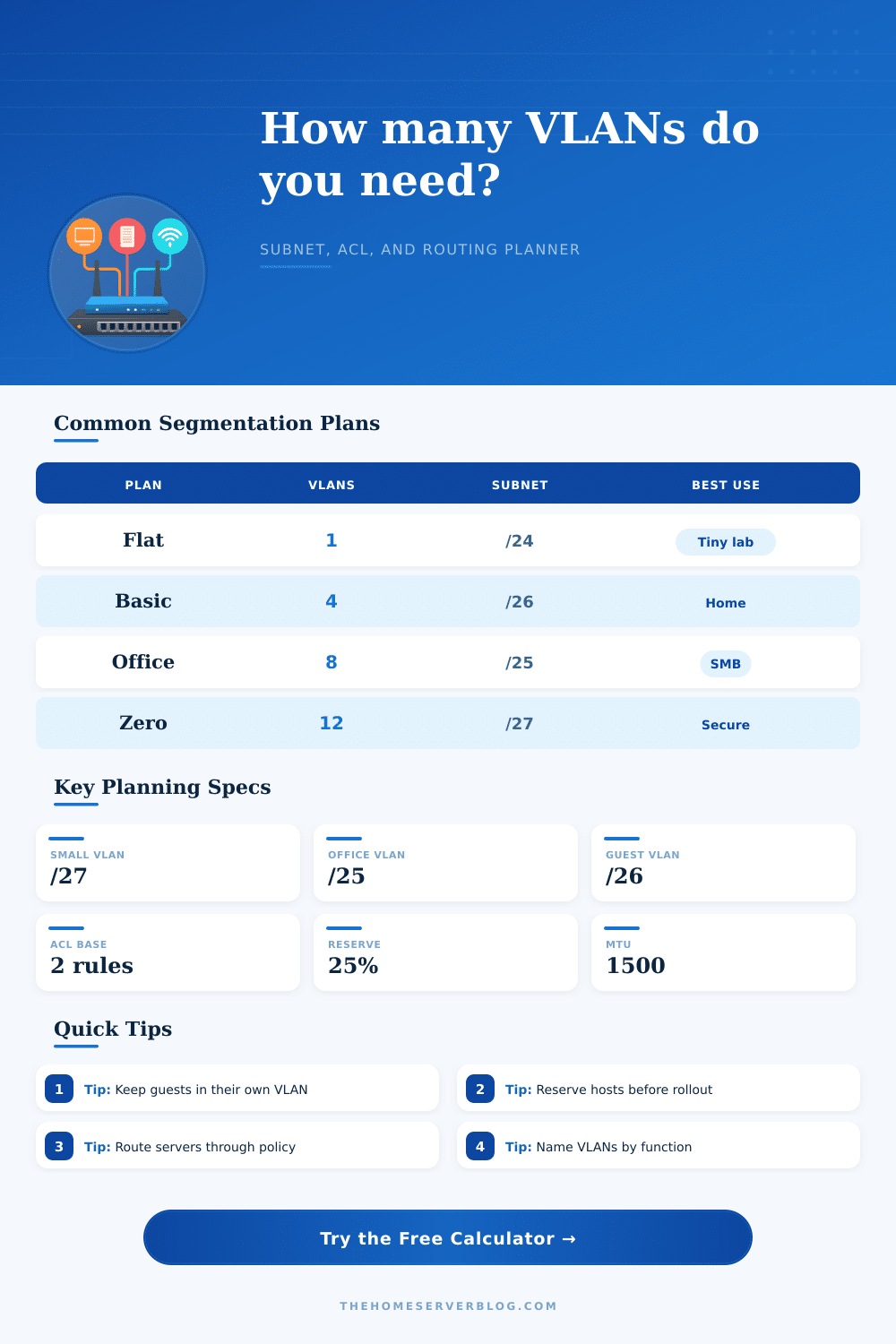
| Flat LAN | 1 to 2 | /24 to /23 | Very small trusted networks |
| Basic Home Lab | 4 to 6 | /27 to /24 | Users, guests, servers, IoT |
| Small Office | 6 to 10 | /27 to /23 | Teams, voice, printers, guests |
| Security Zones | 10 to 18 | /28 to /24 | Default-deny routing and audits |
| Virtual Lab | 8 to 16 | /28 to /22 | Hypervisors, test nets, DMZ |
This is the Home Lab. With best of intentions, you begin your home lab journey. Guests should be kept off your primary network. Gaming consoles shouldn’t live on same subnet as security cameras.
The issue? Subnets and VLANs are abstract things until they break something. Now kids aren’t able to stream video or your printer won’t work because you accidental blocked port 80 in your firewall. Building segmentation isn’t about drawing lines on a diagram; it’s about navigating trust boundaries without creating a data center in your living room that needs an engineer to reboot your router at 2 AM.
How to Build a Simple and Safe Home Network
Once you plug in your device counts (and the calculator does the rest), you’re spared guessing if your expanding list of smart bulbs fit on a /26 subnet. It takes vague wants (“I want security”) and turns them into real figures, how much routing load? How many VLANs? How many access control lists? Understanding what those inputs mean in the real world is the big part of the trick.
Devices-per-department doesn’t just equal number-of-laptops; it equals broadcast domain. Each device in this segment see every single packet sent onto the network. Lots of devices in a single VLAN results in slowed performance and noisier broadcasts for all.
Growth Reserve, Most people ignore the growth reserve setting, sizing their subnets for today’s five phones and three tablets only to realize later that they’ve run out of room when adding new devices. Why bother sizing your subnets today for five phones and three tablets when tomorrow you discover you need to add eight new IoT sensors… and then the subnet is full? Thirty percent isn’t paranoid. It’s forward thinking. It’s anticipating what happens as you add more connected devices.
The calculator does this for you by automatically recommending CIDR blocks larger than you may expect are needed. The additional space means no painful renumbering of all those IP addresses because you’ve run out of room on a /28 block.
Networks get messy quickly when it comes to ACL policy volume. A flat LAN with open routing isn’t too bad. But if your guests could scan your server VLAN then that’s defeating the point of segmentation. How strict do you want to be? The tool will estimate the number of rules involved. You can manage basic allow-lists. Micro-rules at zero trust sound secure … till you’ve got three hundred and have no clue which one blocked the printer. There’s a sweet spot somewhere between opening the back door and locking everything down.
The page also has a reference table that explains these options and shows how different security levels increase workload for administrators.
Another invisible traffic-killing problem is inter-VLAN routing load. Any packets going between the guest VLAN and internet will traverse your firewall/router. A cheap consumer router will choke on this traffic. By entering an average amount of traffic per client and what percent of that flow crosses segments, the calculator estimates the busy-hour demand and therefore helps determine whether you need a dedicated layer 3 switch or not. Small, yes, but it makes a difference in uptime.
Save lives with naming conventions. Guest = guest! Naming zones based off function rather than location (or vlan id) eliminates the guessing game when it’s time to troubleshoot. This calculator creates a plan where DHCP scopes match those functional zone names. From switch port to firewall alias, it maintains the same logic.
A good home network doesn’t require a complicated setup, but it does require one that can handle more than just itself without collapsing in on itself. Four segments are a good place to start. These include Guest, IoT, Servers, and Users. Make it as simple as possible so you can manage it at 1 AM when all hell breaks loose. Aim for predictable, not perfect. When something fails, you should of known why before you begin random reboots.
Segmentation provides that clarity. It transforms chaos into a set of manageable boundaries. That’s where folks go wrong. They believe segmentation is meant to block everything. In reality, it’s meant to understand what touches what. This way, if a camera begins pinging your NAS, you know exactly which rule to adjust.
Give everything clear names, keep segments separate by isolating guests, and leave room to expand. Your future-self will thank you when the network remains silent.