OSPF Auto Cost Reference Bandwidth Calculator
Compare configured bandwidth, reference bandwidth, and path metrics so you can tune OSPF with confidence before you touch a live router.
🖧Preset Scenarios
Calculation Breakdown
Command Preview
router ospf 1
auto-cost reference-bandwidth 100Reference Bandwidth Ladder
| Speed | Cost | Ceiling | Note |
|---|
Interface Family Map
| Family | Physical | Command | Use Case |
|---|
OSPF Planning Guide
| Profile | Suggested Ref | Fastest Tier | Best For |
|---|
Preset Cheat Sheet
| Preset | Ref | Link | Path |
|---|
Use the configured bandwidth value when the interface has a manual bandwidth command.
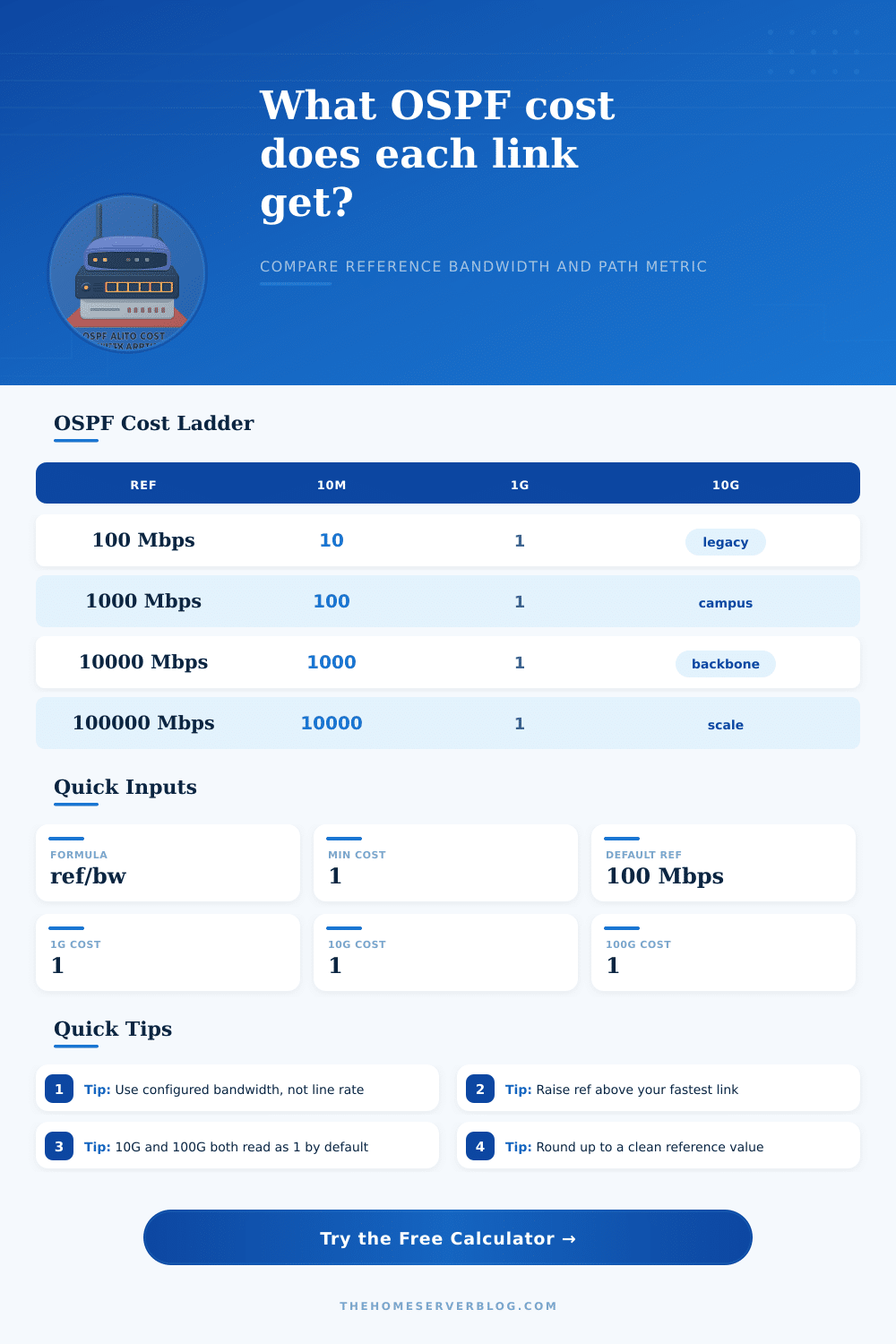
If fast links all show cost 1, raise the reference bandwidth or the topology will lose granularity.
Open Shortest Path First (OSPF) use a metric to determine the best path for data to travel across a networks. The metric for OSPF are calculated by dividing the reference bandwidth by the bandwidth of an specific interface. The result of this calculation are rounded down to the nearest whole numbers.
The minimum metric for any given interfaces is 1. Because the metric use the reference bandwidth to calculate the metric for each interface, the reference bandwidth for the network will determine how OSPF treats the different speeds of the links in that network. If the reference bandwidth for the network is set to the default value of 100 Mbps, then any interface faster than 100 Mbps will have a metric of 1 for OSPF.
How OSPF Uses Reference Bandwidth
Because all interfaces with a speed faster than 100 Mbps will have an OSPF metric of 1, OSPF will not be able to discern between the different speeds of those links; it will treat each link equal. If a network contains links of different speeds, the default reference bandwidth will cause OSPF to treat links of high and medium speeds as if they contains the same bandwidth. For instance, a network that includes both 1 Gbps and 10 Gbps links will calculate the metric of each link with a default reference bandwidth of 100 Mbps.
Each link will have an OSPF metric of 1. Because OSPF does not know that the 10 Gbps link has more bandwidth than the 1 Gbps link, OSPF may route data from the network to the 1 Gbps link rather then the 10 Gbps link. This routing of data to the link of less bandwidth result in suboptimal routing of data across the network.
To avoid suboptimal routing of data across the network, you can change the reference bandwidth for the network to a value higher than the speed of the fastest data link in the network. For instance, changing the reference bandwidth to a value higher than the speed of the fastest link in the network will cause OSPF to calculate a different metric for each link with that network. If the reference bandwidth are changed to 100 Gbps, the 10 Gbps link will have a higher metric than the link with 100 Gbps.
By changing the reference bandwidth, the protocol will calculate a higher metric for links with lower bandwidth than faster links in the network. Additionally, the reference bandwidth can be changed to a higher value than the speeds of the current links in the network to allow for new links of higher bandwidth to be added to the network in the future without changing the reference bandwidth again. The topology of the network will help to determine the best reference bandwidth for that network.
For instance, a Wide Area Network (WAN) that use links of 100 Mbps data speeds will work correctly with the default reference bandwidth of 100 Mbps. However, a network that have links of 1 Gbps and 10 Gbps or 40 Gbps will require a higher reference bandwidth. Data centers that use links of 40 Gbps data speeds or 100 Gbps will also require a higher reference bandwidth for the protocol to discern between the different link speeds in that network.
In addition to the link speeds in the network, the bandwidth value that is configured for each link can also be different than the actual physical speed of the links. OSPF use the value for bandwidth that is configured on each link to calculate the metric for each link in the network. Therefore, the bandwidth value for each link in the network will need to be ensure to reflect the actual throughput of that link.
For instance, if a link with a physical speed of 10 Gbps is manually configured to have a bandwidth of 1 Gbps, OSPF will use that 1 Gbps value in calculating the metric for that link. Therefore, the configured bandwidth for each link should match the throughput of that link, especially in situations like implementing Link Aggregation Groups (LAG) or subrating the links in a WAN circuit. The total cost of the path that data takes across the network is calculated by adding the metrics of each link in the path to calculate the total cost of that path.
For instance, if three links have an metric of 1 each, the total cost of traveling through each link will be 3. If the reference bandwidth for the network is too low, however, the cost of a high bandwidth link may equal the cost of a low bandwidth link, which will make the total cost of that path incorrect for that network. Finally, any changes to the reference bandwidth for the links should of be test in a controlled environment for the network.
Any change to the reference bandwidth will cause OSPF to reconverge, which may impact the stability of the network.