Bitrate Calculator for Streaming
Estimate video bitrate, audio bitrate, upload capacity, platform limits, network headroom, and data use for a stable live stream.
Calculation breakdown
| Resolution | Frame Rate | H.264 Baseline | H.265 Estimate | AV1 Estimate |
|---|---|---|---|---|
| 720p | 30 fps | 2.5 to 4 Mbps | 1.6 to 2.6 Mbps | 1.3 to 2.1 Mbps |
| 720p | 60 fps | 4 to 6 Mbps | 2.6 to 3.9 Mbps | 2.1 to 3.1 Mbps |
| 1080p | 30 fps | 4 to 6 Mbps | 2.6 to 3.9 Mbps | 2.1 to 3.1 Mbps |
| 1080p | 60 fps | 6 to 9 Mbps | 3.9 to 5.8 Mbps | 3.1 to 4.7 Mbps |
| 1440p | 60 fps | 12 to 18 Mbps | 7.7 to 11.5 Mbps | 6.2 to 9.4 Mbps |
| 2160p | 60 fps | 30 to 51 Mbps | 19 to 33 Mbps | 16 to 27 Mbps |
| Platform | Common Ceiling | Typical Keyframe | Best Fit | Calculator Behavior |
|---|---|---|---|---|
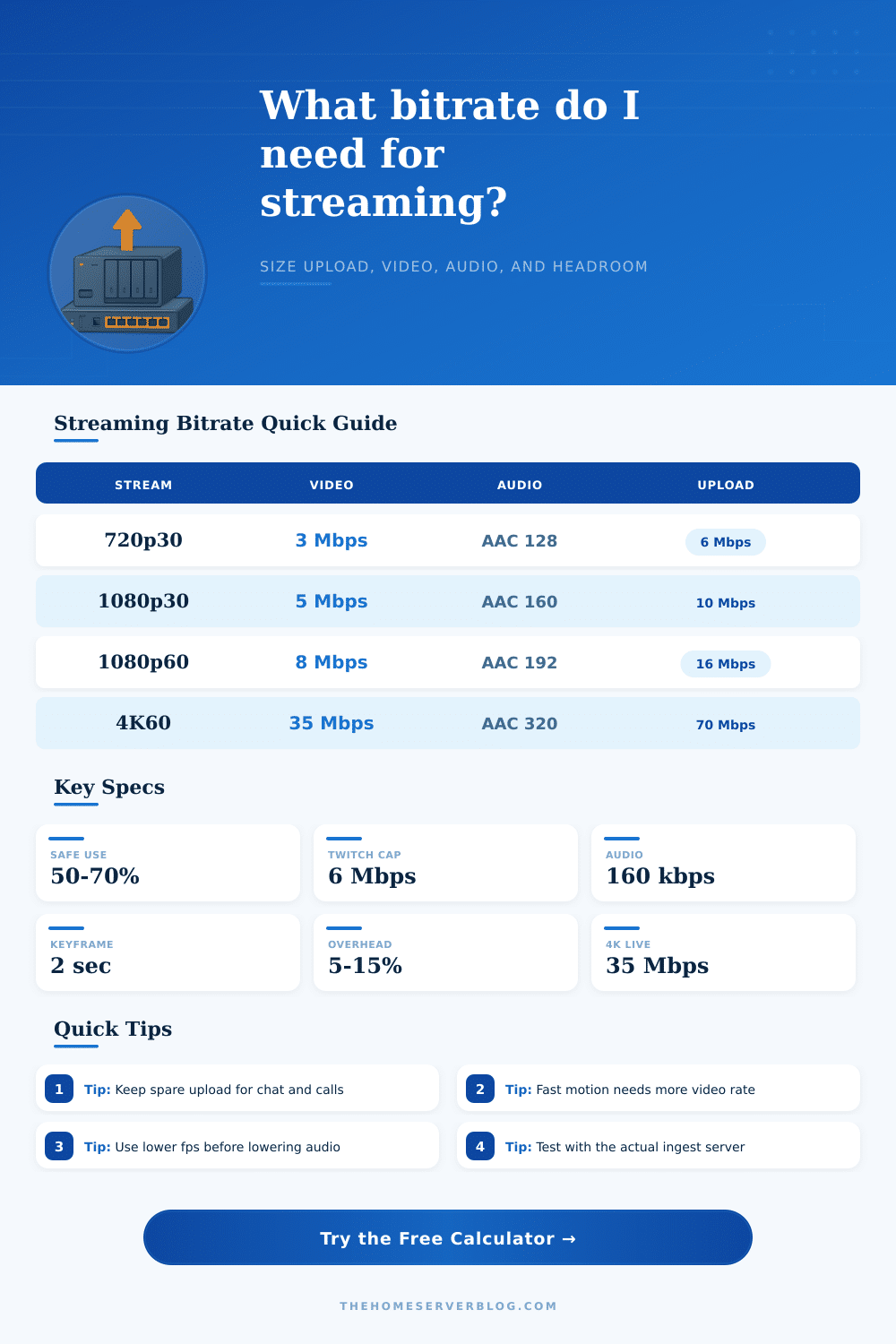
| Twitch | About 6 Mbps video | 2 seconds | 720p60 or 1080p60 | Caps video near 6 Mbps |
| YouTube Live | High 4K rates allowed | 2 seconds | 1080p, 1440p, 4K | Allows larger 4K outputs |
| Facebook Live | Moderate HD rates | 2 seconds | 720p or 1080p | Warns above common HD range |
| LinkedIn Live | Business HD rates | 2 seconds | Webinars and events | Favors stable 1080p30 |
| Custom RTMP or SRT | Server dependent | 1 to 4 seconds | Private contribution | Uses only upload limits |
| Total Output | Data Per Hour | Minimum Upload | Safer Upload | Connection Notes |
|---|---|---|---|---|
| 3 Mbps | 1.35 GB | 4.6 Mbps | 6 Mbps | Suitable for 720p30 |
| 6 Mbps | 2.70 GB | 9.2 Mbps | 12 Mbps | Good 1080p30 target |
| 9 Mbps | 4.05 GB | 13.8 Mbps | 18 Mbps | Fast 1080p60 motion |
| 18 Mbps | 8.10 GB | 27.7 Mbps | 36 Mbps | 1440p60 or high motion |
| 35 Mbps | 15.75 GB | 53.8 Mbps | 70 Mbps | Practical 4K60 target |
| Factor | Low Demand | Standard Demand | High Demand | What It Changes |
|---|---|---|---|---|
| Codec | AV1 | H.265 | H.264 | Bits needed per pixel |
| Motion | Slides | Mixed camera | Sports | Compression difficulty |
| Frame rate | 24 fps | 30 fps | 60 fps | Frames encoded each second |
| Keyframe | 4 seconds | 2 seconds | 1 second | Burst size and seeking |
| Transport | Wired LAN | RTMP internet | Mobile uplink | Overhead and packet loss |
Bitrate refer to the amount of data that is sent during a live stream. Bitrate is one of the critical factor that determine the visual quality of a live stream. Although many person feel that increasing the bitrate will improve the quality of the video that is being live streamed, increasing the bitrate too much can create problem for the live stream if the bitrate is too high for the internet connection.
If the bitrate is too high for the internet connection, the live stream will experience dropped frame and buffering. Thus, understanding bitrate and how it relate to other factors that impact live streaming will allow people to find the best bitrate for there current live stream setup. The resolution of the live stream and the frame rate of the stream will impact the bitrate of the stream.
How to choose the right bitrate for your live stream
A live stream that feature a resolution of 1080p will require more bitrate than a live stream that features a resolution of 720p. This is because a higher resolution has more pixel that must be transmitted at the rate of each frame of the live stream. Additionally, the amount of motion within the live stream will also impact the bitrate of the live stream. For instance, a live stream of a podcast will require less bitrate than a live stream of a racing game.
This is due to the fact that there is less movement within the podcast recording than within the racing game footage. A live stream of a game with fast movement will require a more higher bitrate because each frame has more data that must be transmitted. If there is not enough bitrate provided for these fast movements within a game, the video will begin to look pixelated.
Another factor that will impact the bitrate of the live stream is the codec that is used to compress the video. There is a variety of codecs that can be used for live streaming. A very common codec is the H.264 codec.
However, newer codecs, such as the H.265 and AV1 codecs, are more efficient at compressing the video data than the H.264 codec. This means that higher resolution of video can be streamed at the same quality with newer codec while using less bitrate. Thus, utilizing a newer, more efficient codec will allow the live stream to use less bandwidth, or utilize the extra bandwidth to increase the resolution of the live stream.
In addition to the factors described above, another factor to consider is the difference between the total internet connection speed and the streaming bandwidth that can be used. Individuals may have a high upload speed from their internet provider, but the speed of the internet can fluctuate throughout the connection. Therefore, not all of the upload speed can be utilized for the live stream.
Some of the upload speed will be used for other device that are connected to the internet. Additionally, the upload speed may decrease at some point of the live stream if other devices is used. Thus, some headroom or safety margin must be left in the upload bandwidth to account for these factors.
Therefore, the bitrate should be set lower than the total upload speed to provide a safety margin for the live stream. Another factor to consider is the limit of the live streaming platform that is to be used. Most live streaming platforms have limits to the bitrate that their platform will accept from the individual that stream to their platform.
If the bitrate of the live stream is set to be higher than the limits of the platform, the live stream may be rejected or become unstable. Therefore, to avoid wasting any upload bandwidth, it is beneficial to ensure that the individual reviews the limits of the live streaming platform prior to setting up the live stream to ensure that the bitrate is within the limit of that platform. Lastly, there are tradeoffs that can be made in setting up the live stream between the resolution of the stream, the frame rate, and the stability of the internet connection.
If an individual decide that they want to utilize high resolution and high frames per second for their live stream, it is possible that their internet connection will become unstable. In this case, instead of utilizing high resolution, they could reduce the resolution of their live stream to 720p to improve the stability of their live stream. In this situation, the viewer will have to settle for a lower resolution stream, but the live stream will not freeze and the viewing experience will be better for the audience.
By understanding each of these factors and how they relate to each other, an individual can adjust each of the setting to find the best bitrate for their live stream setup.