Packet Size Calculator
Estimate packet size from payload, Ethernet framing, VLAN tags, IP and transport headers, tunnel overhead, MTU, packets per second, fragmentation, and wire efficiency.
📦Packet and application presets
⚙Packet inputs
The useful bytes carried by one logical packet before network headers.
MTU is the L3 payload inside the Ethernet frame, usually 1500 or 9000.
Include this for physical wire rate and packets-per-second planning.
🖧Protocol header grid
📊Common packet header reference
| Protocol or frame part | Typical bytes | Included in MTU? | Planning note |
|---|---|---|---|
| Ethernet II MAC header | 14 | No | Destination MAC, source MAC, EtherType. |
| Ethernet frame check sequence | 4 | No | Usually absent from packet captures but present on wire. |
| 802.1Q VLAN tag | 4 each | No | Single tag is common; Q-in-Q uses two tags. |
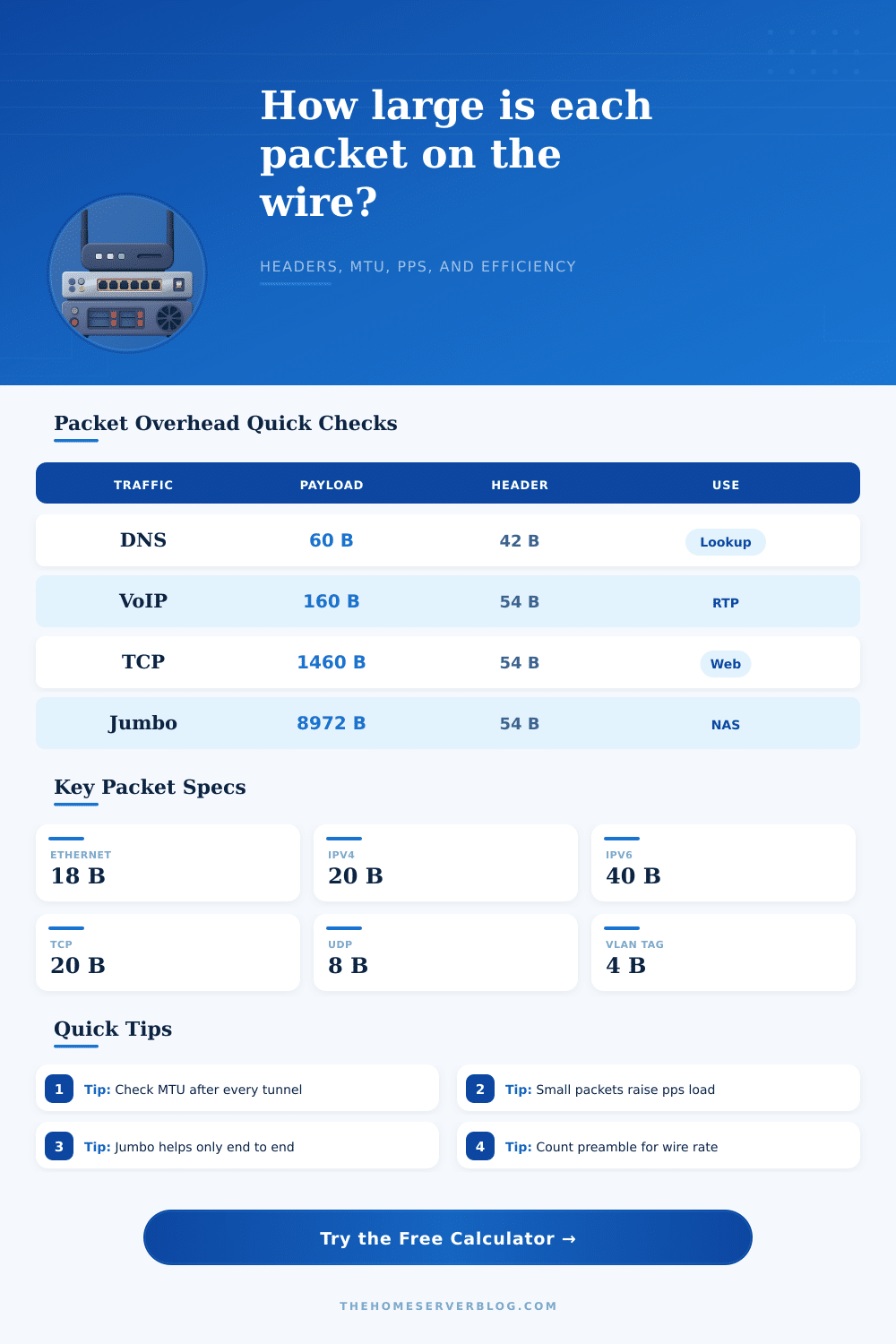
| IPv4 header without options | 20 | Yes | Part of the MTU and fragment accounting. |
| IPv6 base header | 40 | Yes | Higher fixed header, but no router fragmentation. |
| TCP / UDP header | 20 / 8 | Yes | TCP options can reduce payload per packet. |
🔀MTU and fragmentation examples
| Path type | Typical MTU | Safe TCP MSS | What usually breaks |
|---|---|---|---|
| Standard Ethernet IPv4 | 1500 bytes | 1460 bytes | Large payloads fragment above 1500 L3 bytes. |
| PPPoE internet link | 1492 bytes | 1452 bytes | DSL and some fiber ONTs need lower MSS. |
| WireGuard tunnel | 1420 bytes | 1380 bytes | Outer UDP and crypto reduce useful packet room. |
| IPsec NAT-T tunnel | 1400 bytes | 1360 bytes | ESP, UDP encapsulation, and padding vary. |
| VXLAN overlay | 1450 bytes | 1410 bytes | Storage or VM traffic needs underlay headroom. |
| Jumbo Ethernet | 9000 bytes | 8960 bytes | Every switch, NIC, and VM path must match. |
⏱Packets per second and wire load
| Wire packet size | 100 Mbps pps | 1 Gbps pps | 10 Gbps pps |
|---|---|---|---|
| 84 B minimum Ethernet wire slot | 148,810 | 1,488,095 | 14,880,952 |
| 214 B VoIP-style frame | 58,411 | 584,112 | 5,841,121 |
| 1,538 B standard full frame | 8,127 | 81,274 | 812,744 |
| 1,586 B tunneled full frame | 7,881 | 78,815 | 788,146 |
| 9,038 B jumbo wire frame | 1,383 | 13,830 | 138,305 |
💻Application packet patterns
| Traffic pattern | Common payload | Overhead sensitivity | Home lab note |
|---|---|---|---|
| DNS and control traffic | 40-200 bytes | High | Headers can exceed the useful payload. |
| VoIP RTP audio | 120-200 bytes | High | Pps and jitter matter more than Mbps. |
| Game state updates | 60-300 bytes | High | Small packets make router CPU visible. |
| HTTPS API traffic | 500-1400 bytes | Medium | TLS adds bytes, but batching helps efficiency. |
| NAS file transfer | 1460-8972 bytes | Low | Large payloads improve efficiency if MTU matches. |
| VM overlay storage | 1400-8900 bytes | Medium | VXLAN needs underlay MTU headroom. |
Network performance issue are often due to the way that data is organized into packets. Each packet has data that is useful to the receiving network, but also has headers that the network use to transfer the data. If a packet contains a large amount of headers in relation to the amount of data in that packet, then sending those headers will utilize a large portion of that network link.
Thus, the ratio of headers to data in each packet is a critical factor for determining the efficiency of the network. The ratio of headers to data in each packet may change based off the type of traffic that the individual user is sending. For instance, packets that are used to perform a DNS lookup will be quite small in size in comparison to packets that are used to perform a storage backup of a computer system.
Why packet size and headers matter for network speed
Small packets may lead to high rate of packets being sent across the network, which can create problem with routers, firewalls, and network card. Conversely, large packets will be more efficient in that each packet will contain more data than small packets, but may be limited by the number of tunnels, VLANs, and encryption method that are employed in the network. The calculator that is provided here will allow an individual to calculate each of these values for they network.
The calculator will calculate the size of the packets that will be created given the size of the data that will be sent, the number of protocols used, any number of tunnels through which the data will pass, and the rate at which those packets will be created. Furthermore, the calculator will indicate how much of the link speed that those packets will take up. The choice of Layer 2 protocols can have an impact upon the size of data that can be sent in the network.
For instance, Ethernet is one protocol that is often used at Layer 2, but protocols such as PPPoE or WiFi may be used instead. Each of these protocols may impact the amount of data that can be sent in a frame in relation to the MTU of the technology. For instance, each VLAN tag use four bytes of overhead in the frame, so if a frame is double-tagged, it will have eight extra bytes before the data for the IP packet begin.
These eight bytes may create issue for individuals that wish to keep their data within a certain size for their VPN or other type of tunnels. Other protocols at Layer 3 and Layer 4 also have an impact upon packet size. For instance, IPv6 creates a larger header than IPv4, as does TCP if any options are utilized (as opposed to the 20 bytes of overhead for TCP data).
Additionally, any number of tunnels that are used for the traffic will impact the size of the packets. This tool can be used to select each of these settings and to view how the size of the packets will change before they are ever sent across the network. The maximum transmission unit (MTU) creates a variety of problems for the network.
If the data is larger than the MTU, the network must fragment the packet or drop the packet. Because routers for IPv6 do not fragment packets, if the size of the packet is larger than the MTU, the packet will dissapear on the network. The calculator will reveal the number of fragments that will be created, and will warn the user of any issue with Layer 3 protocols that may result.
Thus, an individual may need to reduce the size of the payload size or the MSS on the system that are to send these packets. The rate of the packets that are sent per second can have a major impact upon the network. The number of packets per second can reveal problems with the network that the bandwidth of the link does not indicate.
For instance, a gigabit link can allow 1.5 million frame per second of data. However, firewalls will often drop packets at much lower rate. Thus, if the calculator reveals that many packets will be sent per second, the individual will have to ensure that the devices on the network can handle that many packets per second.
In addition to the model that the calculator utilizes, there are a variety of other variables in the real world that may have an impact upon a network. For instance, a switch may rewrite some of the headers, a middlebox may have its own protocol and overhead, or the wireless link may retransmit some of the frames that are sent. Thus, the buffer percentage allow for adjustments to account for these variable.
This buffer percentage will increase the amount of data sent and the packets per second calculated by the network so that the individual does not plan their network usage at the limit that can be achieved according to the calculator. The reference tables that are provided for the individual help to explain each of the variables in the calculator. Each of these tables contain information about the size of headers for each protocol, the size of the MTU for different link types, and the packets per second limit for different data rates.
Thus, the individual can use these tables to determine if their values are realistic, and if they are comfortable with the difference between their data rates. Finally, while the goal of any network may be to provide the greatest efficiency for the network, the best method for most networks is to allow for a mix of small and large packets. Thus, it is helpful for any network designer or engineer to understand if their overhead result in low efficiency for payloads and packets per second.
If the results of implementing such a network indicate that the network will have low efficiency in relation to its payload size and high rate of packets per second, then batching of the data packets may be required. Finally, if there is comfortable headroom in the packets created after implementing any number of tunnels, then there is a range within which the network can grow before encountering any of the limit mentioned above. You should of checked the settings first to ensure the connection is moddern and luxurius enough for the task.
It is actualy a lot of work to get it right.