VoIP R-factor / E-model Quality Calculator
Estimate home lab PBX, SIP trunk, codec, jitter, packet loss, and latency call quality with an E-model style R-factor and MOS breakdown.
Enter call path details to calculate estimated voice quality.
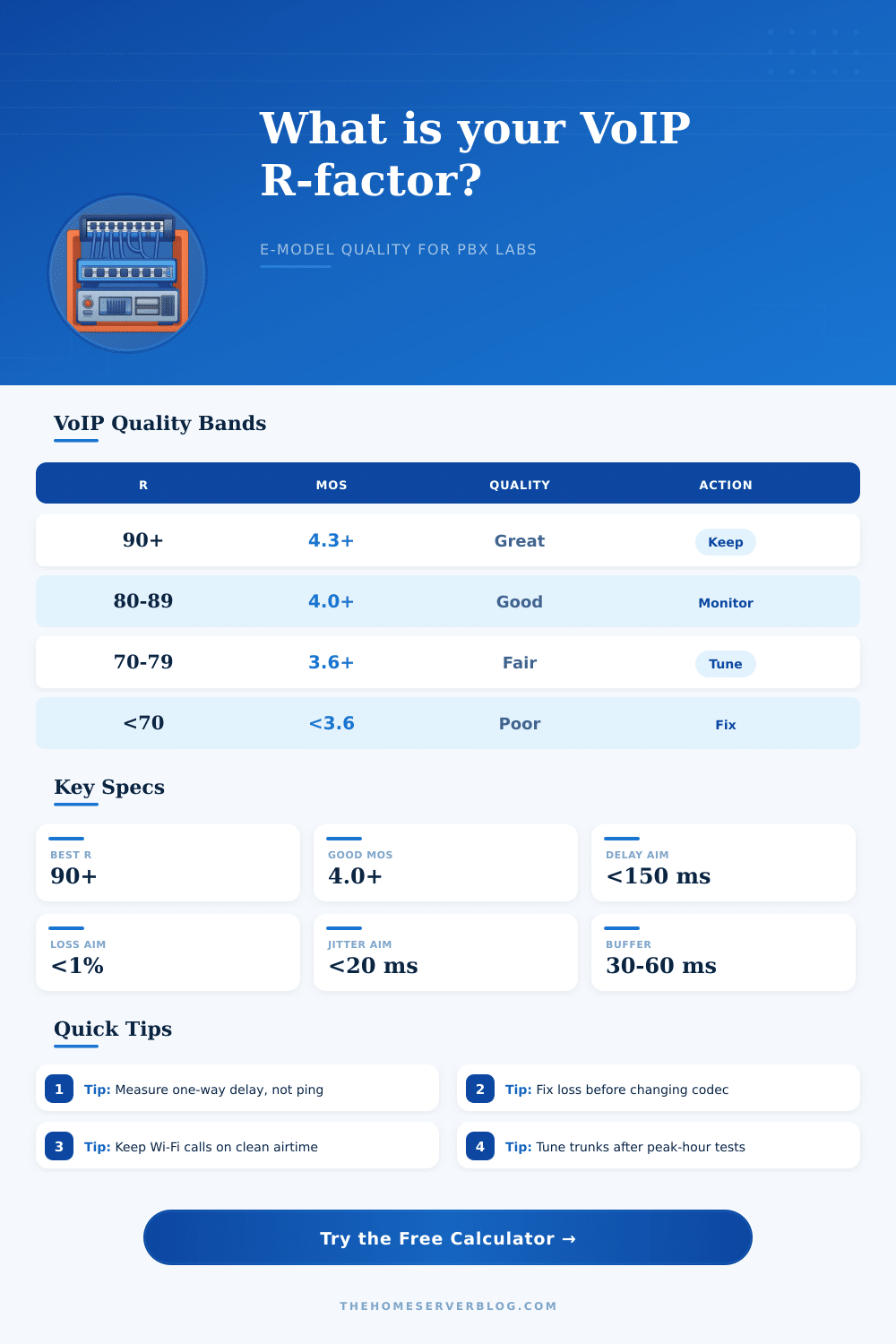
| R-factor | Estimated MOS | User Experience | Home Lab Action |
|---|---|---|---|
| 90 to 100 | 4.3 to 4.5 | Excellent, transparent for most callers | Keep settings; monitor during backups and updates |
| 80 to 89 | 4.0 to 4.3 | Good production-grade home PBX quality | Verify peak-hour jitter and trunk loss |
| 70 to 79 | 3.6 to 4.0 | Fair, usable but callers may notice artifacts | Tune QoS, buffer, Wi-Fi airtime, or codec choice |
| 60 to 69 | 3.1 to 3.6 | Poor for daily calling and IVR prompts | Fix loss and delay before adding extensions |
| Below 60 | Below 3.1 | Bad call path, likely clipping or talk-over | Move traffic, replace WAN path, or disable route |
| Codec | Typical Use | Nominal IP Bandwidth | R-factor Sensitivity |
|---|---|---|---|
| G.711 u-law / A-law | LAN phones, high-quality SIP trunks | About 87 kbps at 20 ms ptime | Low codec impairment, weak under packet loss |
| G.722 | Wideband desk phones and internal calls | About 87 kbps at 20 ms ptime | Excellent clarity when delay and loss are low |
| Opus | WebRTC, softphones, mixed home networks | Often 24 to 64 kbps for voice | Strong resilience with sane jitter buffers |
| G.729 | Low-bandwidth WAN and legacy trunks | About 31 kbps at 20 ms ptime | Higher codec impairment, but saves bandwidth |
| iLBC | Lossy paths and older softphone setups | About 27 to 38 kbps depending mode | Handles loss better than G.711 at lower fidelity |
| Metric | Excellent | Watch Zone | Repair Priority |
|---|---|---|---|
| One-way latency | Under 100 ms | 150 to 200 ms | High once talk-over appears |
| Average jitter | Under 10 ms | 20 to 40 ms | High on Wi-Fi and congested uplinks |
| Packet loss | Under 0.5% | 1% to 3% | Critical before codec changes |
| Jitter buffer | 20 to 50 ms | 60 to 120 ms | Medium; trades loss for delay |
| Loss burst ratio | 1.0 to 1.5 | 2.0 to 4.0 | Critical for clipped syllables |
| Scenario | Typical Codec | Main Risk | First Fix |
|---|---|---|---|
| Mini PC PBX with LAN desk phones | G.722 or G.711 | Switch queue bursts during backups | QoS trust on voice VLAN ports |
| SIP trunk through home fiber | G.711 | Bufferbloat on upload saturation | SQM or router shaping below line rate |
| Remote extension over WireGuard | Opus or G.729 | WAN jitter and MTU mismatch | Set MTU and prioritize UDP voice |
| Wi-Fi softphone in home office | Opus | Roaming, retries, and airtime contention | Use 5 GHz or 6 GHz with clean channels |
| LTE failover trunk | Opus or iLBC | Variable jitter and CGNAT route changes | Adaptive buffer plus lower bitrate codec |
You get Asterisk working, tweak the SIP trunk settings, set up firewall rules, etc., and still your VoIP sounds crap. Everything seems to work just fine; calls go through and signaling happens without issue. But voice quality stinks.
This is where R-factor comes into play, as it takes all of those network statistics and condenses them into a single number that will tell you what human being might hear. This calculation reflects the E-model, which is the framework that tells if it’s good enough to do business on a path. For home use there are looser standards but rules apply in both places.
What Is R-Factor and Why It Matters for VoIP Quality
Three primary factors is at play. Compression degrades signal, dropping points because encoded signal isn’t pure PCM. Delay on a network cause conversation to sound like tennis; waiting for someone to return your volley. Jitter and packet loss introduce distortion, clipping, and other artifacts into audio stream. You don’t have to look up all the impairment constants; you simply set these variables and a calculator do the math for you.
Latency gets blamed first, and a lot of times rightly so. If you’ve got more than two hundred milliseconds of round-trip delay, then you’re gonna have bad quality even with zero loss and jitter. Humans don’t like to wait. Socially speaking calls fail when we speak over each other because we can’t hear pauses even though audio might be clear.
Ping measures round-trip time, which includes your internet’s latency in both directions. To get a good estimate of mouth-to-ear, take half this value. That’s the number you want to plug into the tool. Copying values straight from ping into the delays fields is where new users will stumble.
But the jitter buffer obscures the jitter. It is designed to hide jitter. It does this by storing your phone call audio temporary in a queue until packets arrives at a consistent rate. If they’re too large, buffers adds unnecessary delay, but they don’t eliminate jitter. Small enough buffers drop packet too often. When calculating average jitter and buffer size, the jitter calculator factor that trade-off.
For listening, it also considers whether loss is random (which is better) or clustered into bursts where more than one packet are lost. This is worse. Why? Because human speech isn’t random; it’s structured. Randomly missing a single vowel may not matter if context helps fill the gap, but randomly missing a whole syllable within a consonant cluster makes comprehension impossible. That difference in impact on understanding explains why final score takes account of burstiness.
Less visible but no less important is codec used. For example, G.711 sounds really good over a clean LAN connection… Until your packets begin to drop by even a single percent. It doesn’t do well at hiding dropped packet. Instead, more resilient codecs like G.729 or Opus use less bandwidth while also tolerating dropped packets (but with a lower baseline quality score thanks to compression artifacts). In other words, you sacrifice sound in exchange for error tolerance.
Actualy, it is better than uncompressed audio if the network are bad. This chart shows how various codecs fare in relation to average home network conditions. When using remote VPN tunnel connections or congested Wi-Fi links, uncompressed audio will result in unusably choppy calls, so don’t bother using it unless you have an extremely robust connection.
It’s always been the correct mindset: fix the network path first. Tweaking codecs won’t help if five percent of packets are lost because of bufferbloat on a lightly saturated upload line. You should of checked your upload speed too. Shape traffic. Prioritize voice ports (UDP). Tune your jitter buffer for worst-case scenario. Don’t optimize for quiet evenings. Optimize for peak hours. Make it work. Not perfect. Make it transparent. Let the conversation be the main focus once more.
When you get an R-factor over eighty, then you’ve hit the point when it’s no longer functional, it’s forgettable. That’s the level a home phone system should operate at. You could of achieved better with moddern hardware but this works.