RAID 50 Capacity Calculator
Estimate usable NAS capacity for RAID 50 arrays with equal-size RAID 5 sets, parity loss, hot spares, free-space reserves, rebuild time, and drive-class risk signals.
Full RAID 50 breakdown
NAS CMR HDD
180 MB/s Typical rebuild read rateGood baseline for home RAID 50 when disks are matched and vibration is controlled.
Enterprise HDD
230 MB/s Higher sustained rebuild rateBetter URE rating and workload durability for large shelves or busier VM storage.
SATA SSD
450 MB/s Controller-limited rebuildUseful for quiet VM datastores, but endurance and write amplification still matter.
NVMe SSD
900 MB/s Practical array rebuild capFast media can become limited by HBA lanes, PCIe bifurcation, cooling, or parity CPU.
| Active drives | RAID 50 grouping | Parity drives | Usable drive equivalents |
|---|---|---|---|
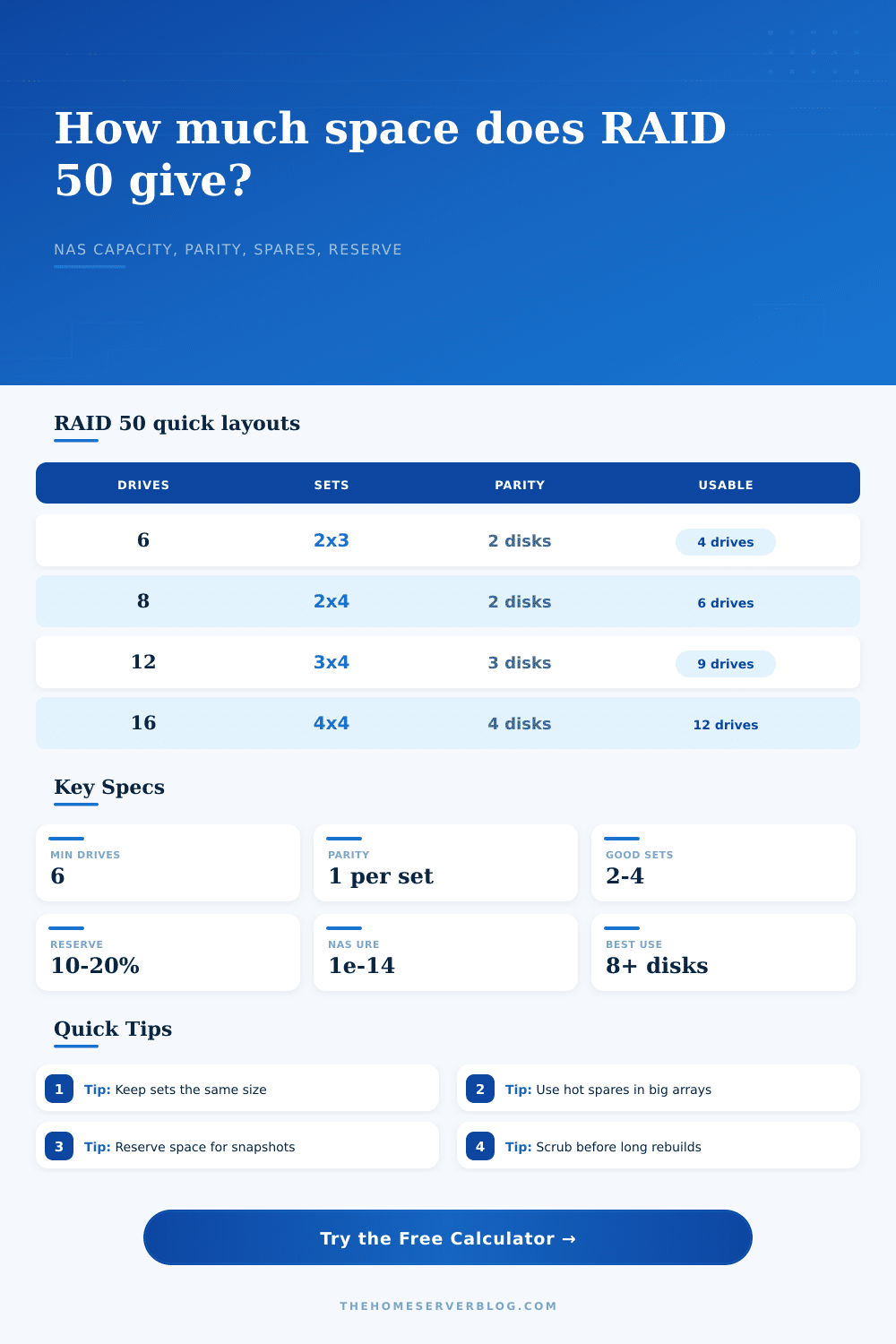
| 6 drives | 2 sets x 3 drives | 2 total | 4 drives, or 66.7% raw efficiency |
| 8 drives | 2 sets x 4 drives | 2 total | 6 drives, or 75.0% raw efficiency |
| 10 drives | 2 sets x 5 drives | 2 total | 8 drives, or 80.0% raw efficiency |
| 12 drives | 3 sets x 4 drives | 3 total | 9 drives, or 75.0% raw efficiency |
| 16 drives | 4 sets x 4 drives | 4 total | 12 drives, or 75.0% raw efficiency |
| Drive class | Typical URE rating | Planning note | Best RAID 50 use |
|---|---|---|---|
| Desktop SATA HDD | 1 in 10^14 bits | Not ideal for long parity rebuilds | Small non-critical lab with backups |
| NAS CMR HDD | 1 in 10^14 bits | Designed for multi-bay vibration and 24/7 workloads | Home NAS media, backups, shares |
| Enterprise HDD | 1 in 10^15 bits | Higher workload rating and better rebuild confidence | Large arrays, VM images, active storage |
| SATA or NVMe SSD | 1 in 10^16 bits | Watch endurance, heat, and controller bottlenecks | Fast VM datastore or scratch pool |
| Reserve choice | What it represents | When to use it | Capacity impact |
|---|---|---|---|
| 0% | Raw block capacity only | Lab math, not a final storage plan | No deduction |
| 5% | Light filesystem overhead and admin margin | Mostly static shares on ext4 or XFS | Small deduction |
| 10% | Normal NAS free-space target | Mixed files, backups, and media libraries | Recommended baseline |
| 15% | Snapshots, churn, and service growth | Busy backup targets or many SMB shares | Safer long-term planning |
| 20% | ZFS, VM datastore, or copy-on-write headroom | VM images, databases, snapshots, dedupe testing | High headroom |
| Storage level | Minimum drives | Fault tolerance | How it compares |
|---|---|---|---|
| RAID 5 | 3 | 1 drive total | More efficient at small scale but a single rebuild domain |
| RAID 6 | 4 | 2 drives total | Safer during rebuilds, often slower for writes |
| RAID 10 | 4 | 1 per mirror pair | Fast rebuilds and random I/O, less usable capacity |
| RAID 50 | 6 | 1 per RAID 5 set | Good capacity and throughput for larger matched arrays |
| RAID 60 | 8 | 2 per RAID 6 set | Better protection for very large disks, more parity loss |
For hardware RAID, controller metadata, sector size, write cache settings, and vendor rounding can shift displayed capacity slightly. For ZFS, use RAIDZ layouts rather than hardware RAID 50 unless you have a specific controller-backed reason.
When building a home server, there is always a moment when calculating how much storage you need starts to feel stressful. You stand there holding a box of high-capacity drives, staring at an empty case and wondering, “Am I getting enough? Or am I buying myself a headache?”
If you’ve got your heart set on striped array performance with parity protection (RAID 50), well, then you have your answer. But there’s a price paid: One drive’s worth of capacity, per array, lost to parity. You can put your drives into the calculator above and it’ll do the math for you. What those numbers mean, however, is the difference between a good archive and a rebuild gone wrong on a Tuesday night.
How to Pick the Right Storage Size
First things first: RAID 50 isn’t a monolith. It’s a stripe of stripes. In practice, it means creating multiple separate RAID 5 array and then striping them together for performance. The way you do this constrains your usable space. With eight drives divided into two groups of four, you’ve got six drives left over after dropping two for parity. That’s seventy-five percent efficient which sounds great until you get into the real world.
No one runs their filesystem at full capacity. There needs to be some metadata. There needs to be some snapshot space. There also has to be breathing room so backups don’t slow down your performance. What happens when you use the tool? It lets you set a reserve buffer (typically 10-20%) to mimic how a real ext4 filesystem or ZFS act under load. The biggest mistake people make is not using that buffer. They’ll see something like “hey, I need a big number” and then get a drive, but their OS won’t let them write because their partition is actualy full.
And then there’s the issue of failure domains. On a typical RAID 5 set if a drive dies, a rebuild begins. Every other drive in that set work like crazy building the lost data back up. If another drive goes down while it does, well, you’re SOL. Your data is toast. RAID 50 protects against that by keeping the sets small. Sixteen drives? Better split them into four sets of four rather than two sets of eight. There’s less data to rebuild per set so the rebuild window are shorter.
The calculator assumes your drives are a certain class. Enterprise drives can rebuild faster and correct errors better different than consumer desktop drives. A little thing, sure, but it counts. Don’t try to push big consumer drives into wider sets with no spares; don’t mix drives; don’t gamble.
Another level of protection is hot spares, which cost you capacity right now. If one drive fails, you have a spare on hand and can drop it into place. Today’s usable storage space are smaller than yesterday’s due to this spare sitting there waiting for disaster. The trade-off is obvious. Terabytes of future movies will never be stored because you had a hot spare. The trade-off is that if a drive fails, it doesn’t mean that you need to drop everything else and pay attention immediately. In an unattended media NAS, that trade-off are typically worth it. That trade-off might not be worth it in a lab environment where you is swapping drives out.
And lastly, think about what it’s made of. Vibration and heat are byproducts of rebuilding parity. Airflow is required to cool big arrays. The tool breaks this down nicely in the reference tables: the larger the number of parity drives you have, the lower the efficiency becomes. And no chart can communicate the frustration of a slow rebuild or the stench of ozone from frying controllers.
Budget for the worst. Expect a drive to fail. Expect the rebuild process to take time. Don’t size an array based off what you could store in theory, but on what you want to store reliably over time. That’s the ceiling that the tool provides. That’s the floor your self-discipline creates.