RAID Capacity Calculator
Estimate usable storage, parity reserve, hot spare impact, fault tolerance, and free-space headroom for a home server or NAS array.
Capacity Breakdown
| Layout | Minimum Drives | Usable Formula | Drive Loss Tolerance |
|---|---|---|---|
| RAID 0 stripe | 2 | N × smallest drive | 0 drives |
| RAID 1 mirror | 2 | Smallest drive only | N - 1 drives if mirror set holds |
| RAID 5 / RAIDZ1 | 3 | (N - 1) × smallest drive | 1 drive |
| RAID 6 / RAIDZ2 | 4 | (N - 2) × smallest drive | 2 drives |
| RAID 10 | 4 | (N / 2) × smallest drive | 1 per mirror pair, best case more |
| RAIDZ3 | 5 | (N - 3) × smallest drive | 3 drives |
| Unraid parity | 2 or 3 | Data disks only | 1 or 2 drives based on parity count |
| Drive Label | Approx OS Capacity | 4-Drive RAID 5 | 6-Drive RAID 6 |
|---|---|---|---|
| 4 TB HDD | 3.64 TiB | 12 TB / 10.91 TiB | 16 TB / 14.55 TiB |
| 8 TB HDD | 7.28 TiB | 24 TB / 21.83 TiB | 32 TB / 29.10 TiB |
| 12 TB HDD | 10.91 TiB | 36 TB / 32.74 TiB | 48 TB / 43.65 TiB |
| 16 TB HDD | 14.55 TiB | 48 TB / 43.65 TiB | 64 TB / 58.21 TiB |
| 20 TB HDD | 18.19 TiB | 60 TB / 54.57 TiB | 80 TB / 72.76 TiB |
| Scenario | Recommended Layout | Why It Fits | Capacity Tradeoff |
|---|---|---|---|
| 2-bay appliance NAS | RAID 1 mirror | Simple recovery and one-drive tolerance | Half of raw capacity |
| 4-bay media server | RAID 5 or RAIDZ1 | Good capacity efficiency for replaceable media | One disk reserved for parity |
| Large HDD archive | RAID 6 or RAIDZ2 | Dual parity protects long rebuild windows | Two disks reserved for parity |
| VM datastore | RAID 10 | Lower rebuild stress and stronger random I/O | About half of raw capacity |
| Mixed-size home NAS | Unraid parity | Accepts varied data disk sizes | Parity disks are not usable data space |
| Project | Drive Set | Primary Result | Secondary Result |
|---|---|---|---|
| Family photo NAS | 2 × 8 TB | 8 TB RAID 1 usable | One-drive tolerance |
| Plex media shelf | 4 × 12 TB | 36 TB RAID 5 raw usable | About 32.7 TiB before reserve |
| Proxmox VM host | 6 × 4 TB SSD | 12 TB RAID 10 usable | Fast mirror-pair rebuilds |
| TrueNAS archive | 8 × 16 TB | 96 TB RAIDZ2 usable | Dual parity protection |
| Backup tower | 12 × 20 TB | 180 TB RAIDZ3 usable | Three-drive tolerance |
When planning to build a storage system for a home server, a balance must be struck between the amount of storage capacity that the server should have and the amount of data protection that is require for that server. The amount of storage that is required may indicate the need for a large amount of storage for media files, virtual machine, and data backups. Yet, the storage array also need to be able to survive the loss of a single drive within the array without losing data.
The ability to balance these two variables is the reason that you should utilize a RAID capacity calculator to determine the capacity of your storage system. The RAID capacity calculator require that you enter several different value in order to calculate the usable storage capacity of your array. You must enter the number of drives that you intend to utilize and the size of each drive into the RAID capacity calculator.
How to Use a RAID Calculator to Plan Home Server Storage
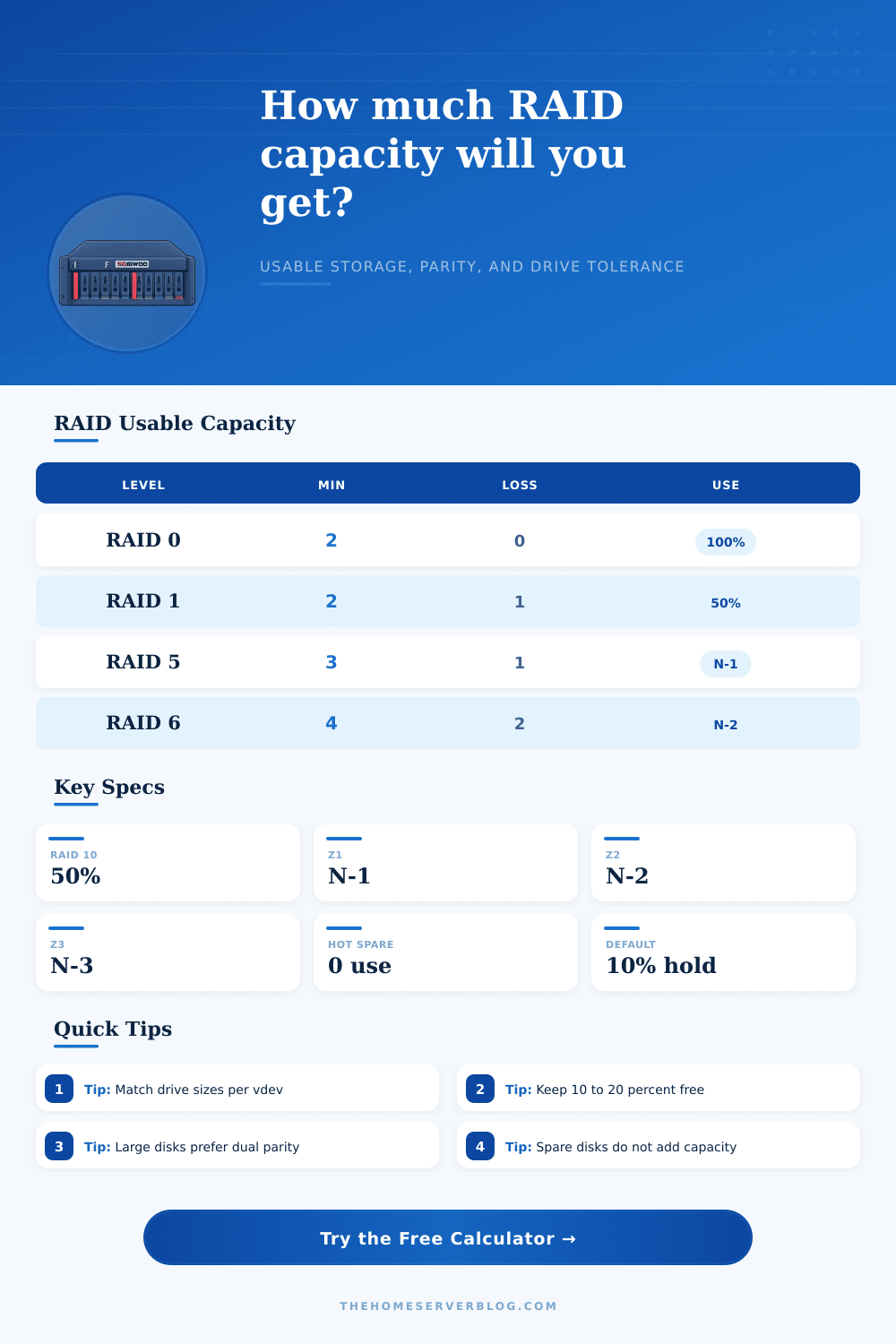
In addition to those two variables, the RAID level (or ZFS parity layout) that you intend to use will determine the amount of storage that will be usable within your array. For instance, a RAID 1 array will provide good data protection but will take up half of the drive in your array. RAID 5 and RAIDZ1 array layouts will provide for improved storage efficiency as your drives will only lose the data of a single drive to the RAID setup.
RAID 6 and RAIDZ2 array layouts will include a second drive for data protection because moddern drive take a long time to rebuild, creating the potential data loss if something happens to that drive during the rebuild process. The RAID capacity calculator can calculate these different RAID array layouts for you. In addition to the RAID level, you should also enter the amount of free space within your array that you intend to dedicate to a hot spare and the percentage of that array that you dedicate to a reserve into the RAID capacity calculator.
Data is lost if a hot spare fails, but dedicating a drive to a hot spare will shorten the amount of time that the server is in a degraded state following the failure of a drive. The reserve percentage account for any overhead for the filesystem and snapshots that are created within that filesystem. Setting the reserve percentage to 100% (or closer to it) can cause storage issue on some filesystems, so it is important to ensure that the percentage that you enter reflects the importance of those snapshots and the number of drives that will be used for those snapshots.
Finally, the type of workload that the array will perform can also have an impact on your array layout; media libraries can use less reserve and hot spare percentages than a data store for virtual machine. In addition to providing a figure that indicates the usable storage of your array, the RAID capacity calculator also provides several different additional value. One of these values is the fault tolerance of the array.
Fault tolerance allow users to compare RAID levels like RAID 5 to RAID 6 for the same chassis to determine which will provide the best performance with the data that will be stored within the drives. The growth headroom for the drives projects the length of time (in years) that the current space within the array will last based off the growth rate of the data that will be stored within the array each year. RAID capacity calculators also provide estimates of how long it will take to complete a full disk recovery of any of the drive within the array; the more drives that are utilized, the less time that it will take to rebuild the drives.
These values help to determine if the RAID layout will provide enough space within the drives for your data in the future. A RAID capacity calculator does not include every individual variable that may impact the drives within the storage array. For example, the firmware that each drive utilizes can impact its reliability.
The vibration of each drive within the chassis can impact its reliability. Using drives of varying sizes will cause issue with RAID software implementations; ZFS software, for instance, recommends using drives of the same size. Additionally, the more drives that are added to an array, the more heat that each drive will create and the more powerful the cooling system that will be required for the storage array.
Some motherboards has limits to the amount of SATA ports that can be used. None of these variables will impact the calculations that are performed with the RAID capacity calculator, but they are still important variables to consider in the design of a storage system that will be able to operate efficiently. The reference tables within the RAID capacity calculator can help to provide information regarding the different RAID layouts and the minimum number of drives that is required to create those RAID layouts.
These tables can help you to ensure that you have enough drives for the RAID layout that you desire. Additionally, these tables can provide information regarding the amount of data that is labeled within the drives and the amount of that labeled data that will be made available to the operating system; drives of 12 TB of data, for instance, will show up as 10.9 TiB in the operating system. Thus, this data can save users from any confusion when planning their data array.
Different RAID layouts are appropriate for different data storage situation. For instance, a two-bay mirror array may be the best option for a home that intends to use the RAID array to store a large collection of photographs; the two-bay mirror array is easy to recover should one of the drives should fail, and it will lose data should one of the drives fail. A twelve-bay RAID array, however, will have a longer period of time within which to recover a drive; during that time, the data can be lost if something should happen to that drive.
A twelve bay array with triple parity will allow for data to be recovered during those long period of time. Most home users, however, will opt for a RAID layout with dual parity, as well as provide a reserve and hot spare for their drive. The RAID capacity calculator will calculate and present these RAID layouts to the user.
Finally, it is recommended to use the RAID capacity calculator again in the future. Data increase within a group over time. Additionally, the capacity of drives increases over time.
Therefore, by entering the same information into the RAID calculator again in the future, it may be possible to determine if the drives in the array have enough “breathing room” to account for the growth of the data within the drives. Furthermore, determining whether the RAID array has enough space for all data can help to indicate whether it is time to expand the drives or whether it is time to create a new RAID array altogether. Thus, using the RAID capacity calculator over time will ensure that users have an efficiently functioning RAID array that meets their data storage needs.