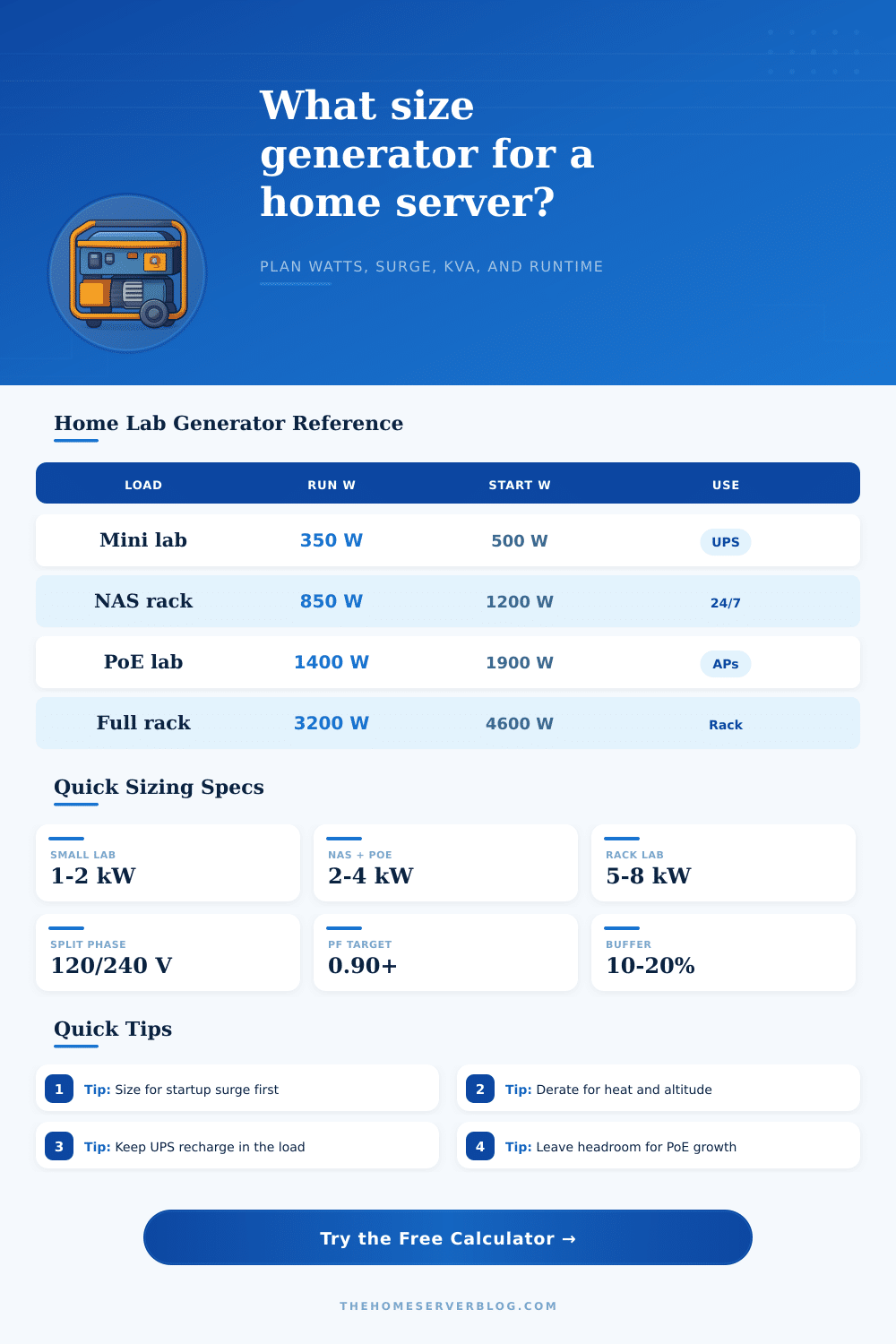
Generator Calculator Sizing for Home Servers
Estimate the generator rating needed for a home server rack, NAS, PoE network, UPS recharge load, and essential support gear without flattening the math into a generic wattage guess.
Include hypervisors, mini PCs, GPU boxes, and management nodes at expected outage load.
Use measured watts if your disks have already spun up before transfer to generator.
Router, firewall, modem or ONT, core switch, KVM, and monitoring display.
Use active draw, not the switch nameplate budget, unless every port may peak.
Battery recharge can matter most right after the generator starts.
Include rack exhaust fans, ventilation, dehumidifier, or a small compressor load.
Lights, fridge control electronics, internet provider gear, or a transfer-panel circuit.
Enter compressor, pump, large fan, disk spin-up, or UPS inrush beyond normal running watts.
1,990 W
Running load
3,189 W
Startup load
6.7 kVA
Apparent power
50 A
Rated amps
| Generator type | Best fit | Output factor | Surge behavior | Runtime planning note |
|---|---|---|---|---|
| Gas inverter portable | Quiet router, NAS, and compact rack backup | 95% usable | Moderate short surge | Good for clean UPS input and small transfer loads |
| Open-frame gasoline | Garage lab or temporary branch-circuit backup | 92% usable | Strong motor surge | Check UPS tolerance for voltage and frequency swing |
| Dual-fuel propane | Stored-fuel home lab standby plan | 86% usable | Moderate surge | Propane output is often lower than gasoline rating |
| Battery inverter | Indoor rack bridge, apartment lab, or silent runtime | 92% usable | Fast electronic surge | Size battery energy separately from inverter watts |
| Whole-house standby | Panel-backed rack plus household essentials | 98% usable | Strong managed surge | Coordinate large HVAC and server restart sequencing |
| Equipment group | Typical running watts | Startup or recharge behavior | Sizing detail |
|---|---|---|---|
| Router, firewall, ONT | 25-90 W | Low surge | Keep on the most stable UPS outlet group |
| PoE switch with APs | 90-500 W | Ports ramp as devices boot | Use actual PoE draw, not only switch maximum |
| NAS with spinning disks | 80-350 W | Disk spin-up can stack | Stagger disk spin-up when the platform supports it |
| Virtualization host | 120-650 W | Usually low motor surge | Base load on outage VM policy, not nameplate PSU |
| UPS recharge | 150-900 W | High immediately after outage | Add a recharge allowance before sizing the generator |
| Mini split or dehumidifier | 300-1,600 W | Compressor surge | Largest startup surge often comes from cooling |
| Factor | Rule used by calculator | Why it matters | Example impact |
|---|---|---|---|
| Altitude | 3% per 1,000 ft above 1,000 ft | Engines make less power in thin air | 5,000 ft is about 12% before other factors |
| Temperature | 1% per 10°F above 77°F | Hot intake air reduces usable output | 97°F adds about 2% derate |
| Power factor | kVA = watts / PF | UPS gear can need more apparent power | 5,000 W at 0.90 PF is 5.6 kVA |
| Heat output | BTU/h = watts × 3.412 | Electrical load becomes room heat | 2,000 W is about 6,824 BTU/h |
| Split phase | Amps = watts / voltage | Transfer circuits and inlet ratings have limits | 7,500 W at 240 V is 31.3 A |
| Project scenario | Equipment count | Likely generator class | Secondary result to watch |
|---|---|---|---|
| Router, fiber ONT, and mini NAS | 4-6 devices | 1-2 kW inverter | UPS recharge can exceed device draw |
| Home office PoE network | 8-15 devices | 2-4 kW inverter | PoE camera IR mode raises night load |
| 12U virtualization rack | 10-20 devices | 4-6 kW generator | Cooling surge can drive the final size |
| 42U full home lab | 25+ devices | 8-14 kW standby | Panel balancing and branch circuit limits |
| Server shed with solar hybrid | 6-18 devices | 5-10 kW inverter | Battery kWh matters as much as inverter kW |
If the generator that is purchased for a computer rack setup is not large enough to provide power to the rack equipment, it is likely that the individual discovered that the generator was too small due to the inability of the generator to meet the power demand of the rack equipment. The Uninterruptible Power Supply (UPS) batteries will run out and the rack equipment will need to be start up again. The equipment will require more power than the individual may have expected from the cooling fan and the disk arrays.
Therefore, calculating the necessary size of a generator also consider the power demands of the equipment other than the computers themselfs. Load is an indication of the amount of electricity that the machine will draw while they are on and powered. The load includes the hypervisor, storage array, switches, and network gear.
How to Choose the Right Generator for a Computer Rack
A calculator will determine the total load by adding each of these items and also adding an allowance for the UPS batteries to recharge. This recharge is necessary for the UPS batteries as they will draw more current when they are being recharged than when they are resting. The startup surge is another consideration for determining the size of the generator.
Each machine may have a startup surge that require more power than the rest of the running machines. For example, the cooling compressor or the bank of disk array may require between 2 and 3 times the power of the running load for a few seconds. If the generator does not have the power to supply that startup load, the voltage will drop.
The UPS units will determine that there is an issue with the voltage and may automatically turn the machines off. This calculation considers the startup surge in the same way that the running load is calculated… It also ask for each of the components that will start up and their wattage.
Power factor is one more factor to consider. Data center computer power supplies dont always use the same power factor as other electrical device. Most units use a power factor of 0.90.
When the power factor is 0.90, more apparent power is drawn from the generator than the wattage alone would indicate. An additional factor to consider is the altitude and the temperature at which the generator will run. Thin air and high temperatures reduce the amount of power that the engine can output.
This factor is also considered in the calculation of how large the generator should be. Not all generators are created equal. For example, inverter model produce cleaner power for the computers but have a lower surge rating.
Propane dual fuel generators may lose some of their power output when switching to propane. Diesel standby generators will last longer when continuously running but have higher installation and maintenance cost. Therefore, people must consider how silent the lab should be, how long the power outage will be, and whether fuel storage is feasible to choose the correct model.
Looking at the factors described above, a person needs to consider more than just the wattage values of the computers and components in the rack. Calculators ask for a fuel or battery reserve to be set for a certain number of hour. This reserve is an indication of the length of time that the generator will run with the current load.
However, the amount of fuel or battery power that will be consumed may vary from the estimate. For instance, if the generator is running at 70% of its maximum capacity, it may use more fuel per hour than when it is running at lower loads. Therefore, another consideration and mistake to avoid is to not calculate the factors to the power requirement with only 10% to 15% of extra capacity.
This extra capacity will allow more time before the power returns to the data center. The same factors apply to cases in which the computer lab will share the generator with essential household computers. For instance, if the generator also powers refrigerators, lights, and a fiber modem, those item will have an impact on the total amount of load that the generator must provide.
There are configuration options to determine whether the calculation is to power only the rack of computers or if it will power the household circuits, as well. One of the most common mistake in determining the size of a generator is to only use the nameplate rating of each computer’s power supplies. The nameplate ratings are of the maximum power of each component but not the power that will be drawn while the computers are in operation.
By asking individuals to enter the loads that will actualy run for each item, the calculation of the size of the generator will be more accurately. Thus, by determining the realistic power draw of each component, individuals can more accurately determine the size of the generator that will be needed to power there data center and the length of time that their fuel budget will last. When correctly sized for the computers in the data center, the generator will allow those computers to remain online during power outages.
Additionally, there will be no need for the individuals who manage and maintain that data center to make the decision of which computers to power down when the computers in the UPS batteries reach low level. Therefore, the correctly sized generator will allow the individuals to focus upon the work that they perform with the data center, rather than focusing upon the backup plan for those server.