VPN Overhead Calculator
Estimate VPN encapsulation overhead, effective tunnel MTU, recommended TCP MSS clamp, packet-rate bandwidth cost, and payload efficiency for IPsec, OpenVPN, WireGuard, and SSL VPN designs.
VPN Overhead Result
IPsec, OpenVPN, WireGuard, and SSL VPN use different outer transport and crypto framing.
The underlay IP header wraps the encrypted VPN packet.
IPsec NAT traversal adds UDP 4500 framing when peers cross NAT.
Compares configured MSS against the recommended tunnel value.
| VPN Type | Formula Used | Key Headers | Planning Note |
|---|---|---|---|
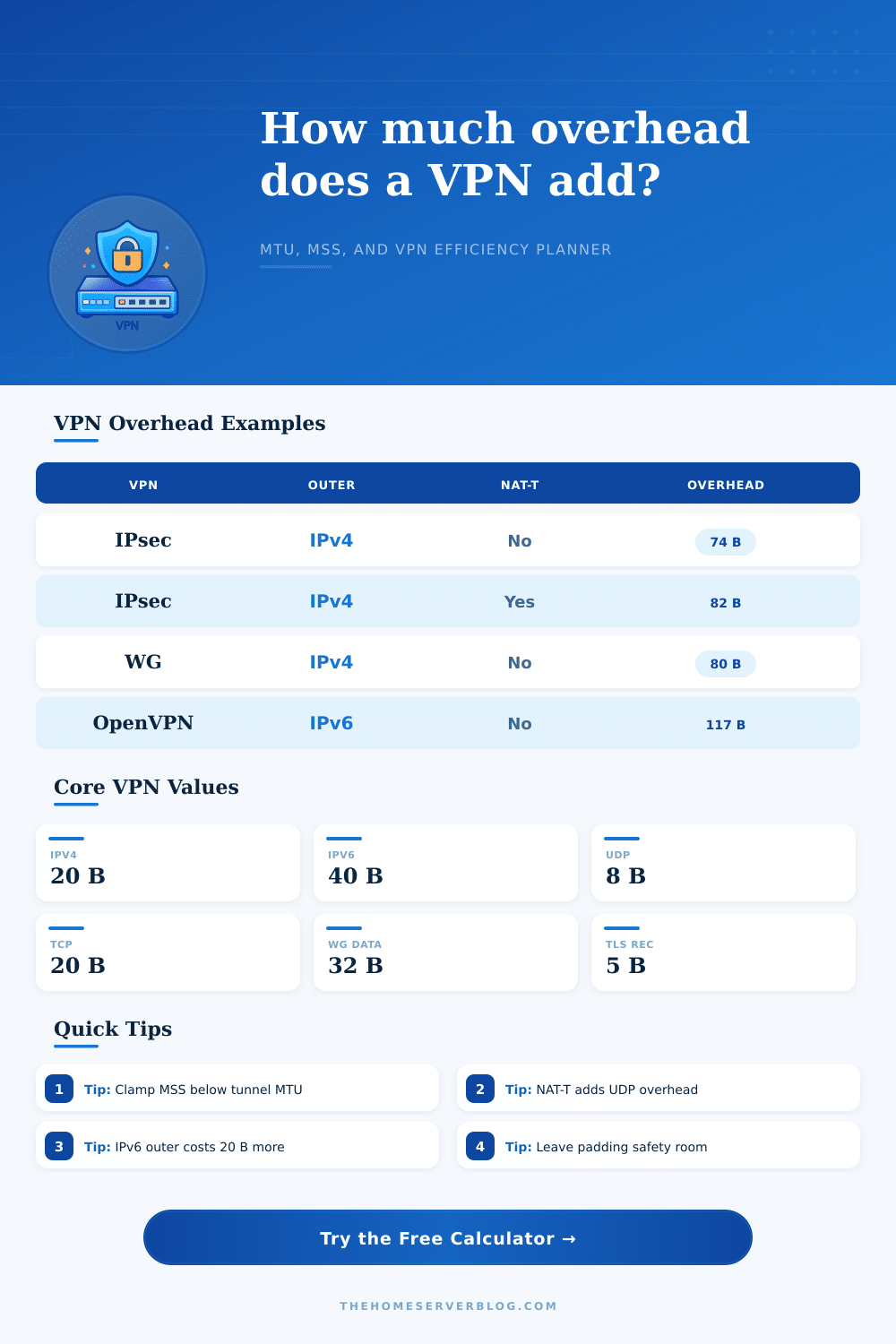
| IPsec ESP tunnel | Outer IP + NAT-T + ESP header + IV + pad/trailer + ICV | ESP 8, UDP 8 if NAT-T | AES-GCM is usually smaller than CBC/SHA with HMAC. |
| OpenVPN UDP | Outer IP + UDP + OpenVPN packet fields + TLS auth + cipher tag | UDP 8, OpenVPN 9-17 | Auth digest and replay fields vary by configuration. |
| OpenVPN TCP | Outer IP + TCP + OpenVPN packet fields + TLS auth + cipher tag | TCP 20, TLS control framing | TCP-over-TCP can work but may perform poorly on lossy paths. |
| WireGuard | Outer IP + UDP + WireGuard data header + Poly1305 tag | UDP 8, WG data 32, tag 16 | Common rule of thumb is 60 bytes over IPv4 before safety margin. |
| SSL VPN DTLS | Outer IP + UDP + DTLS record + VPN framing + AEAD tag | UDP 8, DTLS 13, tag 16 | Often used by browser or client portal VPNs for datagram transport. |
| SSL VPN TLS TCP | Outer IP + TCP + TLS record + VPN framing + AEAD tag | TCP 20, TLS record 5 | Use a conservative MSS when nested inside restrictive networks. |
| Scenario | Outer Header | Typical Overhead | 1500 Path MTU | IPv4 MSS Before Safety |
|---|---|---|---|---|
| IPsec ESP AES-GCM | IPv4, no NAT-T | 74 bytes | 1426 | 1386 |
| IPsec ESP AES-GCM NAT-T | IPv4, UDP 4500 | 82 bytes | 1418 | 1378 |
| IPsec ESP CBC/SHA NAT-T | IPv4, UDP 4500 | 98 bytes | 1402 | 1362 |
| OpenVPN UDP AES-GCM | IPv4, UDP 1194 | 93 bytes | 1407 | 1367 |
| OpenVPN TCP AES-GCM | IPv4, TCP 443 | 105 bytes | 1395 | 1355 |
| WireGuard | IPv4, UDP | 80 bytes | 1420 | 1380 |
| WireGuard IPv6 | IPv6, UDP | 100 bytes | 1400 | 1360 |
| SSL VPN DTLS | IPv4, UDP 443 | 82 bytes | 1418 | 1378 |
| Component | Bytes | Used By | MTU Effect |
|---|---|---|---|
| Outer IPv4 header | 20 | All VPNs over IPv4 | Subtracts 20 bytes from tunnel MTU. |
| Outer IPv6 header | 40 | All VPNs over IPv6 | Subtracts 40 bytes from tunnel MTU. |
| UDP transport | 8 | WireGuard, OpenVPN UDP, DTLS, IPsec NAT-T | Required when the VPN rides inside UDP. |
| TCP transport | 20 | OpenVPN TCP, SSL VPN TLS | TCP outer paths need lower MSS planning. |
| ESP header | 8 | IPsec ESP | SPI and sequence number before encrypted payload. |
| WireGuard data header | 32 | WireGuard | Message type, receiver index, counter, and nonce context. |
| TLS record header | 5 | OpenVPN, SSL VPN TLS | Small fixed record header before encrypted content. |
| VLAN tag | 4 each | Tagged access links | Wire accounting only unless provider MTU includes tags. |
| Preset | Protocol | Outer Path | Default MSS | Good For |
|---|---|---|---|---|
| IPsec ESP IPv4 GCM | IPsec AES-GCM | 1500 IPv4 | 1370 | Site-to-site tunnel without NAT. |
| IPsec NAT-T Home Router | IPsec AES-GCM NAT-T | 1500 IPv4 | 1360 | Home firewall behind carrier or ISP NAT. |
| OpenVPN UDP AES-256 | OpenVPN UDP | 1500 IPv4 | 1350 | Remote access clients with UDP allowed. |
| OpenVPN TCP Remote User | OpenVPN TCP | 1500 IPv4 | 1340 | Fallback through strict outbound networks. |
| WireGuard Road Warrior | WireGuard UDP | 1500 IPv4 | 1380 | Phone or laptop remote-access tunnel. |
| WireGuard PPPoE WAN | WireGuard UDP | 1492 IPv4 | 1372 | DSL or PPPoE home lab edge. |
| SSL VPN DTLS Portal | SSL DTLS | 1500 IPv4 | 1370 | Client portal VPN over UDP 443. |
| Mobile LTE Low MTU | WireGuard UDP | 1420 IPv4 | 1280 | Mobile network with uncertain path MTU. |
| Path | Tunnel MTU Formula | IPv4 TCP MSS | IPv6 TCP MSS |
|---|---|---|---|
| No VPN | 1500 - IP - TCP | 1460 | 1440 |
| WireGuard IPv4 | 1500 - 80 | 1380 | 1360 |
| WireGuard IPv6 | 1500 - 100 | 1360 | 1340 |
| IPsec GCM NAT-T | 1500 - 82 | 1378 | 1358 |
| OpenVPN UDP GCM | 1500 - 93 | 1367 | 1347 |
| SSL VPN TLS TCP | 1500 - 94 | 1366 | 1346 |
There’s a chance that the tunnel you’ve built looks great on paper, but now your video conference has stalled out into pixelated garbage and your speed test tells you that you’re still pulling full gigabit speeds. It turns out that the problem isn’t realy with the encryption at all: it’s the invisible tax of each additional header that gets tacked onto your data packets. Each additional layer of transport add bytes, and so does encryption, until your nice clean one thousand five hundred byte payload just won’t go through standard network door.
Plug in the constraints on your particular path and protocol into calculator above and it’ll do the math for you. No more guesswork about how much headroom you might need.
How to Fix VPN Speed Problems
The problem is that all VPN protocols puts their own headers atop whatever IP traffic they’re carrying. For example, with moddern AES-GCM encryption and no NAT traversal, an IPsec tunnel will tack on about seventy-four bytes. Turning on UDP encapsulation for NAT traversal support make that number go up significantly, especially if you also use old-school CBC mode different than GCM. Because OpenVPN travels atop TLS records, it’s typically bulkier: It adds almost a hundred bytes in most cases. Surprisingly, WireGuard is quite slim due to its stripped-down design and frequently come in below eighty bytes, but even then, when you’re trying to push thousands of packet per second over a busy link, every byte counts. Know how big those headers are, and set your expectations accordingly.
By default most networks has a maximum transmission unit set to 1,500 bytes, sufficient until you throw in some encapsulation. Say your provider is good with it but the VPN adds an extra 80. Now your packet’s too big for the wire to carry. No problem, right? But that is not the case. Unless there is path MTU discovery or fragmentation, those oversized packets will be silent dropped. This lead to intermittent connectivity problems that are famously hard to troubleshoot.
The page has a nice table breaking this down by scenario (and then IPsec, WireGuard, and OpenVPN each cut into your available bandwidth in their own way). Treat the physical path limit as a hard ceiling; figure out what all needs removing from it, and don’t send anything larger than that through tunnel.
Most admins fail here though because they also don’t consider the inner packet headers in their TCP maximum segment size. That’s the MSS value, which describe the amount of actual application data that will fit within a TCP segment (minus the TCP header and the IP header). To calculate your recommended MSS value, start with your tunnel MTU. Subtract 20 for the IPv4 header and another 20 for the TCP header to get a solid baseline. Make it larger, and you risk increasing the likelihood of fragmentation. Go smaller, and you’re forcing more round trips than are needed. Which means higher latency. It’s a fine line between reliability and efficiency, and it comes down completeley to your own stack.
In the real world, you’ll seldom see clean networks with uniform MTUs. Carrier networks often adds their own encapsulation and reduce the connection to less than a thousand four hundred bytes on mobile devices. PPPoE cuts eight bytes directly from DSL lines, and who knows what’s left after you layer a VPN over an already-reduced space? Unless you design for constraints of your access link, your tunnel packets may get dropped or fragmented based off your firewall rules’ strictness.
Adding some safety margin. Say, sixteen or thirty-two bytes. Accounts for any surprises along the way and is considered conservative.
As the number of packets per second increases, overhead as a fraction of every packet have a noticeable impact on efficiency. The more packets, the smaller they tend to be, which makes the header tax a meaningful part of the overall traffic. Instead of using bandwidth to move data, it is being used to move metadata. Tuning your MSS clamp or choosing a less bloated protocol (such as WireGuard) become worthwhile for certain use cases if you understand this tradeoff.
You are doing all this to make sure data arrives in one piece, but you are also tuning it so it travels efficienty down a limited pipe. Get your numbers wrong, and you might of ended up constantly poking holes in your tunnel to fix problems downstream.