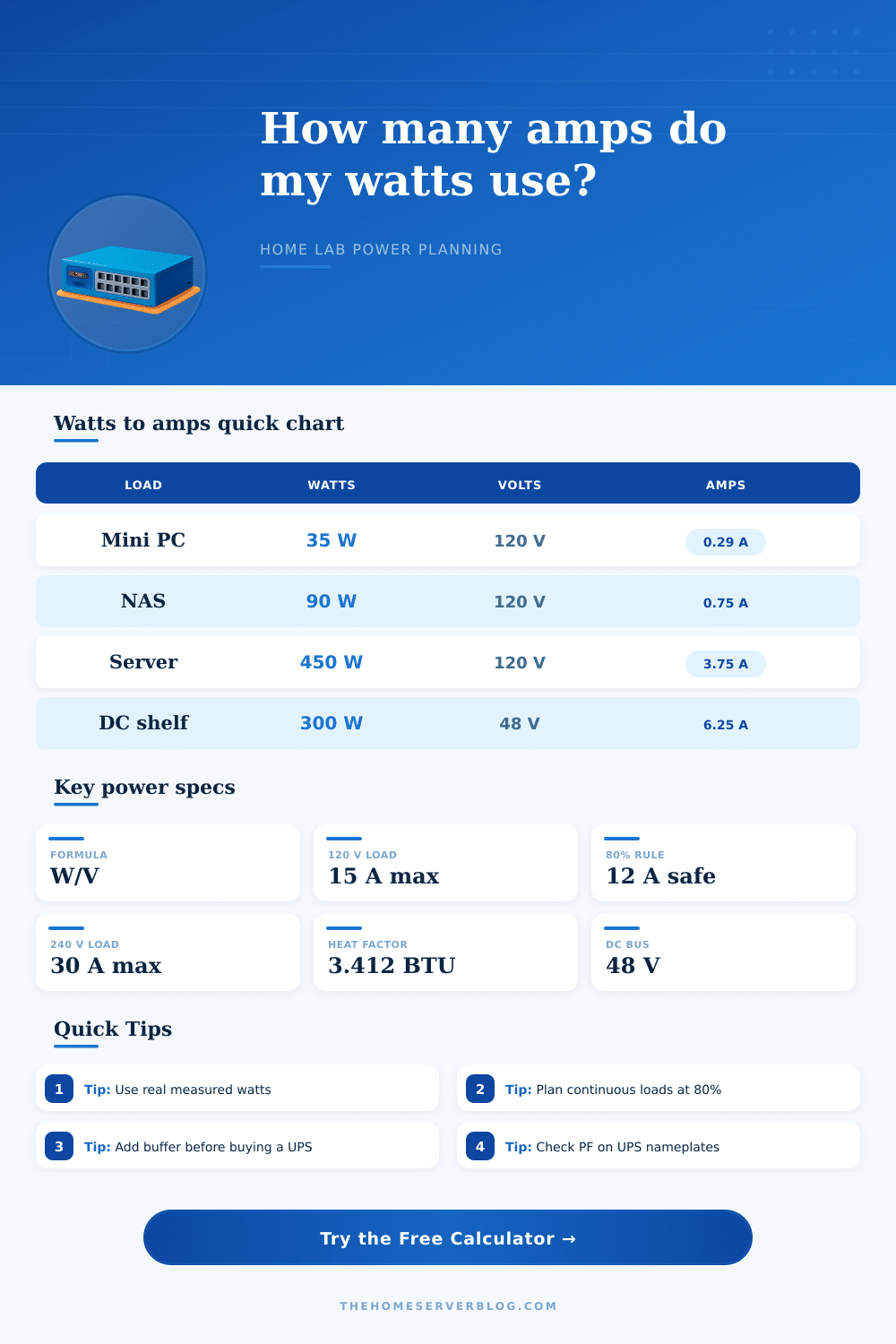
Watts to Amps Calculator
Convert server, NAS, PoE, UPS, and DC power draw into running amps, planned circuit load, breaker headroom, and heat output.
Calculation Breakdown
| Power System | Current Formula | Best Used For | Planning Note |
|---|---|---|---|
| DC bus | Amps = Watts / Volts | 48 V shelves, 12 V gear | No power factor term |
| Single-phase AC | Amps = Watts / (Volts × PF) | Home outlets, rack PDUs | Use measured PF when available |
| Three-phase AC | Amps = Watts / (1.732 × Volts × PF) | Balanced lab panels | Line-to-line voltage is used |
| Heat conversion | BTU/hr = Watts × 3.412 | Cooling estimates | Nearly all IT load becomes heat |
| Circuit Rating | 80% Continuous Limit | Watts at 120 V | Watts at 240 V |
|---|---|---|---|
| 10 A | 8 A | 960 W | 1,920 W |
| 15 A | 12 A | 1,440 W | 2,880 W |
| 20 A | 16 A | 1,920 W | 3,840 W |
| 30 A | 24 A | 2,880 W | 5,760 W |
| Common Load Group | Example Equipment | Typical Watts | Approx Amps at 120 V |
|---|---|---|---|
| Tiny cluster | 3 mini PCs plus switch | 120 W | 1.05 A at PF 0.95 |
| Storage shelf | NAS plus 2.5GbE switch | 140 W | 1.23 A at PF 0.95 |
| PoE edge | Switch plus cameras | 180 W | 1.58 A at PF 0.95 |
| Compute host | 1U virtualization server | 450 W | 3.95 A at PF 0.95 |
| GPU node | GPU tower or 4U server | 850 W | 7.46 A at PF 0.95 |
| Device Class | Power Factor Range | Why It Matters | Calculator Setting |
|---|---|---|---|
| Active-PFC server PSU | 0.90 to 0.99 | Current is close to ideal | 0.95 default |
| Small wall adapter | 0.60 to 0.85 | May draw more current than W/V suggests | 0.75 to 0.85 |
| UPS inverter load | 0.80 to 0.95 | VA capacity can limit runtime planning | 0.90 typical |
| DC power shelf | 1.00 | Watts and volts define current directly | 1.00 |
So you decide to finally build that home lab you’ve been dreaming about. You confidently order up the servers and rack. You gaze over at the wall outlets in your office or garage, and then you remember: Do I even know if this thing will overload the circuit? New admins is familiar with this feeling of panic.
You’ve got all these spec sheets on the gear coming in, and nobody explains the flow of electricity through your house’s wiring until after it’s too late. Power planning is about more than just watts; it involves knowing what your infrastructure can handle as much as how much power your devices consume.
How to Plan Power for Your Home Lab
Energy consumption are measured in watts; the rate at which electricity flows is measured in amps. And there’s a hard limit on how much flow can pass through your walls. Plugging a high-performance GPU server into a typical residential 15-amp circuit draw so much power that it tests the wire’s heat limit.
You don’t need to guess how many outlets to share because the calculator has done the math for you based off your device profiles. But the tool doesn’t work unless you know the rule about continuous loads. Not following the 80 percent rule is the worst offense. For any electrical load lasting three hours or longer, you are limited to 80 percent of the breaker size (electrical codes). So, a 15-amp breaker only give you about 12 amps of actual continuous power. This fact is missed by most folks.
You may be calculating that your server rack pulls 14 amps continuously, so you think it’s okay, right? No. Electrical codes allow for a safety margin that you didn’t account for. And if you don’t take this into consideration, you’re going to end up with hot wiring and tripped breakers. Plan for continuous draw, not burst draw.
The difference is in voltage selection. For any given wattage, half the current flows if you run gear at 240 volts vs 120 volts. That’s why data centers opt for high-voltage input: they consume less current. But home labs relies on whatever building supplies, which is frequently 120 volts. And that will fill up your circuits far more quickly then you’d think.
One 450-watt server doesn’t sound like very much, but at 120 volts it draws almost four amps. Assuming a reasonable power factor. Add another one or two of those to the same circuit (along with a switch and maybe a NAS) and you’re consuming all your available safe capacity.
Adding in DC power makes things complicated… And confusing to hobbyists. Some specialized servers, as well as telecom gear, operate on a 48-volt DC bus. There’s no power factor to think about, so it’s clean math, but the current numbers are pretty different. On a 120-volt line, a 300-watt load pulls around 2.5 amps of juice. On a 48-volt DC rail, it pulls more than six.
The tool will account for that switch automaticly, but remember to set your voltage profile based on what kind of equipment you’re measuring. And then there’s the heat problem. For every watt your IT equipment uses, it produces heat that has to be dealt with. Even a tiny cluster pulling 100 watts can produce enough heat to make a small closet slightly warmer. That heat accumulates fast in an enclosed rack unless you have some sort of active cooling.
The calculator will estimate how much heat output you’ll get so you can size your air conditioning/ventilation accordingly. It’s all too easy to forget that your equipment is also a space heater and focus just on the electricity bill. One hidden variable is power factor. Most moddern servers have active PFC on their power supply, ensuring it’s north of 0.95. Cheap adapters or older equipment may be around 0.7, drawing significantly more amps than their stated wattage. Safety first: if your setup includes some old/cheap and new gear, assume the worst and go with a lower power factor. Better to have headroom than wonder what went wrong when that backup job trips the breaker.
Respect your home’s electrical capacity, you can always upgrade your software on the fly, but you don’t want to be rewiring your house. If possible, take some time to measure your actual usage. Use the presets as a baseline, then tweak according to how you have it set up. Your continuous loads should stay well below your circuit limit, and allow for expansion. Those extra couple of amps you plan for are sometimes the deciding factor between a working lab and a tripped breaker. You should of planned better if you want to avoid issues.