WireGuard MTU Calculator
Calculate a practical WireGuard tunnel MTU from underlay MTU, IPv4 or IPv6 outer encapsulation, UDP and WireGuard bytes, VLAN tags, PPPoE, nested tunnels, and MSS clamp settings.
Calculation breakdown
| Scenario | Path math | Typical WG MTU | TCP MSS note |
|---|---|---|---|
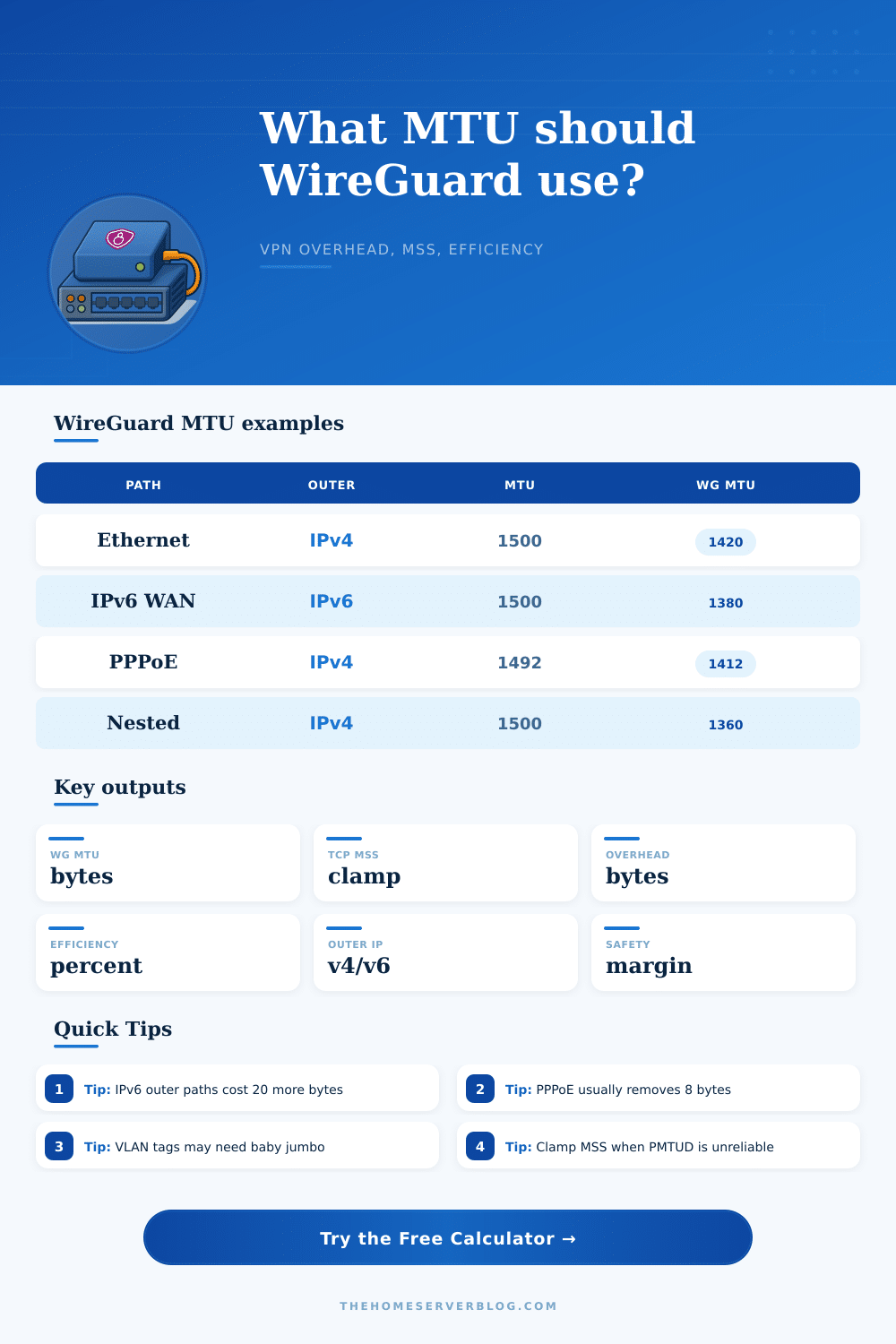
| Plain Ethernet with IPv4 outer | 1500 - 20 - 8 - 32 - 20 safety | 1420 bytes | Clamp near 1380 for IPv4 inside TCP |
| Plain Ethernet with IPv6 outer | 1500 - 40 - 8 - 32 - 40 safety | 1380 bytes | Clamp near 1340 for IPv4 inside TCP |
| PPPoE access circuit | 1492 effective MTU minus IPv4 WG overhead | 1412 bytes | Avoid 1420 if the WAN interface stays at 1492 |
| Mobile hotspot or LTE carrier path | Lower underlay plus larger safety margin | 1280 to 1360 bytes | Clamp is useful when ICMP too-big messages fail |
| Nested VPN or GRE underlay | Subtract the other tunnel before WireGuard | 1320 to 1380 bytes | Use the smaller MSS from the deepest tunnel |
| Component | Bytes | Where it applies | Calculator field |
|---|---|---|---|
| IPv4 outer header | 20 | WireGuard transported over public IPv4 | Outer IP version |
| IPv6 outer header | 40 | WireGuard transported over public IPv6 | Outer IP version |
| UDP header | 8 | WireGuard always rides over UDP | UDP overhead |
| WireGuard data header and tag | 32 | Encrypted transport data packet overhead | WireGuard overhead |
| PPPoE session overhead | 8 | Fiber or DSL WAN links using PPPoE | PPPoE enabled |
| 802.1Q VLAN tag | 4 each | Tagged trunks, QinQ, provider handoffs | VLAN tag count |
| GRE over IPv4 | 24 typical | Site-to-site underlay tunnel before WG | Nested tunnel overhead |
| VXLAN over IPv4 | 50 typical | Overlay networks carrying WireGuard | Nested tunnel overhead |
| Observation | Likely issue | MTU action | MSS action |
|---|---|---|---|
| Small pings work, large pages stall | Path MTU discovery blocked | Lower WG MTU by 20 to 40 bytes | Enable clamp to calculated MSS |
| IPv4 endpoint works, IPv6 endpoint stalls | Extra 20 bytes of IPv6 outer header | Use the IPv6 WAN preset as a baseline | Recalculate after changing endpoint family |
| PPPoE WAN drops large packets | 1492-byte WAN budget | Turn PPPoE on or set underlay to 1492 | Clamp below the resulting tunnel MTU |
| Tagged trunk works only on some switches | Frame size exceeds baby jumbo support | Count all customer and provider VLAN tags | MSS cannot fix non-TCP packet loss |
| Nested VPN is inconsistent | Multiple encapsulation layers stack up | Add GRE, IPsec, or other VPN overhead | Clamp at the innermost TCP edge |
The result is a practical interface setting for WireGuard peers. Always verify with real traffic when you control only part of the path.
On paper, everything look fine: You spin up a WireGuard tunnel and everything checks out correctly. Your routing table is clean. Keys have been exchanged. Connectivity appears to be good. Then you attempt to send a file or browse a webpage (and the connection hangs). Your tunnel isn’t broken; it’s just that packets is too big for their journey down the wire.
Understanding how Maximum Transmission Unit (MTU) size matter helps ensure that your network work properly and doesn’t drop packet. Also note that WireGuard run over UDP. That means it doesn’t try to negotiate packet size with remote endpoint. It just sends packets, and if those encrypted packets is too big for some link on the way, they will get dropped. Most firewalls don’t pass back ICMP messages telling your computer to reduce its request sizes. What you get is a silent drop. It feels like a timeout but it is actualy a geometry issue.
Why Your WireGuard Connection Is Slow or Broken
After entering the specifics of your path, the calculator do the work for you. You no longer has to count every single header byte in your head. Choosing between IPv4 or IPv6 isn’t the only key input here. You’re also going to be concerned with what’s happening between you and your server. Is it PPPoE on top of fiber? That will reduce your available space by eight bytes different than plain old Ethernet. That might not sound like much, but it kicks your standard 1500 byte packet into fragmentation land. When you flip the PPPoE switch, it takes that into account automaticly.
The complication come with IPv6 since its headers require more space then IPv4’s. The smallest possible IPv6 header take up forty bytes; an IPv4 header only take up twenty. Add in overhead of wrapping it all in UDP and then in WireGuard encryption and now you’re looking at pushing well past sixty bytes before you’ve even gotten around to sending your data itself. Attempting to send the maximum 1500 byte payload down this tunnel will result in a outer packet that is too large for many networks to handle.
Reducing the tunnel MTU reduce the size of overall packet and preserves connection. This does not significantly impact speed, as shown in the reference table on the page. Nested tunnels and VLAN tags aren’t something most home users consider but they exist. When you run WireGuard within another VPN or your provider does QinQ tagging, each layer eat into your available bandwidth, one VLAN tag is just four bytes, but add two of them plus a GRE tunnel overhead and suddenly your safety margin dissapears. You could of stack the costs using calculator to see how much this cumulative cost will break your connection.
There is a safety margin. This also means you need to think about a safety margin. You might be able to compute the maximum number of bytes that can be sent on each hop for your route exactly. But, carriers will route different during the day vs. Networks change at night. Mobile hotspots also compress header sizes different per session. To add 20-40 bytes as a safety margin isn’t because you’re conservative. It’s because you accept reality instead of perfection. The slightly smaller packet always gets there; the perfectly sized packet hardly ever does.
The last part: For both SSH and web traffic, you want to enable TCP Maximum Segment Size clamping (which limits how big TCP segments is going into the tunnel). This isn’t a fix for a problem, rather a workaround for the lack of proper Path MTU Discovery, but it’s important all the same. Your calculation of tunnel size informs the tool what the clamp value should be, which in turn give you a hard number you can plug into your nftables or iptables config.
WireGuard tuning isn’t about getting every last byte squeezed onto the wire; it’s about making sure the data you send gets there. You don’t need to worry about reliability if you’re aiming for theoretical maximums, but you can increase reliability by using a slightly smaller MTU. Stop chasing theoretical maximums. Start respecting what the physical path will let you do and then the connection just works without the silence.