ARP Cache Timeout Calculator
Estimate a practical IPv4 ARP timeout, neighbor table size, refresh volume, and stale-entry risk for home labs, VLAN gateways, managed switches, and server networks.
ARP Cache Sizing Results
| Platform | Typical Default | Cache Behavior | Practical Tuning Note |
|---|---|---|---|
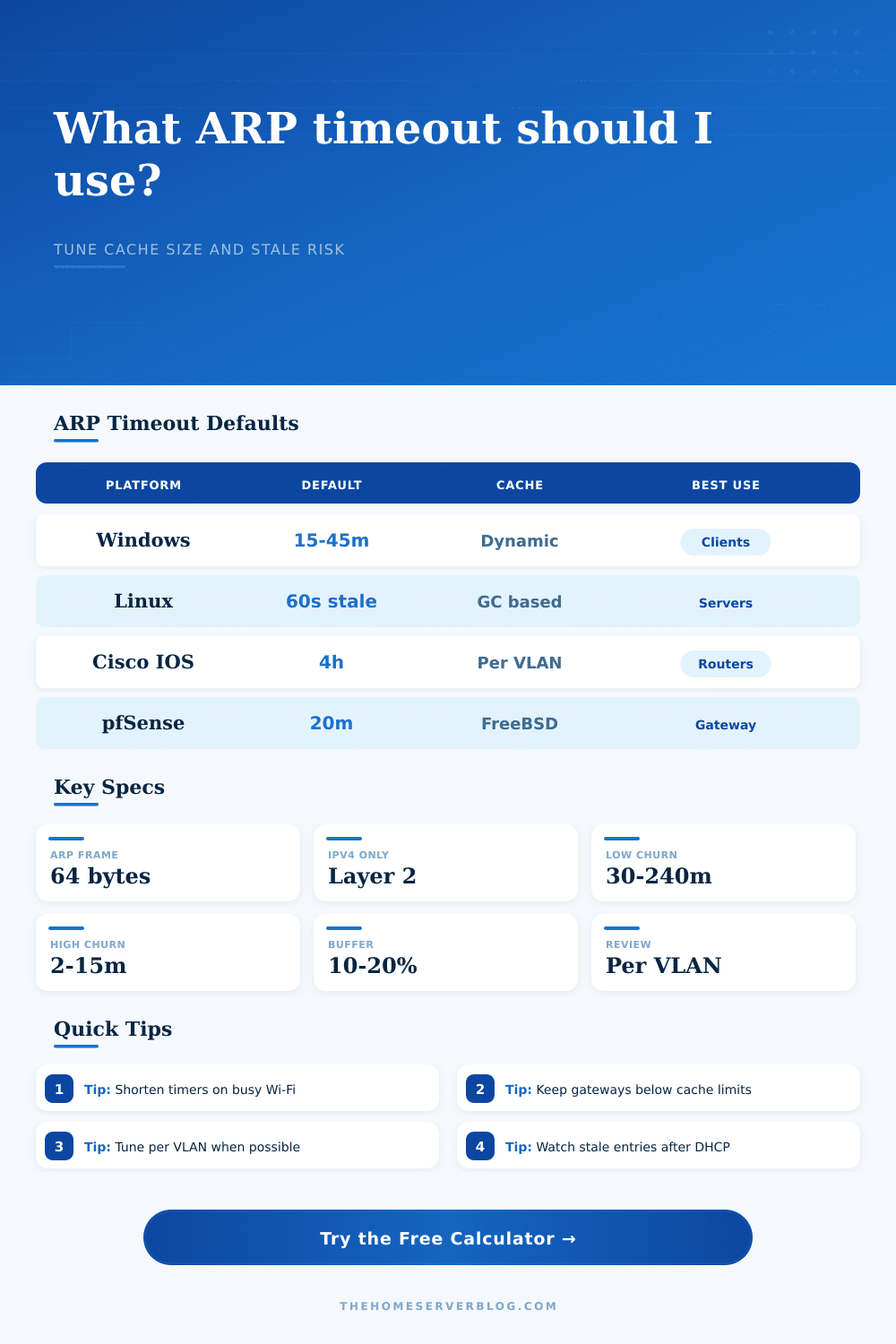
| Windows 10 / 11 client | Dynamic, often about 15 to 45 minutes | Neighbor entries age based on reachability and use. | Good for client VLANs; tune indirectly through network design. |
| Linux iproute2 neighbor cache | gc_stale_time commonly 60 seconds | Entries move through reachable, stale, delay, and probe states. | Use sysctl values and cache garbage collection thresholds together. |
| macOS / BSD hosts | Reachability driven, often short stale checks | Uses neighbor reachability logic with periodic confirmation. | Watch Wi-Fi roaming and sleep/wake behavior on busy client nets. |
| Cisco IOS / IOS XE | 4 hours for ARP timeout | Per-interface ARP cache, often long-lived on wired routed VLANs. | Reduce on high-churn DHCP, HSRP, VRRP, or mobile-heavy VLANs. |
| pfSense / FreeBSD gateway | About 20 minutes in many deployments | Kernel neighbor table ages entries by interface. | Works well for home gateways and modest multi-VLAN labs. |
| Ubiquiti UniFi gateway | Linux-based neighbor behavior varies by model | Router maintains per-interface neighbor state. | Monitor neighbor count when many WLAN, IoT, or guest VLANs exist. |
| MikroTik RouterOS | ARP timeout is configurable per interface | Bridge, VLAN, and routed interfaces may each hold ARP entries. | Shorten carefully on busy bridges to avoid excess broadcasts. |
| Juniper EX / SRX | Long ARP aging is common on routed interfaces | Hardware forwarding tables and ARP tables interact. | Align ARP, MAC aging, and gateway redundancy timers. |
| Network Type | Common Active Hosts | Useful Timeout Range | Why It Works |
|---|---|---|---|
| Stable wired home LAN | 10 to 60 | 30 to 240 minutes | Few MAC or IP moves, so long entries reduce broadcast refreshes. |
| Mixed wired and Wi-Fi | 20 to 120 | 10 to 45 minutes | Roaming, sleep, and power-save clients increase stale entries. |
| Virtualization host VLAN | 20 to 300 | 5 to 20 minutes | VMs, containers, and bridges can move addresses quickly. |
| Guest or IoT network | 30 to 250 | 2 to 15 minutes | DHCP churn and intermittent clients favor faster cleanup. |
| Storage / NAS VLAN | 5 to 40 | 30 to 120 minutes | Stable endpoints and repeated flows benefit from less ARP noise. |
| HA firewall or router pair | 10 to 200 | 1 to 10 minutes | Failover events need stale gateway or host mappings to clear fast. |
| Buffered Entries | Likely Impact | Recommended Review | Example Environment |
|---|---|---|---|
| Under 500 | Light ARP table load | Default timers are usually fine. | Small home LAN or single VLAN lab |
| 500 to 2,000 | Moderate gateway cache use | Review churn and per-interface table limits. | Multi-VLAN home lab or small office |
| 2,000 to 8,000 | Noticeable neighbor state growth | Check hardware forwarding and ARP limits. | Campus-style lab, VDI, or dense Wi-Fi |
| Over 8,000 | High control-plane pressure possible | Split broadcast domains and shorten stale timers. | Large virtualization or training network |
| Term | Typical Value | Calculator Use | Watch For |
|---|---|---|---|
| Minimum Ethernet frame | 64 bytes on wire before extra overhead | Used to estimate baseline ARP broadcast volume. | Switch counters may include different overhead fields. |
| ARP timeout | Minutes to hours depending on platform | Controls how often old IPv4-to-MAC mappings refresh. | Long timers can keep wrong MAC mappings after moves. |
| MAC address aging | Often around 300 seconds on switches | Compared mentally with ARP aging during troubleshooting. | ARP longer than MAC aging can create confusing symptoms. |
| Gratuitous ARP | Sent on address claim or gateway failover | Explains why some failovers recover before timeout expiry. | Filtering, storms, or missed GARPs can leave stale entries. |
Address Resolution Protocol (ARP) probably isn’t on your radar, unless you’ve experienced a ten-second network outage right when it matters most: during an important meeting. Many has. The gateway falls silent, the Wi-Fi re-connects, and life resumes as normal. That short pause is often caused by stale ARP cache entries.
These are entries that linger too long in the table following a device reboot or movement. Every device hold its own local table mapping MAC addresses to IP address; these entries become out-of-sync and create black holes for traffic. Without refreshing the table, we end up bombarding network with needless broadcast noise.
Why ARP Timers Matter
Okay, so that’s how the math works (the calculator above does it for you). Why should you believe its answer? You know what the calculation includes. Begin by specifying your environment: Is this a wired, stable LAN consisting of only desktops and servers? Or is it some crazy IoT VLAN where smart bulbs randomly go offline whenever the power flickers? Your timers will be different than.
In a peaceful wired environment, you can tolerate having ARP entries stick around for hours. There’s no danger of mapping one IP to the wrong physical port; the devices aren’t changing locations. On a guest Wi-Fi network, however, you’re asking for trouble if you use the same timer. Devices come and go, IPs lease out, people roam across APs, or they fall asleep and wake up. The gateway might continue to assume their old MAC address is still valid. At that point, the next packet addressed to that person gets sent to a dead-end.
It asks how many local peers you have and how many active host (where most home lab admins underestimate the load). Each host require a lookup to the NAS, the DNS server, the gateway, maybe one or two more local peers, even if your network only has 20 devices on a VLAN. Multiply that by the number of hosts and you can see why some gateways runs out of memory.
To account for this, the tool adds a safety buffer. It also considers churn: what percentage of hosts change their link state or address hourly? Higher churn means shorter timeouts so that the system doesn’t get filled with stale data. This leads us to the basic trade-off of all network designs: shorter timeouts means your data will be fresher, and less likely to hit a stale entry upon a move or failover.
However, each time you expire an entry the device needs to send another ARP request to learn the mapping again. This take up CPU cycles and also bandwidth on the router/switch. Set the timeout too low, and you spend most of the time yelling at the other machines “hey who has this IP” instead of actualy sending data over the wire.
And that is what people get wrong. They think that because it’s cleaner or more secure to have a timeout, then they should make it as short as possible. No. The trick is to find the right balance between having data that’s old enough to be quiet but fresh enough to be useful.
Default behavior differs by platform, based off what each is intended to be used for. Dynamic aging is a good fit for Windows clients, where recently-used items stay around longer and less-recently used items get tossed. Server OSes such as Linux tend to time-out things quickly and check on-demand (a nice match for server traffic). Enterprise wired networking tends to be fairly static, so routers (such as Cisco IOS devices) often run with four-hour timers by default. The table of references on the page outlines all this, and how your hardware’s defaults may not match up to the pattern of your actual network usage.
But there’s also a little math in there, so most important is knowing what you’re really trying to measure. It’s a balance between broadcast volume and table size. The calculator says “shorter timer”? See if your gateway can stand up to the traffic from refreshing all those devices. Longer timer? Is your device stable enough to support that level of laziness?
One of the nice things about running a home lab is you get to experiment. Set the timer for something else while everyone’s sleeping, kick off a little traffic, then monitor the ARP requests. Are they flying or not? If everything looks snappy on the network and ARP broadcasts aren’t pinging the logs, you’ve found yourself a winner.
Little things matter. In this case, it matters very little. But they do matter. Network reliability is not about heroic configuration. It’s about those other invisible bits. It’s about those thresholds and those timers coming into sync with reality.
If the ARP cache works right you never see it. You just move files around, stream some video, surf the web. If it doesn’t, you notice it at once. Adjusting the timeout is simply making sure that all of the background noise stays in the background. A boring network is what you want, and the proper timer is how you get there.
Clean cache, infrequent broadcasts, and a connection that just works. You should of checked the settings first.