AS Number Range Checker and BGP Planner
Classify ASNs against IANA special ranges, test private lab blocks, size future allocations, and spot BGP compatibility issues before you paste numbers into routers.
Scenario Presets
ASN Range Inputs
Formula core: range size = end - start + 1; required block = ceil((now + future) x (1 + buffer)); collision rate = conflicts inside range / range size.
Results
Range Classification
Private lab
All selected ASNs are private-use ASNs.
Usable Capacity
17 spare
20 ASNs available, 3 already listed as conflicts.
Plan Fit
Fits
Required block after buffer is 18 ASNs.
BGP Risk Score
18 / 100
Low risk for private lab routing.
Full Breakdown
Range Math
Operational Classification
Public, Private, Documentation, and Reserved Comparison
| AS number block | Classification | Global BGP behavior | Best home lab use |
|---|---|---|---|
| 0 | Reserved special ASN | Should not appear as a routed origin ASN; AS0 is reserved by RFC7607. | Only for filtering logic examples, never a lab node ASN. |
| 1-23455 and 23457-64495 | Public 16-bit ASNs | Assigned through RIR policy and can be globally routed when properly registered. | Use only when issued to you; do not borrow random low ASNs. |
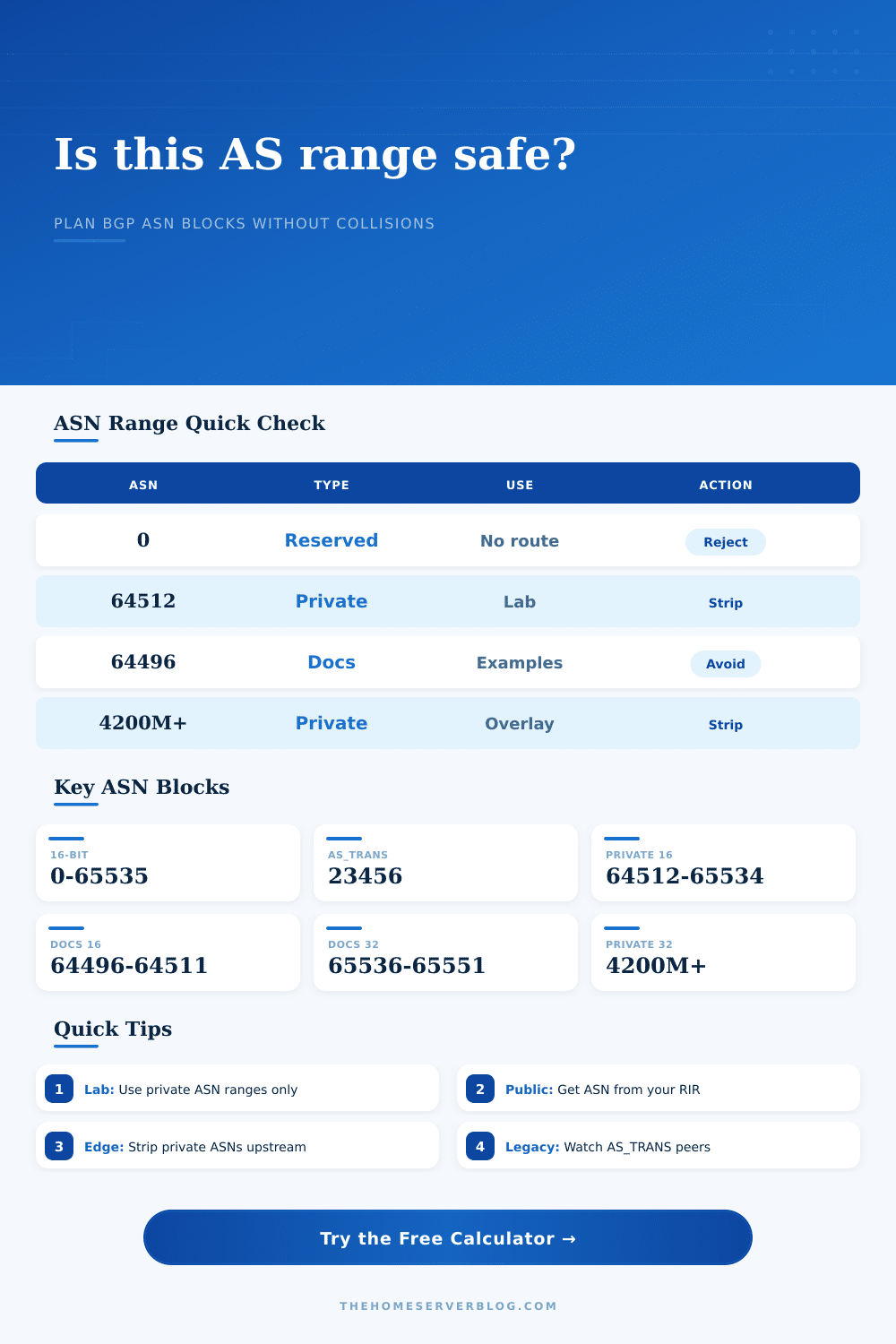
| 23456 | AS_TRANS | Reserved transition placeholder for 4-byte ASN compatibility. | Use to identify legacy migration risk, not as a real lab ASN. |
| 64496-64511 | Documentation | Reserved for examples and sample code by RFC5398. | Safe for blog posts and runbooks; avoid real router deployments. |
| 64512-65534 | Private 16-bit | Must not be announced as a public origin ASN; strip before transit. | Best compact range for small labs, labs with old gear, and iBGP demos. |
| 65535 | Reserved last 16-bit ASN | Reserved by RFC7300. | Avoid. |
| 65536-65551 | Documentation 32-bit | Reserved for examples and sample code by RFC5398. | Useful for teaching 4-byte ASN syntax without colliding with real allocations. |
| 65552-131071 | Reserved 32-bit block | Reserved in the current IANA AS number registry. | Avoid; choose private 32-bit space for overlays instead. |
| 131072-4199999999 | Public 32-bit ASNs | Assigned by RIRs and valid for public BGP after allocation. | Use only if assigned to you or your organization. |
| 4200000000-4294967294 | Private 32-bit | Private-use range from RFC6996; should be filtered from public transit. | Best for large EVPN fabrics, tenant labs, and avoiding 16-bit private collisions. |
| 4294967295 | Reserved last 32-bit ASN | Reserved by RFC7300. | Avoid. |
BGP Platform Planning Reference
| Platform profile | Practical peer scale | ASN compatibility note | Good fit |
|---|---|---|---|
| FRR VM, small lab | 20 peer planning target | Modern 4-byte ASN support; depends on distro package age. | Proxmox, Debian, Ubuntu, route reflector labs. |
| VyOS VM edge | 40 peer planning target | Good 4-byte ASN support in current releases. | Dual WAN edge, site labs, policy testing. |
| MikroTik CHR / RouterOS | 30 peer planning target | Use recent RouterOS for cleaner BGP behavior. | Home ISP edge, lab eBGP, compact routers. |
| BIRD route server | 120 peer planning target | Strong for 4-byte ASNs and route server policy. | IXP labs, route server simulations. |
| OpenBGPD small edge | 15 peer planning target | Lean daemon; check OS release for feature set. | BSD edge nodes and simple policy labs. |
| Juniper SRX branch | 25 peer planning target | 4-byte support is standard on modern Junos. | Branch edge, policy demos, firewall-adjacent BGP. |
| Cisco IOS XE edge | 60 peer planning target | Supports 4-byte ASNs; templates may still assume 16-bit. | Enterprise edge and route filtering practice. |
| Arista EOS fabric | 100 peer planning target | Modern data-center ASN support. | EVPN/VXLAN and leaf-spine labs. |
Common AS/BGP Scenario Sizes
| Scenario | Suggested range | Primary check | Secondary check |
|---|---|---|---|
| Small FRR home lab | 64512-64531 | Private 16-bit block with 20 ASNs. | Easy to remember and legacy friendly. |
| Proxmox route reflector cluster | 64550-64580 | Enough room for hypervisors, routers, and test tenants. | Avoid overlap with default examples from tutorials. |
| EVPN/VXLAN leaf-spine lab | 4200001000-4200001099 | Private 32-bit space avoids exhausting 16-bit private ASNs. | Requires audited 4-byte support on all peers. |
| Public dual-ISP edge | RIR assigned ASN | Do not use private ASNs as public origin. | Ask ARIN, RIPE NCC, APNIC, LACNIC, or AFRINIC. |
| Documentation article | 64496-64511 or 65536-65551 | Reserved documentation ASNs keep examples safe. | Do not copy the same ASNs into production configs. |
| IX route server lab | 4200002000-4200002199 | Private 32-bit range gives room for many participants. | Model AS-SET and max-prefix policy separately. |
Standards and Conversion Reference
| Reference | Range or value | Meaning | Planner impact |
|---|---|---|---|
| IANA AS Numbers registry | 0-4294967295 | Total asplain ASN universe. | Validator rejects anything outside this range. |
| RFC6996 | 64512-65534 | 16-bit private-use ASNs. | Preferred for compact labs and older toolchains. |
| RFC6996 | 4200000000-4294967294 | 32-bit private-use ASNs. | Preferred for large overlays and tenant-heavy labs. |
| RFC5398 | 64496-64511, 65536-65551 | Documentation and sample code ASNs. | Good for writing guides; avoid live routing. |
| RFC6793 | 23456 | AS_TRANS placeholder. | Flags legacy 4-byte ASN migration concerns. |
| RFC7300 | 65535, 4294967295 | Last ASNs reserved. | Always avoid in router configs. |
| IANA special registry | 112 | AS112 project special-purpose ASN. | Calculator warns if selected in a range. |
Practical Tips
With best intentions, you begin your home lab. It’s time to learn how routers talks to each other and you want to run BGP. Unfortunately, you come up against a brick wall. How do I choose an autonomous system number?
There is conflicting advice everywhere on the internet. “Pick something random” says one guide. “Grab yourself something from this range” says another.
How to Pick the Right BGP Number for Your Home Lab
Here lies the issue; not all AS numbers are created equaly. Some are private, some are reserved for documentation purposes, some are absolutely forbidden from ever going anywhere near public internet. Choose incorrectly and you may end up announcing your private network to the world… or worse, having routes go completely missing.
Once you have your config line pasted into your router, though, there’s no guarantee you got the right number in there. That’s where the calculator comes in to help separate the wheat from the chaff. It doesn’t just validate a number. It also tells you what that number mean.
You can put in a range of ASNs and the tool verifies the range against the IANA special registry. Does that mean you’re in public space? Or private space? Or even documentation space? Because how BGP treats an origin depends on which one it is.
Use the wrong one (like trying to use a public ASN in a lab without proper filtering) and you may leak routes. Use a reserved ASN in production and guess what? Your transit provider won’t accept you.
The tool catches this kind of problem by calculating a risk score based off your inputs.
The second most popular error is using the 16-bit private range. The range of 64512, 65534 is reserved for private use at home. It is for home labs. Configure your VyOS, FRRouting or MikroTik devices there without fear of colliding with actual operators.
The reference table on the page explain it nicely. It shows how those addresses get stripped before being sent out onto public internet. That’s the point. Those addresses aren’t global; they’re local. Freedom. You can re-use them. And you can overlap them across different lab segments. Just don’t announce them upstream.
What if your lab is getting bigger though? What if you’re working on something like a multi-tenant fabric or an EVPN overlay? When you start assigning an ASN to each tenant or virtual network, the 16-bit private range run out pretty quickly. There’s only about 1,000 numbers you can use.
That’s where 32-bit ASNs enter. 2 billion. Safe too. Defined by RFC6996. Use the calculator to see if your peers has it covered. Some routers and some versions of router software don’t handle 4-byte ASNs so well. If you’ve got old and new mixing together you may run into compatibility walls. The tool flags that as a risk. Warns you if your peer list suggests you may have some legacy equipment that requires AS_TRANS workarounds.
It’s also about planning for growth. You want some ASNs for right now and some ASNs for later on. How many ASNs do you need right this minute? And how many would you like reserved in case you start a new project or add another site? So that’s what the tool asks for, and it adds a buffer.
It uses simple math to apply a buffer so you don’t run out of space before you know it. For a home lab, a 10% buffer is normally sufficient. That provides some breathing room while using as few addresses as possible. After calculating the buffers and conflicts, the calculator shows you exactly how many usable ASNs is left over. Did your plan fit?
The tool shows you if your plan fits, and also calculates the exact number of usable ASNs taking into account buffers and conflicts.
And there’s another little bit here (documentation). There are special ASN ranges that blogs and books reserve for demonstration purposes. These ranges come from RFC5398. This is great if you’re writing a guide. It is bad when you copy-paste a blog example into production and accidently import a block of example ASNs into your live network. That’s what the checker catches. It won’t let you put down example data by mistake. It is a tiny thing, but it is significant. It prevents you from spending hours troubleshooting why your routing table looks like an example out of a textbook, not a functioning network.
BGP is strong stuff but it’s also unforgiving. It expects you to know what you’re doing. A planner takes the guesswork out of it. Check the ranges. Verify your peers. Make sure your private space remains private.
That way you can get down to the fun stuff. The building the network part. You watch the routes spread. You see the protocols do their thing. With the proper numbers in place, all the rest is just configuration.
So start simple. Use private ranges in your lab. If you go live, get some public ones from your RIR. Separate your documentation. And always check that risk score before you hit enter.
That way your BGP sessions remains stable, your routes remain clean, and your lab remains yours. You should of checked the math too.