BGP Hold Time Calculator
Plan BGP keepalive and hold timers for failure detection, jitter tolerance, route-scale impact, and BFD offload decisions.
| Timer Item | Formula or Value | Source / Practice | Planning Use |
|---|---|---|---|
| Negotiated hold time | Lower configured hold | RFC 4271 OPEN negotiation | Peer with smaller hold controls detection |
| Valid nonzero hold | At least 3 seconds | RFC 4271 | Avoid 1-2 second BGP hold timers |
| Keepalive spacing | Hold time / 3 | RFC 4271 guidance | Keeps session alive before hold expires |
| Keepalive message | 19 octets | BGP message header only | Packet count matters more than bandwidth |
| No hold timer | Hold time 0 | Special negotiated case | Use only when another liveness method exists |
| Profile | Keepalive / Hold | Expected Detection | Best Fit |
|---|---|---|---|
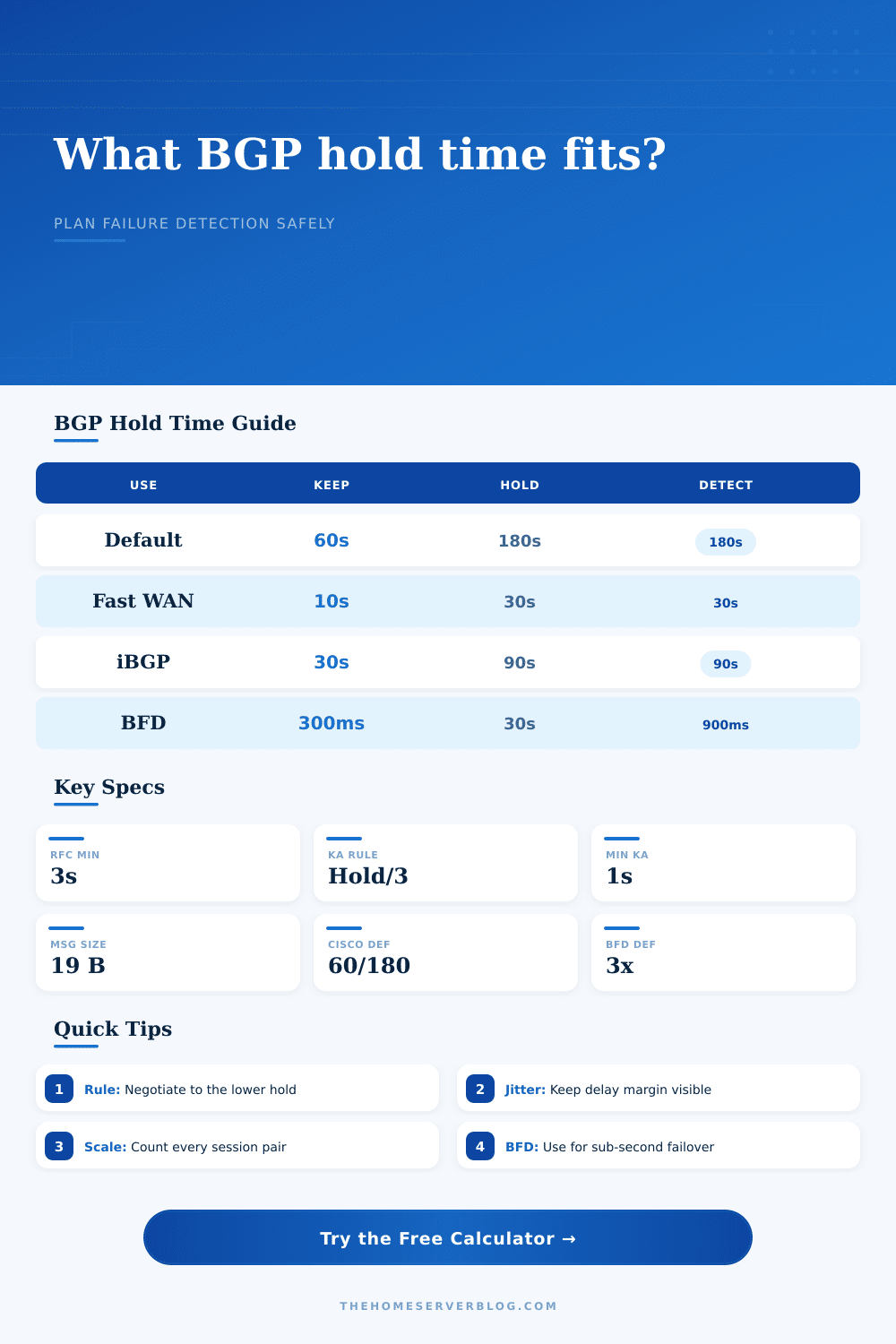
| Conservative internet edge | 60 / 180 seconds | Up to 180 seconds | Transit, ISP CPE, stable WAN links |
| Balanced enterprise edge | 30 / 90 seconds | Up to 90 seconds | iBGP, route reflectors, branch WAN |
| Fast failover without BFD | 10 / 30 seconds | Up to 30 seconds | Dual uplinks where brief churn is acceptable |
| Very fast BGP-only | 1 / 3 seconds | Up to 3 seconds | Small lab only; sensitive to jitter and CPU stalls |
| BFD assisted edge | 30 / 90 or 60 / 180 | 0.9 to 3 seconds | Fast detection with calmer BGP keepalives |
| Method | Detection Formula | Strength | Tradeoff |
|---|---|---|---|
| BGP hold only | Negotiated hold seconds | Simple and universally available | Slow failure detection on defaults |
| Fast BGP timers | Hold near 3-30 seconds | No extra protocol dependency | Can flap under jitter or CPU pressure |
| BFD asynchronous | Remote interval x multiplier | Sub-second or low-second detection | Needs support and careful policing |
| Physical link down | Interface carrier event | Immediate on directly connected links | Misses blackholes beyond the local link |
| Deployment | Sessions | Typical Hold | Planning Note |
|---|---|---|---|
| Small home lab upstream | 1-2 | 90-180 seconds | Defaults are quiet and forgiving |
| Dual-WAN firewall | 2-4 | 30-90 seconds | Balance outage time against tunnel jitter |
| EVPN leaf pair | 8-32 | 30-90 seconds plus BFD | BFD gives faster underlay failure detection |
| Route reflector | 50-500 | 90-180 seconds | Avoid multiplying low timers across clients |
| IX route server client | 1-4 | 90-240 seconds | Provider policy may override local desires |
| BFD Interval | Multiplier | Detection Time | Use Case |
|---|---|---|---|
| 300 ms | 3 | 900 ms | Fast edge or fabric links |
| 500 ms | 3 | 1.5 seconds | Balanced routed WAN |
| 1000 ms | 3 | 3 seconds | Safer across virtual routers |
| 1000 ms | 5 | 5 seconds | Jittery tunnels and cloud edges |
Your internet goes down again for a solid three minutes. You look at your perfectly fine routing table on your desk. You look through the logs; there’s a BGP session flap. But nothing ever went wrong with the link, no, the timer did.
BGP keepalive and hold timers is considered by most network engineers as a one-time configuration value, something you set and then move on. This is a bad idea. BGP timers represent speed at which your network detects trouble and the amount of work your router must perform to stay truthful in doing so. There is always a trade-off, the need to catch trouble quickly but not be tricked into thinking the network is failing due to normal jitter.
How to Choose the Right BGP Timers
In short, when two routers set up a BGP session, they sends each other an OPEN message containing the hold time they want the router to use. They don’t take an average, they simply choose the lowest value. So if you tell it to be 180 seconds, but your peer has it at 30 seconds, the session will operate at 30. Most folks miss this part. Your local settings are only half of equation. The second half is what’s on the OTHER router.
You can plug both in there and it will runs through the negotiation for you (above). Then it shows you what happens BEFORE you commit configuration.
Typically, the keepalive interval will be configured as a third of the negotiated hold time. That means three keepalives are sent before the timer reach zero. This is an easy number to remember, but it has implications for control plane. Keepalives are small (around nineteen bytes), each one. They’re not anything on their own. But, multiply them by your number of neighbors and all of a sudden you’ve got a continuous flow of packets chewing up CPU cycles. If your timers is too aggressive, a home lab router can absorbs a couple of packets a second no problem, whereas a route reflector with hundreds of session might struggle. The tool looks at platform profile and the session count to estimate that kind of load, helping you find a balance between speed and system health.
The silent killer of fast timers is jitter. You can push down BGP hold times to three seconds. You then gamble that packets never get queued up or delayed during a CPU spike or through a tunnel longer than one or two seconds. That’s fine in a clean lab, but in a production environment where traffic is heavy, then micro-outages are normal. The dirty little secret of real hardware is that there’s a lot of messiness that needs accounting for in your planning. A jitter margin adds a little to that, and keeps the session from flapping at the drop of a hat every time the router gets busy for a moment. You want the detection to be fast, but not so fast than you mistake a busy moment for a dead link.
That’s what we’re using here with BFD or Bidirectional Forwarding Detection. At another layer, and in just milliseconds, BFD will notice when something fails instead of letting BGP timers go all calm like they do. Let the BFD screamer handle it if the path falls over, and keep your BGP hold time at ninety seconds to spare some CPU. The table of comparisons on this page spells out the tradeoffs quite well; you get speed but no constant BGP keepalive chatter. This is a separation of concerns. One protocol does the heavy lifting of exchanging routes, and the other do the fast check for liveness.
What timer profile should I use? That depends on your goal; if you are running an edge router that is as conservative as possible, then perhaps you just leave it at the defaults of a 180-second hold plus a 60-second keepalive (it is forgiving and stable). If you have dual WANs, maybe you go to thirty/ten seconds to speed up the failover. Nothing here is One True Best. It’s more about matching your environment to how important the link is and how stable the environment is. And that’s where the calculator comes in; it shows the convergence impact and the detection window, and converts those abstract numbers into a concrete timeline based off your network.
BGP timing, in the end, is a balancing act between precision and patience: on one hand, you need to know as soon as possible if there’s an issue; on the other, you don’t want the noise of running a complex network to wake you up all the time. Chase enough flaps that didn’t affect traffic, and you’ll spend your day doing just that. Get the balance right, however, and your network will be quiet unless it needs to react. It’s not hard math, but context makes all the difference, so turn to the tool for that sweet spot where your network is both responsive yet strong. You should of used a better timer.