HomeServerBlog backup storage planner
Backup Dedup Savings Calculator
Estimate logical restore-point footprint, deduplicated physical storage, compression effect, global pool benefit, block-size metadata, retention pressure, and reserve for home server backup repositories.
1Backup dedup presets
2Backup dedup inputs
Calculation breakdown
Repository pressure
3Workload grid
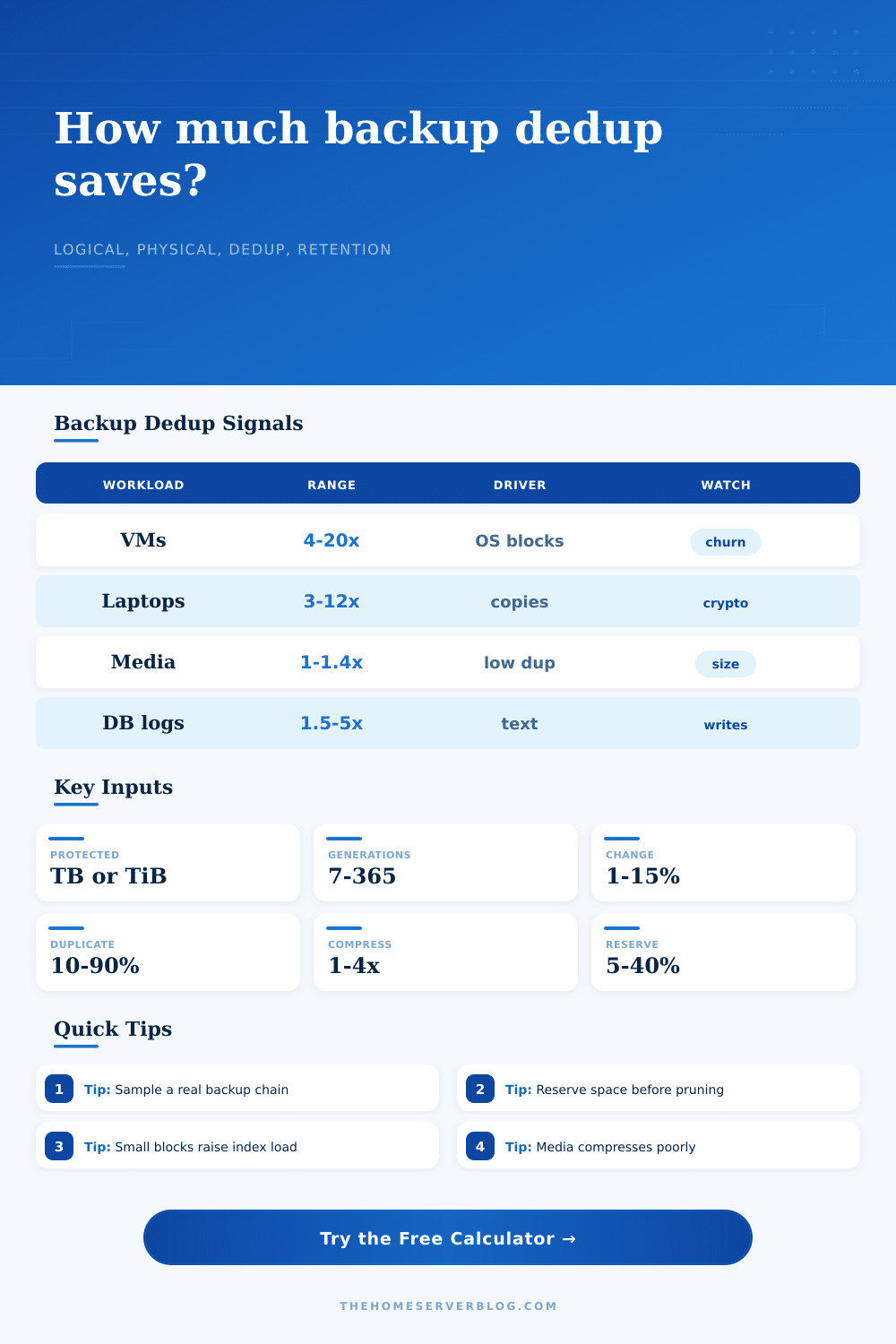
VM and container backups
Similar operating systems, packages, base images, and templates usually give strong cross-source and cross-generation deduplication.
4-20xEndpoint and laptop backups
Documents and common software repeat well, but encrypted user folders and browser caches reduce predictable matching.
3-12xMedia and camera archives
Video, photos, and audio are already compressed, so most reduction comes from deleted files, copies, and retention reuse.
1-1.4xDatabases and logs
Text logs compress well, while active databases can churn blocks quickly and create large incremental generations.
1.5-6x4Dedup summary cards
Total logical changed blocks across retained generations.
Estimated blocks left before compression and metadata.
Catalog, hash index, block map, and filesystem overhead.
Extra space for prune, merge, restore, and growth events.
5Dedup reference tables
| Generations | Logical footprint | Physical required | Effective ratio |
|---|---|---|---|
| Calculate to populate retention sensitivity. | |||
| Block size | Match capture | Index overhead | Physical required |
|---|---|---|---|
| Calculate to compare block-size tradeoffs. | |||
| Pool scope | Match effect | Best fit | Planning note |
|---|---|---|---|
| Per job | Lower | isolated sources | Simple and predictable, but repeated OS blocks across jobs are missed. |
| Repository | Balanced | single backup target | Good home server default when memory and index performance are healthy. |
| Global | Higher | many clients | Finds more shared blocks, especially across laptop fleets and VM clusters. |
| Limited | Reduced | small appliances | Use conservative ratios if cache, RAM, or index size constrains matching. |
| Workload | Typical range | Compression fit | Dedup warning |
|---|---|---|---|
| VM image backups | 4x to 20x | Medium | Database churn can lower apparent savings. |
| Endpoint backups | 3x to 12x | Medium | Encrypted folders and archives rarely reduce well. |
| Documents and shares | 2x to 8x | High | Large ZIP files and media flatten ratios. |
| Video and photos | 1x to 1.4x | Low | Plan near raw retained size unless copies dominate. |
| Logs and text data | 2x to 10x | High | Rotation cadence changes retention growth. |
6Backup dedup tips
The software that does backups today will write duplicate copies of small differences between versions of a file, which seems like a bug but is actualy how things are supposed to work. I thought that if you had twenty terabytes of files, you need at least twenty terabytes of backup space for them, but that’s usually not right.
This makes you spend more money than necessary when buying hardware. Or, it doesn’t give you enough room when you go to restore your files.
How to Calculate Your Backup Storage Needs
Here’s what happens: the backup programs breaks up data into little pieces, usualy kilobytes. Then they looks at each piece and compare it against other things they’ve got on the disk. If they’ve got that same piece already, they skip it. Only the pieces that has changed get written out. That’s called deduplication. It saves a lot of actual space.
To trust a storage calculator’s output, it helps to know what goes into it. First, consider how much data you want to protect. But more important is the daily change rate. A server that’s changing just three percent of its data per day will gradually increase its own backup footprint over time. On the flipside, a database server that’s changing ten percent each day will grow exponentially, and that’s assuming both have equal amounts of total data.
Next, think about the source of any duplicates. Backing up five laptops with identical operating systems mean you’re saving the same set of code blocks repeatedly. That’s the kind of efficiency captured in a global dedup pool.
Encrypted archives and media files aren’t the same thing, though. Video files are already compressed. There isn’t as much redundancy to discover. If what you store is encrypted data, it’s going to look like random noise to the dedup engine. Because every block is seen as unique, there won’t be much savings.
To help ensure you don’t buy storage assuming your workload fits a best case scenario (and get burned when it doesn’t), the calculator lets you see just how thin your margins are.
This efficiency comes at a hidden cost: metadata. For each unique block the system sees, it has to map it, hash it, and then list it. While small per-block, it does add up across millions of chunks. This metadata costs disk space; enter a metadata overhead percentage into the calculator as part of your setup. It is a small number, but it is important if you’re trying to get a year’s worth of backups on a drive.
Finally, reserve space for error. Free space in the backup repository is necessary for performing restores, merging files, pruning older generations, etc. Filling the drive to capacity will almost certainly cause a subsequent backup attempt to fail. Twenty percent reserve headroom isn’t wasted. It’s insurance against a catastrophic failure during a merge process.
The thing about dedup is that people gets caught up with the number (the dedup ratio), as if it’s some sort of game to find the biggest number, without thinking about what the tradeoff is. Often a large dedup ratio mean very small blocks, so more work for your processor and index. So while you save disk space, you lose performance because your server is grinding away hashing out every four-kilobyte block. You don’t want to go too far one way or another.
Look at the table at the bottom of the page. That shows the effect of various block sizes in terms of what they’ll end up costing you in storage. The idea isn’t to maximize the ratio. The idea is to make sure that your backups stays both safe and restorable, at least according to your budget.
Enter your existing data size and how much you think will change. Err on the side of a larger number. That’s how much actual storage you’ll need, including buffer. Purchase enough drives to cover that amount. Better to have some overage rather than discover you’re out of room in the middle of a ransomware recovery.
The math is straightforward and the peace of mind is well-worth it. You’re storing time. Make sure you have room for it.