Cat Cable Bandwidth Calculator
Estimate whether a Cat5e, Cat6, Cat6A, or Cat8 copper Ethernet run has enough bandwidth, length headroom, alien crosstalk margin, and PoE thermal room for a home lab link.
Cat cable bandwidth result
| Category | Specified bandwidth | Typical Ethernet channel | Planning note |
|---|---|---|---|
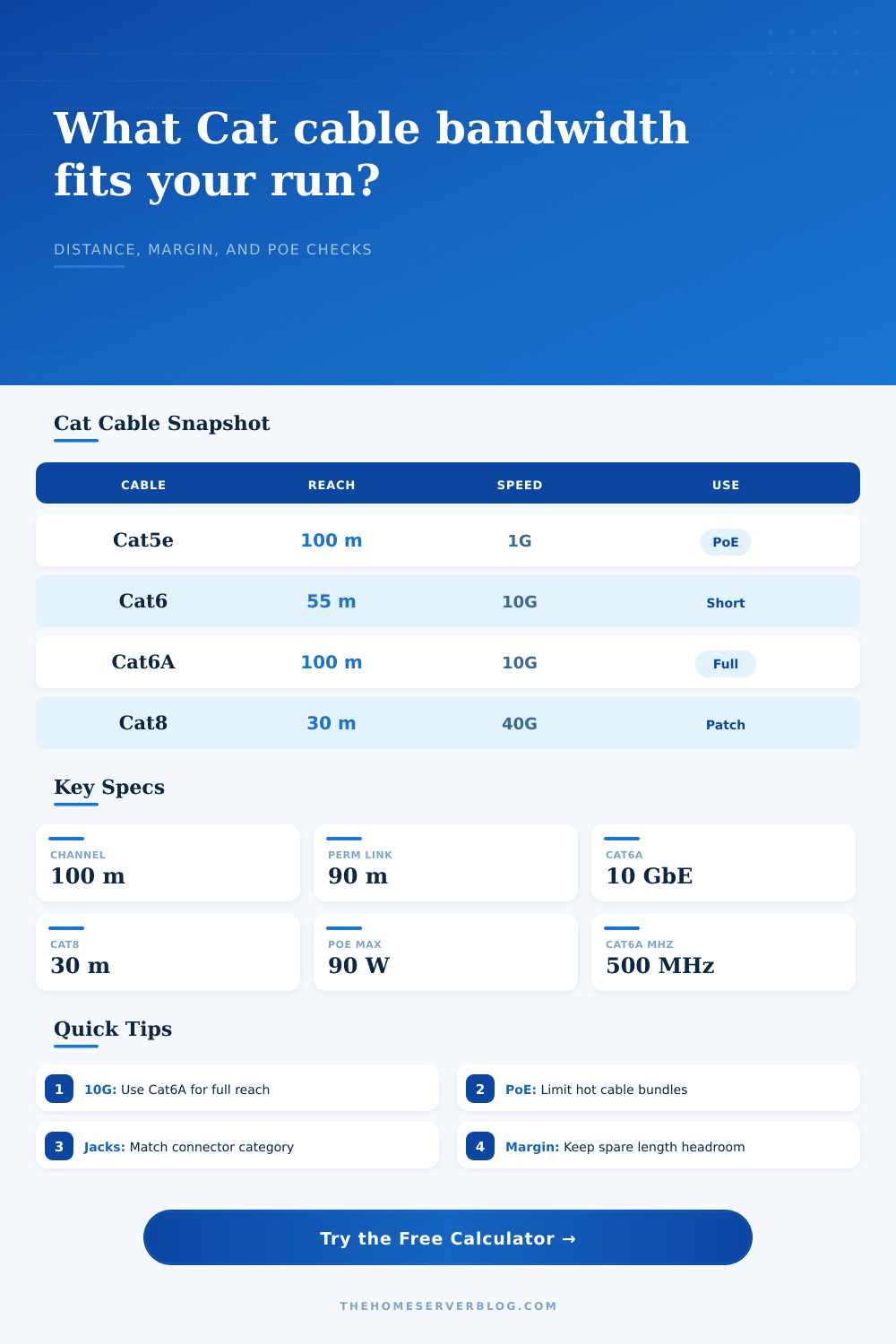
| Cat5e | 100 MHz | 1000BASE-T to 100 m | Often the baseline for existing home office drops and PoE cameras. |
| Cat6 | 250 MHz | 1G to 100 m; 10G often shorter | 10G reach depends heavily on alien crosstalk, installation, and bundle density. |
| Cat6A | 500 MHz | 10GBASE-T to 100 m | Best all-around copper category for full-distance home lab 10G runs. |
| Cat8 | 2000 MHz | 25G/40GBASE-T to 30 m | Short channel for switch-to-server rows, not a general house wiring target. |
| TIA channel item | Common limit | Calculator field | Why it matters |
|---|---|---|---|
| Balanced twisted-pair channel | 100 m maximum for most Cat5e through Cat6A Ethernet planning | Run length plus patch cords | The calculator treats entered length as full channel length. |
| Permanent link | 90 m typical horizontal cabling | Run length before patch leads | A certified permanent link still needs room for patch cords. |
| Patch cord allowance | About 10 m total in a normal 100 m channel | Headroom percent | Extra cords, service loops, and rack moves consume reach margin. |
| Component category | Channel is limited by the weakest rated component | Connector class | A lower-category jack can pull down a higher-category cable run. |
| PoE class context | Power at device | Pairs energized | Cabling concern |
|---|---|---|---|
| IEEE 802.3af Type 1 | Up to about 13 W | 2 pairs | Usually easy on Cat5e or better at normal room temperatures. |
| IEEE 802.3at Type 2 | Up to about 25.5 W | 2 pairs | Check long runs with hot bundles, especially in ceilings. |
| IEEE 802.3bt Type 3 | Up to about 51 W | 4 pairs | Prefer larger copper and avoid large tight bundles. |
| IEEE 802.3bt Type 4 | Up to about 71 W | 4 pairs | Use conservative bundle and temperature headroom. |
| 10G planning factor | Cat6 effect | Cat6A effect | Calculator treatment |
|---|---|---|---|
| Alien crosstalk margin | Can decide whether a 55 m 10G run passes | Usually more controlled by design | Positive dB margin increases confidence score. |
| Connector quality | Bad terminations can dominate the result | Still important at 500 MHz | Lower class connectors reduce effective reach. |
| Shield continuity | UTP relies on spacing and balance | Shielded cable helps only when bonded | Unbonded shield is penalized instead of rewarded. |
| Bundle heat | Large PoE bundles raise resistance and stress | Thicker cable usually keeps more margin | Bundle and temperature derate PoE comfort and reach. |
Maybe you’ve had one of those nice-looking runs of Cat6 cable laid down, but still your network will drop packets when streaming a 4K movie. No, the wire isn’t busted and no, your gear isn’t busted.
Something is getting in the way of the signal, because copper Ethernet is a physical conversation. Magic? Not so much. Physics.
Why Your Network Fails Even With Good Cables
Structured cabling isn’t just about how much data it can carry. It’s also about what amount of noise the cable can handle to push data along distances.
When you’re planning a small office or home lab, it’s not just a question of whether or not the cable makes it to the wall jack. It’s a question of whether or not signal still holds up when it gets there without turning into static.
Plug in your power needs and your run length into calculator above and it will do the math for you. No more guesswork about thermal limits and crosstalk values.
The common mistake: most folks believe that Cat5e is dead and Cat8 is where it’s at. Wrong again. In fact, Cat5e are just fine for short runs of a gigabit connection. Cat8 is plenty fast and is meant for use in server racks, not long horizontal drops. It has a very tight thirty meter limit and can’t handle heat well. Attempting to run Cat8 all over your home will cause it to fail long before you finish connecting the cables.
Use category appropriate for the length required, not the marketing buzz.
The tool’s inputs match real life installations. Consider the bundle size. If you’ve got dozens of cables all tied tightly into a bundle, they’ll be interfering with one another. That alien crosstalk increase the noise floor which causes the link to negotiate a slower speed to keep itself stable. You might have a perfect Cat6A cable, but if it gets squeezed between two dozen other powered devices in your hot attic, it will act like lower grade cable. This calculator take that into account because you can input ambient temperature and bundle density.
There’s another wrinkle: Power over Ethernet. Free electricity? Not quite.
PoE creates heat within the jacket of the cable. Resistance increase with watts; more watts equal more heat. And that equals lower signal margin. Your access point and/or high-end PTZ camera turns the cable into a resistor. So how much power can the bundle withstand without overheating? Will its performance drop? Does your particular wattage draw and PoE mode poses any risk to the bundle? Nobody wants their network to drop while they’re holding a staff meeting.
It is a small detail, yet one that makes a difference.
The other key element is the connectors. Terminate your best shielded cable in the world with some cheap knockoff jack and what happens? The connection fails because of reflection loss. Nothing. It doesn’t connect. Speed is governed by weak link.
Enter a connector class on the calculator’s fields to account for reflection loss from a poorly crimped plug or a mismatched patch panel. What does that do? That reflected signal interfere with the incoming data. Echo drowns out the voice.
And then there’s margin. When networks are designed by network engineers they typically do not design for the very limit of what their system can handle. They provides some headroom. You can configure it so the tool provides X% of length headroom, which keeps your connection from being dependent on ideal conditions.
Life is not ideal in real life. Bundles get tight, cables gets bent, temperature fluctuates. With ten or fifteen percent headroom, your network continues running when things go just a little bit wrong.
And lastly: Keep in mind that this is an estimation, not a certification. It’s an estimation tool. It’s not a test instrument; it’s a planning aid. It assume standard specs and projects results. The tool doesn’t know if you smashed a wire under your desk leg.
If you’re running essential links, go get them permanently tested by a certifier anyway. But for planning purposes, knowing the tradeoffs of power vs. Distance vs. Shielding is half the battle. The other half? You also have to untangle and cool the cables. Give the signal some breathing room.