Cellular Data Usage Calculator
Estimate monthly LTE or 5G usage for home internet backup, travel routers, cameras, cloud sync, remote work, and small home lab failover links.
Estimated cellular data plan load
| Configuration | Typical data drivers | Monthly planning range | Best control lever |
|---|---|---|---|
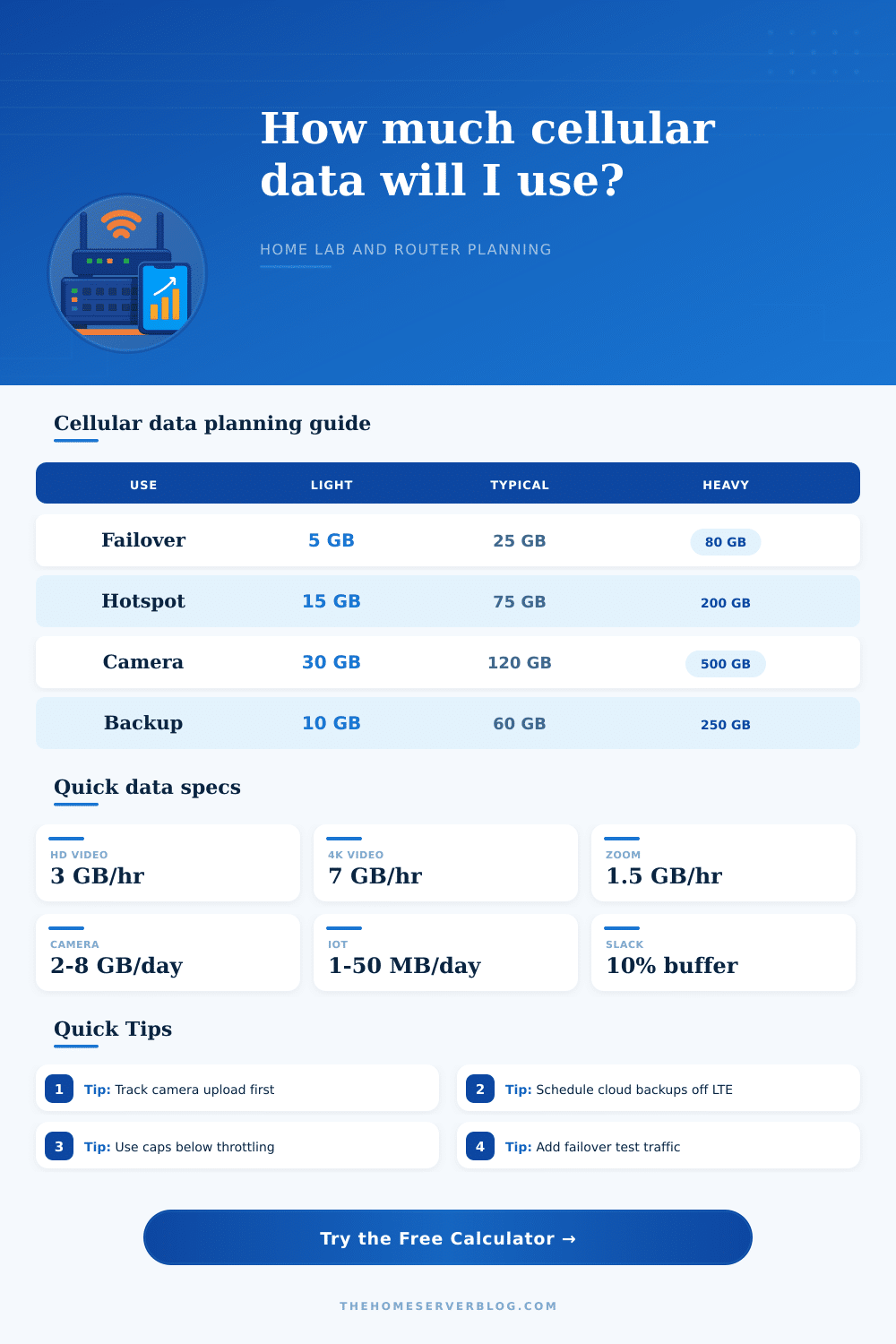
| Router failover WAN | VPN, meetings, retries, health checks | 5 to 100 GB if outages are short | Block video and OS updates during failover |
| Mobile hotspot users | Web, app updates, video calls, streaming | 30 to 300 GB for a small household | Limit streaming quality and app auto updates |
| Security camera uplink | Cloud clips or continuous camera streams | 30 to 800 GB depending on count | Use motion clips, local NVR, and lower bitrate |
| NAS and cloud backup | Photo sync, VM backups, package mirrors | 20 GB to multiple TB if uncapped | Schedule or disable backup jobs on cellular |
| IoT telemetry gateway | MQTT, keepalive, status polling, GPS | 1 to 50 GB for many devices | Batch telemetry and raise reporting intervals |
| Mixed home lab traffic | Failover, monitoring, remote admin, cameras | 50 to 500 GB for active labs | Use firewall rules and traffic shaping profiles |
Cellular carriers may meter protocol overhead differently from router dashboards, so the calculator keeps a selectable overhead buffer.
| Item | Reference value | Calculator use | Practical note |
|---|---|---|---|
| Decimal gigabyte | 1 GB = 1000 MB | Default plan display | Most data plans advertise decimal GB |
| Binary gibibyte | 1 GiB = 1024 MiB | Optional display | Some routers and NAS dashboards use binary units |
| TCP and VPN overhead | 5% to 20% | Selectable buffer | Weak signal and retransmits increase real use |
| 1080p video stream | About 3 GB/hr | Streaming load | Adaptive bitrate can swing lower or higher |
| 4K video stream | About 7 GB/hr | Heavy streaming load | Live sports and high bitrate apps may exceed this |
| Speed test burst | 0.2 to 1.8 GB | Router profile load | Faster 5G gateways use more data per full test |
| Camera event clips | 0.25 to 0.8 GB/day | Camera profile | Continuous upload is far larger than event clips |
| IoT telemetry | 1 to 50 MB/day | Device profile | Polling frequency matters more than payload size |
| Project | Equipment count | Primary result | Secondary result |
|---|---|---|---|
| Small failover router | 1 router, 2 users | 15 to 40 GB/month | Keep 10 GB reserve for testing |
| Remote work hotspot | 1 gateway, 1 laptop | 40 to 120 GB/month | Meetings dominate daily load |
| Cabin internet link | 1 gateway, 3 users | 120 to 350 GB/month | Streaming caps matter most |
| Camera only uplink | 4 cloud cameras | 80 to 700 GB/month | Local NVR reduces cellular use |
| NAS photo backup | 1 NAS, 2 phones | 30 to 250 GB/month | Initial sync should avoid cellular |
| Industrial sensor box | 50 telemetry nodes | 5 to 75 GB/month | Batch uploads save data |
| Traffic category | Low assumption | Default assumption | High assumption |
|---|---|---|---|
| Remote work and browsing | 0.25 GB/user/hr | 0.45 GB/user/hr | 0.9 GB/user/hr |
| Video calls | 0.7 GB/hr | 1.5 GB/hr | 2.5 GB/hr |
| Speed testing | 0.2 GB/test | 0.6 GB/test | 1.8 GB/test |
| Home lab updates | 1 GB/day | 5 GB/day | 30 GB/day |
| Cloud camera clips | 0.25 GB/day | 0.8 GB/day | 12 GB/day |
| IoT telemetry | 0.001 GB/day | 0.008 GB/day | 0.05 GB/day |
When the primary internet connections fails, the cellular connection becomes an backup link and has to carry all the data traffic from the video meetings and security camera uploads. Many people dont know how much data there device use. To provide people with a better understanding of the data their devices use, a data calculator helps them enter their data and active device patterns to remove the guesswork from their data plan.
The data used by the cellular plans are different than the data that the home router reports. The cellular plans include the protocol overhead, data packet retransmissions on weak cellular signals, and the way the cellular data plans counts the data packets. To accommodate this extra data, the data calculator also includes a buffer that allow the user to enter the amount of extra data their link require.
How to Calculate Your Backup Cellular Data Use
For example, a link that is located outdoors and uses 5G may require more data than a link that has a clean signal. With the increasing use of failover links, many people are unaware of the exact use of data during this failover mode. Many people may think that the failover link will only be used during power outage, but there may be data use from other devices during a short power outage.
For example, when the power goes out, a router might connect to the failover link to maintain the network, or a VPN may have to reconnect to a user’s account. The active days for the failover link will determine how often the failover link will carry data. Another factor that may make a person exceed their data plan is the streaming quality.
For example, a person who watches 1080p video for three hours each day will use a specific amount of data. However, if the person watches 4K video for three hours, the amount of data used will be double or even triple the amount use for 1080p video. With the different data calculator features, a person can set the streaming quality for the devices to see how much data will be used.
This helps people make decision about the quality of the video on their televisions and how much data they would like to allocate to their plans. Security camera data plans are another variable in the data plan equation. For example, a security camera that is set to motion clips will use less than one gigabyte of data per day, but a security camera that is set to continuous 1080p video will use six to seven gigabytes of data per day.
The data calculator will separate the data used for security cameras to allow users to decide whether they would like to use local camera or use the security cameras to stream the video data continuosly to the cloud. Another source of data that may be overlooked is the speed test. A 5G gateway may transfer over one gigabyte of data in a single speed test.
If a person uses the speed test every morning, this may use up a considerable amount of data that their cellular plan allow. The router profile setting in the data calculator will allow users to select their type of router so that the data calculator can calculate the data use from the speed tests. Finally, the Internet of Things device in the home may not use much data.
However, if the number of Internet of Things devices in the house increases, the data used by these devices will increase as well. For example, fifty sensors in the house that report information every few minutes will use more data than five sensors that report once every hour. The data calculator has an intensity selector so that users can match it to the actual number of Internet of Things devices they have at home.
This will prevent the data usage from slowly increasing to the point where the cellular data plan may exceed the data cap that the user has for their cellular data plan. Finally, with all these variables accounted for, the data calculator will provide a figure for the data use that the user will experience each month. If the estimated data use for each month is less than the data plan that the user has for their cellular plan, they may still want to use up to one gigabyte more of data to allow for the potential addition of another device to their household.
However, if the estimated data use is more than the data plan that they have subscribed to for their devices, the data calculator will show which categories of data use may be causing the increase in data use. From here, users can decide to reduce data use by blocking video use during the failover of the primary internet connection, creating backup times for the data to use the wired internet connection, or even moving their security cameras to use local data storage instead of continuously using data to upload the security videos to the cloud. Knowing these variables will ensure that the cellular connection remains the backup connection for their home instead of another source of surprising data bills for the users.