Database Sizing Calculator SQL Server
Estimate SQL Server data files, index space, transaction log, tempdb, memory target, IOPS, growth horizon, high availability copies, and usable storage headroom for home lab, branch, SaaS, analytics, and production-like workloads.
Formula Breakdown
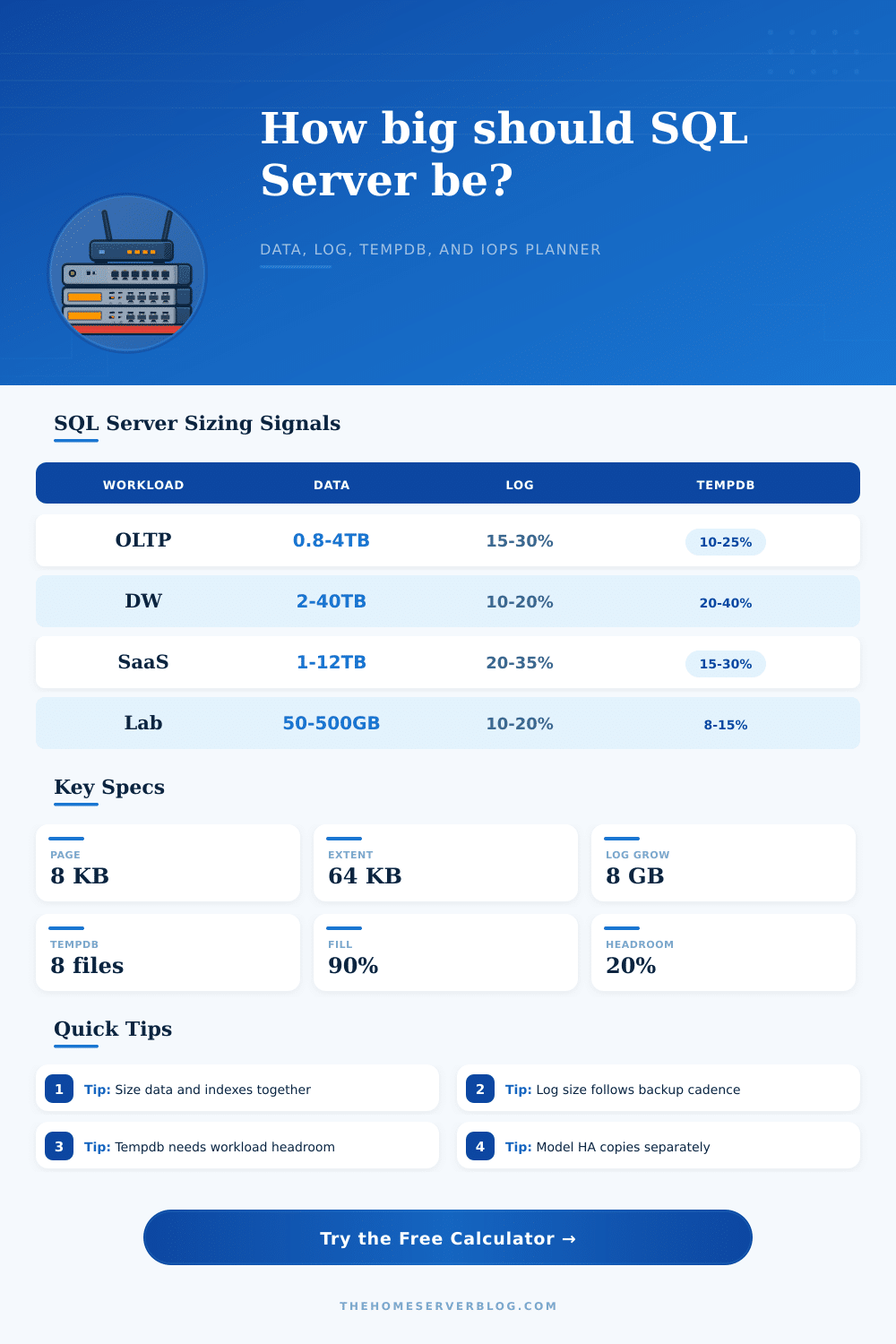
| SQL workload | Index space guide | Log sizing guide | Tempdb planning note |
|---|---|---|---|
| OLTP order entry or line-of-business app | 50% to 120% of table data | 15% to 30% of final data or peak log interval | Version store, sorts, and online maintenance usually drive the reserve. |
| Reporting warehouse with columnstore | 20% to 70% after compression | 10% to 20% unless large batch loads run | Hash joins and rebuilds can make tempdb a first-class capacity item. |
| Multi-tenant SaaS database | 80% to 180% when tenant filters are indexed | 20% to 35% because writes arrive in bursts | Tenant-heavy reports benefit from extra tempdb and memory headroom. |
| Audit, event, and retention store | 30% to 90% depending on search patterns | 10% to 20% for append-heavy loads | Partition switching and purge jobs can briefly raise tempdb pressure. |
| Component | Formula used | Why it matters | Operational check |
|---|---|---|---|
| Data and index files | max(existing, row estimate) x index x LOB x compression x fill factor | Sets MDF and NDF allocation before growth and buffer. | Compare against sys.master_files and actual reserved page counts. |
| Transaction log | log GB per hour x backup interval x burst x recovery multiplier | Prevents VLF churn, autogrowth waits, and failed large transactions. | Check log backup history and DBCC SQLPERF logspace trends. |
| Tempdb | max(percent of data, sessions x MB per session) x workload factor | Protects sorts, version store, snapshot isolation, ETL, and maintenance. | Watch tempdb file growth, version store, and PFS/SGAM waits. |
| Memory | hot data x buffer target plus worker and plan cache allowance | Reduces repeated physical reads and improves predictable latency. | Review page life expectancy, memory grants, and read latency. |
| Edition or platform | Memory planning note | Compression note | Storage implication |
|---|---|---|---|
| Express or local edge instance | Treat memory as tightly capped and favor small active sets. | Compression may not rescue poor schema design. | Keep data, log, and tempdb split only when the host storage benefits. |
| Standard Edition | Plan around a practical buffer pool ceiling and leave OS headroom. | Row and page compression can be useful but test CPU impact. | Separate log latency from data throughput where possible. |
| Enterprise Edition | Larger memory targets can support hotter data and columnstore use. | More advanced features may reduce data size and IO pressure. | IOPS and latency often become the limiting factor before capacity. |
| Managed instance or hosted SQL | Choose a tier that matches memory and IO, not just database size. | Platform defaults may differ from self-managed servers. | Replica, backup, and snapshot storage may be accounted separately. |
| Project size | Inputs to collect | Primary result | Secondary result |
|---|---|---|---|
| Home lab app database | Current MDF/NDF, log history, yearly rows | Primary storage target | Memory and tempdb sanity check |
| Branch office ERP | Transaction log rate, index ratio, users | Data and log split | IOPS and HA copy footprint |
| SaaS tenant database | Rows per tenant, active tenant set, retention | Growth horizon allocation | Replica and local backup footprint |
| Reporting warehouse | Load volume, compression, sort pressure | Final data plus tempdb | Memory target and write burst risk |
This calculator is a planning aid. Confirm production deployments with SQL Server DMVs, backup history, storage latency measurements, recovery testing, and workload-specific growth reports.
Sizing a SQL Server database correctly are an important task. Sizing a SQL Server database correctly is necessary because if the SQL Server database are not sized correctly, then the performance of that database will be poorly. Factors such as fast storage and good database indexes dont matter if the file sizes, log sizes, and memory targets is incorrect.
Each of these component must be understood in terms of its consumption by the SQL Server database, and why those consumption figure may change. Data files is easily seen within the database. The data file can be sized based off the row count within the database and the average size of each row.
How to Size a SQL Server Database
However, other factors such as indexes, LOB columns, and fill factors can increases the size of the database data files. Data files can be compressed to reduce their size, but the amount of data that can be compressed depend upon whether the data within the database is random or already packed. However, the calculator estimate the size of the data files based upon user-entered values for each of these factors.
The sizing of the transaction log of a SQL Server database are calculated differently from the sizing of the data files of that SQL Server database. The sizing of the transaction log is based upon the amount of log data that is generated per hour, and how often the user performs log backups. Thus, the sizing of the database transaction log is not based upon the size of the database itself.
For example, you can perform log backups at a short interval to minimize the amount of data that is exposed to the case of a database failure, but there must be enough space within the transaction log to handle long database transaction. The shorter the time between transaction log backups, the more larger the transaction log files should be sized, which help to avoid the database autogrowing its transaction log files. The tempdb database of SQL Server is sized differently from the other databases within the SQL Server.
Tempdb store data for sorts, hashes, the version store, and online index operation. Workloads that do not use much of tempdb will have smaller tempdb databases than workloads that perform heavy reporting operation or ETL processes. Therefore, it is important to ensure that the percentage of the database that use tempdb is matched with the number of concurrent session using the database to ensure that tempdb is sized apropriately before deployment to the production environment.
Memory is sized in the same way as the data files within the SQL Server database. Each instance of SQL Server has to size its memory to ensure that the active portion of the database is stored in the buffer pool in RAM. Thus, the hot portion of the database should be stored in RAM, but there also must be room within the RAM to store other data that is used by SQL Server itself, such as the workers, plan cache, and the operating system.
Additionally, the edition of SQL Server that is used can limit the amount of RAM that can be allocated to SQL Server, especially in instances of SQL Server Standard Edition. The estimates of the Input/Output Operations Per Second (IOPS) of a SQL SQL Server database are calculated by determining the amount of read operation that can be performed on the active portion of the database and the amount of write operation that is performed by the transaction log. These estimates are not exact values for the databases IOPS, but they can help determine if the storage system will become a bottleneck in terms of data retrieval and data modification operation.
Therefore, these estimates help determine whether local SSD drive should be purchased compared to hosting the databases in tiers that provide storage and bill for the amount of throughput. In addition to the calculations of each of the individual database within a SQL Server, it is also necessary to account for high availability copy and retained backups of those databases. Each readable copy of a database will require additional data storage space for that database.
Additionally, local backups of databases will require additional data storage space, even if those backups are compressed in size. Both of these factors is accounted for in the calculator in estimating how much data storage will be required for the SQL Server databases overall. It is also important to perform these calculations twice.
Once the user can perform the calculations using the current values for the databases component, the calculations can be performed again if using higher values for growth or burst of workloads. The difference between the two estimate will reveal whether the databases are sized for the current version of the SQL Server databases, or if they are sized for the upcoming (next) version of the databases. The calculations should of been performed every few month to ensure that they is up to date and accurate.
By performing each of these calculation, a database administrator will ensure that the data is not sized only for the data files. Additionally, if any of the component are sized separately from the data files, then it is likely that the component will be starved for resource. Instead, by sizing each component of a SQL Server database for what is required of it, the storage request will accurately reflect what the databases require overall.