DDR4 Memory Bandwidth Calculator
Estimate theoretical channel bandwidth, sustained payload bandwidth, ECC impact, rank interleaving, and read/write split for DDR4 desktops, workstations, and home servers.
Use the DDR rating, such as 2666 or 3200 MT/s.
Typical sustained STREAM-like results often land below peak.
Write share is calculated from the remaining percentage.
51.2
GB/s before efficiency43.4
GB/s after efficiency and ECC30.4
GB/s at selected mix13.0
GB/s at selected mixBandwidth Breakdown
64 bit
Data bus per channel
8 B
Bytes per transfer
1.2 V
Standard DDR4 voltage
x72
Common ECC width
| DDR4 Data Rate | Single Channel | Dual Channel | Quad Channel |
|---|---|---|---|
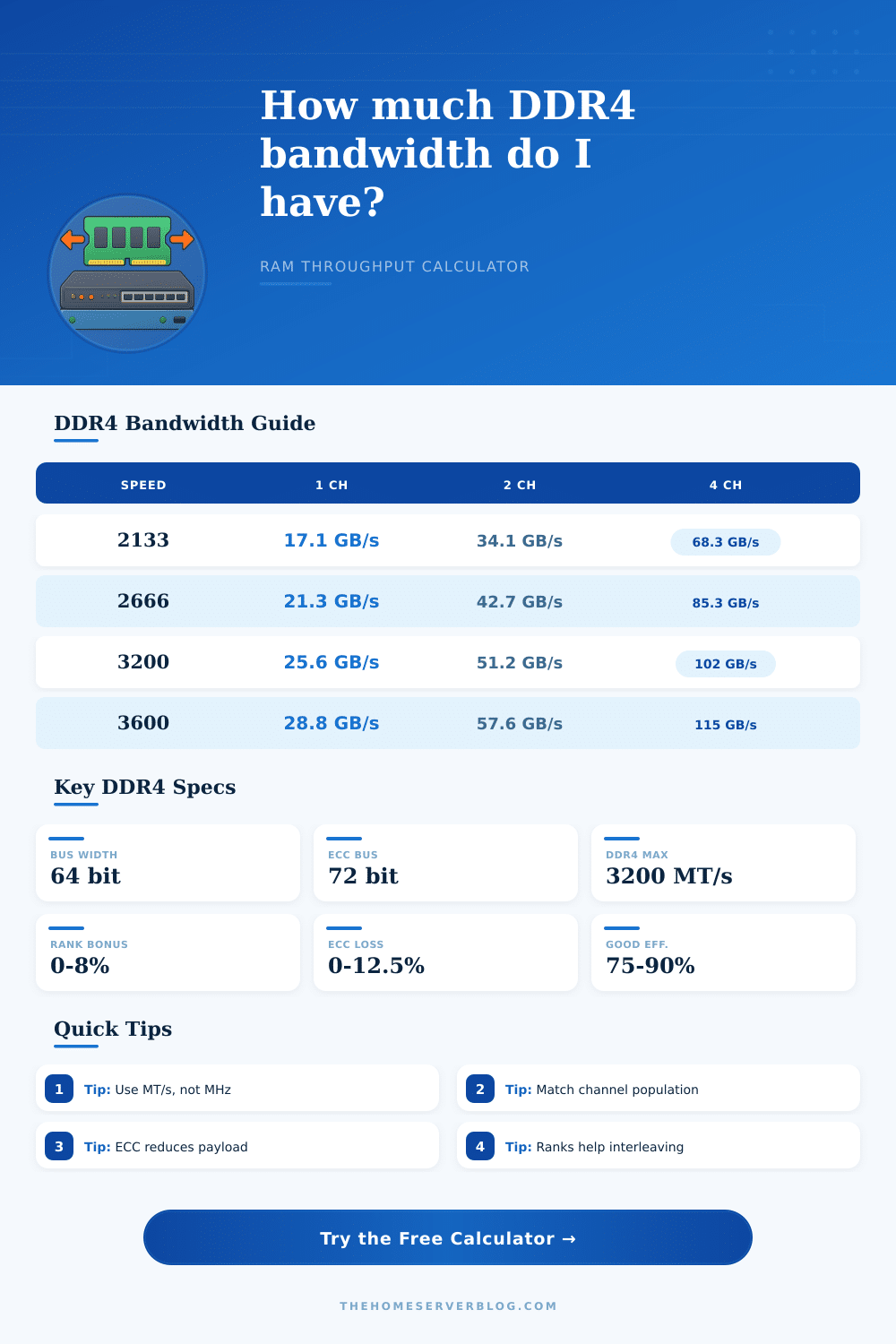
| DDR4-2133 | 17.1 GB/s | 34.1 GB/s | 68.3 GB/s |
| DDR4-2400 | 19.2 GB/s | 38.4 GB/s | 76.8 GB/s |
| DDR4-2666 | 21.3 GB/s | 42.7 GB/s | 85.3 GB/s |
| DDR4-2933 | 23.5 GB/s | 46.9 GB/s | 93.9 GB/s |
| DDR4-3200 | 25.6 GB/s | 51.2 GB/s | 102.4 GB/s |
| Configuration | Typical Use | Peak Formula | Peak Bandwidth |
|---|---|---|---|
| 1 x DDR4-2666 | Small NAS or office PC | 2666 x 8 x 1 | 21.3 GB/s |
| 2 x DDR4-3200 | Dual-channel desktop | 3200 x 8 x 2 | 51.2 GB/s |
| 4 x DDR4-2933 | Quad-channel workstation | 2933 x 8 x 4 | 93.9 GB/s |
| 8 x DDR4-3200 | Multi-channel server | 3200 x 8 x 8 | 204.8 GB/s |
| Factor | Typical Range | Calculator Input | Bandwidth Effect |
|---|---|---|---|
| Memory controller efficiency | 65% to 92% | Efficiency % | Reduces peak to sustained |
| Rank interleaving | 0% to 8% | Ranks per channel | Small practical gain |
| ECC payload allowance | 0% to 12.5% | ECC overhead | Reserves parity bandwidth |
| Mixed population | 78% to 100% | Population mode | Penalizes uneven channels |
| Spec Item | DDR4 Value | Why It Matters | Calculator Use |
|---|---|---|---|
| Transfer style | Double data rate | Rating already includes both clock edges | Enter MT/s directly |
| Channel width | 64 data bits | Each channel moves 8 bytes per transfer | Bus width field |
| ECC module width | 72 physical bits | Extra bits carry error correction data | ECC overhead field |
| JEDEC top bin | DDR4-3200 | Higher speeds are usually XMP or OC | Preset comparison |
When you upgrade your desktop or your server, youll likely look at the memory speed rating that’s printed on the memory module box. However, the memory speed rating does not indicate how much data will actualy pass through your memory. The DDR4 memory bandwidth calculator will show you the data movement potential of your memory system because the memory speed on the box do not always equal the usable memory data throughput.
By entering the specifications for your memory into the DDR4 memory bandwidth calculator, you can observe how the component of your memory will work together within your system prior to making your purchase. The data rate and the number of bytes that exit the memory module each cycle will determine the bandwidth ratings for your memory. If you have a DDR4-3200 memory kit, 8 byte of data will move through each 64-bit channel every cycle.
How the DDR4 Memory Bandwidth Calculator Works
Should you add another memory channel to your system, the amount of data that can move will double. This doubling effect is automatically calculate within the DDR4 memory bandwidth calculator when you enter the number of channels and the bus width of your memory. However, the theoretical figure that results from the calculator is not the same than the actual speed of the memory within your system.
Your memory system will never reach the theoretical maximum of your memory because the memory controller must dedicate some of the cycles within that theoretical maximum to several essential system tasks. These tasks includes managing refresh cycles for the memory modules, command scheduling, and address translation within your system. Some of those memory cycles will be used for these tasks, which means your memory will not reach its theoretical maximum but some percentage of that maximum.
An efficiency field within the DDR4 memory bandwidth calculator allow you to set the percentage of the theoretical maximum that your memory will reach. You can model a busy server that manages data and network traffic by entering a lower percentage or a workstation that handles large streaming files by entering a higher percentage. Another factor that can alter the usable data movement through your memory is if your memory module contain error-correcting code (ECC).
Most server memory modules will be a 72-bit ECC module because the additional 8 bit of data are used to store parity. This parity data travels every time data move in and out of your memory modules, taking up approximately 12.5% of the total data that can move. The DDR4 memory bandwidth calculator automatically subtracts this amount if you select the ECC memory option within the calculator.
Because most server memory modules have this data movement limitation, using ECC memory can significantly impact how much memory you can effectively use in your server for your workloads, and the loss of data movement adds up as the total amount of memory within your server increase. Another factor that can impact your memorys data movement is the number of rank within each memory module. If your memory module features two ranks of memory chips, the memory controller can access both ranks of memory to transfer data.
The DDR4 memory bandwidth calculator accounts for this additional data movement when you set the number of ranks in your memory. While the additional data movement from the second rank within the memory module is modest, if you use servers that work heavy memory loads, this additional data movement could still significantly impact how fast the servers processors can retrieve the data. Yet another factor that can significantly impact your memory data movement is the relative number of read operations and write operations that must occur within your system.
Applications will use your memory in varying degrees of read and write operations. The read percentage field in the DDR4 memory bandwidth calculator allows you to weight the data movement based on the percentage of read operations to write operations. The calculator separates the data movement to only those read operations and the data movement to only those write operations to provide an accurate insight into your memory system’s data movement based on your application’s needs.
Reference tables on the page allow you to quickly understand more information about memory data movement. These tables allows you to see the data movement calculations for different amounts of memory channels at JEDEC memory speeds. These tables will allow you to cross-check the information that the DDR4 memory bandwidth calculator provides to the information on the memory modules boxes.
The way that you install the memory modules into your system will also alter the memory data movement within your system. If your system features a dual-channel memory installation, it require two memory modules of the same specifications. If you install only one memory module into a dual-channel system, the data movement will be halved.
The population mode selector within the DDR4 memory bandwidth calculator allows for the calculation of data movement with only one memory channel. Furthermore, the calculator can estimate the data movement with memory modules with different speeds to one another. The last factor to discuss is the voltage specifications for your memory modules.
The DDR4 memory bandwidth calculator does not require that you enter the voltage specifications for your memory. The default voltage for DDR4 memory is 1.2 volts. This voltage is included in the data rate that you have to enter into the DDR4 memory bandwidth calculator.
If you plan on running your memory at a higher voltage than the default 1.2 volts, it will require manual adjustments to the memory’s timing specifications so that your memory run stably at the higher voltage. Using a higher voltage can significantly impact the efficiency of your memory because your memory may not run as efficiently if it does not remain as stable as with the default 1.2 volt setting. Memory bandwidth is not a single number but instead the product of a few different variables.
Memory bandwidth specifications includes the data rate, the number of channels, the bus width, the rank organization within each memory module, the data movement loss from ECC memory, the efficiency of the memory controller within your system, and the type of workload that your system execute. Any alteration to these variables will alter the memory data movement within your system. The DDR4 memory bandwidth calculator allows you to test the impact of altering these variables.
By entering the different variables within the calculator, its output will indicate to you whether the memory upgrade that you are planning will increase the data movement within your system or whether the memory will become a bottleneck for your systems data operations.