Surveillance Camera Bandwidth Calculator
Estimate IP camera bandwidth for NVR ingest, PoE switch uplinks, Wi-Fi camera groups, remote live view, VPN access, and daily network transfer from security video.
▶Named Surveillance Presets
Two entry cameras with modest H.265 bitrates and occasional remote live view.
⚙Camera Bandwidth Inputs
Bandwidth Results
🖧Surveillance Spec Grid
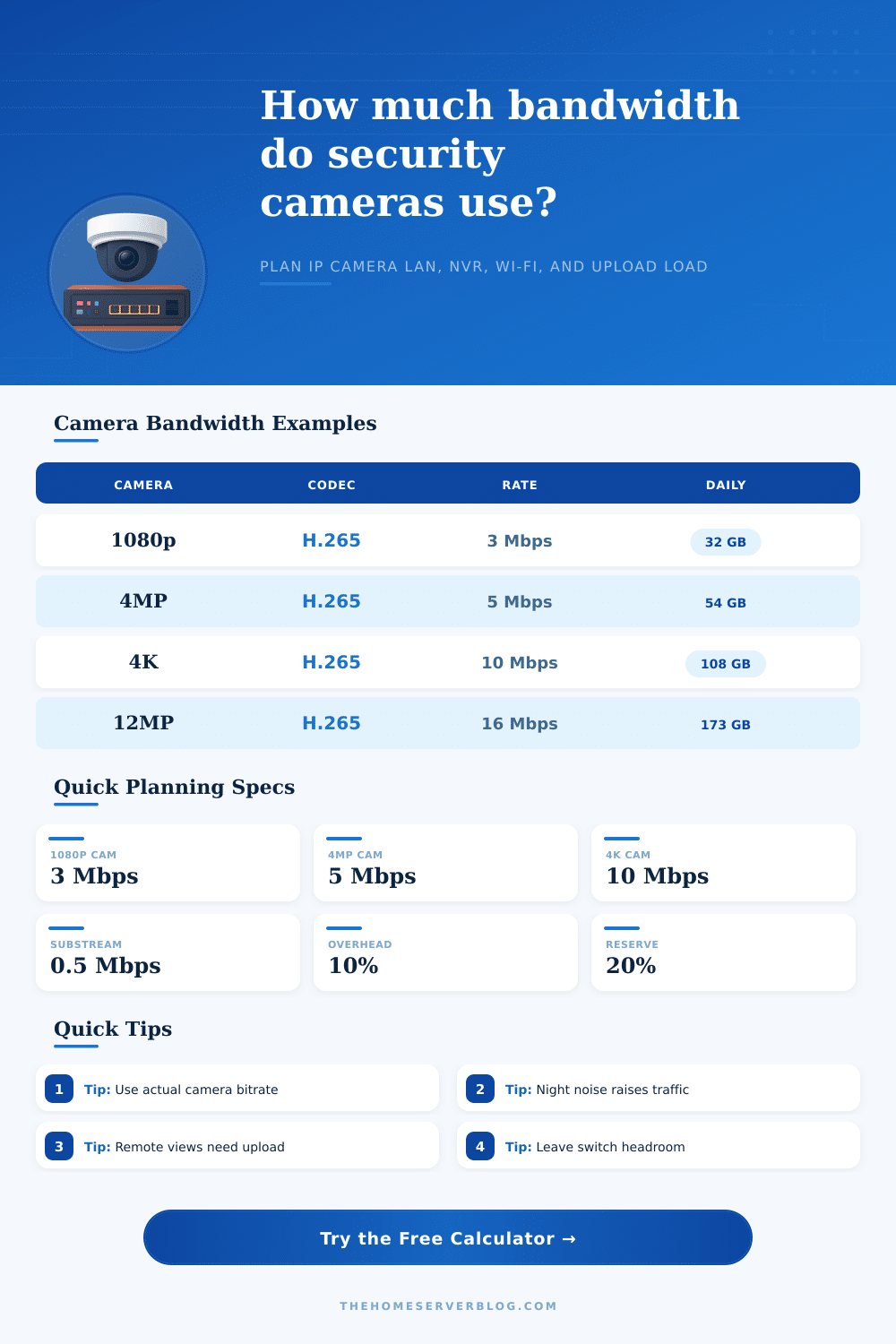
📹Camera Bitrate Reference
| Camera Class | Typical H.265 Main Stream | Typical H.264 Main Stream | Planning Use |
|---|---|---|---|
| 2K doorbell or entry camera | 2.5 to 4 Mbps | 4 to 6 Mbps | Entry doors, porches, lobbies, and package views. |
| 1080p security camera | 2 to 4 Mbps | 4 to 8 Mbps | General indoor rooms, garages, and small exterior zones. |
| 4MP turret or bullet | 4 to 6 Mbps | 7 to 10 Mbps | Balanced perimeter coverage where license plates are not the goal. |
| 5MP detail camera | 5 to 8 Mbps | 9 to 12 Mbps | Driveways, side yards, and higher-detail entry coverage. |
| 8MP or 4K camera | 8 to 12 Mbps | 12 to 20 Mbps | High-detail wide views, parking areas, and larger yards. |
| 12MP high-detail camera | 12 to 18 Mbps | 18 to 28 Mbps | Detail-heavy scenes, wide property coverage, and forensic review. |
| Dual-lens panoramic camera | 10 to 18 Mbps | 16 to 28 Mbps | Two sensors or panoramic streams counted as one enclosure. |
| Substream live view | 0.3 to 1 Mbps | 0.5 to 2 Mbps | Mobile apps, multi-camera grid views, and low-bandwidth remote checks. |
⚙Codec, FPS, and Scene Factors
| Factor | Bandwidth Effect | When It Applies | Planning Rule |
|---|---|---|---|
| H.265 normal profile | Baseline in this calculator | Modern NVR and camera fleets | Use the camera UI bitrate when available. |
| H.264 normal profile | About 55% higher | Older cameras or compatibility mode | Check switch uplink and NVR ingest limits. |
| Smart H.265 or H.265+ | About 25% lower average | Static scenes with compatible NVRs | Still size network for peak scene complexity. |
| 25 to 30 fps | About 38% higher | Smooth motion capture | Use only where motion detail matters. |
| Low-light color night | About 35% higher | Noisy color night scenes | Keep extra reserve for rain, insects, and grain. |
| Motion recording | Lowers daily volume | Event or schedule recording | Peak live bandwidth can still equal continuous. |
🖧Network Tier Planning
| Network Segment | Conservative Payload | Good For | Watch Point |
|---|---|---|---|
| 100 MbE camera uplink | 94 Mbps | Small 1080p or 4MP groups | 4K fleets can saturate it quickly. |
| 1 GbE PoE switch uplink | 750 Mbps | Most home and small-business NVRs | Shared uplinks also carry management and live view. |
| 2.5 GbE uplink | 1,875 Mbps | Dense 4K camera groups | NVR or NAS write speed may bottleneck first. |
| 10 GbE VMS backbone | 7,500 Mbps | Large VMS servers and review stations | Disk arrays and CPU decode must keep up. |
| Good 2.4 GHz Wi-Fi group | 90 Mbps | A few low-bitrate cameras | Airtime, signal, and retransmits reduce margin. |
| Wi-Fi 6 practical client | 350 Mbps | Several cameras near an access point | Backhaul still carries every camera stream. |
| Home fiber upload | 40 to 300 Mbps | Remote live view and VPN checks | Remote main streams duplicate upload demand. |
| LTE or metered backhaul | 5 to 40 Mbps | Substream checks and event clips | Continuous cloud upload can use large data volumes. |
🏠Common Surveillance Project Sizes
| Project | Camera Mix | Peak Ingest | Secondary Check |
|---|---|---|---|
| Front porch and driveway | 2 entry cameras | 6 to 12 Mbps | Upload for mobile app viewing. |
| Four-camera home | 4 x 4MP H.265 | 20 to 30 Mbps | Small PoE switch is usually fine. |
| Eight-camera perimeter | 8 x 4MP or 5MP | 45 to 80 Mbps | 100 MbE uplinks may be tight. |
| 4K detail home NVR | 8 x 4K H.265 | 90 to 140 Mbps | Use 1 GbE uplink with headroom. |
| Small shop | 12 mixed cameras | 80 to 180 Mbps | Review stations duplicate streams. |
| Warehouse VMS | 24 mixed cameras | 200 to 450 Mbps | Segment switches and storage writes. |
| Remote cabin | 2 to 4 low-rate cameras | 3 to 16 Mbps | Substream and event clips save upload. |
| High-detail driveway | 12MP plus 4K mix | 30 to 80 Mbps | Night noise can raise sustained bitrate. |
ℹPractical Surveillance Bandwidth Tips
Surveillance systems involve many cameras that send data to a network. When surveillance cameras communicate with each other over a network, they create a steady stream of data. This data has to travel over a network.
When considering the data that the surveillance cameras will send, a person must consider if the network can keep up with the data that every camera creates when every camera is active. Additionally, the network will have to be able to handle the data created by motion in the surveillance cameras’ videos and the data that is created when an individual opens an application to view the surveillance camera footage from a different location. One of the main considerations of network bandwidth is the data that every camera in the surveillance system sends.
How to Plan Network and Storage for Security Cameras
Every camera will create a flow of video data that will change based on the amount of light in the video, the motion within that video, and the codec that the surveillance camera uses to create that video. For instance, a camera of an indoor hallway will create less data than a camera that views a parking lot at night with moving trees. Each of these surveillance cameras will have a difference in the amount of data that is created due to the varying conditions that each camera must view.
However, if an individual adds more cameras to the network or if individuals view the surveillance cameras’ feeds from remote locations, the surveillance cameras will rapidy increase the amount of data that is used. Additionally, many network designers size the network for the average amount of activity that occurs in each of their surveillance cameras. When the surveillance cameras experience periods of high activity, the network may stutter with the surveillance cameras’ feeds as the network was not sized for those high activity conditions.
To calculate the amount of data that will be used by each surveillance camera system, the surveillance camera designer is required to input information regarding the surveillance cameras themselves and the viewing habits for those surveillance cameras. The number of surveillance cameras, the codec for each surveillance camera, the frames per second for each surveillance camera, the activity that occurs in each surveillance cameras viewing area, and for how much of the day the surveillance cameras will record must be entered into the surveillance data calculator. Each of these parameters are required in order to compare the calculated data rates to the bandwidth available to the surveillance camera network.
Another consideration for surveillance cameras is the data that is created by individuals viewing the feeds of the surveillance cameras from outside of the local network. Each of these individuals will require the bandwidth available from the internet upload connection for viewing live surveillance feeds. While a few individuals viewing a substream from each surveillance camera may not use much of the available internet bandwidth, simultaneously viewing the main surveillance camera feeds from outside the local network will require more data to travel over the internet connection.
The data calculator allows for an individual to input the number of individuals that will view the surveillance cameras’ feeds from outside the local network to determine if the available internet plan can support the surveillance cameras. If the internet plan is unable to provide the bandwidth for remote viewers, the surveillance cameras may need to be configured to use lower resolution surveillance feeds for those external viewers. Another factor that affects the amount of data used by surveillance cameras is if the surveillance cameras are Wi-Fi cameras.
Because Wi-Fi cameras share the airtime of the network, the network must retransmit some of the data sent from each surveillance camera. Because the retransmissions of the surveillance camera data packets reduce the available capacity of the network, the throughput of the Wi-Fi network will always be less than the advertised speed of the router that emits the Wi-Fi signals. Thus, the data calculator for surveillance cameras requires an entry of the available throughput of the usable Wi-Fi or mesh network backhaul to which the Wi-Fi cameras are connected.
This parameter considers the locations of the surveillance cameras and the potential for the Wi-Fi backhaul to become the bottleneck in the surveillance system’s data travel. Additionally, the surveillance cameras may create more data when viewing scenes with less light, or when those surveillance cameras incorporate color night vision to increase the visibility of objects in those less lit surveillance cameras’ views. Additionally, if the surveillance cameras include high grain as a means of preserving the details of objects in those surveillance cameras’ views, the amount of data that those surveillance cameras create will increase.
These factors are considered in the surveillance data rate calculator in the scene complexity selector field. This field allows the individual to ensure that the surveillance cameras’ evening data rates dont create a higher bandwidth requirement than the surveillance cameras create during the daytime hours. The calculations of the amount of data that will be transferred by the surveillance cameras can also be used to calculate the amount of data that will arrive at the surveillance system’s network video recorder (NVR) or network attached storage (NAS) devices.
Each surveillance camera sends data to these devices daily so that the surveillance cameras’ recorded videos can be played back. The daily data transfer amounts will allow the surveillance system designer to determine the appropriate sizes of the hard drives that are installed into the network video recorder or the network attached storage devices. Additionally, these calculations will help the designer to decide whether cloud archiving of the surveillance system’s data is a suitable alternative to local data storage.
The duty cycle field within the surveillance data calculator considers motion detection in each surveillance camera’s view. Thus, the number that is calculated as the daily data transfer amount to the network video recording or network attached storage devices will be the same as the amount of data that the surveillance cameras will create and send to the surveillance system’s storage devices. Additionally, the surveillance designer should of leave extra storage space within each surveillance system’s network video recording or network attached storage devices for firmware updates from the surveillance cameras and for any other events that may occur in the surveillance system that may create higher bitrates than the other events that are factored into the surveillance data calculator.
The reference tables that are published alongside the surveillance data rate calculator help to provide context for the calculations of the amount of data that will be used by the surveillance cameras. These tables list the typical main-stream data rates for various classes of surveillance cameras, as well as the comparison of the data rates created by the use of the H.264 codec compared to those that use the H.265 codec. Additionally, the reference tables list the capacities of the uplink connections of various internet plans.
These tables are not a replacement for measuring each individual surveillance camera, but provide a method of ensuring that the surveillance designer determines whether there calculated data rates for each surveillance camera are within a normal range. Additionally, an individual can learn of the requirements of many surveillance systems with these surveillance data rate calculators. For instance, the calculations indicate that most surveillance systems dont require a large amount of extra data capacity for those surveillance cameras’ feeds.
Often, upgrading the network to 1 GbE will provide enough data capacity to support the surveillance cameras for many years. Additionally, the same is true of the internet upload speeds. An internet speed plan that can support a few remote surveillance cameras’ main streams will be sufficient for a residential or small business network.
In either case, expensive problems can be created with surveillance systems if an individual underestimates the complexity of the scenes that those surveillance cameras will view or if the individual over-looks the extra data that those remote viewers create. Overall, these surveillance data rate calculators will ensure that the surveillance system’s network is not interfering with the surveillance cameras. Each network should be constructed and configured in such a way that the surveillance cameras can complete their functions without any need for additional attention.
The surveillance data rate calculator will allow an individual to determine if their network assumptions are accurate before purchasing the surveillance system components or the internet service plan. If the calculated data rates and sizes match the actual surveillance system components and the viewing habits of the surveillance cameras, the surveillance system will behave in a predictable way.