Internet Usage Data Calculator
Estimate how much monthly data your household, home office, cameras, game downloads, cloud backups, and home server traffic will use before your ISP cap resets.
⚙️Named Usage Presets
📊Monthly Internet Inputs
Usage Breakdown
🖥Internet Usage Spec Grid
📘Reference Tables
| Activity | Typical Data Rate | Monthly Example | Cap Planning Note |
|---|---|---|---|
| HD streaming | 2 to 4 GB per hour | 3 hr/day = 180 to 360 GB | Most households underestimate TV background time. |
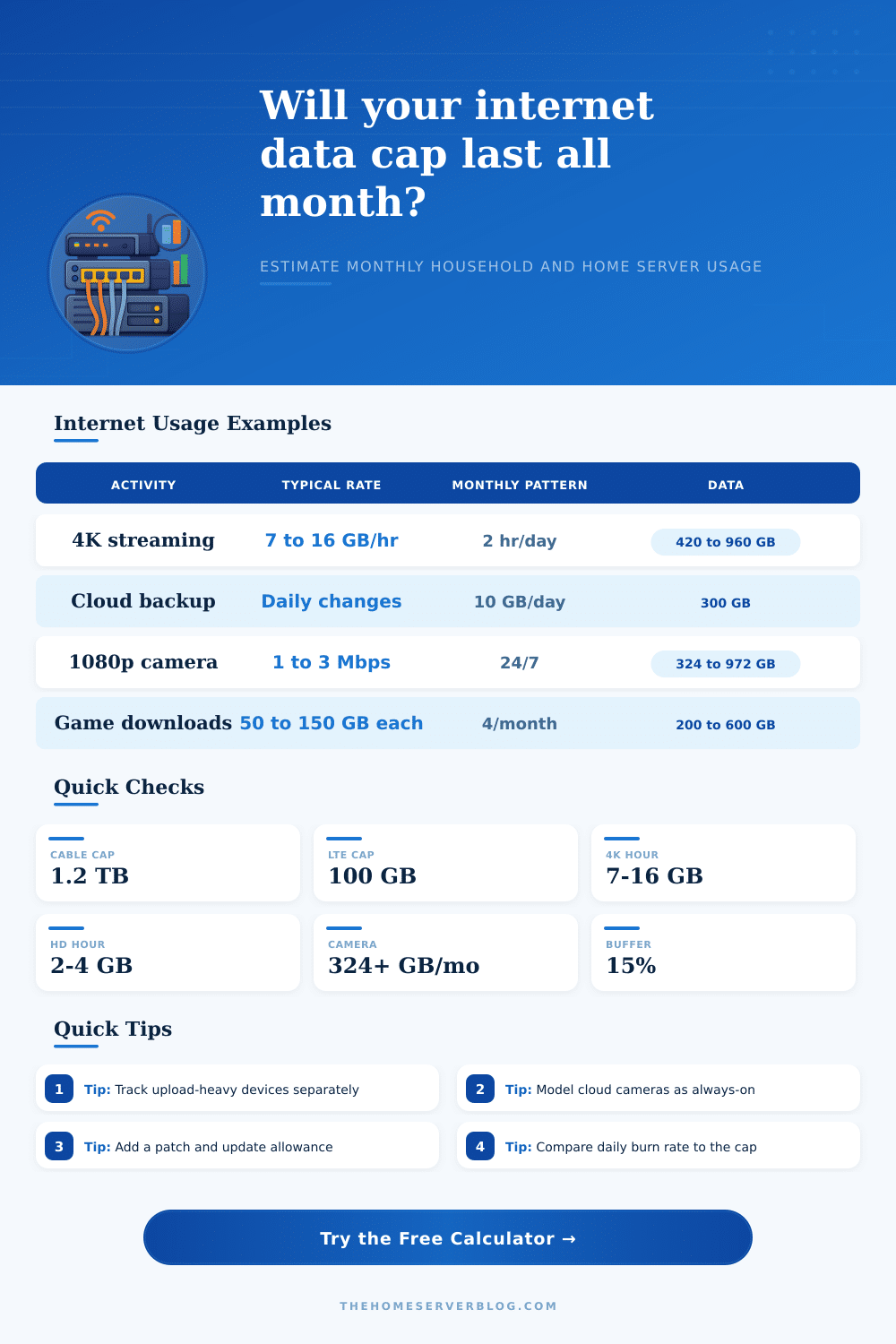
| 4K streaming | 7 to 16 GB per hour | 2 hr/day = 420 to 960 GB | Premium bitrate settings change the month quickly. |
| HD video calls | 1 to 2 GB per hour | 3 hr/workday = 60 to 120 GB | Calls use both upload and download, but caps count total transfer. |
| Cloud backup | Changed data per day | 10 GB/day = 300 GB | Initial seeds can be much larger than steady state. |
| Game downloads | 50 to 150 GB each | Four games = 200 to 600 GB | Season updates and texture packs are often separate downloads. |
| Cloud cameras | 0.5 to 8 Mbps each | 2 Mbps 24/7 = 648 GB | Continuous upload is usually the cap breaker. |
| Remote home server | 1 to 40 GB per day | 5 GB/day = 150 GB | Remote Plex, VPN, and file sharing show up as WAN usage. |
| Plan Type | Common Cap Range | High-Risk Workload | Useful Setting |
|---|---|---|---|
| Cable broadband | 1 TB to 1.5 TB | 4K video, game downloads, cloud cameras | Use 1,200 GB cap and 15% buffer. |
| Fiber unlimited | Usually uncapped | Upload saturation rather than data total | Enter 0 cap but still check monthly traffic. |
| Fixed wireless | 300 GB to 1 TB | Streaming households and backups | Use a higher buffer because speeds and retries vary. |
| LTE hotspot | 50 GB to 300 GB | Background updates and video calls | Disable large downloads during hotspot use. |
| Satellite priority data | 40 GB to 1 TB priority buckets | Cloud backup and software updates | Separate priority data from slower unlimited data. |
| Business connection | Often higher or uncapped | Self-hosted services and off-site backup | Track upstream usage by device or VLAN. |
| Counter Location | What It Measures | Strength | Watch Out For |
|---|---|---|---|
| ISP portal | Billable usage for the account | Best match for cap enforcement | Often delayed by several hours or a day. |
| Router WAN interface | Bytes crossing the internet port | Good for real-time monitoring | May include overhead differently than the ISP. |
| Firewall per-device stats | Usage by client, VLAN, or rule | Best for finding heavy devices | Needs stable device names or reservations. |
| NAS or backup app | Application-level sync totals | Explains backup behavior | May report file size, not retransmits or protocol overhead. |
| Streaming app quality menu | Playback resolution and bitrate | Useful for quick reductions | Adaptive bitrate changes during a show. |
| Camera NVR or cloud app | Camera stream bitrate | Critical for 24/7 upload math | Event mode and continuous mode differ widely. |
| Preset Scenario | Typical Monthly Usage | Main Driver | Best Mitigation |
|---|---|---|---|
| Light apartment | 150 to 350 GB | Phones, laptops, HD streaming | Keep updates automatic but avoid 4K autoplay. |
| Cable family | 800 GB to 1.4 TB | Streaming plus game downloads | Watch daily pace after big download weekends. |
| Rural LTE cap | 60 to 200 GB | Work calls and background updates | Use metered connection modes on PCs. |
| Cloud security cameras | 1 TB to 5 TB | Continuous upload | Record locally or reduce cloud bitrate. |
| NAS backup month | 500 GB to 2 TB | Initial seed and daily deltas | Seed locally or throttle by schedule. |
| Creator upload sprint | 1 TB to 4 TB | Project delivery and cloud sync | Use business or uncapped fiber when possible. |
💡Planning Tips
Data cap are the amount of data that a person can use in a given month. Many individual dont notice that they have a data cap until they are close to using up their data allowance for the month. The data that a household use can be difficult to reasonably predict.
For instance, a single high-resolution movie can use a significant amounts of data. Additionally, device like smart cameras that automatically back up to the cloud can also use a significant amount of data. Thus, there are numerous activity that can use data that an individual might not consider, but which contribute to their data usage.
How to Track and Reduce Your Home Data Use
Quality setting for data streaming can significantly impact the data that a household use. For instance, higher bitrate settings are necessary for viewing 4K videos compared to standard definition videos. Therefore, if each device in the household is set to the highest quality settings, the household will use the most data each month.
Additionally, video call require both the individual to upload and download data. Thus, adjusting the quality settings for streaming and video call will immediate lead to changes in the data amounts used by each individual in the household each day. Background data traffic can contribute to the data that a household use.
Background data traffic come from various device in the home, such as smartphones, smart devices, and software update. While each device may use a relatively small amount of data, the number of devices in a household that is using data in the background can lead to a significant amount of data to be used in thirty day. By utilizing a data calculator, a household can determine how much data is use for background data traffic.
By understanding how much data each device use, a person can make adjustments to the number of devices in their home that contribute to background data traffic. Cloud cameras can be a major contributor of the data that a household use. Cloud cameras that stream data continuous can use hundreds of gigabytes of data per month.
Thus, if a household own a number of cloud cameras, it is possible that their data usage from the cameras can be more than all of the data that is use for all other streaming activities in the household. Additionally, individuals must choose between using local recording to store the cameras data, or choosing to upload that data to the cloud continuous. Each of these choice will impact the amount of data used by the cameras over the given billing cycle.
Data is use by a household when any number of games or software download. The files that must be downloaded for any game are of such large size that a few game downloads can lead to the same amount of data as a household streams media for a period of a week. Thus, if any games is downloaded at the beginning of the billing cycle, there is time to adjust the data cap for the household for the remainder of the cycle.
However, downloading data at the end of the cycle may push the data cap for that household over it limit. Individuals who work from home may have different data usage during the work week compared to the weekends. During the work week, individuals use data for video calls and transfer files between computers during their specific work hours.
Thus, if a number of individuals work from home the data usage of the household will increase during the work week and decrease during the weekends. Thus, it is important to distinguish between the work and non-work data traffic of a household to determine whether increased data usage is permanent or temporary. Based off this determination, a household can determine whether data plan adjustment are necessary.
The main purpose of calculating the amount of data a household use is to determine which specific changes to data usage can lead to the greatest reduction in data. For instance, reducing the bitrate settings for cloud cameras or adjusting the quality settings for streaming may be more beneficial than attempting to reduce the data usage of the household in general. A calculator can show the total amount of data that will be use each month, as well as provide a daily burn rate.
By knowing the daily burn rate for a household, individuals can monitor the data being use each day for the month. Thus, if an individual checks the data that is being use for the household early in the month, the individual can make adjustments prior to the data being over the data cap for that billing cycle. By understanding the amount of data that a household is using for various activity, a person can more accurate evaluate the different internet plan available to them.
For instance, an internet plan that is relatively expensive may be more cost-effective for a household if it will avoid overage charges for going over the data cap. Thus, by evaluating the options, a person can more easy determine whether the household should stay with the current internet plan, or whether a change in internet plan is beneficial.