Storage Calculator for NVR
Estimate surveillance recording storage from camera count, bitrate, codec, frame rate, motion schedule, RAID layout, spare drives, and retention target.
Storage Breakdown
| Resolution Class | H.264 Normal | H.265 Normal | Typical Use |
|---|---|---|---|
| 720p HD, 1 MP | 1.5 to 2 Mbps | 0.8 to 1.3 Mbps | Doorbell, hallway, low detail |
| 1080p Full HD, 2 MP | 3 to 5 Mbps | 1.8 to 3 Mbps | Home perimeter and office rooms |
| 2K or 4 MP | 5 to 8 Mbps | 3 to 5 Mbps | Driveway, register, lobby |
| 5 MP camera | 7 to 10 Mbps | 4 to 6 Mbps | Wider scenes with detail |
| 4K or 8 MP | 10 to 16 Mbps | 6 to 10 Mbps | Parking, loading bay, overview |
| 12 MP overview | 16 to 24 Mbps | 10 to 15 Mbps | High-detail wide coverage |
| Recording Pattern | Duty Factor | Where It Fits | Storage Caution |
|---|---|---|---|
| Continuous 24x7 | 100% | Evidence, compliance, busy sites | Most predictable and largest storage |
| Motion-heavy | 70% | Entrances, street-facing cameras | Night noise can raise actual bitrate |
| Motion-normal | 45% | Typical home perimeter | Pets and trees change the estimate |
| Motion-light | 25% | Side yard, storage, utility room | Missed motion lowers retention accuracy |
| Business hours | 42% | Office or retail daytime recording | After-hours events add bursts |
| Event-only | 12% | Low-risk archive or alerts | Not a substitute for full evidence |
| Storage Layout | Minimum Drives | Usable Formula | NVR Planning Note |
|---|---|---|---|
| Single disk or JBOD | 1 | N x drive size | Max capacity, no parity protection |
| RAID 1 mirror | 2 | One drive size | Simple two-bay appliance resilience |
| RAID 5 | 3 | (N - 1) x size | Good efficiency for small camera counts |
| RAID 6 | 4 | (N - 2) x size | Better for large drives and long rebuilds |
| RAID 10 | 4 | (N / 2) x size | Strong write behavior, lower capacity |
| ZFS RAIDZ2 | 4 | (N - 2) x size | Checksum-friendly video archive pool |
| Project Size | Camera Mix | 30-Day Need | Drive Pattern |
|---|---|---|---|
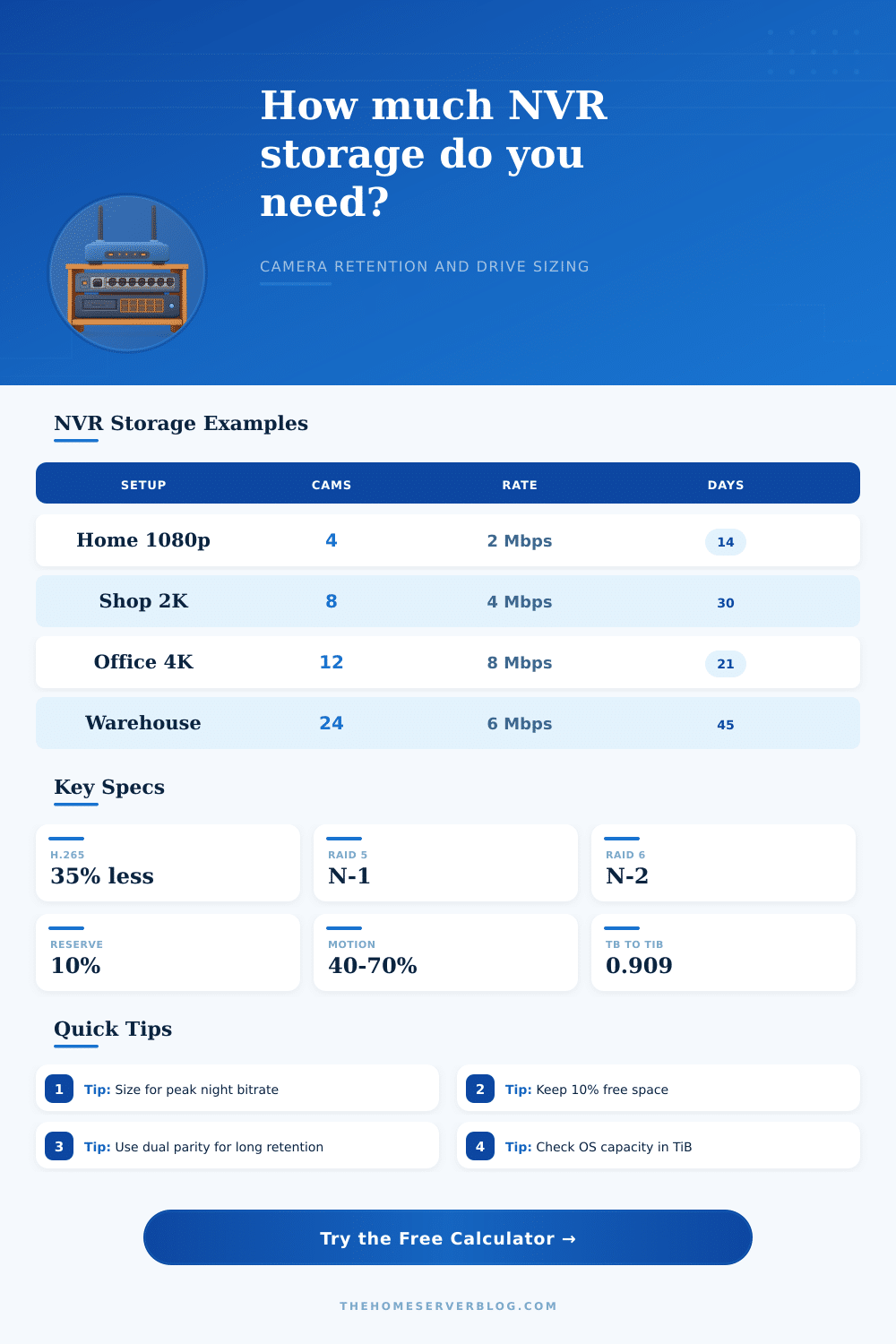
| Small home | 4 x 1080p H.265 at 2 Mbps | About 2.6 TB | 2 x 6 TB mirror fits |
| Detached garage | 6 x 2K H.265 at 4 Mbps | About 7.8 TB | 3 x 6 TB RAID 5 fits |
| Small shop | 8 x 2K H.265 at 4 Mbps | About 10.4 TB | 4 x 8 TB RAID 5 fits |
| Office floor | 12 mixed cameras at 5 Mbps | About 19.4 TB | 5 x 8 TB RAID 5 fits |
| Warehouse | 24 cameras at 6 Mbps | About 46.7 TB | 8 x 12 TB RAID 6 fits |
| 4K exterior | 8 x 4K H.265 at 9 Mbps | About 23.3 TB | 6 x 10 TB RAID 6 fits |
When choosing an amount of storage to purchase for a network video recorder (NVR), a person must understand how the camera generate data. The number of drives that a chassis can hold are not the only consideration when purchasing storage for an NVR. The storage requirements for an NVR depend on the number of cameras, the resolution of the cameras, the codec of the cameras, and the drive configuration.
The calculator makes it easy for a person to enter each of these variables into the calculator to determine the storage requirements of the NVR. Using the calculator will ensure that a person does not purchase either too much or too little storage for the network video recorder. Many individuals feel that the number of cameras and the resolution of each of those cameras is the only factors that determine the amount of data that an NVR must store.
How to Calculate Storage for an NVR
However, the recording schedule for each of the cameras is also a factor in the amount of storage for an NVR. Cameras with different recording schedules will use different amount of storage for an NVR. For example, a camera that captures images of a quiet hallway will experience significantly less data being recorded than a camera that monitor a loading dock with heavy traffic.
By using the duty cycle setting for the NVR in the calculator, a person can ensure that the data is correctly calculate for each of the cameras. For example, if the duty cycle is not properly adjusted for each of the cameras, it is possible that the NVR will not be able to store enough data to meet the retention goal of the network. Another factor that affect the amount of storage that an NVR will use is the codec for each camera.
For example, by changing from an H.264 codec to an H.265 codec, the user can reduce the bitrate for the surveillance footage. By using the codec selection in the storage calculation calculator, the storage requirements that are display for the NVR will calculate the reduction in storage that occurs by implementing this codec change. The storage savings from using an H.265 codec will be more noticeable with a higher number of cameras, as well as if the NVR is configured to keep thirty or sixty days of footage.
The RAID layout for the NVR will also impact the amount of usable storage that an NVR have in the NVR. For example, RAID layouts that use single parity will leave one drive’s capacity unavailable for data storage. RAID layouts that use dual parity will leave the capacity of two drives unavailable for data storage.
A RAID layout must be chosen to account for the possibility of a drive failure within the NVR. By choosing a RAID layout that does not provide enough protection for the drives, the NVR could be at risk of data loss due to the failure of one of those drives. The calculator will show the usable storage after the drives are set up in a RAID layout to provide the level of protection that is require for the data that will be stored.
The frame rate and whether or not the cameras record audio will also contribute to the amount of data that the network video recorder must store. Most surveillance cameras has a default frame rate of either fifteen or twenty frames per second. Additionally, if audio is enabled for every camera, that will contribute to the amount of data that is stored.
Although these settings may not appear to have much effect on a single surveillance camera, those settings will have a similar linear effect on the total amount of storage if applied to every camera in the NVR system. These settings can be adjusted in areas where there is little activity to reduce the amount of data that those surveillance cameras store. Each camera has the potential to record motion detection.
Items such as the wind moving branches in the surveillance area or the headlights of passing cars can trigger motion detection. These triggers will result in the surveillance camera continuously recording footage. By using the growth buffer for the NVR in the calculator, a person can ensure that there is enough storage for the data created by these motion detection triggers.
Without properly adjusting for motion detection in the NVR, the storage space for the NVR may be exhausted prior to the recording of the surveillance footage that was planned. Additionally, the size of each drive and the number of drives that are set aside as hot spares will also impact the amount of storage for the NVR. By using drives of larger sizes, fewer drive bays will be required to contain the surveillance cameras’ storage need.
However, larger drives will result in longer times to rebuild those drives in the case of a drive failure. Hot spare drives can be set aside to protect the NVR and cameras from data loss due to a drive failure. However, setting aside drives as hot spares will reduce the amount of storage available for surveillance footage.
The storage calculator will display the raw capacity of each drive and the net usable space after setting aside drives as hot spares. The reference tables in the calculator display the typical bitrates for various resolutions for surveillance cameras. Additionally, the reference tables illustrate how the RAID layouts will impact the usable amount of space in the NVR.
These tables are useful in determining if the storage needs of an NVR will be met, but they are not strict rules. For example, a warehouse that experiences a great deal of traffic will generate significantly more data from surveillance cameras than an empty warehouse of the same size. The reference tables are merely an estimate to the data needs of an NVR, and adjusting for the actual conditions of the NVR will result in adjustments to the storage requirements.
The goal in determining the amount of storage that an NVR will require is to find the best configuration for the NVR for providing the desired amount of data retention. The configuration should provide the necessary amount of retention while leaving enough storage for potential exports and database growth. By using this calculator, a person can gain insight into the different storage configurations that could be used within an NVR.
By using this calculator, a person can make a decision about storage that is based on the actual conditions of the NVR and its requirement.