iSCSI Throughput Calculator
Estimate practical iSCSI SAN throughput from NIC rate, active paths, MTU, TCP window, iSCSI overhead, queue depth, block size, storage media, and home lab safety margin.
iSCSI Throughput Breakdown
| Profile | Good fit | Realistic payload | Planning note |
|---|---|---|---|
| 1GbE home NAS port | Small LUNs, boot targets, light backups | About 110 MB/s | One HDD mirror can often saturate it |
| 2x1GbE MPIO ports | Multiple VMs or multiple initiators | About 210 MB/s | Needs round-robin and multiple outstanding I/O |
| 2.5GbE mini server | Compact NAS, Proxmox lab, SATA SSD target | About 280 MB/s | Often limited by USB NICs or switch buffers |
| 10GBASE-T lab switch | General home SAN and fast backup windows | About 1.1 GB/s | Latency and heat vary by adapter and cable |
| 10GbE SFP+ direct attach | Low-latency server-to-storage links | About 1.15 GB/s | Usually easier jumbo-frame behavior than copper |
| 25GbE SFP28 flash target | All-flash pool, several hosts, heavy VMs | About 2.9 GB/s | Storage and PCIe lanes usually matter next |
| Virtual iSCSI vSwitch | Nested lab, software initiators, test clusters | Host dependent | vCPU scheduling can dominate peak numbers |
| Remote routed iSCSI link | Lab replication tests, not primary VM disks | RTT limited | TCP window and packet loss matter more than MTU |
Ethernet payload rates are planning values. Real systems also depend on HBA driver, initiator stack, target service, interrupt moderation, and storage pool behavior.
| Path setting | What it changes | Typical factor | Home lab caution |
|---|---|---|---|
| 1500 MTU | More frames and interrupts per GB | 0.90 to 0.94 | Safest default across mixed switches |
| 9000 MTU | Fewer Ethernet, IP, TCP, and iSCSI headers | 0.96 to 0.99 | Every hop must match or large packets fail |
| Header digest | Extra integrity work for iSCSI PDUs | 0.92 to 0.97 | Useful on risky paths, rarely needed on a clean VLAN |
| CHAP | Authentication during session setup | 0.97 to 1.00 | Little data-plane cost after login |
| Storage VLAN | Isolation, QoS marking, easier troubleshooting | 0.98 to 1.00 | Does not fix an oversubscribed uplink |
| Routed or tunneled path | More latency and possible fragmentation | 0.75 to 0.90 | Avoid for active VM datastores unless tested hard |
| Target media | Sequential range | Random IOPS range | Throughput bottleneck pattern |
|---|---|---|---|
| HDD RAIDZ or parity pool | 250-800 MB/s | 500-3,000 | Random writes and parity math limit VM datastores |
| HDD mirrors or RAID10 | 350-1,200 MB/s | 1,000-8,000 | Good for mixed home VM loads with enough disks |
| SATA SSD array | 800-2,000 MB/s | 25k-100k | 10GbE can become the cap before media does |
| NVMe mirror | 1,500-5,000 MB/s | 100k-400k | 25GbE or PCIe lanes may be needed for peak reads |
| All-flash NVMe pool | 4,000-12,000 MB/s | 300k-1M | Initiator CPU and queue depth often show up next |
| RAM disk target | 10,000+ MB/s | 1M+ | Useful for isolating network limits during testing |
| Scenario | Likely active limit | Good target | Extra check |
|---|---|---|---|
| Single host boot LUN | Random read IOPS and target latency | 1GbE to 2.5GbE | Boot storms need queue depth and caching |
| Small Proxmox cluster | MPIO balance and storage pool writes | 2x10GbE for shared VM storage | Separate migration traffic from storage VLAN |
| Nightly backup target | Sequential write ceiling | 10GbE if backup window is short | Measure compression and dedupe CPU load |
| Database VM LUN | Small-block IOPS and latency | NVMe target plus low RTT | Use synthetic and application-level tests |
| All-flash lab SAN | Initiator CPU, PCIe, or 25GbE link | 25GbE or multiple 10GbE paths | Confirm MPIO policy uses all paths |
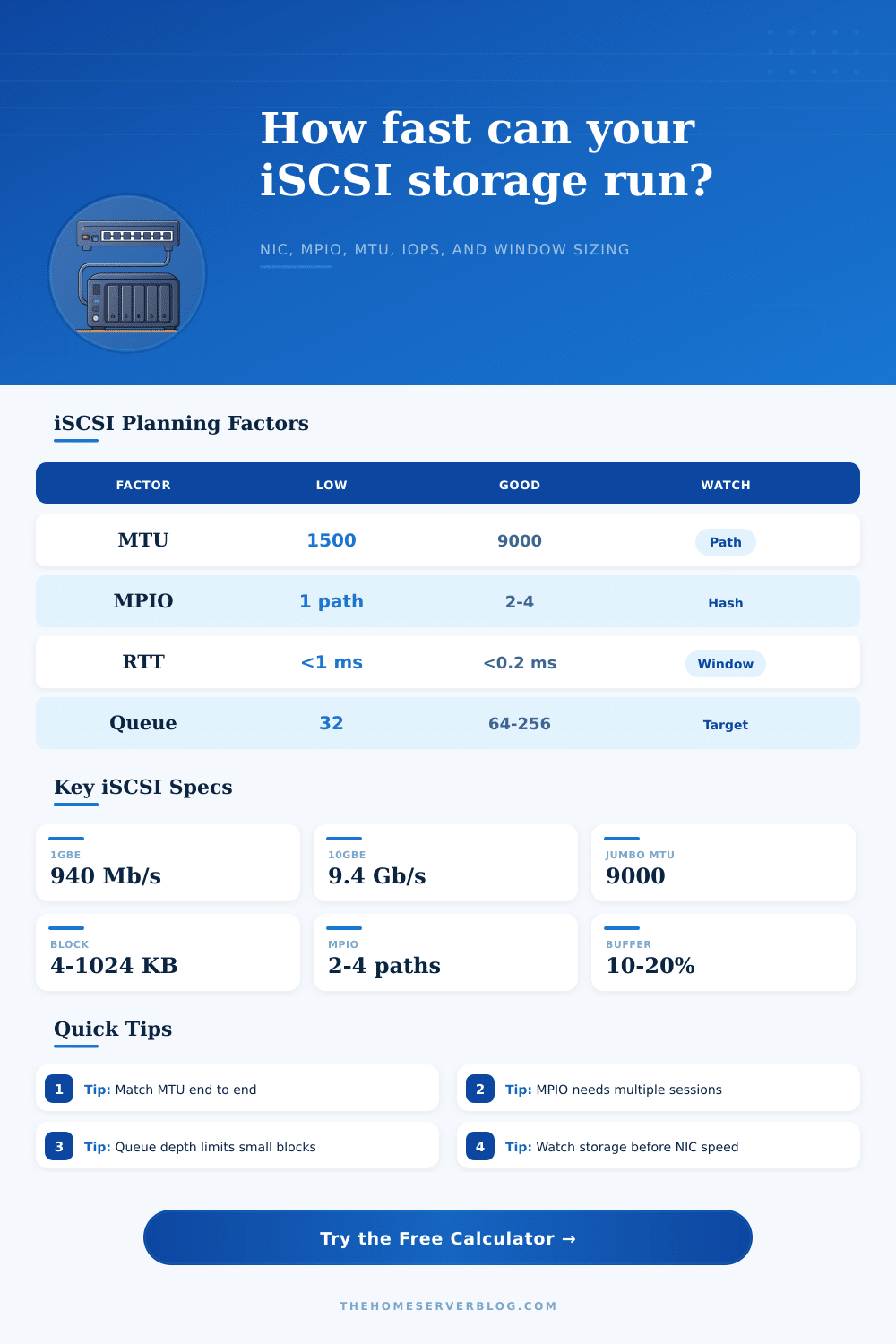
Performance in home laboratory can be limited by the task of connecting a server to storage. The iSCSI protocol is used to connect a standard Ethernet networks to storage, but the configuration of that protocol can have a direct impact on iSCSI. Factors like the size of the Maximum Transmission Unit (MTU) of the network and the number of open session can impact the amount of data that passes through the iSCSI network.
Consequently, the performance of virtual machines that is installed on a machine can be smooth or experience stuttering depending upon how these factors of the iSCSI protocol are configured. The link between a machine and the network is another majorly contributing factor to the performance of iSCSI. A single link of 1 GbE may not be sufficient for the requirements of iSCSI if data must also travel over that same network for other tasks.
What Affects iSCSI Performance
Additionally, the 1 GbE link may become a bottleneck for virtual machines if they is installed on the machine and require a high degree of speedly. A calculator may be used to determine the actual speed at which the link between a machine and the network will perform. Such a calculator requires the entry of fields relating to the speed of the link, the number of active paths through the link, and the policy regarding path selection (multipathing policy).
Another major factor in iSCSI is the latency between the machine and the storage system. Latency can impact the way that the Transmission Control Protocol (TCP) fills the pipe between the machine and storage system. If the latency to the storage system is small in time measurements, that latency may still limit the performance of the TCP protocol.
The bandwidth-delay product for TCP will limit the amount of data that can pass through the network. If the TCP window size for data is too small for the distance between the machine and the storage system, adding more bandwidth to the network will not increase the speed at which the data can travel. This tool requires the entry of the TCP window size and the latency between the machine and the storage system to determine which of these two factors are limiting iSCCI performance.
The size of the blocks of data in storage and the depth of the queue that is used for the storage system are two additional factors that impact the performance of iSCSI. For instance, databases may require deep queues and fast storage systems to accommodate for the number of requests for small amount of data. Small amounts of data do not necessarily require fast Network Interface Cards (NICs).
Additionally, large amounts of data that are to be continuously backed up will require both the storage system to have the ability to sustain those large amounts of data to backup, but additionally those backups will require that the NIC has the ability to sustain those large amount of data. The workload selector within the calculator allows for the selection of the weight of each of these factors to reflect the type of traffic that is to run on the storage system. The storage media itself is yet another factor that can impact the performance of iSCSI.
Storage systems based upon Hard Disk Drive (HDD) media that implement parity may exhibit high speed in the testing of those drives for sequential writing of data, but the parity calculations and the random I/O operations that may occur can reduce the actual performance of those drives. Using NVMe (Non-VRSA Memory) mirrors for the storage drives can similarly impact the performance of the storage system, but only if the initiator of the storage system has enough commands in flight for those NVMe drives and if the CPU is not overwhelmed by the number of interrupt that the NVMe drives can send. Tables on the storage system website detail the potential performance of each type of storage system, and those tables can help determine whether additional paths should be added to the network or whether the type of storage disk should be changed.
Multipath Input/Output (MPIO) allows for two or more paths for data between a machine and storage. However, using two cables to provide two paths for the data does not automatically provide double the speed of the data that can move through the network. For instance, if a round-robin policy is used to distribute the data among the paths, it is necessary to have multiple sessions created between each path and the storage system to allow for the even distribution of data to each path.
Similarly, if a least-queue-depth policy is used, one path may remain idle while data passes through another path to avoid the congestion that may build up within that one path. A multipathing factor within the calculator can help determine these policies and how they may impact the performance of the storage system with respect to data movement. Using jumbo frames for the network can increase the efficiency with which the data is moved between the machine and the storage system, but small mistakes in the setup of jumbo frames can cause problems.
For instance, for jumbo frames to enable efficiency in moving data, every device on the network must have the same Maximum Transmission Unit (MTU) size for the network. If the devices do not all have the same size for the MTU, dropped packets and stalls in data through the network will result. The jumbo frame efficiency calculation tool only applies an estimate for the efficiency of the jumbo frames with the network.
Additionally, security and encapsulation for data on the network can impact performance as well. For instance, implementations of challenge handshake protocol (CHAP) for authentication have a low impact on the data rate after the initial login into the storage system. Additionally, the use of header digests, data digests and encrypted tunnels for security protocols will impact the performance of the storage system.
However, if the data travels through a shared fabric for the network switch, it is possible for congestion to occur due to other data traveling on that network. To avoid this, dedicated VLANs for storage will avoid the congestion caused by data traveling on the network for other tasks. Each of these impacts is not likely to be large individually in their impact on the performance of the storage system, but the combination of their impacts can work to make an adequate link between the machine and the storage system feel slow.
The value of calculating each of these factors is that they can help to determine which of the limiting factors is impacting the performance of the iSCSI connection between the machine and storage system. The limits to performance can be the network, the storage system itself, or the TCP protocol. Knowing which of these limits to performance will allow for a step to be taken to fix the problem.
Thus, these calculations help to turn a collection of individual computer components into a storage system that performs according to the expectation of the system administrator.