HomeServerBlog Ethernet wire-rate planner
Line Rate Throughput Calculator
Estimate Ethernet payload throughput, packets per second, framing overhead, and efficiency from link speed, frame size, VLAN tags, FCS handling, protocol headers, duplex mode, utilization, stream count, and useful payload size.
1Ethernet presets
2Line-rate inputs
Calculation breakdown
Fit and stream status
3Current frame details
Frame plus preamble, IFG, VLAN tags, and FCS mode.
Ethernet header, tags, payload field, and FCS when counted.
Frame payload ceiling minus protocol overhead.
Aggregate payload divided across the stream count.
4Protocol comparison grid
5Ethernet overhead tables
| Ethernet component | Bytes | Counts in capture? | Line-rate note |
|---|---|---|---|
| Preamble plus start frame delimiter | 8 | Usually no | Consumes wire time before every Ethernet frame. |
| Inter-frame gap | 12 | No | Idle byte-times that still reduce maximum pps. |
| Destination and source MAC | 12 | Yes | Part of the 14 byte Ethernet II header. |
| EtherType or length field | 2 | Yes | Completes the normal 14 byte Ethernet header. |
| 802.1Q VLAN tag | 4 each | Usually yes | Adds 4 bytes per tag on a trunk or tagged access frame. |
| Frame check sequence | 4 | Often no | Present on the wire even when packet captures hide it. |
| Common frame case | Wire bytes | 1G maximum pps | 10G maximum pps |
|---|---|---|---|
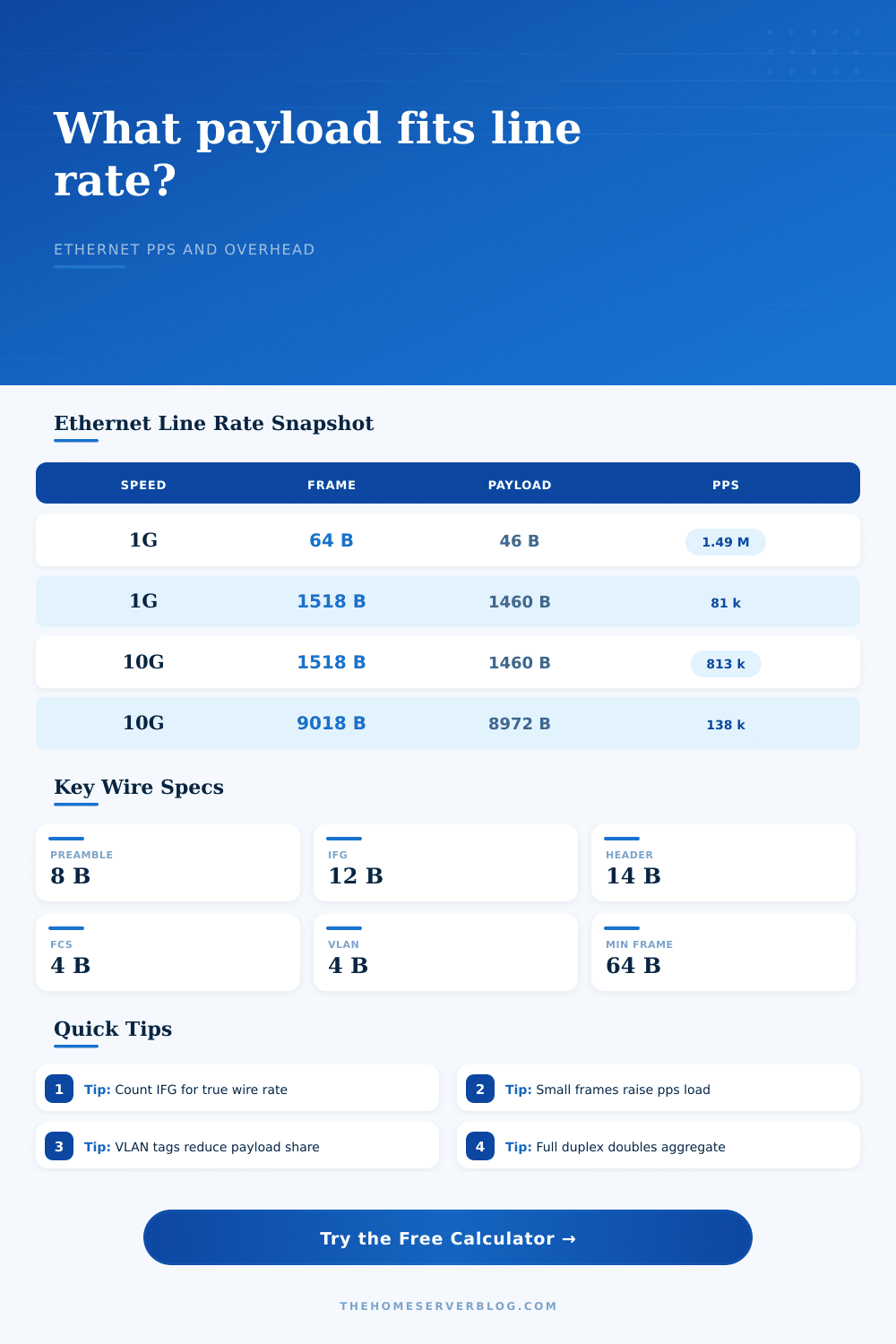
| Minimum untagged Ethernet frame | 84 B | 1,488,095 | 14,880,952 |
| Minimum single-tag VLAN frame | 88 B | 1,420,455 | 14,204,545 |
| 1500 MTU, untagged, FCS counted | 1538 B | 81,274 | 812,744 |
| 1500 MTU, one VLAN tag | 1542 B | 81,063 | 810,635 |
| 9000 MTU, untagged jumbo | 9038 B | 13,830 | 138,304 |
| 9000 MTU, one VLAN tag | 9042 B | 13,824 | 138,243 |
| Protocol profile | Overhead inside MTU | Typical payload at 1500 | Use in home labs |
|---|---|---|---|
| IPv4 TCP | 40 B | 1460 B | NAS, HTTP, SMB, backups, and most tests. |
| IPv4 UDP | 28 B | 1472 B | iperf3 UDP, DNS, RTP, telemetry, and tunnels. |
| IPv6 TCP | 60 B | 1440 B | Dual-stack services and routed IPv6 labs. |
| PPPoE IPv4 TCP | 48 B | 1452 B | Fiber or DSL WAN where PPPoE reduces MTU. |
| WireGuard IPv4 TCP | 100 B | 1400 B | Remote home server VPN and site-to-site links. |
| VXLAN IPv4 TCP | 90 B | 1410 B | Virtualization overlays and tenant networks. |
| Planning scenario | Frame size to test | Overhead focus | Practical note |
|---|---|---|---|
| Firewall small-packet forwarding | 64 to 128 B frames | Packet rate | CPU, ASIC, NAT, and rule count usually matter more than Mbps. |
| NAS or backup throughput | 1500 or 9000 MTU | Payload efficiency | Jumbo frames reduce pps only when every hop supports them. |
| VLAN trunk uplink | 1504 plus tags | Tag overhead | One or two tags slightly reduce payload rate and pps ceiling. |
| VPN over Ethernet | 1200 to 1420 payload | Tunnel headers | Compare encrypted goodput with CPU and NIC offload limits. |
| Full duplex storage replication | 1500 to 9000 MTU | Aggregate direction | Full duplex can receive and transmit line rate at the same time. |
6Line-rate calculation tips
The trick with line rates is that you can have a pipe filled with either rock or water, they may appear equally full on the outside but one are full of something else. Gigabit links sound impressive until you want to shove a million tiny packets down them. The calculator above will do the maths for you. But knowing how and why those numbers shift is more important then the tool itself.
A frame on Ethernet isn’t simply a stream of valuable data bits. It’s a frame carrying baggage. It includes the preamble and start frame delimiter. It also contains destination and source MAC addresses and frame check sequence. And don’t forget about the inter-frame gap; those dozen idle byte-times between each frame that allow for receiver resets and collision avoidance. These invisible bytes is often hidden in packet captures. The result? Your lab tests may indicate 90 percent efficiency when in reality the wire’s been choked by overhead. Count what you’re not seeing.
Why Small Packets Slow Down Your Network
The lever you pull is frame size. Big frames such as jumbo packets carries more payload per header which lowers the overhead-to-useful-data ratio. Small frames do just the opposite. A sixty-four byte packet isn’t much; it is mostly overhead. The wire sends your files along with headers and gaps, but with small frames, it spend most of its time transmitting those headers and gaps rather than your actual data. Your switch or firewall may hit its packets per second limit on small frames; your throughput will drop to zero though your Mbps use may look low.
Then there’s VLAN tags on top of that. A single eight-zero-two-dot-one-Q tag is just four bytes. Those four bytes take away from your MTU. Yeah, you may think you’ve got fifteen hundred bytes to play with as payload, but there’s the tag. It reduces it. Double tagging in QinQ reduces it even more. It is a small thing, but it matters if you are trying to squeeze every ounce of bandwidth out of an uplink trunk.
This is made worse by protocol overhead. Ethernet adds fourteen bytes, IP adds another twenty, TCP adds another twenty. And that’s before you’ve even sent a single byte of your file. Layer VPNs such as VXLAN or WireGuard on top and now you’re tunneling packets within packets. Every tunnel header is pure cost. The wire frame remains the same size or even grows, but your effective payload shrinks. That’s why encrypted tunnels can feel slow relative to raw Ethernet. The bandwidth is there; it’s just that payload capacity are gone.
The math changes when you factor in duplex: full duplex means being able to transmit and receive simultaneously at line rate. At a gigabit/second, you’re sending and receiving at the same time. Half duplex shares that medium. Because total capacity is wildly different across these two types of operation, the calculator takes it into account. Remember: sending and receiving both ways is only a possibility; one direction at a time is what actualy happens.
Safety valves are usage targets. If you push a link to a hundred percent of capacity, you’re begging for congestion. Windows will burst; packets will get lost and retransmitted; latency will spike. A use target of ninety-five percent gives room for interrupts to be handled and for flow control. Networks should breathe. When there’s a burst, they need somewhere to expand in.
That’s where the page’s reference table comes into play. For typical cases, it spells it all out: As frame size increases, the packets per second (pps) ceilings decreases. With minimal-size frames, a one-Gigabit link can process more than a million packets per second, while full-sized jumbo frames will limit that to just under eighty-one thousand. That’s a tenfold difference in the packet processing load! When switches and CPUs reaches their interrupt-per-second limit, it doesn’t matter if you still have plenty of bandwidth; the hardware has reached its throughput limit, and no longer cares.
The math isn’t hard; it’s its interpretation that makes the plan succeed or fail. Packets per second is what matters for smaller frames. Payload efficiency matters when you’re trying to send big files. Don’t lose yourself in the raw Mbps numbers. The pipe might be wide enough for a truck, but if it’s stuffed with gravel, you should of known you ain’t going nowhere. Leave yourself some breathing room, respect the overhead, and keep frame sizes honest.