HomeServerBlog Calculator
MAC Address Table Size Calculator
Estimate switch CAM table load from physical endpoints, bridged Wi-Fi clients, virtual NICs, VLAN copies, static entries, topology spread, and churn headroom.
▣Real Switch CAM Table Presets
⚙Table Load Inputs
📊Equipment Spec Comparison Grid
🗂Reference Tables
| Switch or Family | MAC Table Size | Switching Capacity | Planning Note |
|---|---|---|---|
| TP-Link TL-SG108E | 4K | 16 Gbps | Small smart desktop switch; tight for dense VM labs. |
| D-Link DGS-1100-08 | 4,160 | 16 Gbps | Similar 8-port smart class with a slightly above-4K table. |
| NETGEAR GS308E | 4K | 16 Gbps | Good edge switch; avoid making it a big VLAN aggregation point. |
| NETGEAR GS108T | 8K | 16 Gbps | More comfortable for home office trunks and small lab switching. |
| Aruba Instant On 1930 | 8K | Varies by port count | Useful small-business class baseline for mixed wired and wireless LANs. |
| Ubiquiti UniFi US-8-150W | 16K | 20 Gbps | PoE edge switch with enough room for AP-bridged client learning. |
| Cisco Business CBS350 | 16K | Varies by model | Managed SMB switch family with enterprise-style table behavior. |
| Cisco Catalyst 2960-X | 16K | Varies by model | Common used lab access switch; SDM template affects resources. |
| Juniper EX2300 | 16K | Varies by model | Branch/access switch class with a 16K hardware MAC table. |
| Cisco Catalyst 2960-XR VLAN template | 32K | Varies by model | High-L2-density SDM profile, useful for many learned MACs. |
| Utilization Band | Operating Meaning | Likely Symptom | Recommended Action |
|---|---|---|---|
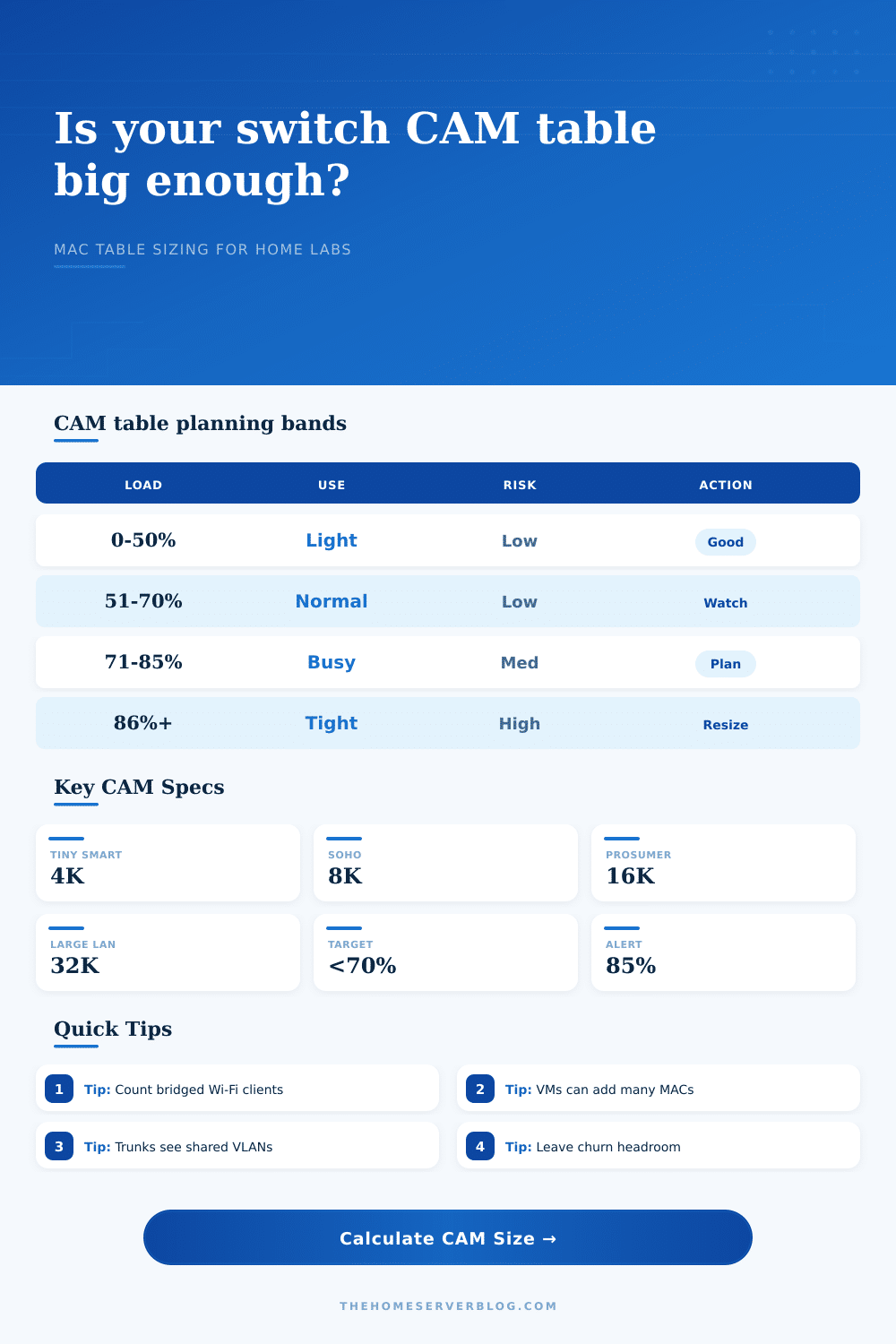
| 0-50% | Comfortable | No CAM pressure | Normal monitoring is enough. |
| 51-70% | Healthy but active | Roaming spikes fit | Keep headroom for new APs or hypervisors. |
| 71-85% | Busy | Short spikes may age entries faster | Reduce L2 spread or choose a larger table. |
| 86-100% | Risky | Unknown unicast flooding can rise | Segment VLANs or move aggregation to a larger switch. |
| Over 100% | Oversubscribed | Frequent relearning and flooding | Do not use this switch for the modeled role. |
| Topology Pattern | Calculator Multiplier | Why Entries Grow | Home Lab Example |
|---|---|---|---|
| Single access switch | 1.00 | Mostly local endpoints | One switch, one router, a few VLANs. |
| Two-switch home office | 1.10 | Some entries cross an uplink | Desk switch uplinked to a closet switch. |
| Access switch with AP trunks | 1.20 | SSID clients appear behind AP ports | Two APs bridging LAN, IoT, and guest. |
| Hypervisor or Proxmox rack | 1.35 | Many virtual NICs can move or restart | Three nodes, nested routers, lab VLANs. |
| Distribution switch or core trunk | 1.50 | Aggregates several access domains | Core switch carrying all VLAN trunks. |
| MLAG pair or lab fabric edge | 1.70 | Redundant links widen L2 visibility | Dual uplinks, storage VLANs, test fabric. |
| Common Project Size | Typical MAC Sources | Estimated Entries | Switch Class Fit |
|---|---|---|---|
| Home Office Edge | 15 wired, 25 Wi-Fi, 3 VLANs | 50-90 | 4K table is plenty. |
| Camera and IoT Closet | 35 wired, 20 Wi-Fi, 4 VLANs | 80-150 | 4K to 8K table is comfortable. |
| Proxmox Mini Cluster | 25 wired, 80 virtual, 6 VLANs | 180-450 | 8K table gives easier headroom. |
| AP Aggregation Switch | 20 wired, 250 Wi-Fi, 5 VLANs | 350-700 | 8K to 16K is safer. |
| Nested Network Lab | 60 wired, 400 virtual, 10 VLANs | 1,000-2,500 | 16K recommended. |
| Event or Lab Fabric | 150 wired, 900 Wi-Fi, 12 VLANs | 2,000-5,000 | 16K to 32K for comfort. |
MAC tables are Layer 2 forwarding databases. VLAN-aware switches usually track learned entries as a MAC-and-VLAN association, so the same device can consume more than one slot when it appears in multiple VLANs.
⚡Practical Sizing Tips
For most home lab builders, the biggest metrics of performance are port count and switching capacity. And so, you invest in 5G links. You also need enough PoE budget for all your access points. That makes sense. Bandwidth is a visible bottleneck. You see it when a file transfer take longer then expected or when a video buffers. You say “the internet was too slow.”
But what isn’t visible is a bottleneck within the switch silicon itself. This occurs in the Content Addressable Memory (CAM) table, or MAC address table, which acts as directory within the switch. If this table is too small, then the switch will begin to flood traffic everywhere and stop making efficient forwarding decisions. Your network slows down, but not because it’s missing bandwidth, because it forgot where to send it.
Don’t Let Your Switch Memory Get Full
The above calculator can help you get a sense for what kind of load your specific setup puts on this hardware resource. And that’s the point: Number of devices doesn’t matter as much as how many devices your switch thinks there are. One laptop hooked up to a typical access port use a table entry. Simple math. But hooking up a hypervisor with two dozen virtual machines? Or bridging wireless client traffic over several VLANs? Those change the equation fast.
The tool includes such multipliers. Enter in quantity of bridged Wi-Fi clients, or the number of VMs you’re running, and the tool will add a copy factor, how many times does each MAC address show up across various virtual LANs? This is where the average person makes their mistake. They count endpoints instead of table entries. While a 4,000-entry switch may be able to handle 50 wired PCs without blinking an eye, it may choke under a handful of virtual machines distributed over half a dozen VLANs.
Consider the table as a shelf with a certain number of slots, and each unique MAC address as an item on that shelf. When a device connects, it occupy a slot. The switch doesn’t create another; it just updates the slot when the device changes ports. That’s where the concept of aging time comes in. Most switches will purge unused entries within five minutes. Why? Because they don’t want their table filled with entries for devices that were turned off hours ago. They only want to keep entries for devices currently active.
The problem arises when your environment changes a lot (e.g., wireless clients roam around the building or VMs start and stop). In such cases, there’s so much churn that the switch spends all of its time rewriting its forwarding database. Eventually, the table gets full, at which point the switch falls back. It begins broadcasting unicast traffic on all ports. What was previously a Layer 2 network becomes nothing more than a Layer 1 broadcast storm, wasting bandwidth and eating up CPU cycles.
To give us an idea of what those numbers mean for actual hardware, the tool provides useful reference tables. Typically, entry-level smart switches will have tables in the range of 4,000 entries. That’s fine for a basic desktop with a few cameras and a printer. Prosumer and enterprise models tend to ship with 16,000 entries or more. In fact, 16K versus 4K isn’t really about speed; it’s about scale.
Do you have a guest network? Do you have an IoT VLAN? Do you have a server farm? Do you have multiple departments in your home office? You’ll want that headroom. The calculator allows you to see how much headroom remains, so if the number gets down into the red zone, you’re risking unknown unicast flooding.
As a general rule of thumb, shoot for less than seventy percent table utilization. This accommodates normal network traffic fluctuations, surprise visitors, and any new equipment you might want to plug in to test out briefly. For a lab environment, leave yourself even more buffer. Virtual machines can get messy with MAC addresses. Virtual switches, container networks, and nested routers will all spit out entries that wouldn’t be seen in the real world. By including extra space for changes and static entries, it gives you control to tweak for this type of messiness. It encourages you to think about the hidden topology complexity.
In short, don’t pick a switch based off what’s visible on the front panel. Pick one that fits your network’s size and shape, a device that will learn its way around but won’t fill up. When it does overflow, the results are subtle yet noticeable: the network slows down, degrading in a way you’re unable to trace to a single source. Maybe it’s your wireless router, maybe it’s your ISP. But really, it’s just a stuffed-up CAM table.
Get the hardware right from the start so you never need to worry about having enough memory. You’ll thank yourself later if your network starts to feel like it has too much traffic even though you’ve got lots of bandwidth. Better to leave some breathing room in the table than to end up with a head scratcher of a mystery as to why your network is feeling congested. There should always be room for another book on the shelf.