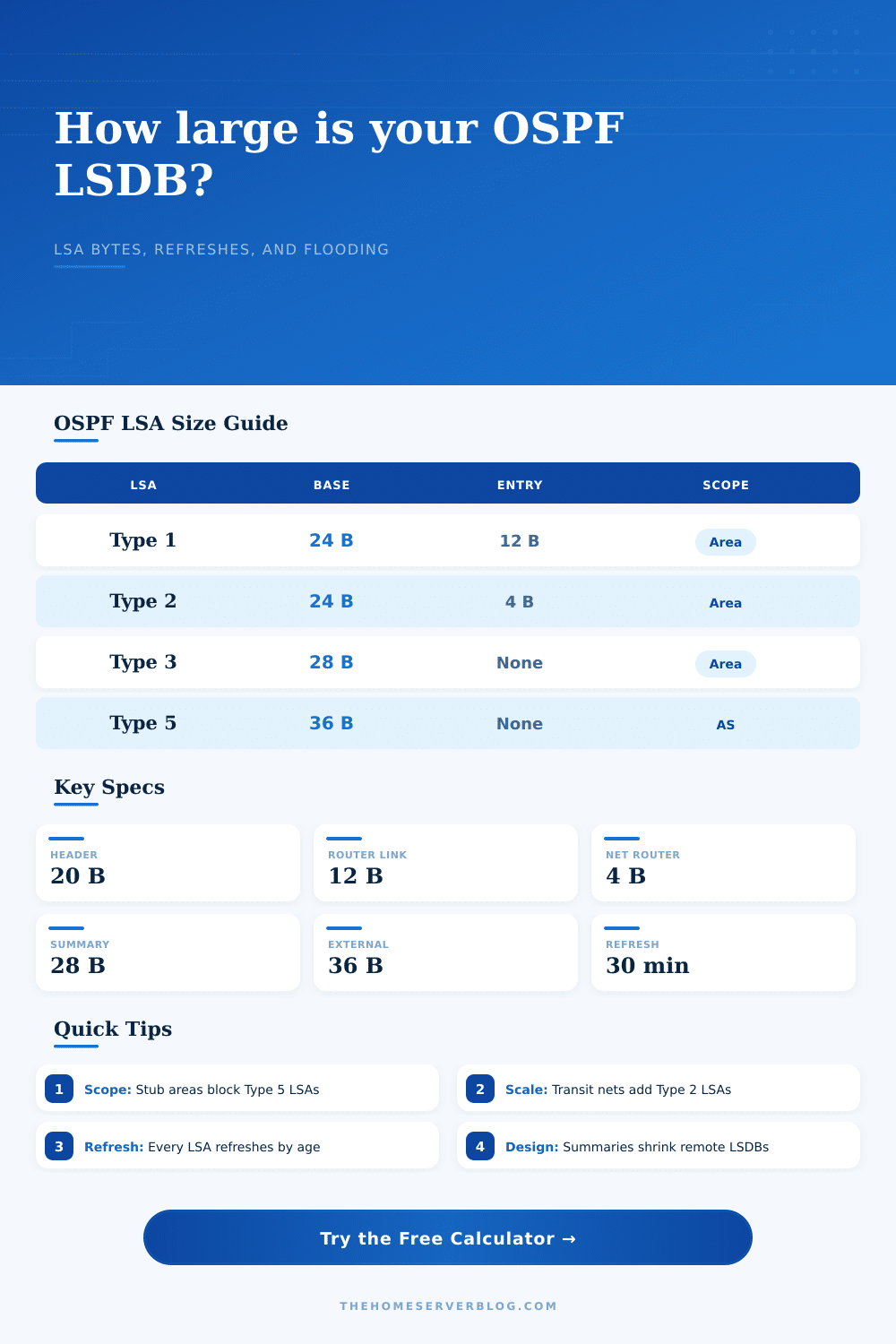
OSPF LSA Size Calculator
Estimate OSPFv2 LSDB size, LSA type mix, refresh load, and topology-change flooding for a home lab, lab core, or routed VLAN design.
Full LSA Breakdown
Type 1 Router-LSA
- Origin
- Every router in the area.
- Formula
- 24 bytes + 12 bytes per router link description.
- Scope
- Flooded only inside the originating area.
- Design note
- Loopbacks, passive VLANs, and point-to-point links increase entries.
Type 2 Network-LSA
- Origin
- Designated router on broadcast or NBMA segments.
- Formula
- 24 bytes + 4 bytes per attached router ID.
- Scope
- Flooded inside the local area only.
- Design note
- Point-to-point network type avoids Type 2 LSAs.
Type 3 Summary-LSA
- Origin
- ABRs advertising networks between areas.
- Formula
- 28 bytes per summary prefix.
- Scope
- Flooded into the receiving area.
- Design note
- Route summarization reduces remote LSDB size sharply.
Type 4 ASBR Summary
- Origin
- ABRs describing how to reach an ASBR.
- Formula
- 28 bytes per ASBR summary LSA.
- Scope
- Flooded where external reachability is needed.
- Design note
- Often small, but visible in multi-area redistribution labs.
Type 5 AS-External
- Origin
- ASBR redistributing connected, static, or another protocol.
- Formula
- 36 bytes per external route.
- Scope
- Flooded through normal areas, blocked by stub areas.
- Design note
- Default-only redistribution is far lighter than many specifics.
Type 7 NSSA External
- Origin
- ASBR inside a not-so-stubby area.
- Formula
- 36 bytes per NSSA external route.
- Scope
- Local NSSA scope, commonly translated to Type 5 by an ABR.
- Design note
- Useful for edge labs that need controlled redistribution.
| LSA or Packet Item | Size Formula | What Adds Entries | Useful Design Reading |
|---|---|---|---|
| LSA common header | 20 bytes | Every LSA instance | Age, type, ID, advertising router, sequence, checksum, length |
| Router-LSA | 24 + 12 per link | P2P links, transit links, loopbacks, stubs | Usually the main area-topology contributor in small labs |
| Network-LSA | 24 + 4 per attached router | Broadcast or NBMA segments with a DR | Shared VLANs create a compact but separate topology LSA |
| Summary-LSA | 28 per prefix | ABR inter-area advertisements | Summarize at ABRs when many VLANs leave an area |
| External or NSSA LSA | 36 per prefix | Redistributed static, connected, BGP, or default routes | External-heavy labs grow faster than pure internal OSPF |
| Link State Update packet | OSPF 24 + count 4 + LSAs | LSAs packed up to payload limit | Smaller MTUs raise packet count and per-packet overhead |
| Area Model | Type 3 Behavior | Type 5 Behavior | Type 7 Behavior |
|---|---|---|---|
| Normal area | Inter-area summaries allowed | AS-external LSAs flooded in | Not normally used |
| Backbone area 0 | Central inter-area transit | AS-external LSAs flooded unless filtered by design | Receives translated routes, not Type 7 directly |
| Stub area | Summaries may be allowed | Blocked from the area | Not used |
| Totally stubby area | Typically default summary only | Blocked from the area | Not used |
| NSSA | Summaries may be allowed | Blocked locally | Allowed inside the NSSA |
| Framing Profile | Estimated Overhead | Typical Payload Limit | When to Use It |
|---|---|---|---|
| IPv4 OSPF over Ethernet | 66 bytes per LSU packet | 1400 to 1460 bytes | Home lab VLAN or routed switch links with standard MTU |
| 802.1Q VLAN trunk | 70 bytes per LSU packet | 1396 to 1456 bytes | Lab routers connected through tagged switch ports |
| PPPoE or small WAN MTU | 74 bytes per LSU packet | 1200 to 1412 bytes | Edge lab or routed tunnel with reduced MTU |
| GRE or IPsec lab tunnel | 110 bytes per LSU packet | 1200 to 1360 bytes | Virtual WAN, overlay, or encrypted home lab transport |
| Topology Pattern | Common LSA Pressure | Expected Risk | Calculation Watchpoint |
|---|---|---|---|
| Tiny two-router area | Router-LSAs dominate | Low | Loopbacks can outnumber real links |
| Routed home VLAN core | Stub prefixes and summaries | Low to medium | Each SVI commonly appears as a stub network |
| Virtual router mesh | Many point-to-point link records | Medium | Adjacency count drives flood copies |
| Redistribution lab | Type 5 or Type 7 routes | Medium to high | Summarize or default external routes if practical |
| Multi-area home core | Type 3 summaries | Medium | ABR policy determines remote area LSDB size |
It begins like this: a simple home lab has a handful of VLANs and six router. It seems manageable. Now you have an additional subnet. Okay, now you’re redistributing some static routes. Next thing you know, your OSPF neighbors is sending out large Link State Update packets. Your router is converging and using up your CPU. How big is your LSDB? (Link State Database) What’s that? Oh man… you don’t even know how many bytes are in your LSDB.
The calculator do. And now you need to know what all these numbers mean if you want to keep network stable.
Why You Need to Calculate OSPF Database Size
So what’s the problem? OSPF routes don’t go very far. Instead, it broadcast them all over the place. Whenever a change occur to the topology, it will send its entire set of LSAs throughout the area (out to every single router).
And a Type 1 Router-LSA is tiny. They are typicaly about two dozen bytes plus maybe another byte or two per link. And you’ve got dozens of those things. Now, Type 3 Summary-LSAs and Type 5 External-LSAs can gets pretty hefty. Like three times larger than before. So if your company core is large with thousands of prefixes, it doesn’t take long for those bytes to start stacking up.
Take a look at reference table on the page for an exact breakdown of how many bytes each LSA eats up. Because memory isn’t endless, you should of care.
Bandwidth is the other side of flooding. Type 2 Network-LSA, Most engineers underestimate impact of these. These are created by the Designated Router on the broadcast segment. If you have lots of routers on a single switch (hub-and-spoke), then the DR list all neighbors in a single LSA. Size grows linearaly.
The tool asks for # of routers per transit network and adjusts accordingly. Leaving it too low means underestimating size of the LSDB. It is a small thing, but it matters if you plan for a dense campus slice.
Ospf lsas don’t merely exist. By default they’re refreshed every half-hour, your database gets retransmitted every half hour. On top of that you may be layering event-driven flooding on top off the periodic heartbeat if your topology change often. The calculator factor in how often you change and how many wires you have so it can estimate hourly traffic from periodic floods.
For example, with a low-bandwidth link (e.g., GRE tunnel or PPPoE) this matter. You might be able to afford to flood a gigabit Ethernet trunk. Repeated LSUs will choke a small WAN link. People get that wrong. They see the static size of the database and forget about the dynamic cost of synchronizing it.
The best defense against bloat is area design. External routes coming in are blocked by Stub (and Totally Stubby) areas. That shrinks the LSDB dramaticly. Toggle those settings on the tool. Notice how much the byte count drop when you change an area from normal to stub.
This is not just theory; it is practical capacity planning. Too many times you see edge routers struggling with CPU use because they has too many external routes they will never use.
The other thing you need to think about is the framing overhead. An Ethernet packet contains some fixed headers. Add a VLAN tag (aka 802.1Q) and/or IPsec encryption, then the payload space available for LSAs becomes smaller. This causes OSPF to send less LSA per packet. This means we need more packets overall. More packets mean the router’s CPU handle more interrupts. There is an option to select a framing profile when using the calculator to consider this fact.
It’s one of those details folks often skip over when looking at simple designs based off a design guide.
Predictability. Knowing that your LSDB will be this big and when you run out of memory. You know that the refresh traffic won’t overload your slow links. With the tool, you get an estimate on the buffered size. The tool gives you a safety margin for design changes.
Compare topologies with the tool. How different would a single-area flat design be compared to a multi-area stub design? How many bytes are different? The numbers will let you know if your design can sustain the load. The numbers will warn you if you’re approaching a scalability wall, better to find out the size of the issue now than in the middle of a late night outage.
Future-you will thank you for the precision. Your network will thank you for the precission.