HomeServerBlog modulation planner
QAM Constellation Size Calculator
Size a QAM constellation from order, I/Q levels, bits per symbol, symbol rate, EVM target, SNR estimate, coding overhead, channel bandwidth, streams, implementation loss, and roll-off.
1QAM deployment presets
2Constellation and channel inputs
Calculation Breakdown
Fit Status
3Derived QAM equipment specs
Selected levels match the order.
Smaller spacing needs better SNR and lower EVM.
Symbol rate plus roll-off allowance.
Useful for comparing coded link budgets.
4Cable, Wi-Fi, and cellular comparison grid
5QAM reference tables
| QAM order | Bits per symbol | Square I/Q grid | Typical SNR target | Common use |
|---|---|---|---|---|
| 4-QAM / QPSK | 2 | 2 x 2 | 9 to 12 dB | Robust links, control channels, edge Wi-Fi and cellular modes. |
| 16-QAM | 4 | 4 x 4 | 16 to 20 dB | Moderate-rate Wi-Fi, cable upstream, LTE, and lab modems. |
| 64-QAM | 6 | 8 x 8 | 22 to 26 dB | Good Wi-Fi links, LTE, DOCSIS upstream, and microwave radio. |
| 256-QAM | 8 | 16 x 16 | 28 to 32 dB | DOCSIS downstream, Wi-Fi 5/6, 5G NR, and clean fixed wireless. |
| 1024-QAM | 10 | 32 x 32 | 34 to 38 dB | Wi-Fi 6 peak rates, high-capacity microwave, and lab coax paths. |
| 4096-QAM | 12 | 64 x 64 | 40 to 44 dB | Wi-Fi 7 peak MCS, DOCSIS 3.1/4.0 profiles, and very clean links. |
| Constellation | Loose EVM | Practical target | Peak-rate target | Planning note |
|---|---|---|---|---|
| 16-QAM | 17.5% | 12.5% | 10% | Usually tolerant of modest distortion and phase noise. |
| 64-QAM | 11% | 8% | 6% | Needs cleaner RF and a more linear transmit chain. |
| 256-QAM | 5% | 3.5% | 3% | Common point where cable, Wi-Fi, and cellular links start needing strong margin. |
| 1024-QAM | 2.5% | 1.8% | 1.5% | Very sensitive to oscillator, PA, equalizer, and interference behavior. |
| 4096-QAM | 1.5% | 1% | 0.8% | Peak profile for very clean channels with low noise and low distortion. |
| Channel example | Usual symbol rate | Roll-off range | Bandwidth fit | What to check |
|---|---|---|---|---|
| 6 MHz cable channel | 5.36 to 6.95 Msym/s | 10% to 18% | Carrier plan specific | DOCSIS profile, MER, ingress, and plant tilt. |
| 20 MHz Wi-Fi channel | OFDM subcarrier based | Guard and pilots | Standard defined | Use negotiated MCS, NSS, GI, and channel busy counters. |
| 10 MHz LTE/NR slice | Resource-block based | Scheduler based | Standard defined | CQI, MIMO rank, BLER target, and interference floor. |
| 40 MHz microwave link | 20 to 40 Msym/s | 5% to 35% | Radio profile | Filter mask, adjacent channels, fade margin, and ACM steps. |
| Lab SDR or IF path | User selected | 0% to 50% | Filter selected | ADC sample rate, clock quality, and analog bandwidth. |
| Technology | Common high QAM | Bandwidth style | Feedback metric | Primary limiter |
|---|---|---|---|---|
| Cable / DOCSIS | 256 to 4096-QAM | 6, 8, 96, or 192 MHz blocks | MER, SNR, codeword errors | Ingress, plant tilt, amplifier noise, and micro-reflections. |
| Wi-Fi / WLAN | 256 to 4096-QAM | 20 to 320 MHz channels | MCS, RSSI, SNR, retries | Contention, client distance, channel busy time, and multipath. |
| Cellular / LTE and NR | 64 to 256-QAM | Resource blocks inside carrier bandwidth | CQI, SINR, BLER, rank | Scheduler share, interference, mobility, and MIMO rank. |
| Fixed microwave | 256 to 4096-QAM | Licensed channel raster | ACM state, RSL, BER | Fade margin, rain fade, antenna alignment, and interference. |
6QAM calculation tips
In the world of wireless design, the question of whether you get good signal quality is typically framed as binary: Yes/No. Either you do or you don’t. But reality is less clear-cut, as any wireless engineer who has tried to stuff more data into a limited amount of spectrum can attest.
It’s about the noise and it’s about the geometry. Think of the constellation points on a QAM grid as targets on a bullseye. Add more data and they shrinks and become closer together. Meanwhile, thermal noise, amplifier nonlinearity, and phase noise beat them around. The receiver must still pick out a 256-QAM dot from one next to it. So it becomes a game of push-me-pull-you between physics and ambition.
How to Use the Wireless Signal Calculator
That’s what the calculator above does for you. It takes all that abstract modem information and spits out real-world throughput expectations. More importantly though, it explain how and why it produces those results.
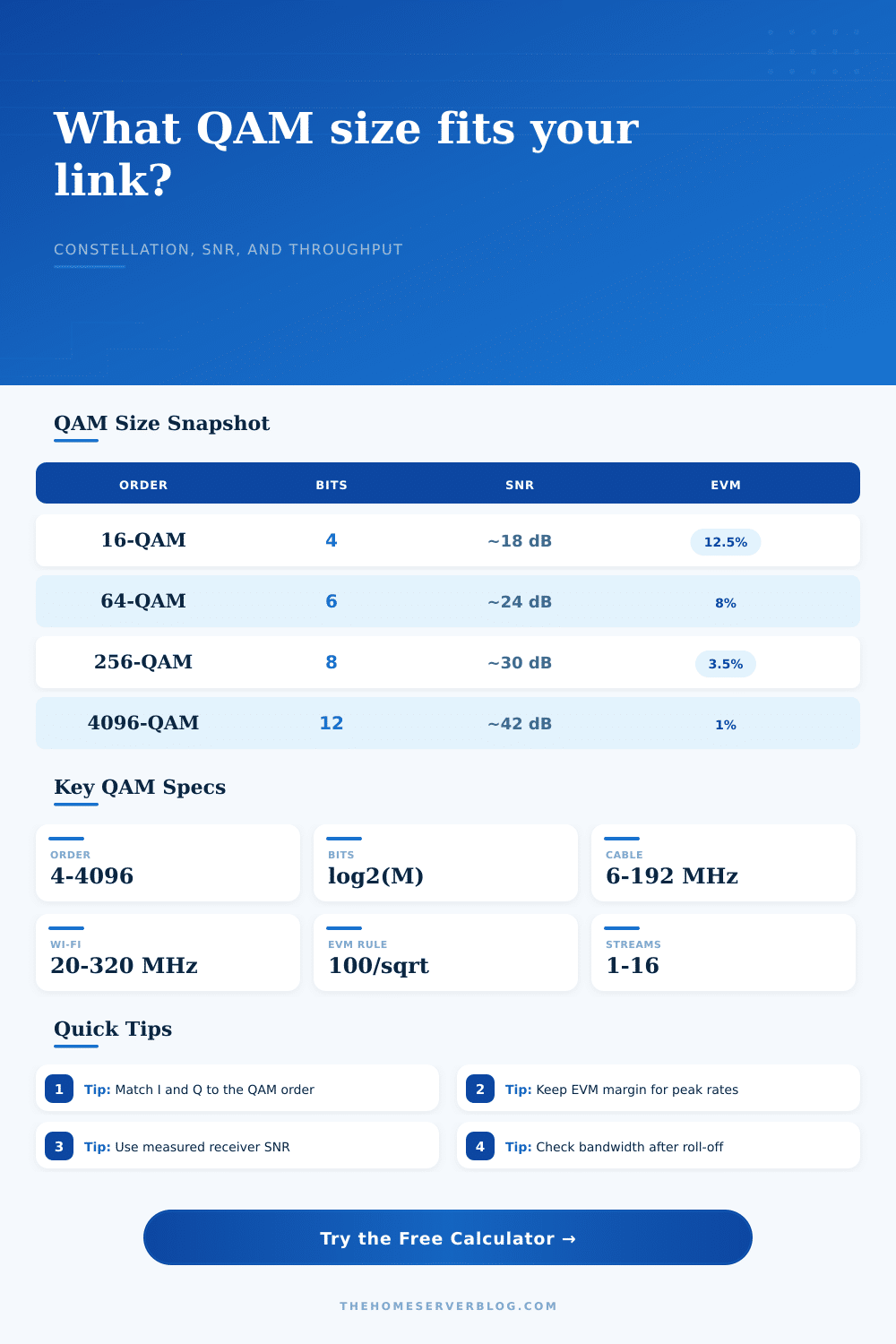
Bumping up the constellation order are requesting a higher signal-to-noise ratio. While a 16-QAM signal may hold at 18 dB of SNR, you’re going to need almost 42 dB for 4096-QAM. That isn’t some figure to mark down on a spreadsheet; that’s cleaner line, fewer ingress points in a cable plant, and a client closer to an access point.
This tool shows you when your link budget is cracking. When high-order modulation fails, the problem is usualy Error Vector Magnitude (EVM). This metric measure the extent to which actual signal departs from its ideal placement. While a sloppy EVM target may appear respectable on paper, it is a failure in practice. For example, 256-QAM requires an EVM of roughly 3.5 percent to maintain this rate with confidence. Above this value errors increase; the modem steps down to 64-QAM instead. Doing so reduces your throughput by over half. Ouch! Poor RF discipline bring a brutal penalty.
The calculator tests your constellation size against your EVM headroom. If your hardware won’t support your ambition, it alerts you to the fact.
The second limitation is bandwidth. How much bandwidth do you have? Can you push an unlimited amount of data through a skinny pipe before some of that signal bleeds over and interferes with the next band? That’s what the tool uses the roll-off factor for; it define how the edges of your signal fade to nothing as you approach the next band. Most systems use a 15 percent roll-off. Why? Because it has a soft curve and keeps interfering signals low while not wasting too much spectrum. Tighten up that filter a bit to squeeze more in, and you’ll distort the envelope on your signal. Loosen it up and now you’re wasting spectrum.
The tool figures out how much spectrum your signal takes so you know if it will fit in your assigned channel. Use the tool to prevent adjacent channel interference; that silent killer of link margins.
The real world collides with theory at the point of implementation loss. Ideal components exist only in textbooks. Real world amplifiers compresses. Real world oscillators drift. Real world mixers leak. To compensate for these issues, the calculator will ask for an implementation loss number, which is often around 2 to 3 dB. Ignoring this factor lead to optimistic plans that fail on the first sunny day. Implementation loss is the buffer between a working link and a barely-hanging-together link. Always leave yourself some margin. If you calculate that there is no margin, then you’re already in trouble.
Why all these different numbers? A look at technology shows the difference. Wi-Fi operates in a highly changing environment; channels shift fast and client locations changes frequently, enabling very aggressive adaptation. Cable DOCSIS is used in controlled, relatively static environments that can support 1024 or 4096-QAM stably for months. Mobile networks occupy space between them, trading off mobile use vs. Spectral efficiency. And each technology have a different tolerance to errors. Use the right preset based off understanding the environment in which it will operate. Don’t push a cellular solution into a fixed microwave link. The propagation conditions are simply too dissimilar.
In conclusion, there’s no free lunch here: higher order means more data but less resilience; lower order means less data but more stability. Where do you tune for the sweet spot? That depends on your bandwidth constraints, channel conditions, and hardware. You want to go as high as you can while surviving worst case noise conditions. This is part science, part art of engineering.
You should of started with the basics. Begin with the constraints. Measure the SNR. Check the EVM. Fit the bandwidth. Then let the math guide you. The constellation will show you what the channel can handle.