RAID Rebuild Time Calculator
Estimate rebuild ETA, degraded exposure, effective throughput, and verification time for generic RAID, RAIDZ, and nested home server arrays.
⚙ RAID array presets
💾 Rebuild inputs
Rebuild estimate
📊 RAID rebuild factor grid
📝 Rebuild reference tables
| RAID level | Generic factor | Minimum disks | Practical rebuild note |
|---|---|---|---|
| RAID 1 | 1.00x | 2 | Reads from surviving mirror and writes replacement disk. |
| RAID 5 | 1.00x | 3 | Single-parity rebuild; array is exposed until completion. |
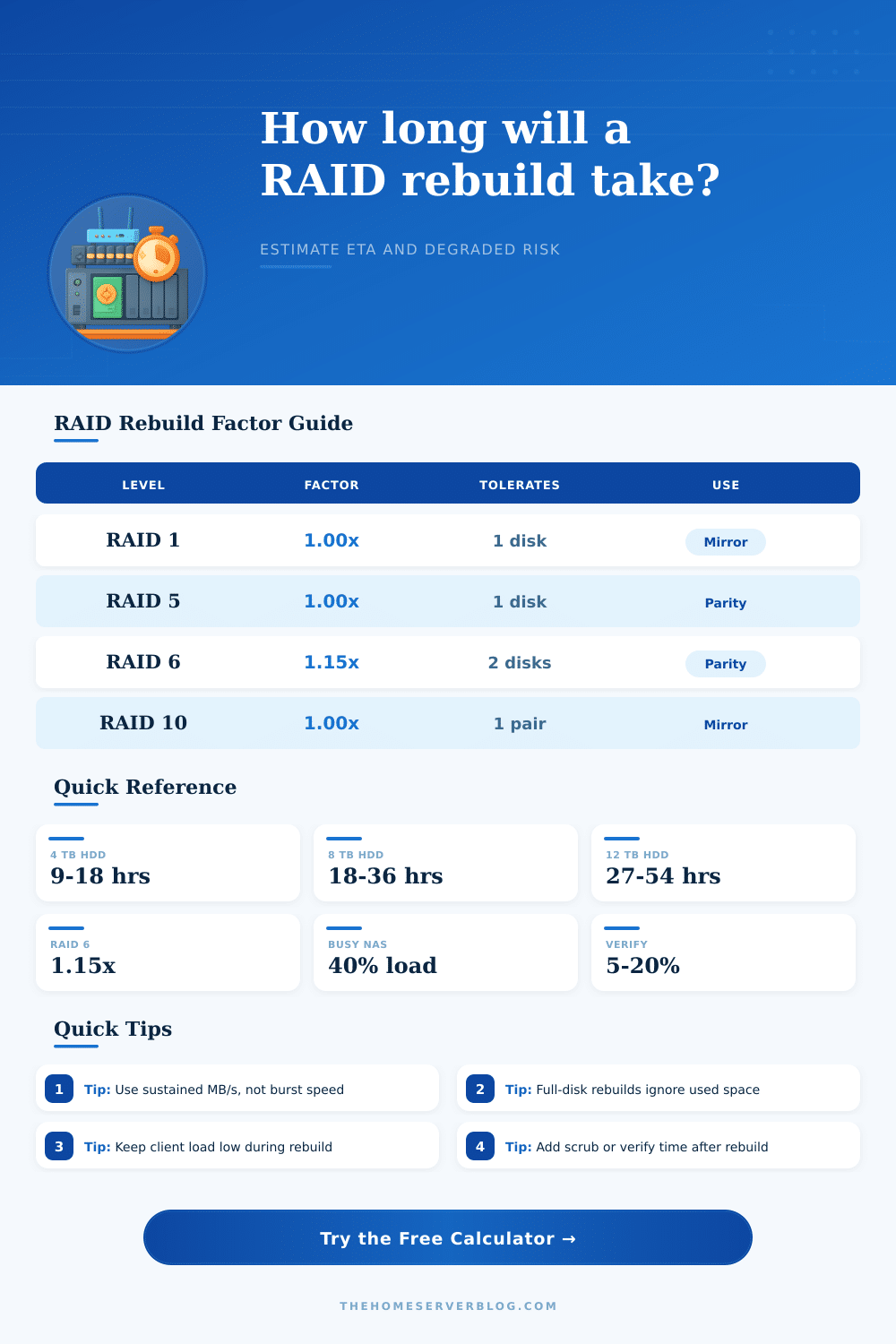
| RAID 6 | 1.15x | 4 | Dual parity adds more parity math and read activity. |
| RAID 10 | 1.00x | 4 | Mirror-pair rebuild is often simple but still disk-bound. |
| RAID 50 | 1.10x | 6 | Nested parity can rebuild one failed member inside one set. |
| RAID 60 | 1.25x | 8 | Dual-parity nested sets need more verification headroom. |
| Drive size | At 80 MB/s | At 150 MB/s | Planning comment |
|---|---|---|---|
| 2 TB | 6.9 hours | 3.7 hours | Small arrays can still take an evening. |
| 4 TB | 13.9 hours | 7.4 hours | Common home NAS size; schedule overnight. |
| 8 TB | 27.8 hours | 14.8 hours | Client load can push this past a full day. |
| 12 TB | 41.7 hours | 22.2 hours | Thermals and vibration become important. |
| 18 TB | 62.5 hours | 33.3 hours | Large disks create multi-day degraded windows. |
| Background load | Rate multiplier | Typical cause | Rebuild impact |
|---|---|---|---|
| 0-10% | 0.90-1.00x | Quiet maintenance window | Best estimate accuracy and lowest contention. |
| 20-30% | 0.70-0.80x | Light shares or media reads | Often acceptable for home NAS rebuilds. |
| 40-60% | 0.40-0.60x | VMs, cameras, backups | ETA can double while latency rises. |
| 70-90% | 0.10-0.30x | Heavy active workload | Consider pausing jobs if backups are current. |
| Risk window band | Hours exposed | Operational meaning | Practical response |
|---|---|---|---|
| Short | Under 12 | Usually one controlled maintenance period. | Keep monitoring alerts visible. |
| Moderate | 12-36 | Overnight to next-day degraded operation. | Reduce nonessential writes and heat. |
| Long | 36-72 | Multiple days with reduced redundancy. | Confirm backups before heavy workloads. |
| Extended | Over 72 | Large-drive or busy-array rebuild exposure. | Plan replacement, spare, and scrub windows. |
🔧 Planning markers
💡 Rebuild tips
That’s when it always happens, that silence that says there’s something wrong. You assume everything on your NAS is just fine. There are no bad sectors, no heat problems, and no voltage problems. Then, one morning, you realize that one of your drives have stopped spinning. Panic ensues.
You swap the drive out, begin rebuilding, and wait. It’s not whether your array recovers; it’s how long it takes for your system to finish parity calculations with fewer disk, which leaves you vulnerable. This window of exposure is where your data goes missing, not necessarily at time zero.
How Long Does NAS Repair Take?
The math will ease some of the fear. Restoring isn’t just shoveling files from one place to another; it’s performing sector reads on all surviving disks, using bit-wise XOR operations for parity and checksumming blocks for integrity, and then writing results to new drive. That has to be done in order because random access is slow.
Once you enter your array configuration into the calculator, it’ll run through those numbers to save you from guessing whether an eight-disk parity set or a 12-terabyte mirror take longer. It bases its calculations based off sustained throughput, which is measured while drive is thermally loaded. Not the moddern marketing peak speed that falls off within five minutes.
But what about the inputs? While most folks type in raw drive size and assume it’s close enough, it’s the background load that makes all the difference. Do you have a backup agent running every night? Does Plex do transcoding? Then the rebuild process will be competing with your library for I/O bandwidth.
To account for this, the tool lets you dial down the workload percentage so that it models this contention. Your busy array might only reserve 40% of its available speed to recover itself. That means a ten-hour job becomes a twenty-five-hour ordeal. It is a small detail. But also something that can make a big difference if you’re planning ahead based off how people actualy use the device versus how fast it could go.
The math are complicated by drive size. Larger drives might appear more efficient on paper. However, you must also factor in mean time between failures and the amount of data they need to check during verification. If everything else is equal, an eight-terabyte drive will take about double the amount of time to rebuild than a four-terabyte drive. But if you have an eighteen-terabyte drive in a RAID 6 setup, you’ll be left with less-than-full redundancy for many days at a time. And if another drive fails while your data is unprotected, you’ll lose it all unless you’re backing up.
As the chart shows, the window of exposure increases non-linearly as both capacity and parity increases. In practice, however, people don’t do this verification step until something go wrong. If there was some sort of silent corruption prior to the crash, then running a consistency check or scrub after the fact will repair the structure but won’t guarantee data integrity. The catch? This takes more time, typically ten to twenty percent of what was already spent rebuilding.
Do you want to know this now, or would you rather find out when it happens? A smart administrator schedules this type of task at an off-peak period. She’s willing to pay the cost of latency today to avoid bad data tomorrow.
Understanding what it’s really measuring is a big part. It is not just speed. Risk management. You should pause heavy jobs, use your backup, and so on. That’s the idea, and the exposed window estimate will give you a ballpark of when things are OK to do heavy jobs again.
Know your own equipment better than any generic formula. Let the tool frame up the time, then make the call based off how your drives look and how hard they’re working. Just because the array comes back doesn’t mean the rebuild was a success. Knowing precisely how much time it spent at-risk during the rebuild, that’s the real win.