RAM Latency Calculator
Convert DDR4, DDR5, ECC, and workstation memory timings into true nanoseconds, row access delay, bandwidth, and stability headroom for home servers and lab workstations.
⚙Memory presets
💾RAM timing inputs
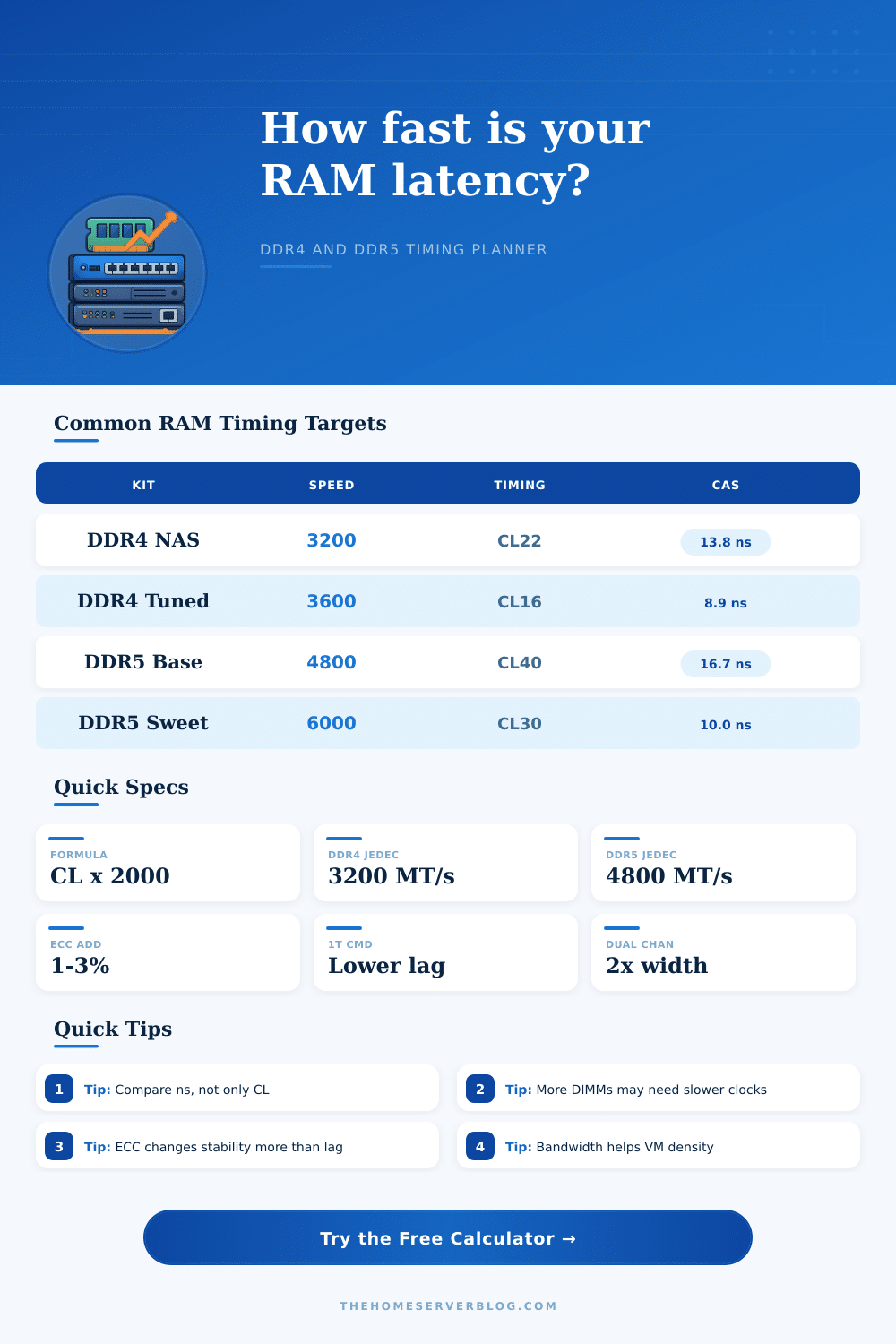
True CAS latency uses CL x 2000 / MT/s. The calculator adds row timing, command rate, controller mode, ECC mode, module loading, and workload weighting to estimate practical memory behavior.
Timing Breakdown
Enter memory timings🖧Calculated spec grid
📊RAM timing formula reference
| Metric | Formula used | What lower means | Home server note |
|---|---|---|---|
| Clock cycle | 2000 / MT/s | Each timing cycle is shorter | Higher data rate can offset a larger CL number |
| True CAS | CL x cycle ns | Faster first column access | Useful for databases, metadata, and interactive VMs |
| Row access | (CL + tRCD) x cycle | Faster access after opening a row | Better model for cache misses than CL alone |
| Row miss | (CL + tRCD + tRP) x cycle | Faster recovery when switching rows | Heavy random access sees this more often |
| Bandwidth | MT/s x 8 x channels / 1000 | More sequential transfer capacity | VM density, ZFS scrub, and iGPU workloads benefit most |
| Command rate | One to three extra cycles | Fewer command setup delays | Full DIMM slots often require 2T or looser training |
🧮Common DDR4 and DDR5 kits
| Memory setup | Typical timing | True CAS | Best-fit workload |
|---|---|---|---|
| DDR4-2666 ECC UDIMM | CL19-19-19 | 14.25 ns | NAS, router, and low-power server boards |
| DDR4-3200 JEDEC ECC | CL22-22-22 | 13.75 ns | Stable home server and appliance builds |
| DDR4-3600 tuned desktop | CL16-19-19 | 8.89 ns | Interactive lab desktop and game server hosting |
| DDR5-4800 JEDEC | CL40-40-40 | 16.67 ns | Baseline DDR5 desktops and mini servers |
| DDR5-5600 ECC server | CL46-45-45 | 16.43 ns | High-capacity ECC platforms with many channels |
| DDR5-6000 EXPO | CL30-36-36 | 10.00 ns | AM5 home lab with a responsive desktop workload |
| DDR5-6400 XMP | CL32-39-39 | 10.00 ns | Intel workstation with bandwidth-sensitive tasks |
| DDR5-7200 tuned | CL34-42-42 | 9.44 ns | Bench-focused lab build with strong memory training |
🔧Platform and DIMM loading guide
| Configuration | Latency trait | Bandwidth trait | Planning note |
|---|---|---|---|
| Single-channel mini board | Similar CAS, less throughput | Half of dual-channel width | Enough for routing or light NAS, tight for many VMs |
| Dual-channel desktop board | Lowest training complexity | Good general-purpose width | Best balance for Proxmox, containers, and game servers |
| Four DIMMs on consumer DDR5 | Often needs lower MT/s | Capacity rises more than speed | Use conservative settings for 128 GB daily stability |
| Quad-channel workstation | May be looser per DIMM | Large total bandwidth gain | Great for compile farms, storage cache, and render queues |
| Registered ECC server | Small register delay | Many channels hide per-DIMM looseness | Reliability and capacity usually beat a few nanoseconds |
| LRDIMM high capacity | More buffer overhead | Massive capacity per socket | Choose for memory footprint, not lowest latency |
📈Home server workload interpretation
| Workload | Latency sensitivity | Bandwidth sensitivity | What to optimize first |
|---|---|---|---|
| Small database server | High | Medium | Lower true CAS and row miss latency |
| ZFS NAS with ARC | Medium | Medium | Capacity and ECC before aggressive timings |
| Virtual machine host | Medium | High | Enough channels and capacity per VM |
| Media server | Low | Low to medium | Capacity, iGPU access, and storage speed |
| Compile or render node | Medium | High | Bandwidth and channel count after CPU core count |
| Game server host | High | Medium | Stable low latency with no memory errors |
💡RAM latency planning tips
When you build a server or workstation, memory timing is one of the factor to consider. Memory timing can impact the performance of your system during specific tasks. Your system could feel responsive or sluggish depending on how quick the processor can pull data from the RAM.
Clock speed is one of the factors that can impact the performance of your RAM, but it is not the only factor that determine its performance. Other factors include row access timings, row miss timings, command rate, memory controller modes, number of DIMMs, bandwidth, voltage, and memory training margins. All of these factor are included in the calculator to provide you with a complete understanding of how your RAM will perform.
How Memory Timings Affect Your Computer
CAS latency is one of the number found on the memory kit label. However, the CAS latency only tell a portion of the story. The time that the CAS latency represents in nanoseconds is the most important measurement of the memory kits performance.
A memory kit with a higher CAS value but a faster data rate will provide a quicker response from the RAM than a memory kit with a lower CAS value but a slower data rate. You can use the calculator to convert a CAS latency value to nanoseconds. This value will allow you to determine if you need to purchase new RAM or if you need to tune the memory in your systems BIOS settings.
Row access timings and row miss timings is two of the most important memory timings for a server with database or virtual machine hosting capabilities. If the processor need to access data from a different row, it must close the open row and open the new row. This process takes some time and is one of the reasons why databases and virtual machine host have high memory latencies.
The calculator allows you to include the penalties for row access and row miss timings in the memory latency output of the calculator. These timings only matter for systems that perform database or virtual machine operation. The command rate and memory controller modes has a significant effect on your RAM.
If your motherboard supports a 1T command rate, it will perform that way when you are not under heavy memory loads. Most motherboards will switch to a 2T command rate or gear-down mode when you fill up every memory slot on the motherboard. A delay of one or two cycles is not noticeable when memory is accessed a few thousand times per second.
However, if your system is accessing memory several thousand times per second, that small delay of one or two cycles can have a significant effect on the systems performance. ECC modes add a delay in memory access due to the memory controller checking and correcting each bit of data. Registered and load-reduced DIMMs add buffer stages between the memory controller and memory modules, increasing the CAS latency.
These DIMMs are used for high-capacity memory installations. You can adjust these settings in the calculator. The number of DIMMs installed in your system and the rank of the DIMMs also have an effect on the memory timings.
Using more memory module per memory channel increases the electrical loading of the memory channel. High electrical loading force the memory timings to be loosened to prevent instability. Using dual-rank DIMMs also multiplies the memory access bandwidth because the memory controller can access both rank modules simultaneously.
However, the latency of dual-rank DIMMs is higher than single-rank DIMMs. The calculator builds in a safety buffer to account for this instability. Once you move beyond single-threaded applications, the available bandwidth of your RAM becomes important.
Virtual machines, media transcoding, and ZFS ARC caching all require significant bandwidth. The calculator allows you to choose the type of workloads your RAM will perform to weight the importance of available bandwidth. Memory capacity is important to ensure that your RAM can hold all the data you access.
The balance between memory latency and bandwidth will determine how your system perform when under heavy memory loads. The voltage at which your RAM runs also has an effect on its performance. Running RAM at a voltage higher than the JEDEC specification will shorten the effective cycle time of the RAM.
However, running the memory at a higher voltage also increases the heat and the chance of read and write error in the memory modules. These limits are included in the stability headroom setting in the calculator to allow you to determine if you want to run your system with these higher voltages or not. Here are some of the common memory kits and there CAS latency specifications.
A DDR4-3200 CL16 memory kit will have a CAS latency of approximately nine nanoseconds. A DDR5-6000 CL30 memory kit will have a CAS latency of approximately nine nanoseconds as well. These timings become more significant when you compare memory kits of different generations or when you compare a JEDEC specification of RAM to a RAM kit that is tuned to perform at higher latencies.
The reference table on the page displays these memory specifications so that you can easily determine what type of RAM will best suit the needs of your storage server or interactive workstation. When you purchase RAM for your system, it is important to choose a memory kit based off the type of work you will perform on your system. If you are setting up a small database, you will want to use a RAM kit with the lowest possible first-word latency.
However, a virtual machine host will require more memory capacity and memory channels than low-latency performance from the RAM. The calculator will allow you to compare these values for your system to help you make an informed decision about what type of memory to purchase and how to configure the memory modules in your system.