Reolink NVR Storage Calculator
Estimate Reolink recording retention from camera count, resolution, codec, bitrate, motion schedule, HDD bays, drive size, reserve space, and NVR model limits.
Reolink storage breakdown
| Camera Class | Typical Main Stream | Storage Planning Use | Bitrate Note |
|---|---|---|---|
| Doorbell or 2K entry camera | 2 to 4 Mbps | Front door, porch, hallway | Event clips often dominate if alerts are frequent. |
| 5MP PoE bullet or dome | 4 to 7 Mbps | Home perimeter and garage | Good balanced planning class for mixed home systems. |
| 8MP or 4K PoE camera | 6 to 10 Mbps | Driveway, yard, entrance detail | H.265 usually matters more at this resolution. |
| 12MP high-detail camera | 9 to 14 Mbps | Wide scene and face detail | Use actual Kbps if the scene is busy at night. |
| 16MP high-resolution camera | 12 to 18 Mbps | Large overview and evidence capture | Large streams can fill smaller NVR drives quickly. |
| Duo or TrackMix dual-view camera | 8 to 16 Mbps | Panoramic or dual-lens coverage | Plan by combined main-stream bitrate when available. |
| Recorder Class | Channel Planning | HDD Planning | Storage Caveat |
|---|---|---|---|
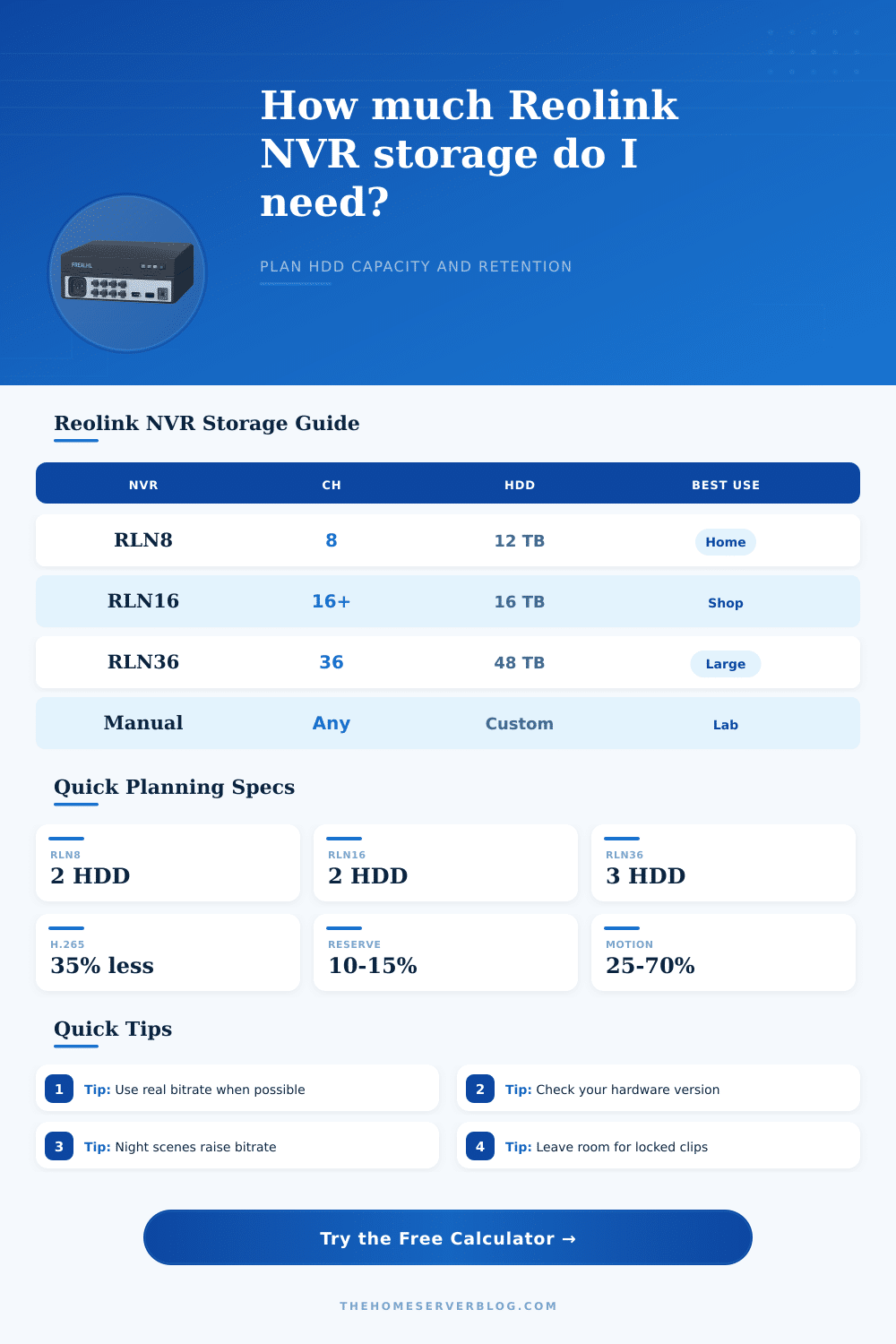
| RLN8-410 | 8 PoE camera class | Internal HDD plus expansion planning | Some versions list different per-drive limits; check the label and support page. |
| RLN16-410 | 16 PoE ports, plus model-dependent IP handling | Two-drive planning class | Hardware revisions and kit variants can have different HDD ceilings. |
| RLN36 | 36 working cameras | Three internal HDDs, commonly planned to 48 TB | It depends on external PoE switches, not built-in PoE ports. |
| NVS16 or RP-PN16 | 16-channel class | Use the manual limit fields | Business-oriented variants should be checked against their own spec sheet. |
| NVS36 class | 36-channel class | Use the manual limit fields | Large camera counts need switch, uplink, and retention planning together. |
| Manual NVR | Custom channel count | Custom maximum capacity | Best for older Reolink NVR hardware versions or mixed deployments. |
| Recording Mode | Duty Factor | Reolink Use Case | Planning Caution |
|---|---|---|---|
| Continuous 24/7 | 100% | Always-on evidence recording | Largest storage need, but easiest to predict. |
| Motion busy street | 70% | Street-facing driveway or storefront | Headlights, rain, and pedestrians can keep recording active. |
| Motion normal home | 45% | Typical perimeter and porch cameras | Pets and trees can change the real duty cycle. |
| Motion quiet zone | 25% | Side yard, shed, or utility room | Lower storage, but retention depends on detection sensitivity. |
| Scheduled daytime | 42% | Office hours or retail daytime | After-hours events add burst storage. |
| Event-only alerts | 12% | Alert clip archive | Not equivalent to continuous evidence coverage. |
| Common Project | Camera Mix | 30-Day Need | Likely Recorder Fit |
|---|---|---|---|
| Small Reolink home | 4 cameras at 4 Mbps | About 5.2 TB before reserve | RLN8 with an 8 TB drive can fit if reserve is modest. |
| 4K perimeter home | 8 cameras at 8 Mbps | About 20.7 TB before reserve | RLN16 or RLN36 class if retention is strict. |
| Small shop | 12 cameras at 5 Mbps | About 19.4 TB before reserve | RLN16 can be tight unless motion recording is used. |
| Warehouse view | 24 cameras at 6 Mbps | About 46.7 TB before reserve | RLN36 class with large drives and lower duty cycle. |
| Long-retention yard | 8 cameras at 4 Mbps for 60 days | About 20.7 TB before reserve | Needs larger model capacity or reduced bitrate. |
| Dual-lens coverage | 6 Duo cameras at 12 Mbps | About 23.3 TB before reserve | Check aggregate bitrate, not only camera count. |
When planning a security systems that uses a network video recorder (NVR), you must plan for storage before planning for the other elements of the security system. While choosing the security cameras for the system is a simple task, calculating the amount of storage spaces for the system is a difficult task for most individuals who plan security systems for businesses or residential properties. In many cases, individuals struggles with calculating storage space requirements for a network video recorder security system because most people do not know how much data the security cameras will produce over many day of operation.
If the storage space is incorrectly calculated for the security system, whether with too little storage space for the data requirements of the security system or if with purchasing too much storage space for the capacity that the security system will require, money will be wasted on buying storage drives that are either too small to handle the storage needs of the security system or too much storage space that will go unused. The amount of data that the security system will produce is not based on the number of security cameras that are selected for the system. Rather, the amount of data that the system will produce is based on the amount of data that each individual security camera will produce and how frequent each security camera writes data to the hard drives of the network video recorder.
How to Calculate Storage for Your Security System
Security cameras that are pointed at areas that have little activity will produce less data than security cameras that are pointed at areas that have more activity. Additionally, the amount of data that security cameras produce can change at night due to the activation of infrared lights on the security cameras to illuminate the areas that is being recorded or due to the movement of trees in front of the security camera at night. Each of these factors is more important than the specifications that are printed on the security camera boxes.
Storage calculators are available to security system designers to help calculate the amount of storage space that will be required for the security system. These storage calculators ask the security system designer to input information about the surveillance system that will be created. This information includes the number of cameras that will be used in the security system, the codec that each camera will use, the frame rate at which each security camera will record video footage, the motion duty cycle of each security camera, and the recording load for each security camera.
These storage calculators ask for these parameters because the storage calculator uses them in determining the amount of storage space that will be required for the security system. For instance, if the recording mode of each security camera is changed from continuous recording to motion-only recording, the storage calculator will reflect the change in storage space that will be required to store all of the surveillance footage from the security cameras. The codec that each security camera uses also has an impact upon the amount of storage space that the surveillance system will use.
For instance, if you replace the H.264 codec with the H.265 codec for each security camera in the system, the amount of storage space that the surveillance system will use will decrease. This is because each H.265 codec will allow more days of surveillance footage to be stored on each hard drive for the network video recorder. The storage calculator will calculate these storage requirements for each system so that the security system designer does not have to manually calculate these requirements for the surveillance system.
The answer that the storage calculator provides can, however, change if any event clips are locked for the surveillance system or if the scene buffer for each security camera is higher than that which is expected from the surveillance system. The storage calculators also typically include reference tables that show information about the parameters of the surveillance system. For instance, one of the reference tables that is included with many storage calculators show the bitrate for each class of surveillance camera.
Another table may show the different duty cycles that can be used for surveillance cameras and how many days of footage can be stored for each of those duty cycles. These reference tables are not a replacement for measuring the surveillance system that will be created, but they do allow the security system designer to ensure that the numbers that the storage calculator calculates are accurate and reflect the surveillance system that will be created. For instance, if one or more of the security cameras that will be used in the surveillance system is positioned in an area that has little light, such as a driveway that is illuminated only by the headlights of passing cars or by the infrared reflections of those headlight beams, the bitrate will be higher than for a security camera that is viewing only indoor areas that have consistent and bright light.
Many of the mistakes that are made in the planning of network video recorder security systems are made because the designer treats storage space as a fixed number. For instance, one of the mistakes that many security system designers make is the purchase of the largest possible hard drives for the network video recorder. By purchasing the largest size of hard drive for the NVR, a designer thinks that they have purchased a solution to the storage space problem for the surveillance system.
However, if additional security cameras are added to the system or if the surveillance system is to use audio from the security cameras, the storage period for the surveillance system will drop from thirty days to twelve days. This dropping of the storage period for surveillance system can be seen by the security system designer through the use of a storage calculator prior to the purchase of the hard drives for the network video recorder. Additionally, the storage calculator can show the designer whether there is too much storage space for the surveillance system so that the resolution or the frame rate of the surveillance system can be increased without the storage space for the surveillance system being reached.
In addition to the storage space for the surveillance system, there are also storage space limitations for the network video recorders. Not all models of network video recorders can support the same number of hard drives or the same amount of storage space for each hard drive bay. Some models of network video recorders have a different number of supported hard drives or storage capacities than others.
The model of network video recorders that is selected for the storage calculator takes into account these hardware limitations for the NVR so that the storage space that is planned for the surveillance system will be a number that the NVR is capable of using. Two models of network video recorders may seem similar, but each model may have different capabilities for surveillance footage storage. An additional decision that the security system designer must make is the length of time that the surveillance system should retain the footage from each security camera.
This length of time will determine the age of the oldest recordings of the surveillance system when the security cameras make new recordings. This decision can be made by the security system designer based upon whether the surveillance system is to be used for continuous surveillance of the area or if the surveillance system is to be used as an archive of certain events that occur within the area that is to be protected by the security system. These two different modes of operation for the surveillance system can be compared in the storage calculator so that the security system designer can decide which mode the surveillance system should use.
The storage calculator can display the retention of footage for surveillance systems if the surveillance system is set to twenty-four-hour recording as opposed to motion-only recording. The change from motion-only recording to continuous recording will increase the retention of surveillance footage by the surveillance system for many week. Another factor that will impact the amount of data that the surveillance system will store is the scene conditions under which each security camera is to operate.
For instance, security cameras that are positioned within an indoor area and that are viewing indoor scenes more quick and in less storage space can produce data than data produced by security cameras that are positioned outdoors and that may record footage that includes scenes of rain, headlights, or infrared reflections from those security lights. The buffer for each security camera in the storage system can be set to model these scene conditions. This buffer setting will allow the security system designer to understand how the surveillance system will differ in the amount of data that is produced by each surveillance camera without having to wait for a full month to operate the surveillance system with those scene conditions.
Finally, the goal of the planning of a surveillance system with a network video recorder is to develop a plan that includes a margin of error for the variables of the surveillance system that are unaccounted for in the planning stage. These variables could be the addition of locked surveillance event clips or an update to the firmware of each security camera. If the storage calculator indicates that there will be enough storage space for the surveillance system even with the addition of these unaccounted-for variables, the security system designer can be confident that the surveillance system will function as required of the surveillance system despite the variables that may be introduced to the surveillance system during the operation of that surveillance system.