Streaming Media Bandwidth Calculator
Estimate local LAN, Wi-Fi, NAS, and remote upload capacity for Plex, Jellyfin, Emby, DLNA, and mixed household streaming loads.
▶Named Home Media Presets
Balanced local playback with one 4K-capable TV, one 1080p device, and modest upload reserve.
⚙Streaming Load Inputs
Streaming Capacity Results
📊Equipment Spec Grid
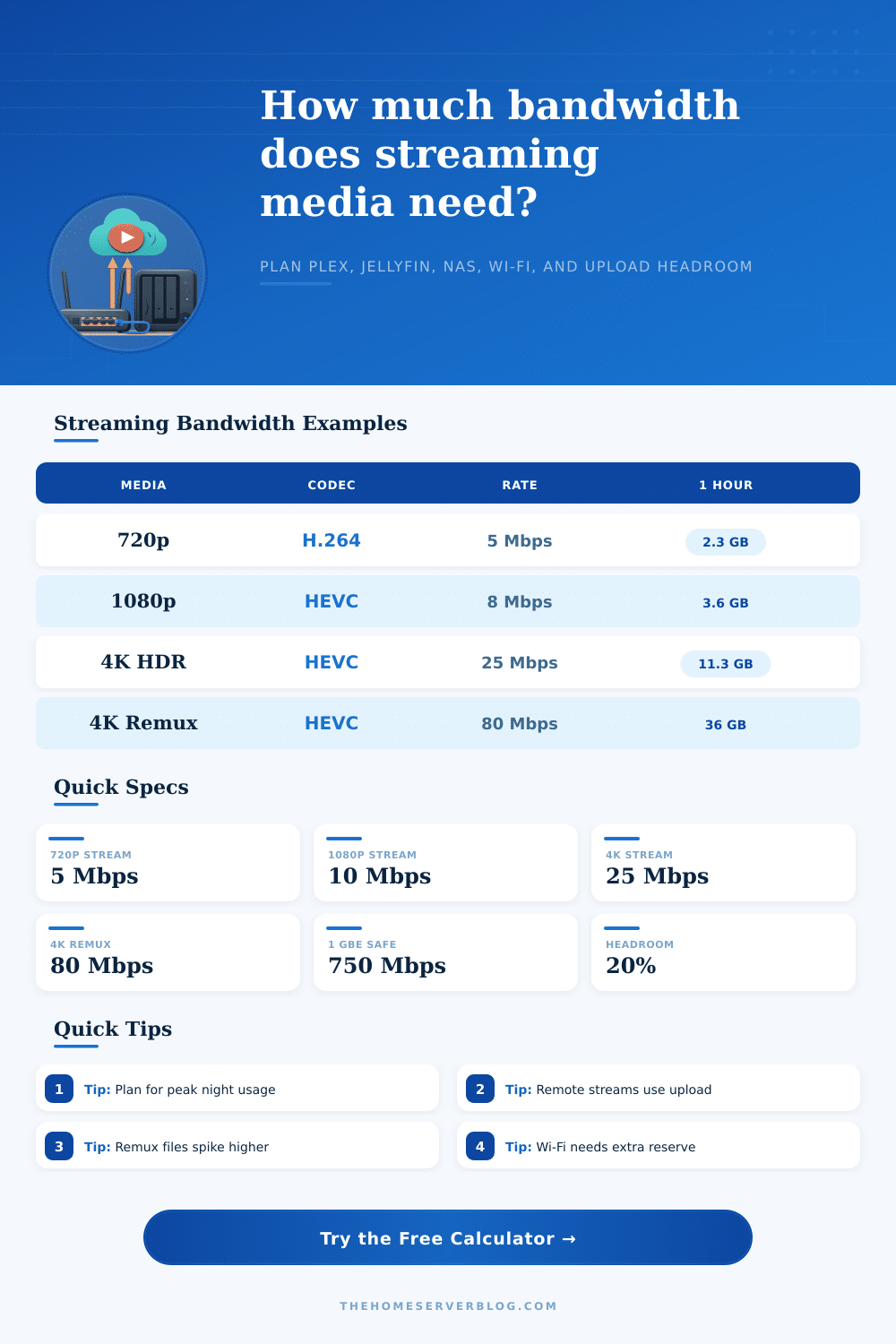
📹Streaming Bitrate Reference
| Media Type | Typical Codec | Planning Bitrate | Data Per Hour |
|---|---|---|---|
| 480p mobile direct play | H.264 | 2 Mbps | 0.9 GB/hr |
| 720p web rip | H.264 | 5 Mbps | 2.25 GB/hr |
| 1080p efficient encode | HEVC | 7 Mbps | 3.15 GB/hr |
| 1080p Blu-ray encode | H.264 | 10 Mbps | 4.5 GB/hr |
| 4K HDR direct play | HEVC | 25 Mbps | 11.25 GB/hr |
| 4K AV1 efficient encode | AV1 | 18 Mbps | 8.1 GB/hr |
| 4K Blu-ray remux | HEVC or AVC | 80 Mbps | 36 GB/hr |
| Lossless music zone | FLAC or ALAC | 1 Mbps | 0.45 GB/hr |
🖧Network Tier Planning
| Network Link | Conservative Payload | Good For | Watch Point |
|---|---|---|---|
| 100 MbE | 94 Mbps | Several 1080p streams | One remux can saturate it |
| 1 GbE | 750 Mbps | Most home media servers | NAS disks may bottleneck first |
| 2.5 GbE | 1,875 Mbps | Heavy 4K libraries | Switch uplinks need matching ports |
| 10 GbE | 7,500 Mbps | Editing, remux, and NAS tests | Storage arrays must sustain reads |
| Wi-Fi 5 client | 180 to 350 Mbps | Compressed 4K playback | Distance and airtime reduce margin |
| Wi-Fi 6E close range | 650 to 1,100 Mbps | Multiple 4K clients | Backhaul still matters |
🏠Common Home Server Sizes
| Scenario | Streams | Primary Need | Secondary Check |
|---|---|---|---|
| Solo apartment Plex | 1 to 2 | 15 to 30 Mbps | Wi-Fi signal quality |
| Family movie night | 3 to 5 | 60 to 160 Mbps | TV client direct play support |
| Remote family share | 2 to 4 remote | 25 to 80 Mbps upload | ISP upload cap and router QoS |
| 4K HDR library | 2 to 3 | 80 to 180 Mbps | Wi-Fi airtime and subtitles |
| Remux collector | 2 remux streams | 200 Mbps plus buffer | NAS read speed and 1 GbE uplink |
| NAS migration test | Media plus copy job | 1 GbE to 10 GbE | Disk queue during playback |
🔧Transcode and Container Factors
| Factor | Bandwidth Effect | When It Applies | Planning Rule |
|---|---|---|---|
| Direct play | Uses original file rate | Client supports codec and container | Plan for source bitrate |
| Video transcode | Uses target output rate | Remote limit or unsupported codec | Add target Mbps per session |
| Audio transcode | Small but steady | DTS, TrueHD, or unsupported audio | Add 0.5 to 2 Mbps |
| Subtitle burn-in | May force video transcode | Image subtitles on weak clients | Use transcode mode reserve |
| MKV plus tracks | 3% to 10% overhead | Multiple audio and subtitles | Use container overhead input |
| Wi-Fi retransmits | Variable overhead | Weak signal or crowded channel | Use 20% to 30% buffer |
ℹPractical Planning Tips
Streaming media work through a network that moves data every second to provide video to the viewer. People only become aware of streaming media when there are issues with streaming media or video quality. If there are additional televisions or devices connect to the network that plays streaming media, the files from the devices compete for the available airtime and upstream capacity.
A bandwidth calculator allows peoples to plan around these competing data files. The inputs for the bandwidth calculator are the streaming media files that will run simultaneously. The quality level of the streaming media files must be consider, as well as the number of simultaneous stream that will leave the house to stream media to a remote viewer.
How to Calculate Bandwidth for Home Streaming
A 4K HDR file contains more data then a 1080p file. Furthermore, when a remote viewer plays a file, the data travels in the opposite direction of the streaming media server. This reverse data travel use the upload speed of the remote network connection.
A bandwidth calculator considers both the upload and download speed of the network. Streaming media files may have multiple audio track and subtitles. These additional data files can significantly reduce the available bandwidth for the primary audio stream.
Furthermore, the Wi-Fi signal for streaming media files can fluctuate between the streaming media server and the streaming media player. A buffer percentage are included in the bandwidth calculator to allow for these streaming media file fluctuations. This buffer percentage allows for the streaming media files to have a margin of error in there data transfers.
Transcoding streaming files can lead to additional bandwidth use. If the streaming media client cannot play a file, the streaming media server may need to transcoding the file to a lower bitrate for the client application. This transcoding process use the available bandwidth out of the streaming media server.
Furthermore, if the server transcodes a file in real time to burn in subtitles for the client, this can significantly reduce the available bandwidth for other streaming media clients. A bandwidth calculator allow for the consideration of transcoding streaming media files. The local access to the streaming media server can be either wired or wireless.
A Gigabit Ethernet connection can carry more data than most home need. However, a Gigabit Ethernet connection can fail if the data storage array cannot provide sufficient data read speeds. Wi-Fi shares the available airtime between all devices in range of the access point.
As devices move farther from the access point, the available Wi-Fi speed for those devices reduce. Therefore, the bandwidth calculator should consider the available throughput for streaming media files over a Wi-Fi network. Bandwidth calculations made for remote access to streaming media files often fail to consider that people usually calculate their available bandwidth based off their download speed.
However, upload speed is usually significantly lower than download speed. Every time a client streams media to a remote viewer, the client sends data over the upload speed. Therefore, a client can quickly dissapear upload speed if multiple members of the household are streaming media to remote viewer.
It is essential to check the upload speed available for remote media sharing after entering the variable for the bandwidth calculator. The reference tables provides the bitrate for different type of media files. These reference tables are provided as an aid for the person calculating bandwidth to not have to guess at whether their media files are efficient file encodes or high-bitrate files from disc backups.
By entering the known profile of the media files that will be streamed, the other variables for the bandwidth calculator are significantly more easier to set. The numbers for the bandwidth calculator should of been run for the busiest hour of the household rather than the average hour. The busiest hour will provide an accurate reading of whether or not the home network can handle the load of streaming media files.
If there is headroom in the bandwidth for the local area network and the upload speed for media sharing, more client can be added to the network later. However, if the bandwidth calculator shows that the available bandwidth is nearly all that is being used for streaming media, an investment in a stronger access point for streaming media or a faster upload bandwidth will be required. The main goal for using a bandwidth calculator is to understand the limitation of the network in the home to solve the appropriate problem.