HomeServerBlog economizer planner
Free Cooling Hours Calculator
Estimate annual server-room economizer hours from outdoor wet-bulb bins, supply temperature setpoint, humidity lockout, IT heat load, partial-free-cooling credit, maintenance bypass, redundancy reserve, and site climate.
1Climate and site presets
2Economizer inputs
Economizer breakdown
Opportunity indicator
3Live economizer planning cards
Lower of economizer threshold and supply-setpoint approach limit.
Outdoor hours before humidity, bypass, and redundancy screening.
Near-threshold hours credited by the partial-free-cooling factor.
Server-room heat removed through economizer operation.
4Cooling mode comparison grid
Mechanical cooling
Baseline compressor operation for all load hours when outdoor wet-bulb or humidity is not usable.
0 hrsPartial free cooling
Mixed-mode operation where outdoor conditions reduce compressor lift but do not carry the full load.
0 hrsFull airside economizer
Direct outdoor-air operation when filtration, dampers, and humidity limits are satisfied.
0 hrsWaterside economizer
Heat-exchanger or tower-assisted operation that can be easier to isolate from room air quality.
0 hrs5Economizer reference tables
Climate and site presets
| Preset | Wet-bulb character | Good free-cooling window | Planning watch point |
|---|---|---|---|
| Seattle marine cool | Many hours below 55 F | Fall, winter, spring, cool nights | Filter moisture and intake rain protection. |
| Portland shoulder-season lab | Cool nights with mild summers | Long shoulder seasons | Summer smoke events can force bypass. |
| San Francisco bay micro DC | Stable coastal wet-bulb | Most nights and many days | Marine air filtration and corrosion control. |
| Denver dry edge rack | Dry air improves wet-bulb hours | Nights and winter days | Altitude derates fans and heat exchange. |
| Minneapolis cold winter site | Very strong winter hours | Winter and shoulder seasons | Freeze protection and minimum damper position. |
| Chicago mixed office room | Useful shoulder seasons | Spring, fall, winter nights | Humidity swings reduce summer hours. |
| Boston coastal colo prep | Cool but sometimes damp | Winter and shoulder seasons | Salt air and humid shoulder mornings. |
| Atlanta humid server room | Warm humid summer | Winter and cool shoulder nights | Humidity lockout is often the limiter. |
| Phoenix dry night assist | Dry but hot daytime | Winter and desert nights | High dry-bulb can still stress intakes. |
| Miami humidity lockout test | High wet-bulb most of year | Rare cool events | Economizer may be backup assist only. |
Wet-bulb threshold sensitivity
| Threshold band | Typical interpretation | Controls implication | Server-room caution |
|---|---|---|---|
| 45 F and below | Conservative waterside-only operation | Fewer hours, high confidence | Check freeze protection and coil approach. |
| 50 to 55 F | Common full-free-cooling planning range | Good balance of hours and control risk | Supply setpoint must still be achievable. |
| 56 to 62 F | Partial or hybrid assist zone | Compressor trim may still be needed | Humidity and dew point screening matter. |
| 63 F and above | Aggressive warm-air strategy | Needs tolerant equipment and tight control | Watch intake RH, condensation, and alarms. |
Lockout and bypass planning
| Lockout source | How it appears | Calculator input | Typical correction |
|---|---|---|---|
| Humidity lockout | Outdoor air is cool but too damp | Humidity lockout threshold | Use enthalpy control or waterside isolation. |
| Maintenance bypass | Economizer path unavailable during service | Bypass hours per month | Schedule service during low-opportunity seasons. |
| Redundancy reserve | N+1 rules hold capacity out of service | Redundancy reserve percent | Validate failover before counting all hours. |
| Short run blocks | Weather qualifies briefly then drifts out | Minimum useful run block | Add deadband or accept partial credit only. |
Economizer mode table
| Mode | Useful when | Offset strength | Watch item |
|---|---|---|---|
| Airside dampers | Clean cool air is available | High | Filtration, smoke, humidity, and damper reliability. |
| Waterside heat exchanger | Outdoor loop can reject heat | High | Pump energy, tower water quality, and freeze protection. |
| Indirect evaporative assist | Dry air gives wet-bulb depression | Medium | Water treatment and approach temperature drift. |
| Hybrid airside and waterside | Site has varied seasons and strict SLA | High | Controls need clear priority and lockout rules. |
6Free cooling planning tips
This calculator is a planning model for home labs, edge rooms, and small server spaces. Commissioning should use local weather files, sensor trends, equipment limits, filtration needs, and the exact economizer control sequence.
Building a home server lab require a certain type of optimism. You see it as racks humming quietly in silence. You see the cooling provided by local climate rather than mechanical compressors. And you hope that the power usage effectiveness get close to one; after all, this is nature doing the work.
But in practice, things is a bit more complicated. The air on the outside contain dust and moisture. The air change every hour. Free cooling isn’t about hoping the weather will be nice. It’s about figuring out what fraction of the time the weather match your humidity and temperature limits.
Understanding Free Cooling Challenges
Everyone looks at the dry-bulb temperature. “Oh, it’s only sixty degrees this morning. I’ll go with free cooling.” They don’t realize it’s not the dry-bulb temperature that realy counts. It’s the wet-bulb temperature because heat rejection happen through the air. Plug in your setpoints and your location, and the calculator figure it out for you. No more guesswork about whether or not humidity will limit your run time.
Relative humidity means wet-bulb temperature doesn’t come down as much even though the air may be cool. That humid air won’t hold onto heat well so your heat exchanger can’t reject heat very effective. You still have to turn on those mechanical chillers. You’re burning electricity for some nice-looking air that was just fine based off your old-school thermometer.
That’s what makes the tool ask for a humidity lockout threshold. Because there are always going to be hours when the air’s cool but too wet to safely use. Where you are matter; it determines your ceiling for success.
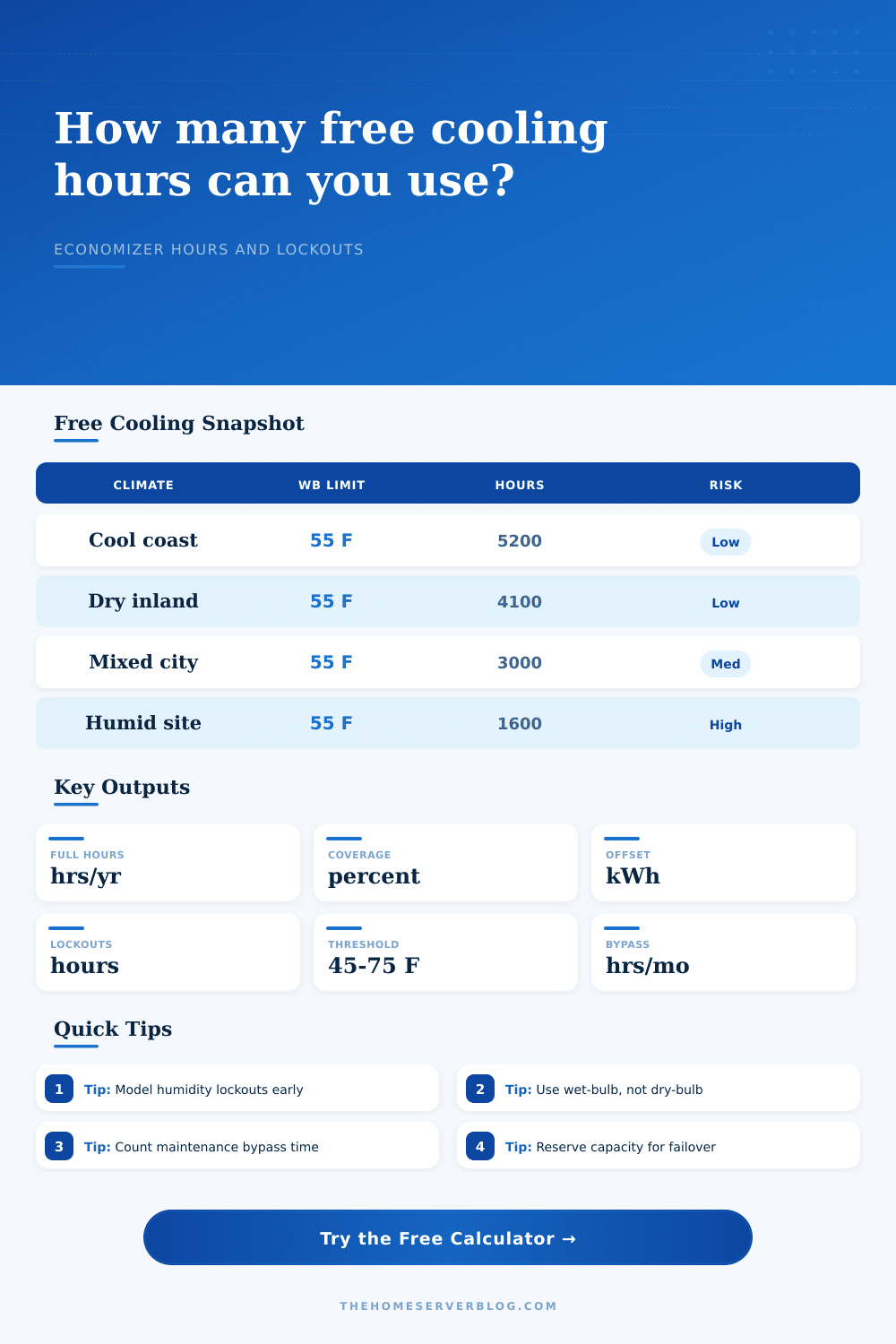
If you’re in Seattle with a lab, there will be thousands of hours where the outside wet-bulb temperature is comfortabley below fifty-five degrees. That’s actualy beneficial for a lab, since moist marine air holds the dry-bulb and wet-bulb temperatures close together.
If you’re in a Miami lab, it’s another story entirely. The humidity is so widespread that the wet-bulb almost never fall low enough to even trigger full economizer mode. This may happen for a few hour in deep winter. Otherwise, mechanical systems has to do all the work.
The table on the page map various climatic conditions onto risk level and available hours. It’s a quick sanity check before you spend good money on equipment. That means you need to factor in the downtime that comes with it.
Air intakes close during smoke-filled wildfire. Filters block up. Systems goes down for maintenance. There’s some redundancy reserve time and maintenance bypass hours you can enter into the tool. It’s not being pessimistic here, it’s realistic.
Sure, if the weather is perfect and your N-plus-one cooling plan says you should of keep a chiller ready at all times, then great… But that doesn’t mean you’re getting those hours of free cooling! That’s the capacity you pay for with redundancy. Take away those hours and you’ll see how much you really are saving.
Operators also get creative with partial free cooling. Not everything has to be all or nothing. The outdoor air may not be cold enough during the shoulder seasons to carry entire load. But it can still reduce the lift on your mechanical compressor. That reduces energy use.
This works even when outdoor condition aren’t perfect. Setting a partial cooling band in the calculator help you capture those marginal gains. It is the difference between thinking of a day as a partial win or a total loss.
The goal isn’t just to lower electric bill. It’s about creating a system that works with local climate. Before purchasing the hardware, you want to know your limits. If the math shows that humidity lockouts will eat up half your potential savings, you might choose a waterside heat exchanger over an airside economizer. In this case, you choose a heat exchanger instead of an economizer for the water side. Isolating the server room from direct outdoor humidity change the physics of the problem.
Marriage is where infrastructure meets atmosphere. It’s free cooling, you negotiate with the weather, you control the equipment. That romantic vision of passive cooling becomes an operational strategy. You must understand the wet-bulb, respect the humidity, and account for the messiness of real-world maintenance.
The hours adds up if you only count the ones that are actualy productive.