Structured Cabling Length Calculator
Estimate permanent-link cable pulls, total bulk cable, box count, channel-limit margin, and usable slack for Cat5e, Cat6, Cat6A, Cat7, and Cat8 home lab cabling plans.
Structured cabling length result
| Standard item | Planning value | Calculator use | Field note |
|---|---|---|---|
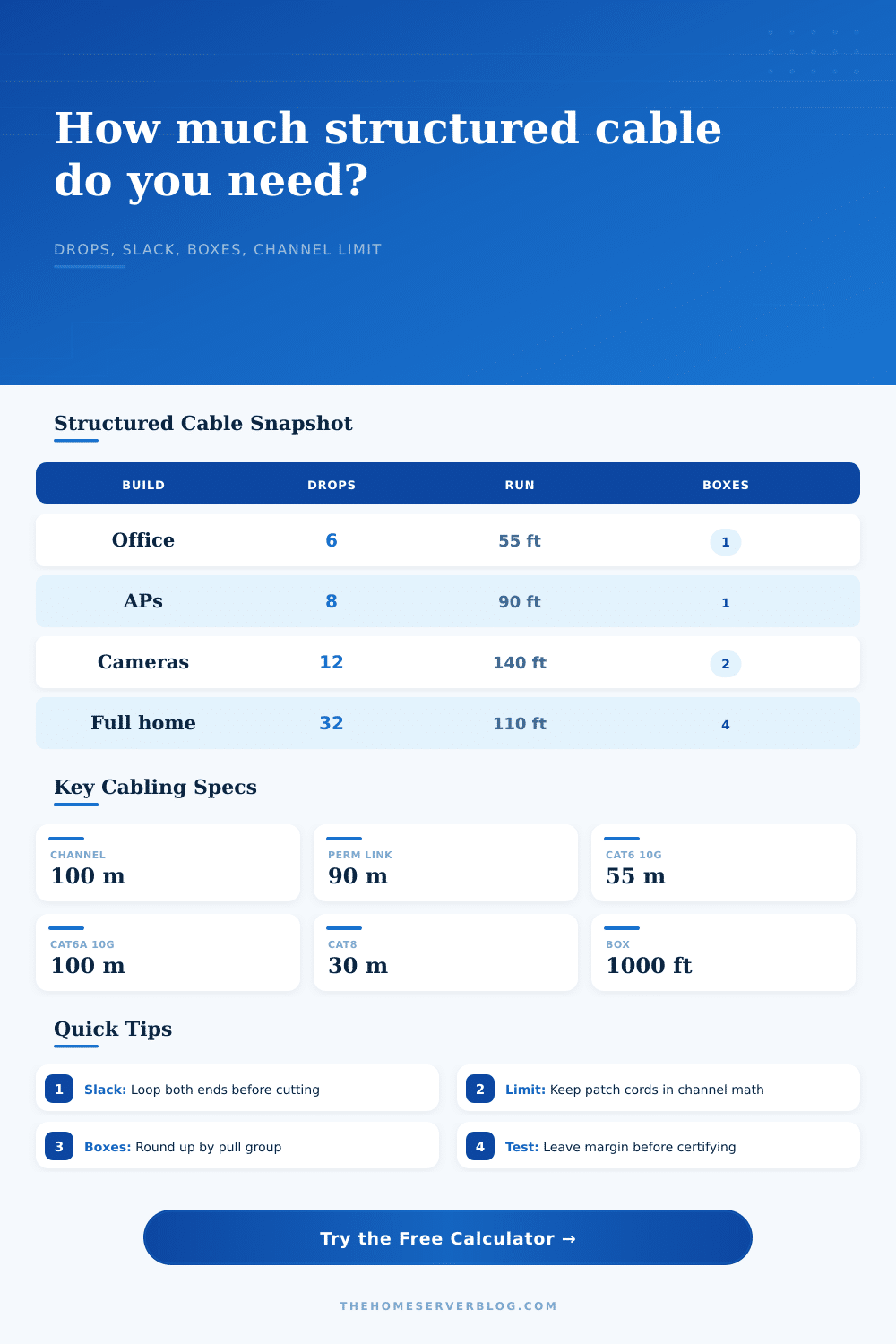
| Balanced copper channel | 100 m / 328 ft | Checks permanent link plus both patch cords. | Common Ethernet planning limit for Cat5e through Cat6A channels. |
| Permanent link | 90 m / 295 ft | Warns when installed cable alone is too long. | Leaves 10 m for patch cords in the full channel. |
| Work area patching | Part of channel | Device patch cords are included in the limit card. | Do not ignore long desk, camera, or AP patch leads. |
| Equipment room patching | Part of channel | Rack patch cords are added to the channel check. | Shorter patching can rescue a tight permanent link. |
| Cable category | Common reach | Speed reference | Length planning note |
|---|---|---|---|
| Cat5e | 100 m channel | 1G, often 2.5G | Use for ordinary drops when 10G is not the goal. |
| Cat6 | 100 m 1G; 55 m 10G | 1G to short 10G | Keep 10G runs shorter and avoid messy terminations. |
| Cat6A | 100 m 10G | 10G copper | Better pick for full-length 10G home lab runs. |
| Cat8 | 30 m channel | 25G / 40G | Usually rack, row, or equipment-room patching only. |
| Pathway feature | Typical allowance | Why it changes length | Calculator field |
|---|---|---|---|
| Wall plate service loop | 1 to 3 ft | Lets a jack be reterminated without repulling cable. | Outlet service loop |
| Rack service loop | 6 to 10 ft | Allows rack moves, panel dressing, and future rework. | Rack service loop |
| Pathway bends | 0.25 to 1 ft each | Accounts for sweeps, offsets, and route measurement loss. | Bends and bend allowance |
| Waste and trimming | 5% to 15% | Covers pull damage, label ends, measuring error, and cut loss. | Waste percent |
| Home cabling project | Drops | Average channel | Planning response |
|---|---|---|---|
| Office refresh | 4 to 8 | 40 to 80 ft | One 1000 ft box normally leaves generous spare cable. |
| Ceiling AP layout | 4 to 10 | 60 to 130 ft | Include slack for moving APs away from obstructions. |
| Camera perimeter | 8 to 16 | 90 to 220 ft | Long soffit paths need channel and PoE margin review. |
| Whole-home wiring | 24 to 48 | 70 to 150 ft | Pull groups by floor to avoid tangled partial boxes. |
Measure how far away your devices are from rest of your network equipment. It is not the straight line across the room, but the route that the cable follows after you run it down the wall. It snakes behind the stud, plunges into ceiling voids and travels through closets. That real-world path is almost always greater than direct distance. And that’s why so many peoples projects fail before they even begin.
Use a calculator to figure out how long it needs to be. It will do conversions and coefficients for you. It also will make you think about the difference between channel and permanent link. The permanent link is the cable in the wall. The channel is made up of the permanent link, including patch cords on each end.
Why You Need Extra Cable
The whole channel have a hard limit from the standards, a hundred meters max. Say you installed a ninety-five meter cable; then you’re limited to using five meters of patch cord. Most folks runs two five-meter cords. That’s broken the link.
Add some excess cable to each end of your run Things move around. Patch panels gets rearranged. Cables gets unplugged. Jacks get damaged when moving something in or out. Have three feet of extra cable at the outlet and eight feet on the rack side just in case. If one of your terminations goes bad without that service loop you have to yank the whole cable out of the wall. Yanking that sucker out of the wall sucks, it’s also a pain in the ass.
The cable length depend on distance and number of bends. Bend Radius Respect the wire’s bend radius. Crushing the wire inside distorts signal and destroys the shielding. Extra length are required to keep a good curve. Each bend gets an allowance added by the calculator. That accumulates into a lot of cable over time with multiple bends and drops. Failure to account for it means you’ll have tight pulls which damage the copper strands. You might not be able to see the damage. The network tester won’t like it either.
The cable category also determines how far the cable can be run. With Cat5e, gigabit works out to one-hundred meters. Cat6 will do ten gigabits, but just for 55 meters. Cat6A will do ten gigabits all the way. That means if you’re going with Cat6 for speed, you’ll need to keep your runs short. Depending on what you choose, the tool adjust the channel guidance to match. It tells you when you’re getting close. It is better than buying the box and finding out later.
At some point, you’re going to be wasteful with your cable. You’ll measure wrong for a room. You’ll snip your cable too short. You’ll strip a connector wrong. And when it does, add another 12 percent. That’s what we call the “waste factor.” That accounts for both the physical constraints of moving your cable around (especially in small spaces), and for our own human errors. Don’t skimp here and think you’ll save a few bucks. One trip back to the store is more expensive than the additional cable.
For larger projects, where you’re buying in bulk boxes, it’s good to know that they come in a thousand foot box. The calculator tells you how many boxes you need based off total length. It rounds up, as it should. You can’t purchase half a box! This way you know ahead of time what your project will cost and don’t have to go through the panic of running out of cable towards the end of your project.
Finally, there’s testing. Plugging something into the wall doesn’t mean it works. That goes double for cables. That is why certification matters. There’s also a margin field on the calculator. This provides headroom to allow passing more strict performance tests. It is a little addition, but it means no failures down the road.
Move your desk so you don’t have a network failure. Infrastructure is invisible. It’s there until it isn’t. Until it doesn’t work and it brings everything to a halt. Plan well. Don’t measure the room; measure the path. Allow for some slack. Know its limitations. What cable you purchase today will last for a decade. You should of ensured it gets there.