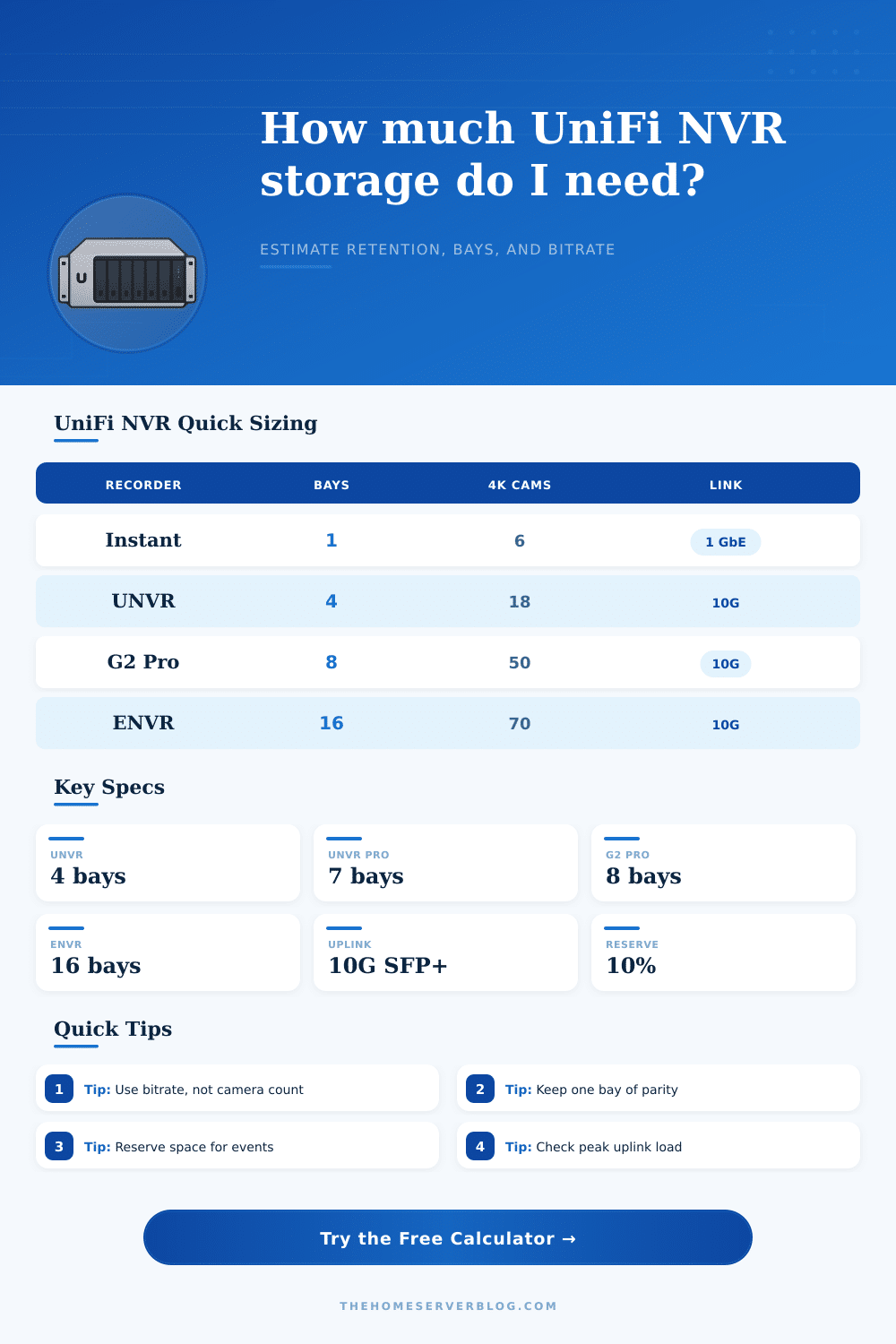
Ubiquiti NVR Storage Calculator
Estimate UniFi Protect retention from recorder bays, drive size, camera mix, bitrate, recording schedule, and reserve buffer.
Storage uses decimal TB. Daily write volume = total Mbps × 0.0108 × recording-day fraction × event uplift.
| Camera class | Efficient Mbps | Balanced Mbps | High Mbps | One day at balanced |
|---|---|---|---|---|
| 1080p indoor or doorbell | 1.2 | 2.0 | 4.0 | 0.0216 TB |
| 2K turret or bullet | 2.5 | 4.0 | 8.0 | 0.0432 TB |
| 4K camera | 5.0 | 8.0 | 16.0 | 0.0864 TB |
| High-detail AI 4K scene | 8.0 | 12.0 | 24.0 | 0.1296 TB |
| Recorder | Bays | Published camera scale | Network interface | Rack or mount |
|---|---|---|---|---|
| UniFi NVR Instant | 1 x 3.5 inch | 6 4K or compact kit scale | GbE uplink plus PoE ports | Desktop / wall / DIN |
| Dream Machine Pro / SE | 1 x 3.5 inch | Small integrated Protect sites | GbE / 10G SFP+ uplink path | 1U rack |
| Dream Machine Pro Max | 2 x 3.5 inch | Gateway with dual NVR bays | 10G SFP+ and 2.5G LAN mix | 1U rack |
| UniFi NVR | 4 x 2.5/3.5 inch | 60 HD / 30 2K / 18 4K | 10G SFP+ plus GbE | 1U rack |
| UniFi NVR G2 | 4 x 2.5/3.5 inch | 60 HD / 50 2K / 30 4K | 10G SFP+ plus 2.5 GbE | 1U rack |
| UniFi NVR Pro | 7 x 2.5/3.5 inch | 70 HD / 35 2K / 24 4K | 10G SFP+ plus GbE | 2U rack |
| UniFi NVR G2 Pro | 8 x 2.5/3.5 inch | 100 HD / 50 4K class scale | 10G SFP+ plus 2.5 GbE | 2U rack |
| Enterprise NVR | 16 x 2.5/3.5 inch | 210 HD / 140 2K / 70 4K | Dual 10G SFP+ plus 10 GbE | 3U rack |
| Drive set | Raw TB | Single parity TB | Dual parity TB | Best fit |
|---|---|---|---|---|
| 1 x 8 TB | 8 | 8 | 8 | Instant or UDM |
| 4 x 8 TB | 32 | 24 | 16 | UNVR home site |
| 7 x 12 TB | 84 | 72 | 60 | UNVR Pro |
| 8 x 16 TB | 128 | 112 | 96 | NVR G2 Pro |
| 16 x 20 TB | 320 | 300 | 280 | Enterprise NVR |
| Project | Typical cameras | Storage pressure | Network note | Recorder tier |
|---|---|---|---|---|
| Front door and garage | 2 to 4 HD/2K | Low, 1 drive works | GbE is plenty | Instant or gateway |
| Whole-home exterior | 6 to 10 mixed 2K | Moderate, parity helps | PoE switch uplink matters | UNVR |
| Retail or workshop | 12 to 24 mixed 4K | High daily writes | Use 10G path if possible | UNVR Pro / G2 |
| Campus or warehouse | 40 to 100 cameras | Very high retention load | Segment camera VLANs | G2 Pro / ENVR |
A storage calculator is a tool used to calculate how many day of footage a video surveillance system can retain based off a variety of factors. Many people attempts to guess at how many days of footage a system will retain based solely upon the number of camera that are to be deployed into the surveillance system. However, the number of cameras is not the only factor that will impact the retention of those cameras; a storage calculator allow for each of those variables to be input into the system in order to calculate the length of time that the surveillance system will retain its recorded video footage.
Some of the factors that impact the storage calculation performed by a storage calculator include the number of cameras that are to be deployed, the resolution of each of those cameras, the bitrate of those cameras, the amount of motion that is to be captured within the surveillance area, and the number of drive that are to be deployed to store the footage. Bitrate is one of the primary factors in calculating the amount of storage a surveillance system will use. The bitrate of a camera determine the amount of data that is produced by each camera every second.
How a Storage Calculator Works for Camera Footage
Cameras with higher bitrates will create more data than cameras with low bitrates, thus filling the storage drives more quick. A storage calculator allows for those different bitrates to be entered to calculate how much data will be produced by each camera. Additionally, a storage calculator accounts for the data increase caused by motion within the surveillance area; motion within the surveillance area result in an increase in the amount of data that is created by the surveillance camera.
The mode in which the surveillance system protects its drives can also impact the calculation of how many days of footage can be retained by the surveillance system. For instance, if parity mode is chosen for a single drive, that drive cannot be used to store any video footage. Similarly, if the surveillance system choose mirror mode for its drives, its usable drive capacity is halved due to the second set of drives that is required to store the same data.
A storage calculator can calculate the amount of usable terabytes that will be available for video footage after these protection modes are accounted for. Such knowledge is essential in establishing how many days of footage the surveillance system will retain; using any protection mode will reduce the amount of footage that can be stored on the drives. Additionally, the hours during which the surveillance system is to record, and the amount of motion that is detected during those hours, will also impact the amount of footage that the drives will contain.
For instance, twenty-four hour recording will contain more data than if the surveillance system is only required to record during business hours each day. Each of these variables can be accounted for within a storage calculator to help establish how many days of footage each drive will contain. The data that must be transmitted over the surveillance system’s network is another factor that can impact the surveillance system; this amount of data is referred to as the network overhead of the system.
Network overhead is the amount of data that is stored in order to allow for remote viewing of the surveillance system by a variety of user. The smaller the network, the less network overhead is required by the surveillance system. A storage calculator accounts for network overhead to determine whether that network will become too high with the number of users before the storage drives are filled with surveillance footage.
A storage calculator is a valuable tool for estimating the amount of storage that will be required by a surveillance system for a variety of reasons. For instance, the project for which the surveillance system is to be deployed may not use one of the standard templates that are created by the manufacturer for storage estimation. The system may be deployed to a small business location with a large number of 4K surveillance cameras, or it may be deployed to a residential area with a small number of 2K surveillance cameras.
A storage calculator is adaptable to either situation and can send a warning message to the surveillance system engineer if they attempt to deploy more cameras than the surveillance system is capable of supporting. Additionally, surveillance systems that are connected to too many cameras may experience an issue known as dropping frame; dropping frames is one failure mode of the surveillance system that reduce the quality of the surveillance video. Many people make mistakes when estimating the amount of data that will be produced by surveillance cameras for a variety of reasons.
For instance, some people may use the number of cameras as a means of calculating data production rather than the bitrate of the surveillance cameras. Other people may not account for the data production of surveillance cameras during motion within the surveillance area. Even more people may not account for the fact that their surveillance system will need to include a buffer for any extra data, such as AI metadata or thumbnail indexes of the stored footage.
A storage calculator prevents these type of mistakes by forcing the engineers to account for bitrate, motion within the area to be supervised, and any protection modes before they purchase the surveillance drives required for the installation. The size of the drives that are to be used for the surveillance system, and the number of drive bays that are provided for those drives, are also additional factor that impact the surveillance system. For instance, using larger drives will reduce the amount of heat and power that the surveillance system must use to operate its drives.
However, larger drives will take longer to rebuild in the case of one of the drives failing. A storage calculator can help to determine if fewer large drives should of be purchased compared to a number of smaller drives; the storage calculator can account for each protection mode that is applied to the drives. Finally, a storage calculator accounts for the need for a reserve buffer for the surveillance system; this extra data is used for additional data features and is included in the calculation of the storage calculator.
Thus, a storage calculator will provide an engineer with a specific number of days of storage for which a surveillance system will retain its recorded video footage.