HomeServerBlog rack power planner
UPS Sizing VA Calculator
Estimate UPS VA, output watts, runtime, battery Wh, load target, topology penalty, redundancy mode, startup surge, derate, and growth margin for a home server rack or small network room.
★UPS sizing presets
⚙UPS load and runtime inputs
Capacity breakdown
Runtime and redundancy breakdown
▦VA, watts, runtime, and headroom cards
Steady load after growth before startup surge.
Required usable battery energy for the runtime target.
Standard UPS size that fits VA and watts.
Load each counted UPS must carry in the redundancy case.
⇄UPS topology comparison grid
📋UPS sizing tables
| UPS frame | Typical watts | Internal battery | Best fit |
|---|---|---|---|
| 650 VA | 360 W to 390 W | 70 Wh to 100 Wh | Router, modem, small switch, and mini PC. |
| 1000 VA | 600 W to 700 W | 120 Wh to 180 Wh | Light NAS, firewall, and a few PoE devices. |
| 1500 VA | 900 W to 1000 W | 180 Wh to 300 Wh | Home server, NAS, and network closet. |
| 2200 VA | 1800 W to 1980 W | 350 Wh to 550 Wh | Small rack with storage and switch load. |
| 3000 VA | 2700 W to 3000 W | 500 Wh to 900 Wh | Rack UPS frame for denser homelab loads. |
| Runtime goal | Use case | Battery note | Planning choice |
|---|---|---|---|
| 5 to 10 minutes | Ride through blips | Internal battery often works | Focus on VA and watt headroom. |
| 15 to 30 minutes | Orderly shutdown | Internal battery may be tight | Check real runtime chart at load percent. |
| 45 to 90 minutes | Network holdover | External battery likely | Size Wh and recharge time together. |
| 2 hours or more | Generator bridge | Battery cabinet design | Plan ventilation, breaker, and charging current. |
| Target load | Result | Runtime effect | When to use |
|---|---|---|---|
| 40% to 50% | High headroom | Better runtime curve | Growth, surge, and quiet fan goals. |
| 60% to 70% | Balanced sizing | Good practical runtime | Most home server racks. |
| 75% to 80% | Tighter capacity | Runtime falls quickly | Known loads with little expansion. |
| 85% or higher | Alarm-prone | Short runtime | Use only when load is measured and stable. |
| Mode | Installed UPS | Counted UPS | Capacity effect |
|---|---|---|---|
| Single UPS | 1 | 1 | One unit carries the whole load. |
| A/B redundant pair | 2 | 1 | Each side must carry full load if the other is down. |
| Parallel capacity pair | 2 | 2 | Both units count, but it is not a failover design. |
| N+1 three-module set | 3 | 2 | Two modules carry the load after one module fails. |
| 2N two-UPS design | 2 | 1 | Two full systems, one can be offline. |
💡Two UPS sizing tips
There’s a special kind of panic that comes over you when power goes out during a backup… No lights means no data.
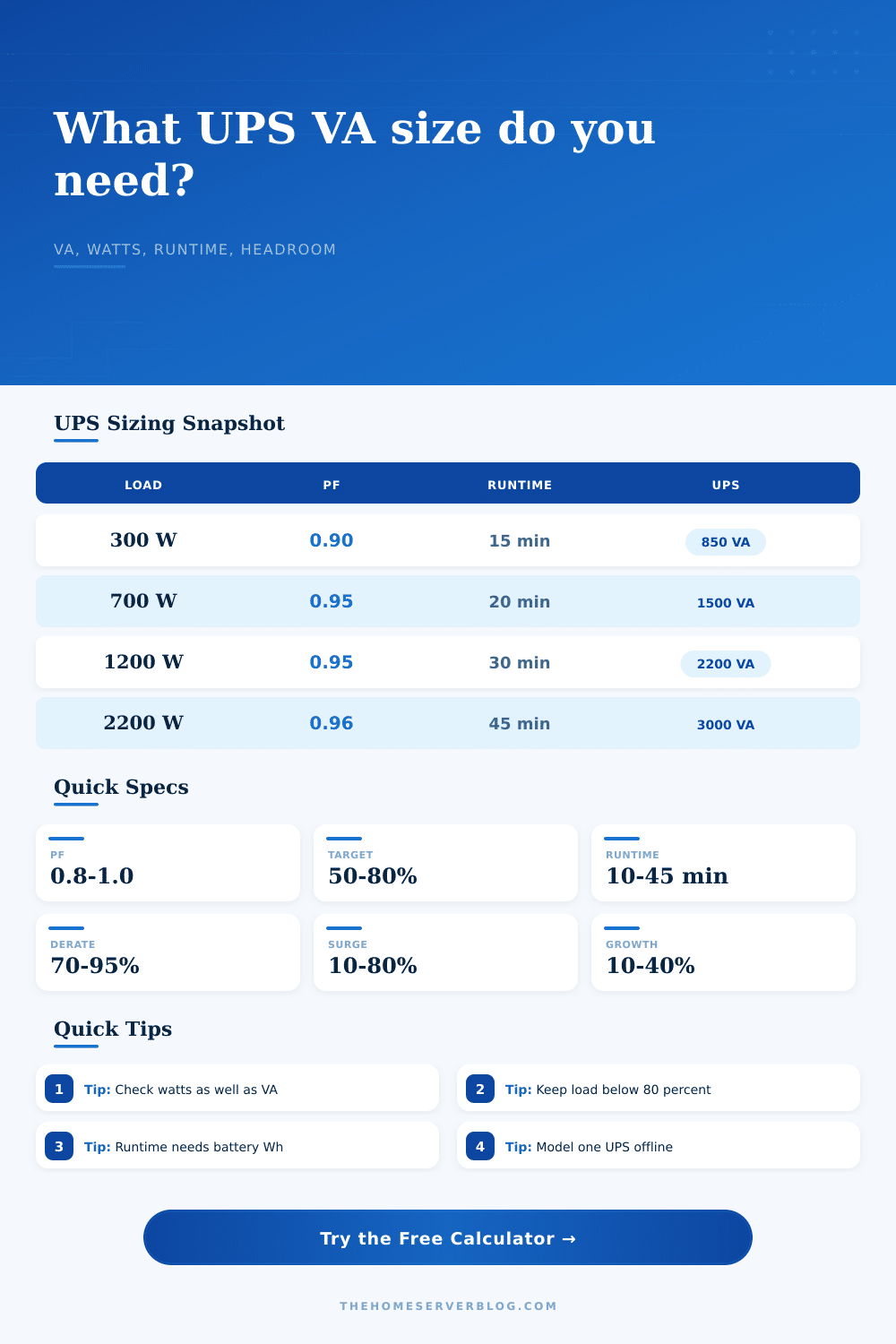
If you’ve been around servers for a while, someone has probably told you to figure out your entire wattage load and then buy an uninterruptable power supply (UPS) capable of supplying those watts. While partially correct, this can cause problems: It fails to account for what is called apparent power. Apparent power are defined in volt-amps, while real world work (the stuff you care about) is defined in watts. Power Factor That’s the power factor, the number that differentiates between those two.
How to Choose the Right UPS Size
Switching power supplies these days range from zero point nine to one. So not much of a difference, but it does matter if you’re pushing limits of your hardware. Failure to differentiate will result in choosing a unit based off the VA rating because that number looked good enough. But what happens is that unit has a lower wattage ceiling then your gear requires. The calculator will do the math for you, but understanding why the tool give two different values will help you avoid tripping the overload while surging.
The runtime calculation also becomes complicated because batteries inside typical tower units aren’t intended to hold power for an extended period. Instead, they’re designed to rapidly switch over when needed. For example, a typical unit can offers up to five minutes of juice at full output. In other words, you can save your data and shut down properly within that time frame.
If you want greater runtime, then you’ll have to upgrade to a bigger rack unit or go with external battery packs. The calculator takes into account watt-hours, but it doesn’t consider battery age. A three-year-old battery wouldn’t of been as good as a fresh battery.
Adding more makes things complex in a way that feels abstract until the moment you need it. For instance, a simple home lab will have just one unit powering the whole thing. However, if you’re serious about this and want something redundant, you’ll use an A/B configuration. It’s two units pulling double duty. If one of them die, the other takes over. Because of this, your individual units has to be big enough to support the full load on their own. The calculator reflects this by checking total capacity against the number of units left alive. That way, if one goes down, system doesn’t go down with it.
Topology choices also influence your decision in subtle ways. An offline standby unit will do the job efficient and cheaply. But it adds a small delay before switchover into battery mode. This confuse some sensitive network cards. An online double-conversion unit cleans up the power continuously and gives you a perfect sine wave. On the downside, they have a higher cost over time and a higher operating temperature. The reference table spells out the tradeoffs. And it reveals that which option makes the best sense depends on how much you value power quality vs It depends on how much you care about cost savings.
In most cases for a home server, a line-interactive unit strike the right balance by giving you voltage regulation automatically while avoiding the heat penalty of true online conversion.
Don’t forget about surge capacity. A lot of servers will spike massively when they boot up as the power supplies draws current. After the initial spike, they settle down to their normal state. Even though your normal load might not exceed the max on your UPS, the initial surge can still cause the UPS to trip its overload circuitry. To account for this initial surge, add some extra room to your calculations.
Add in some space for drives and other upgrade that haven’t been installed but are coming someday. Better to have unused space than to add a new drive bay and have an angry UPS beep at you.
When sizing a UPS it’s not as much about getting the largest number. More so it’s about getting the right balance between cost and risk. How big of a buffer do you need? Do you need enough for tomorrow’s growth? Do you need enough to handle unexpected spikes? But you don’t want to overpay for capacity you’ll never use.
So how do we get this right? How do we build a system that does nothing until it has no choice? That’s right, a quiet system in the background delivering just enough when needed most. It is a system that keeps your data safe. It also doesn’t have you overspending on equipment.