WiFi Range Calculator
Estimate wireless coverage radius, access point count, far-edge signal, wall loss, and practical throughput for a home network or small lab.
Calculation Breakdown
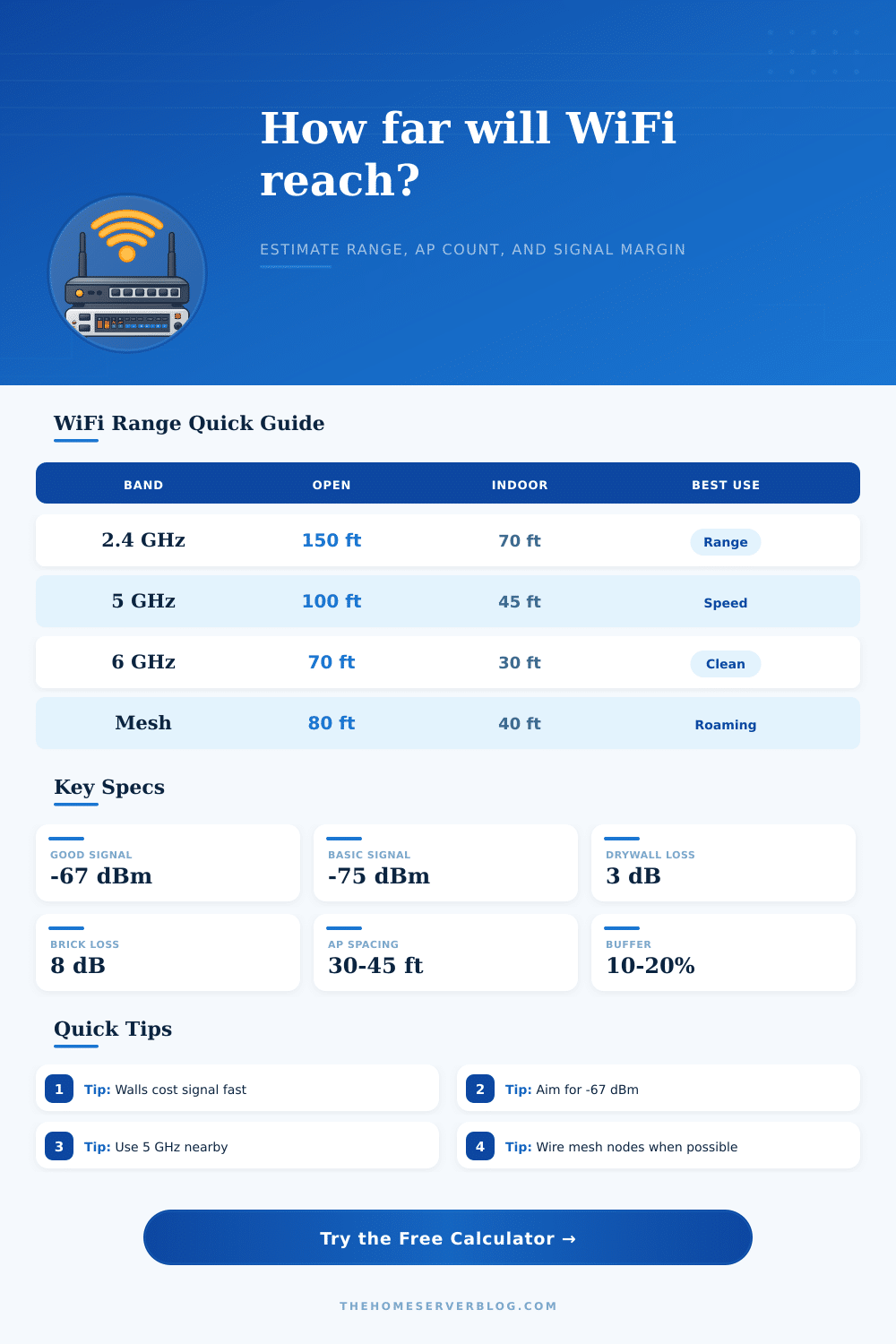
| Band or Layout | Strong Indoor Radius | Usable Indoor Radius | Practical Home Lab Use |
|---|---|---|---|
| 2.4 GHz single router | 35 to 55 ft | 60 to 85 ft | IoT, printers, distant rooms |
| 5 GHz WiFi 5 or WiFi 6 | 25 to 40 ft | 40 to 60 ft | Laptops, streaming, gaming |
| 6 GHz WiFi 6E | 18 to 30 ft | 28 to 45 ft | Same-room high throughput |
| Ceiling access point | 30 to 45 ft | 45 to 70 ft | Balanced whole-floor coverage |
| Wireless mesh node | 25 to 40 ft | 35 to 55 ft | Roaming where cable is hard |
| Wired mesh node | 30 to 50 ft | 45 to 75 ft | Best multi-AP home network |
| Obstacle or Condition | Typical Loss | Range Effect | Planning Note |
|---|---|---|---|
| Drywall or wood wall | 2 to 4 dB | Moderate | Two or three walls can halve speed |
| Brick, tile, or plaster | 6 to 10 dB | Heavy | Plan an extra AP nearby |
| Concrete or metal | 10 to 18 dB | Severe | Use Ethernet or relocate AP |
| Floor crossing | 8 to 12 dB | Heavy | Place APs on each occupied floor |
| Busy 2.4 GHz channels | 4 to 8 dB | Moderate | Use 5 GHz where devices support it |
| 160 MHz channel width | 3 to 6 dB | Shorter | Fast nearby, fragile at distance |
| Signal Level | Quality | Typical Use | Calculator Target |
|---|---|---|---|
| -50 to -60 dBm | Excellent | Video calls, VR, fast LAN | Use for demanding rooms |
| -61 to -67 dBm | Very good | Reliable roaming and streaming | Recommended default |
| -68 to -70 dBm | Good | Browsing and media | Fine for casual zones |
| -71 to -75 dBm | Basic | IoT and low-rate devices | Only for tolerant devices |
| Below -76 dBm | Weak | Unstable roaming | Add AP or move hardware |
| Project Size | Common Area | Likely AP Count | Best Configuration |
|---|---|---|---|
| Small apartment | 500 to 900 sq ft | 1 | Central router or compact AP |
| Townhouse | 1200 to 1800 sq ft | 2 | One AP per active floor |
| Large home | 2200 to 3500 sq ft | 3 to 4 | Wired mesh or ceiling APs |
| Home lab plus office | 300 to 700 sq ft | 1 | 5 GHz or 6 GHz nearby AP |
| Detached garage | 30 to 120 ft link | 1 to 2 | Outdoor AP or point link |
WiFi signals travels through air as radio wave. Physical object in teh way of the WiFi signal can weaken the radio waves. Many people may believe that there WiFi router creates a bubble of WiFi signals that continuously travels and provides connectivity for the devices in the area.
However, WiFi signals can lose their strength when the WiFi signal pass through materials like drywall, wood, and concrete. Because of the fact that WiFi signals lose their strength when passing through these material, the placement of the router can have a significant impact on the numbers of devices that can receive the signal and how strong the signal is. WiFi use different frequency band to transmit the signal to the devices.
Why WiFi Is Weak and How to Make It Strong
The 2.4 GHz frequency band can pass through walls but is often slow due to the number of device using the band. The 5 GHz and 6 GHz bands offer more higher speeds but have a difficulty passing through walls and obstacle. As a result, people will experience high speeds if they are close to the router but may experience low speeds or no signal if they are further from the router.
The distance that the signal must travel has an impact on the performance of the frequency band. Higher frequency band will have a more difficult time traveling long distance than lower frequencies. If the WiFi signal passes through a wall, the signal will lose some of its strength.
The signal loss is measured in decibels. Drywall will cause a small loss in decibels, but brick or concrete walls will cause a significant loss of signal strength. If the signal loses too much of its strength, the signal will not be able to effectively move data to the device.
Signal strength can be measured in units called dBm. A signal strength of -67 dBm indicate that the signal strength is strong enough for devices to maintain high speed. If the signal strength drops to -75 dBm, the signal is too low for high performance; video call will freeze on screens, and smart device will lose there connection to the internet.
The physical location of the router is crucial to how strong the signal will be. Many people purchase WiFi router and place them in the closet or behind the television in the living area of the home. However, these location can reduce the range of the WiFi router.
Ceiling mounted WiFi access point will typically provide more coverage than a router on a shelf or table. By mounting the router on the ceiling, the signal will have a clear line of sight to the devices in the home. This will allow the signal to reach further distance without passing through many piece of furnitures in the area.
In home that are of a large area, one WiFi router may not be sufficient to provide signals to each room of the house. Using only one router may lead to high speeds in one area of the house but no signal in another area of the house. To combat this problem, people can use a wired mesh system.
A wired mesh system will use cable to connect to multiple WiFi node. These nodes will emit the same signal as the router but allow the signal to reach further distance into the home. Wireless mesh system are also an option but will lose some of the WiFi bandwidth each time the signal have to pass through a wireless hotspot.
People can use a tool to estimate the WiFi signal strength in a home by entering the area of the floor and the number of barrier in the home. Using this estimation tool will allow a person to determine whether more WiFi router are needed or whether the current router can be moved in the home. By using the estimation tool to plan the WiFi router, a person will not have to purchase additional hardware to increase the strength of the signal.
Additionally, the person will not have to deal with the issue that may result from the physical barrier to the signal. A successful WiFi network will remain steady and strong in each room of the house.